MultiDrive – free backup, clone & wipe disk utility from Atola Technology

All times are UTC - 5 hours [ DST ]


Post new topic Reply to topic  [ 6 posts ] 
Author Message
 Post subject: My PC detects HP OEM HDD as unknown device.
PostPosted: August 25th, 2024, 12:52 
Offline

Joined: August 25th, 2024, 12:34
Posts: 3
Location: Turkey
Hi Guys.
I got a Seagate HDD salvaged from an old HP Server case. When I connect the disk to my PC's SATA port, it is not shown in Windows' disk management console. When I check in the device manager, I see an unknown device (yellow exclamation mark) named FB160C4081. (This device is definitely this HDD because it disappears when I remove the disk.)

When I double-click it and look at the VID/PID values, it says /SCSI/FB160C4081.
When I connect the same disk to my PC with a cheap Chinese USB-SATA cable, the PC detects the disk without any problems. It shows the files in it.

Why can't I access the disk when I connect it directly with a SATA cable? Can I fix the problem by flashing Generic Seagate firmware to this disk?

Attachment:
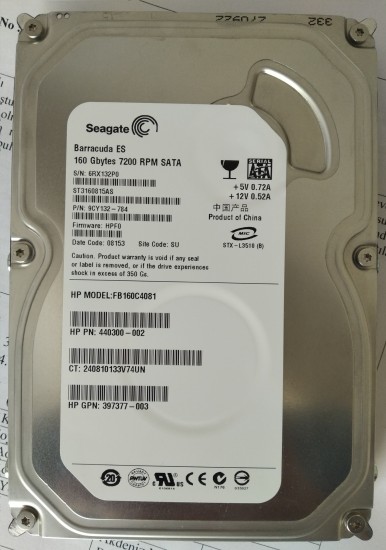
IMG_20240823_130102.jpg
IMG_20240823_130102.jpg [ 583.29 KiB | Viewed 2513 times ]


Top
 Profile  
 
 Post subject: Re: My PC detects HP OEM HDD as unknown device.
PostPosted: August 26th, 2024, 0:19 
Offline
User avatar

Joined: April 7th, 2009, 21:36
Posts: 487
Is it detected correctly in the bios?

_________________
Zero Alpha: zeroalpha.com.au
Find Cheap Donor Drives App: https://www.zeroalpha.com.au/donor-drive-app Updated February 2026


Top
 Profile  
 
 Post subject: Re: My PC detects HP OEM HDD as unknown device.
PostPosted: August 26th, 2024, 1:26 
Offline

Joined: August 25th, 2024, 12:34
Posts: 3
Location: Turkey
Bios detected as FB160C4081. CrystalDiskInfo detected this disk, and shows Smart information.
Attachment:
CrystalDiskInfo_20240826081348.png
CrystalDiskInfo_20240826081348.png [ 58.24 KiB | Viewed 2444 times ]


Top
 Profile  
 
 Post subject: Re: My PC detects HP OEM HDD as unknown device.
PostPosted: August 26th, 2024, 19:49 
Offline
User avatar

Joined: April 7th, 2009, 21:36
Posts: 487
Looks correct to me. HP are using a custom model name for this model.

_________________
Zero Alpha: zeroalpha.com.au
Find Cheap Donor Drives App: https://www.zeroalpha.com.au/donor-drive-app Updated February 2026


Top
 Profile  
 
 Post subject: Re: My PC detects HP OEM HDD as unknown device.
PostPosted: August 26th, 2024, 20:44 
Offline
User avatar

Joined: September 8th, 2009, 18:21
Posts: 16960
Location: Australia
Can DMDE detect the drive after CrystalDiskInfo returns the SMART data?

https://dmde.com/

_________________
A backup a day keeps DR away.


Top
 Profile  
 
 Post subject: Re: My PC detects HP OEM HDD as unknown device.
PostPosted: August 27th, 2024, 3:00 
Offline

Joined: August 25th, 2024, 12:34
Posts: 3
Location: Turkey
Thank you @fzabkar.
I have no problem accessing the data on the disk. I can access the data with a cheap Chinese USB-SATA cable. Thanks for the advice though.

Thanks @Zero Alphe for the suggestions. We have provided information on how to access OEM drives that have these. But I am investigating whether I can turn it into a retail Seagate ST3160815AS by changing the firmware.

Yesterday I tried another method. I right clicked on the FB160C4081 device that was shown as an unknown device in the device manager and said update driver. I continued by saying I will select the driver in the window that appeared. I unchecked the Show compatible drivers option and listed all the drivers. Then I selected the driver named disk driver and said install it. Windows warned me that it might be incompatible, I continued by installing it anyway. It said the driver update was completed successfully.

Now my device appears in Windows Explorer and I can access it.

Frankly, I have a P4 Titan case that I use for its serial and parallel ports at home. Its disk was faulty. I decided to evaluate this disk for that. But the Windows installation environment does not recognize this disk in this state. It was solved by manually installing the driver in Windows, but I know that the Windows installation assistant does not allow such manual driver installation. This seems to be a mess.


Top
 Profile  
 
Display posts from previous:  Sort by  
Post new topic Reply to topic  [ 6 posts ] 

All times are UTC - 5 hours [ DST ]


Who is online

Users browsing this forum: No registered users and 77 guests


You cannot post new topics in this forum
You cannot reply to topics in this forum
You cannot edit your posts in this forum
You cannot delete your posts in this forum
You cannot post attachments in this forum

Search for:
Jump to:  
Powered by phpBB © 2000, 2002, 2005, 2007 phpBB Group


