Request for service. Would you take this platter damage case
December 26th, 2025, 16:47
Hello everyone, and happy holidays!
This is a wd20jdrw-11c7vs1
The drive has two platters and the other platter has the same scratch. The photo was taken by a specialist, inside the clean room. The scratch occurred while cloning the drive, after the specialist takes platters to a donor drive.
Would you take this case? Or, can you suggest me a lab that can handle this drive? EU and UK area is preferred.
This is a wd20jdrw-11c7vs1
The drive has two platters and the other platter has the same scratch. The photo was taken by a specialist, inside the clean room. The scratch occurred while cloning the drive, after the specialist takes platters to a donor drive.
Would you take this case? Or, can you suggest me a lab that can handle this drive? EU and UK area is preferred.
- Attachments
-
Re: Request for service. Would you take this platter damage
December 26th, 2025, 16:58
Pandemicc wrote:The drive has two platters and the other platter has the same scratch.
Since he already picked them up once, I'm guessing he can take a picture of the other surfaces.
Pandemicc wrote:The scratch occurred while cloning the drive, after the specialist takes platters to a donor drive.
For what purpose were the plates transferred to the new body?
I can see the fingerprint on the magnet and head assembly...
Re: Request for service. Would you take this platter damage
December 26th, 2025, 17:00
Lukas wrote:Pandemicc wrote:The drive has two platters and the other platter has the same scratch.
Since he already picked them up once, I'm guessing he can take a picture of the other surfaces.Pandemicc wrote:The scratch occurred while cloning the drive, after the specialist takes platters to a donor drive.
For what purpose were the plates transferred to the new body?
-the drive's lid is closed and returned so no chance for new photos I'm afraid.
- the drive was dropped, RW heads were broken hence the transfer.
Re: Request for service. Would you take this platter damage
December 26th, 2025, 17:04
The heads are transferred, not the platters, because it's a simpler and safer process.
The platters are lifted to inspect their condition - there's no need to install them in a new chassis if the motor remains functional.
This is an SMR drive, it may be difficult to start even if the other three surfaces are intact.
Does the serial number on the sticker match the serial number on the sticker on the chassis side?
The platters are lifted to inspect their condition - there's no need to install them in a new chassis if the motor remains functional.
This is an SMR drive, it may be difficult to start even if the other three surfaces are intact.
Does the serial number on the sticker match the serial number on the sticker on the chassis side?
Re: Request for service. Would you take this platter damage
December 26th, 2025, 17:09
Lukas wrote:The heads are transferred, not the platters, because it's a simpler and safer process.
The platters are lifted to inspect their condition - there's no need to install them in a new chassis if the motor remains functional.
This is an SMR drive, it may be difficult to start even if the other three surfaces are intact.
Does the serial number on the sticker match the serial number on the sticker on the chassis side?
yes the serial numbers on original's and the donor's do match
Re: Request for service. Would you take this platter damage
December 26th, 2025, 17:11
Pandemicc wrote:yes the serial numbers on original's and the donor's do match
Do donor and patient have the same serial number? Interesting.
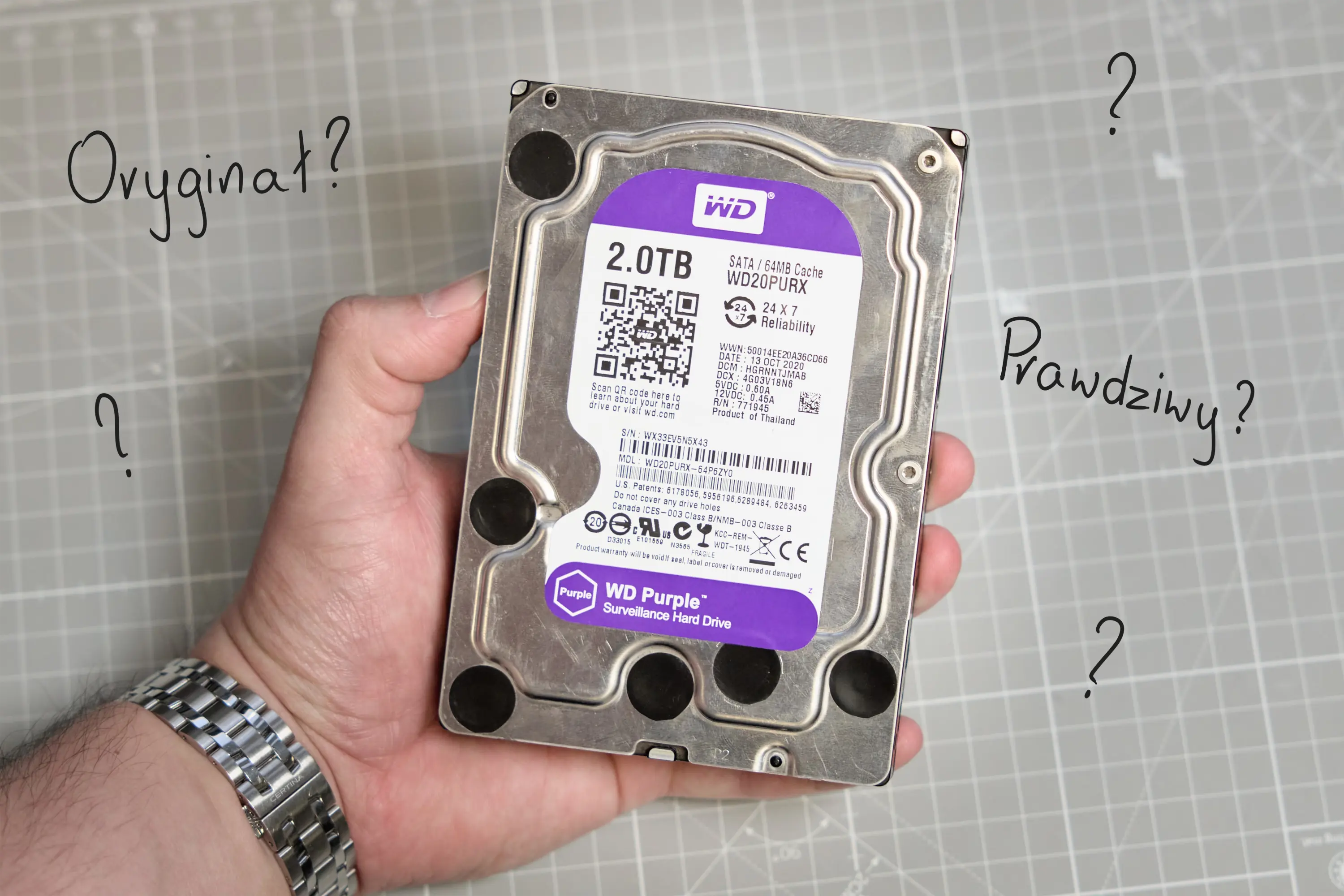
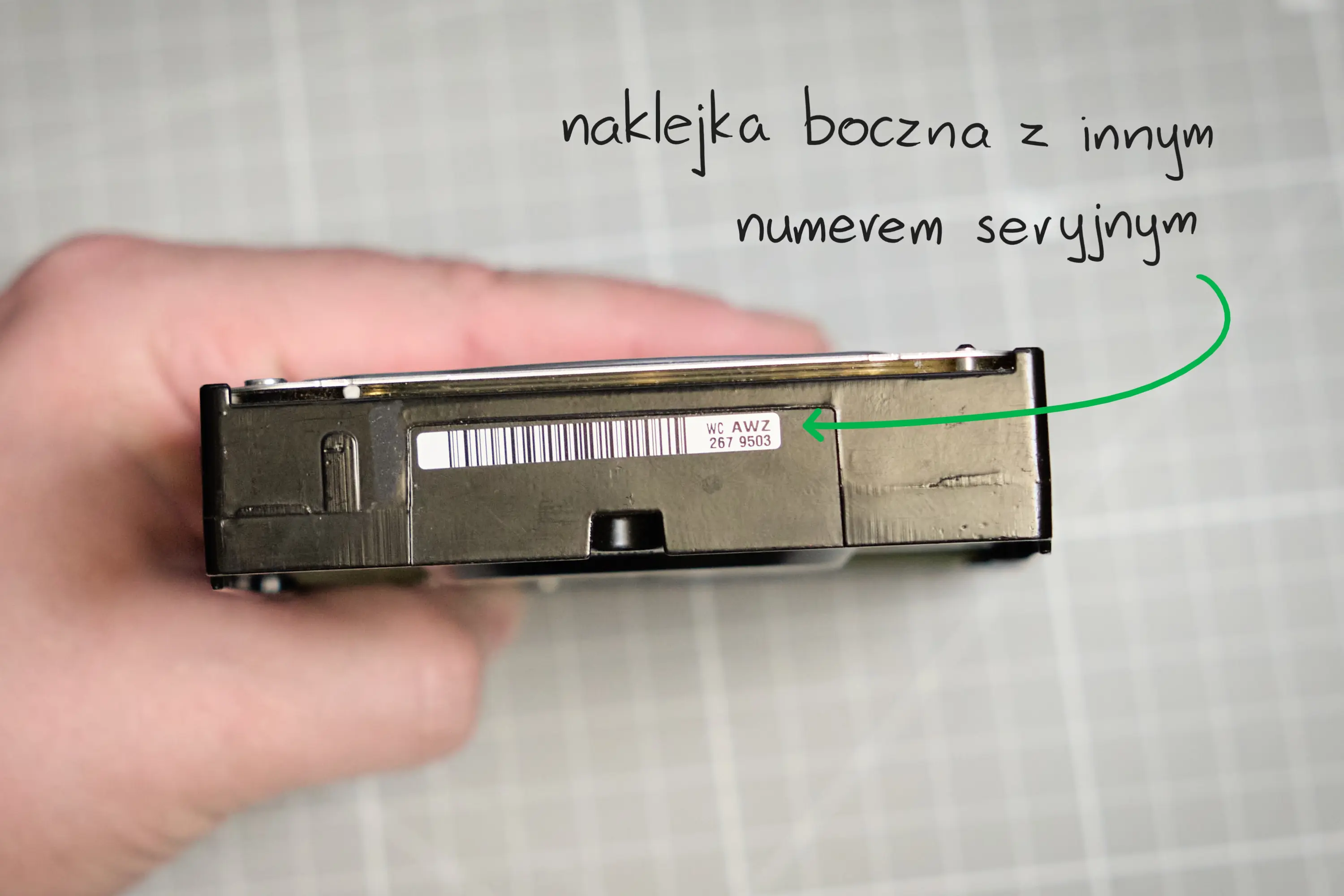
I asked if the patient's serial number on the sticker on the cover was the same as on the side of the body.
https://hex-serwis.pl/images/fake-hdd/p ... l-2tb.webp
https://hex-serwis.pl/images/fake-hdd/p ... ryjny.webp
Re: Request for service. Would you take this platter damage
December 26th, 2025, 17:15
Lukas wrote:Pandemicc wrote:yes the serial numbers on original's and the donor's do match
Do donor and patient have the same serial number? Interesting.
I asked if the patient's serial number on the sticker on the cover was the same as on the side of the body.
https://hex-serwis.pl/images/fake-hdd/p ... l-2tb.webp
https://hex-serwis.pl/images/fake-hdd/p ... ryjny.webp
yes I understand. Original casing's sticker and the one on the lid do match, just the same for the donor
Re: Request for service. Would you take this platter damage
December 26th, 2025, 17:22
Pandemicc wrote:Original casing's sticker and the one on the lid do match, just the same for the donor
So you have a donor and a patient drive.
The plates were moved - once or twice?
Because once, the patient's plates should have been in the donor's body, unless someone moved them again - but if so, why didn't he take other photos? It's a logical sequence.
Re: Request for service. Would you take this platter damage
December 26th, 2025, 17:29
Lukas wrote:Pandemicc wrote:Original casing's sticker and the one on the lid do match, just the same for the donor
So you have a donor and a patient drive.
The plates were moved - once or twice?
Because once, the patient's plates should have been in the donor's body, unless someone moved them again - but if so, why didn't he take other photos? It's a logical sequence.
I really don't know any other details. The plates are in the donor's body right now, sealed, original casing is empty.
Re: Request for service. Would you take this platter damage
December 26th, 2025, 17:32
On the one hand it's good, on the other it's not 
If scratch occurs in this place on other surfaces, recovery will probably be forgotten.
If scratch occurs in this place on other surfaces, recovery will probably be forgotten.
Re: Request for service. Would you take this platter damage
December 27th, 2025, 19:24
the main problem is that the SA is in the filter. So even if there were no other issues, this alone determines the case.
Re: Request for service. Would you take this platter damage
January 1st, 2026, 8:22
Powered by phpBB © phpBB Group.