|
Hello I have a client with a very old Dell PowerEdge T310 running a PERC6/i controller. The system is running RAID5 (4 hard 146GB drives) and has VMWare installed. I think the controller MIGHT be bad, and I am pretty sure that one drive has gone bad.
The client contacted us saying that they were unable to access their shared drive (from a VM) and upon trying to access the Windows OS remotely, the system showed that it was online, however it was non-responsive when I remoted into it. So the OS was still somewhat functional because it did accept the connection from our ScreenConnect software.
When I dispatched a technician, the standard VMWare ESXi screen was up.
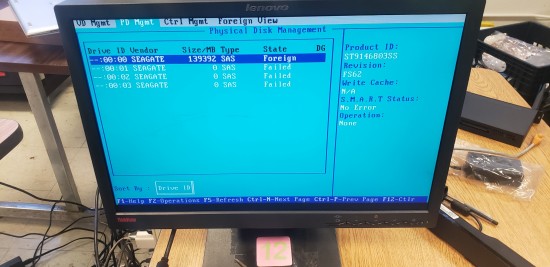
Upon restarting the physical server, we were presented with the "Foreign Configuration Found" message, and rather than load the foreign config, we went into the controller's configuration to see what it was showing. The 2nd drive (drive number 1) showed as failed. There was no utility to run a drive test. Upon rebooting the server and going back into the config utility, it showed that 2 drives were failed (1 & 2), and that the only drives not in an error state were Drives 0 & 3....Rebooting the server again, it then showed that all drives were failed with the exception of drive 0...and it shows as foreign.
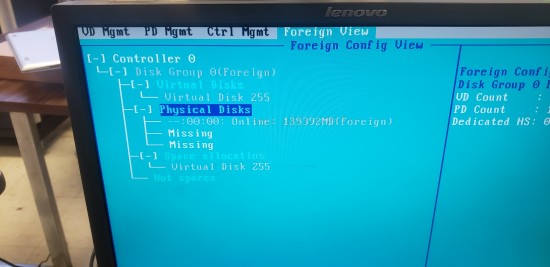
Subsequent reboots have produced different information on the Foreign View tab (first it showed the physical drives along with the logical drive, and now it shows only one physical disk and Virtual Disk 255)...very inconsistent behavior, which is why I am thinking the actual controller might be bad, opposed to the all 3 disks being bad.
I am not sure if there is a utility that I can possibly use to verify if the disks are good or not first before making a decision to purchase recovery software or send off to a recovery center. Maybe taking each drive out (will probably have to remove from the drive tray as well...they are SAS drives) and testing on a separate machine.
If there is a utility to do that, and we find that only the single drive is bad opposed to all 3, do we first replace the controller, reinstall the drives and attempt to import the foreign config if it's found on the drives, or is there another route we should go. I don't want to do anything to increase the risk of not being able to recover the data.
This client doesn't have a backup of this data as they were under the impression it had been moved to a different location.
I have attached a couple of photos showing what the controller is showing now.
Please advise.
| Attachments: |
Resized_20251230_130618.jpeg [ 1.15 MiB | Viewed 6055 times ]
|
Resized_20251230_130239.jpeg [ 917.02 KiB | Viewed 6055 times ]
|
|



 FAQ
FAQ Search
 Login
Login Register
 HDDGURU FILES

