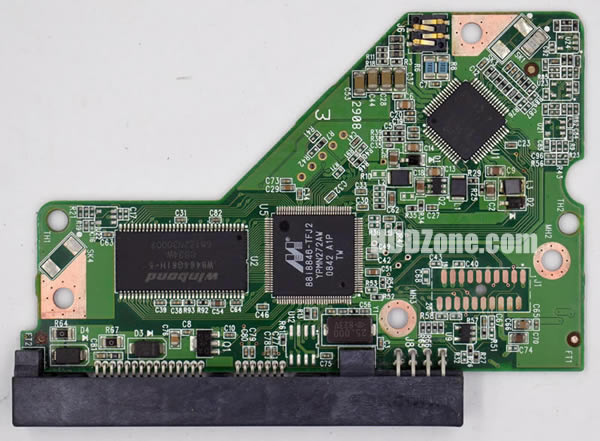
curwiler wrote:
will look for the software
The modern internet has become a place where it's impossible to find anything, so if you can't find this old version, I'll give you a link to where you can download it. I thought this program was in the files section on this site, but no.
This program has some drawbacks: it's entirely in Russian and doesn't support AHCI mode or anything else, only IDE. It also doesn't work on modern operating systems, so you'll have to find an old computer with a Core 2 Duo processor and install 32-bit Windows 7 on it. Or, you can temporarily install a 32-bit version of Windows 10 on your computer and switch the motherboard's SATA controller to IDE compatibility mode.
You'll also need a more recent version of this program, for example, the demo version fzakbar linked to. If it doesn't work, I can also provide links to older demo versions. New versions have a one-click solution for restoring the original ROM of your faulty hard drive—you'll need this after flashing the ROM from a similar hard drive onto the board.
First, it's best to start with the demo version—it works in read-only mode. Check that it can detect the hard drive, read the ROM, and create a restore point. As far as I understand, you purchased another working hard drive as a donor, not just a board, which is good.
If everything works, you can move on to the old beta version. It launches the same way as the new one, with a big, scary warning that if you want to press buttons without understanding what they do, it's best not to waste your time. It's better to take your hard drive to an e-waste recycling center right away, because it'll end up there anyway. There's also another warning about disabling the ATA channel the hard drive is connected to in Device Manager to prevent the operating system from interfering with anything. If the computer asks you to reboot after this, reboot it and continue. If another drive, including a system drive, is connected to the same ATA channel, the drive will have to be connected to a different SATA port.
These warnings should be taken seriously, and the program itself should be treated as a minefield—some buttons initiate actions immediately when pressed, without warning or requiring confirmation. In the image below, I've illustrated what you need to press and where the magic button you're looking for is located. Another useful feature is stopping the hard drive motor. After flashing the ROM, you'll have to disconnect the hard drive from the computer and transfer the circuit board to the faulty drive, so it's best to stop the motor before flashing to avoid damaging the hard drive by shaking it while it's running.
Attachment:
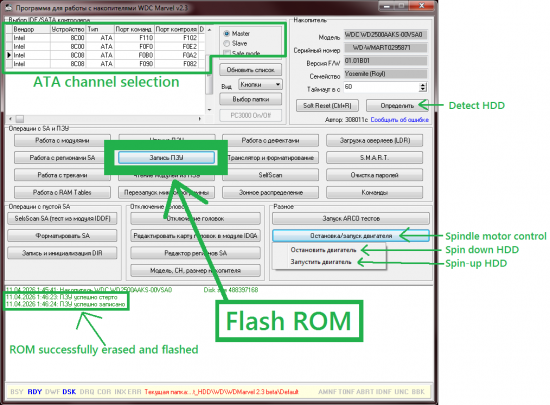 wdm.png [ 87.55 KiB | Viewed 4995 times ]
Now for the most important thing: for some Western Digital hard drives, you can only flash the board using this program if the drive starts up and is fully functional. Or if the drive was able to at least partially initialize. If the drive can't initialize (for example, if it can't read anything from the magnetic platters due to faulty heads, or if only the control board was connected to the computer, without the HDA), if the ROM contains incorrect firmware, or if the ROM contains garbage instead of what it should contain, you can't do anything with the software. If the board has external ROM, this isn't a problem, since you can always transfer the chip from one board to another or flash it with a cheap Chinese programmer with a clip. But in our case, the ROM is stored inside the MCU. In this case, the board can still be flashed, but it's much more difficult, and this is definitely not the problem we need.
I have a drive with the same board as yours, but I haven't tested how it behaves in a similar situation. So take a photo of the labels on the faulty drive and the donor drive, and upload them to the forum; people here have a lot of experience in data recovery and will be able to find the correct file.
curwiler wrote:
my board looks similar - main diff being that I do NOT have that huge winbond chip
This means you have a completely different board. These boards all look identical, judging by their color and shape. But they're all different, with different MCUs, with or without external ROM, with different types of RAM, motor control chips, and so on. They're incompatible with each other, even though they can be physically installed on a HDA, and the hard drive will even be able to spin up with a completely incompatible control board. Of course, it will spin up extremely slowly—about a minute. This can be used to determine whether the preamp inside the HDA is working properly—if it's faulty, the hard drive won't spin up.



 FAQ
FAQ Search
 Login
Login Register
 HDDGURU FILES