MultiDrive – free backup, clone & wipe disk utility from Atola Technology

All times are UTC - 5 hours [ DST ]


Post new topic Reply to topic  [ 4 posts ] 
Author Message
 Post subject: I Fried my PCB
PostPosted: December 12th, 2006, 6:17 
Offline

Joined: December 12th, 2006, 5:27
Posts: 2
I recently plugged the wrong power cable into my Maxtor DiamondMax 10 / Model: 6B200PO 200GB PATA133 HDD

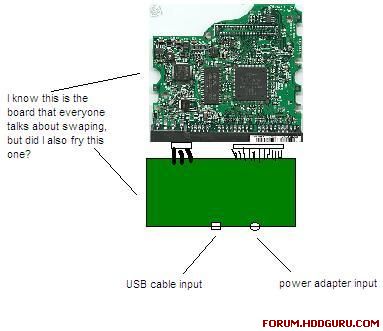
It is an external hard drive, so it has two circuit boards: one board where the USB and Power are plugged in and the PCB that goes with the Hard Drive itself. As far as replacing damaged parts, I have one major concern. I can't visually locate what I actually fried; the first board where the power adapter and USB cable plug in, the hard drive's PCB, or both. Can anybody tell me what the most common scenario is? Also, how do I identify the firmware for my hard drive so that I can be most sure that my replacement PCB is compatable? I know these questions are rather basic compared to some of the others I've seen on this forum, but it seemed to be a very good sourse for information. Thank you.


Top
 Profile  
 
 Post subject:
PostPosted: December 12th, 2006, 12:11 
Offline

Joined: June 27th, 2006, 11:33
Posts: 2288
Location: In ur HDD !
Firmware no is mentioned on the hdd like

Model : _____ eg : 4d040h2
Head : ____ eg : 22
Pcba : ____ eg : 05
Unique : ____ eg : 11

and the alphabetic code written on the hdd like NMBB

and the pcb no mention on the back of the hdd where the pcb is connected to the hdd on the place where ide cable is connected like b5fdp

combination of all these make the firmware code like on this hdd firmware code is 4d040h2220511-NMBB-B5FDP


Is there power in your hdd .


Top
 Profile  
 
 Post subject:
PostPosted: December 12th, 2006, 15:28 
Offline

Joined: December 12th, 2006, 5:27
Posts: 2
Thanks for the quick response.

I think I have the firmware issue figured out now.

I'm not sure what you mean when you ask if there is power in my hdd. I don't know much about circuitry. I just know that there are two boards.
Image


Top
 Profile  
 
 Post subject:
PostPosted: December 15th, 2006, 7:12 
Offline

Joined: June 27th, 2006, 11:33
Posts: 2288
Location: In ur HDD !
put ur hand on the hdd connect the cables if the motor spins correctly it means power is coming chk for clicking sounds .


Top
 Profile  
 
Display posts from previous:  Sort by  
Post new topic Reply to topic  [ 4 posts ] 

All times are UTC - 5 hours [ DST ]


Who is online

Users browsing this forum: Google [Bot] and 56 guests


You cannot post new topics in this forum
You cannot reply to topics in this forum
You cannot edit your posts in this forum
You cannot delete your posts in this forum
You cannot post attachments in this forum

Search for:
Jump to:  
Powered by phpBB © 2000, 2002, 2005, 2007 phpBB Group