MultiDrive – free backup, clone & wipe disk utility from Atola Technology

All times are UTC - 5 hours [ DST ]


Post new topic Reply to topic  [ 11 posts ] 
Author Message
 Post subject: Western Digital HDD failed to import from Disk Management
PostPosted: March 8th, 2007, 3:43 
Offline

Joined: March 7th, 2007, 3:44
Posts: 4
Hello To all of you in the forum,

I am here to discuss with you, about my weird situation. I am having 2 computers at home. Computer A, is an intel-based computer, whereas computer B is an AMD-based computer. In my Computer A, I am having 3 hard disk drives.

The first HDD (Maxtor 2B020H1) is a primary master HDD, which contains a Windows XP professional SP2 inside.

The second 160GB HDD (WDC WD1600JB), is a primary slave HDD, which does not contains system file inside. It is being used as a storage HDD, for keeping my important files such as movies, pictures, songs, company’s data, private data, and etc.

My third 320GB HDD (WDC WD3200JB), is an external HDD, its function is to backup all my important data in it. It connects to my computer using a normal USB2.0 3.5” HD external box.

Both of my Western Digital Caviar HDD were being set as a Dynamic Disk.

Several days ago, I tried to plug out my third 320GB external HDD from computer A, and plug it in to computer B. After copying some files, I clicked on the ‘safely remove hardware’, and intended to safely remove my external HDD from computer B. Unfortunately the external HDD can’t be removed. It said : “The device ‘Generic volume’ cannot be stopped right now. Try stopping the device again” .

I was in a hurry and I didn’t wait for it, and I just plug it out with out clicking the ‘safely remove hardware’ icon. Right after I have done that, when I tried to plug my third HDD into my computer A, it could not be detected.

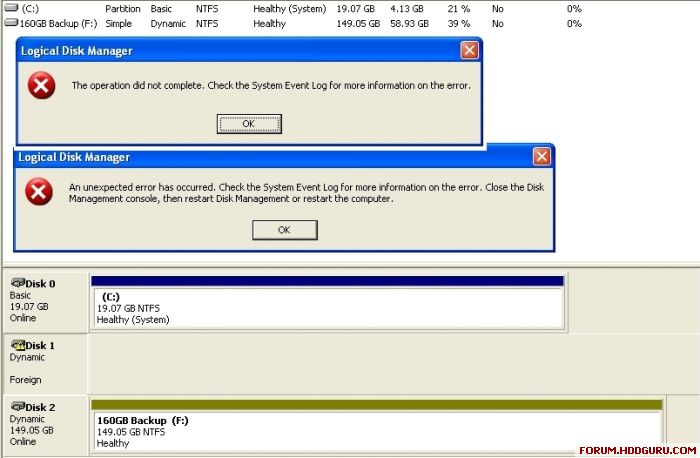
Usually, when people meet with this kind of situation, they will have to go to the Computer Management area > Disk Management area (Right Click on My Computer icon > Manage > Disk Management ) , to either reactivate the external drive or to import the foreign disk drive into their computer. I always do that without any problem. But this time, it cannot be reactivated neither to be imported into my computer A. I tried that too, in my computer B, still, no hope. I get some error messages which sound like this : “The operation did not complete. Check the System Event Log for more information on the error” & “An unexpected error has occurred. Check the System Event Log for more information on the error. Close the Disk Management console, then restart Disk Management or restart the computer.” (Refer to the image shown below if you don't know what am I talking about)

I then quickly tried some file recovery/ntfs recovery tools on my corrupted hard drive. For most of the software that I have tried, most of them did show up my files inside the corrupted hard disk, and I have a choice to copy them out using those third party software to another hard drive if I wanted to. At least, this makes me feel comfort, since I know that it might have something wrong with the NTFS or the Master File Table (MFT) or the Partition table, but not loosing any of my important file inside the HDD.

I am still scanning my hard drive with various kind of repairing programs. I will let you all know which method that I am using will be the best one. And I might be posting the result of the scanning from time to time, so that it can be view by all of you, and hope that my sharing is useful to someone else out there, who might have been encountered a problem like mine.

Thanks in advance for all of your concern.
Image


Top
 Profile  
 
 Post subject: Right there with ya!
PostPosted: March 19th, 2007, 1:43 
Offline

Joined: March 19th, 2007, 1:37
Posts: 3
KingofKK,

I'm having the same problem. Some things i've tried, i've disabled and re enabled it in my bios, i've tried resetting the hard drive as well as re-booting the computer umpteen million times. I'll keep trying to get passed it, let me know if you figure it out and i'll do the same!

thanks,
bogusboy


Top
 Profile  
 
 Post subject:
PostPosted: March 19th, 2007, 1:54 
Offline

Joined: June 27th, 2006, 11:33
Posts: 2288
Location: In ur HDD !
get ur hdd out of the external usb box plug it into a normal ide port and then run mhdd or victoria on it do a scan and tell the results here plus also chek the name of the hdd that it displays in the software .


Top
 Profile  
 
 Post subject:
PostPosted: March 20th, 2007, 23:38 
Offline

Joined: March 19th, 2007, 1:37
Posts: 3
I have it hooked up via sata not usb.


Top
 Profile  
 
 Post subject:
PostPosted: March 23rd, 2007, 17:02 
Offline

Joined: January 10th, 2007, 19:24
Posts: 31
scan using mhdd is a good choice , lets hope you didnt get the firmware corrupted ,this will make it harder to fix


Top
 Profile  
 
 Post subject:
PostPosted: March 25th, 2007, 14:24 
Offline

Joined: March 7th, 2007, 3:44
Posts: 4
I am very sorry to miss all of your replies. Thanks for all the contributions and replies posted. I have fixed the problem just several days after my original thread posted above, using the program named : Testdisk-6.6 ...

Since I am having some other hard disk and since I didn't over write the corrupted 320GB HDD with other files, what I did was, first of all, recover my files in the corrupted HDD using some other file-recovering softwares. I backed up all those files in another hard disk.

2nd thing that I did was : Since I have backep up all the stuffs that I wanted, I played around with the 320GB corrupted hard disk. I tried so many 3rd party NTFS/partition table fixing programs, but all of them failed to recover the partition table of my hard disk.

Eventually I came to a program called : Testdisk-6.6 (just GOOGLE it if you want to download the file, and it could have newer version) ... It is a freeware program, and it was being written in DOS mode, a file which is quite small in size, and the most interesting part is, you don't even have to install the program to use it !

In my case, that I have describe in the original post above, what I did was just click on the [testdisk_win] > [Create] > [Select a media and PROCEED] > [Select partition table type & press ENTER] >[ADVANCE] > [select type & Press enter (I forgot what type that I've chosen,sicne I was using Dynamic but not the BASIC type of disk)] ...

To my surprise, it has recovered my hard drive after rebooting my computer, and the whole process only took about 3 to 5 minutes.

To play safe, if you really want to do it like what I did, you can try to download "File Scavenger 3.0", for recovering all of your files and have them backup in another hard drive which is sufficient to backup all those datas (I got all my data , yes i meant 100% of my data being copied to another HDD using this program).

After having your data being backed up, you can then try to play around to fix your corrupted HDD using the program : Testdisk-6.6, if anything happens to the corrupted HDD, you will at least have your data saved on another HDD. If everything goes well, you will then get your data back in a few minutes, on the corrupted HDD.

After fixing my corrupted HDD, I have decided not to convert my HDD type from BASIC to DYNAMIC anymore. I have had this kind of problem for several times previously, whenever I am using a DYNAMIC mode. I know that the transfer rate is so fast when you are using a DYNAMIC mode HDD, but it is so unstable in case of any emergency situation happen, such as power shortage OR sudden rebooting your computer OR improper shut down of your computer etc. The MFT or the partition table or the MBR etc could be easily damaged, when you are in the DYNAMIC mode. I backed up all my files in another HDD, and I formatted and set my HDD as BASIC mode, and I recopy those files back into my newly formatted HDD, and I have tried all kind of improper shut down of my pc, but it still runs smoothly for the Basic mode HDD. But of course on the other hand, the HDD transfer rate is so slow in Basic mode, comparing to the Dynamic Mode.

This is just my 2 cents, please feel free to add any testimony OR your opinion OR your experiences in this thread if you found any other ways to fix this kind of problem, or should you have faced/are facing any similar kind of problems . Thanks a lot for all of your supports !


Top
 Profile  
 
 Post subject:
PostPosted: March 25th, 2007, 18:41 
Offline

Joined: March 19th, 2007, 1:37
Posts: 3
I followed the same steps above and it worked like a charm! If you are having this trouble, start here. no data was lost and everything is back to normal. I'm also able to swap the HDD between my 2 computers again!


Top
 Profile  
 
 Post subject:
PostPosted: March 26th, 2007, 17:30 
Offline

Joined: March 26th, 2007, 17:23
Posts: 2
Hi guys,

I'm facing exactly the same problem since several days.

I found your tip worth for a try, kingofkk. Thanks so much. However I'm having some problems to get it right... After [Advance] I select the type and press Enter but then I'm not given any other choices! I'm stucked in this menu "Type select"... Already tried to quit the "Tetsdisk" and reboot the computer but no HDD recover took place... Any ideas?


Top
 Profile  
 
 Post subject:
PostPosted: March 29th, 2007, 13:24 
Offline

Joined: March 26th, 2007, 17:23
Posts: 2
My problem is solved guys. Not really the way I wanted but at the end the important is I could recover all my 200GB music files. I just bought a new HDD and used "File Scavenger 3.0" to recover into there (thanks so much for the tip kingofkk. It looks a very good tool!). Now I will just reformat the s* old HDD and definitely set it as "basic". Don't want to hear about "dynamic" disks anymore as long as I don't use RAID!!

Thanks everyone and good luck to all!


Top
 Profile  
 
 Post subject:
PostPosted: March 31st, 2007, 1:27 
Offline

Joined: March 7th, 2007, 3:44
Posts: 4
Glad that my tips are able to help someone out. Appreciate all of your testimonies, and your 2 cents being added in this thread ! :)


Top
 Profile  
 
 Post subject:
PostPosted: March 31st, 2007, 1:32 
Offline

Joined: March 7th, 2007, 3:44
Posts: 4
poligunus wrote:
Hi guys,

I'm facing exactly the same problem since several days.

I found your tip worth for a try, kingofkk. Thanks so much. However I'm having some problems to get it right... After [Advance] I select the type and press Enter but then I'm not given any other choices! I'm stucked in this menu "Type select"... Already tried to quit the "Tetsdisk" and reboot the computer but no HDD recover took place... Any ideas?


Poligunus. I am sorry for the late reply. For your case, it might be the same with my 1st time's case. Perhaps The MBR is corrupt, not the partition table. In that case, I used another NTFS/MBR recovery program named : "Active@ Partition Recovery" to fix the problem, and it fixed my HDD in the matter of "SECONDS", not "minute" , LOL !!! Anyway, I am glad that you have recovered your files using the "File Scavenger 3.0" .... I feel happy of being able to help you all out in here.


Top
 Profile  
 
Display posts from previous:  Sort by  
Post new topic Reply to topic  [ 11 posts ] 

All times are UTC - 5 hours [ DST ]


Who is online

Users browsing this forum: No registered users and 85 guests


You cannot post new topics in this forum
You cannot reply to topics in this forum
You cannot edit your posts in this forum
You cannot delete your posts in this forum
You cannot post attachments in this forum

Search for:
Jump to:  
Powered by phpBB © 2000, 2002, 2005, 2007 phpBB Group
