Hello To all of you in the forum,
I am here to discuss with you, about my weird situation. I am having 2 computers at home. Computer A, is an intel-based computer, whereas computer B is an AMD-based computer. In my Computer A, I am having 3 hard disk drives.
The first HDD (Maxtor 2B020H1) is a primary master HDD, which contains a Windows XP professional SP2 inside.
The second 160GB HDD (WDC WD1600JB), is a primary slave HDD, which does not contains system file inside. It is being used as a storage HDD, for keeping my important files such as movies, pictures, songs, company’s data, private data, and etc.
My third 320GB HDD (WDC WD3200JB), is an external HDD, its function is to backup all my important data in it. It connects to my computer using a normal USB2.0 3.5” HD external box.
Both of my Western Digital Caviar HDD were being set as a Dynamic Disk.
Several days ago, I tried to plug out my third 320GB external HDD from computer A, and plug it in to computer B. After copying some files, I clicked on the ‘safely remove hardware’, and intended to safely remove my external HDD from computer B. Unfortunately the external HDD can’t be removed. It said : “The device ‘Generic volume’ cannot be stopped right now. Try stopping the device again” .
I was in a hurry and I didn’t wait for it, and I just plug it out with out clicking the ‘safely remove hardware’ icon. Right after I have done that, when I tried to plug my third HDD into my computer A, it could not be detected.
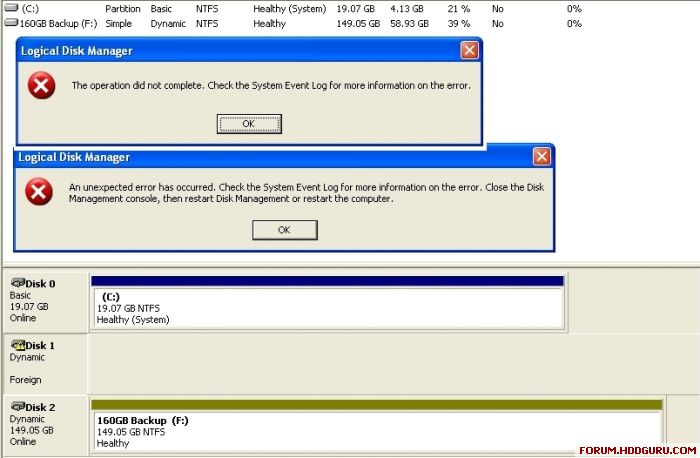
Usually, when people meet with this kind of situation, they will have to go to the Computer Management area > Disk Management area (Right Click on My Computer icon > Manage > Disk Management ) , to either reactivate the external drive or to import the foreign disk drive into their computer. I always do that without any problem. But this time, it cannot be reactivated neither to be imported into my computer A. I tried that too, in my computer B, still, no hope. I get some error messages which sound like this : “The operation did not complete. Check the System Event Log for more information on the error” & “An unexpected error has occurred. Check the System Event Log for more information on the error. Close the Disk Management console, then restart Disk Management or restart the computer.” (Refer to the image shown below if you don't know what am I talking about)
I then quickly tried some file recovery/ntfs recovery tools on my corrupted hard drive. For most of the software that I have tried, most of them did show up my files inside the corrupted hard disk, and I have a choice to copy them out using those third party software to another hard drive if I wanted to. At least, this makes me feel comfort, since I know that it might have something wrong with the NTFS or the Master File Table (MFT) or the Partition table, but not loosing any of my important file inside the HDD.
I am still scanning my hard drive with various kind of repairing programs. I will let you all know which method that I am using will be the best one. And I might be posting the result of the scanning from time to time, so that it can be view by all of you, and hope that my sharing is useful to someone else out there, who might have been encountered a problem like mine.
Thanks in advance for all of your concern.



 FAQ
FAQ Search
 Login
Login Register
 HDDGURU FILES

