Data recovery and disk repair questions and discussions related to old-fashioned SATA, SAS, SCSI, IDE, MFM hard drives - any type of storage device that has moving parts
December 27th, 2008, 17:43
Dear folks,
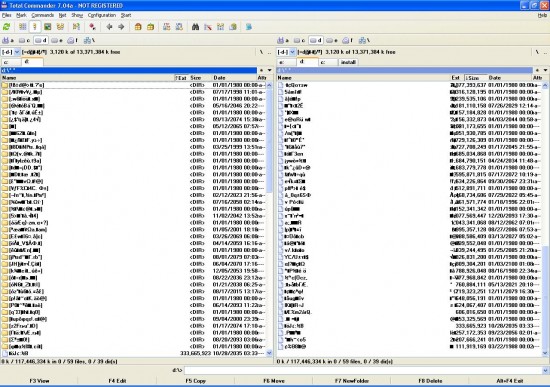
I really need your help. One of the three IDE hard drives installed on my P4 Dell desktop machine (Win XP Pro) turned totally "gibberish". Nothing readable - some recent very important files were not backed up.
Unfortunately, I don't remember the precise moment it happened but I do note here that around that time three things happened. i) I tried to replace this disk with a new one (Maxtor 250G), which turned out to be out of order. ii) my PC was infected with a couple of viruses. iii) I updated BIOS on my motherboard since I assumed that it will let the system read the new 250GB disk.
I have copied the whole partition to a brand new working hard drive but it looks on it precisely the same.
I'm attaching the screen shot of how that "gibberish" looks (in total commander).
I appreciate any help.
German
December 29th, 2008, 9:23
FAT32 no doubt.....
December 29th, 2008, 9:57
TikTak's right I think - You need to send to a good DR company so they can rebuild FAT and root directory.
December 29th, 2008, 11:12
If this is 1 of 3 drives, I am assuming it is not your main System drive with your operating system? If this is the case then you can attempt recovery of your data by some commercially available software, but you must be aware that even with SW based recoveries, there are risks including the chance you could render your data unrecoverable completely.
If you are fairly confident in computers and DR, then you can try yourself, but probably the best thing you can do is send to a Professional who will secure 100% of your data (if possible).
December 29th, 2008, 11:37
Hi,
As you now have a backup copy on your new hard drive you can work on that without damaging the file system any more than it is.
Are the files names inside the folders also corrupted?
I would try booting from dos, a windows 98 startup disk or a win98 cd and then have a look at the folder and file names. Do you see any names like 'file~1.exe' or folder~1 etc etc?
It looks like a virus problem.
Powered by phpBB © phpBB Group.