Sandisk SDXC 64gb
July 23rd, 2014, 11:09
Hi guys,
after a shoot, my card did not mount at all. I send it in to a data recovery company and they returned the card back to me saying that the lower left extreme gold pinout is missing due to heat generated while shooting. Now i do not know what else can be done. Please advice .
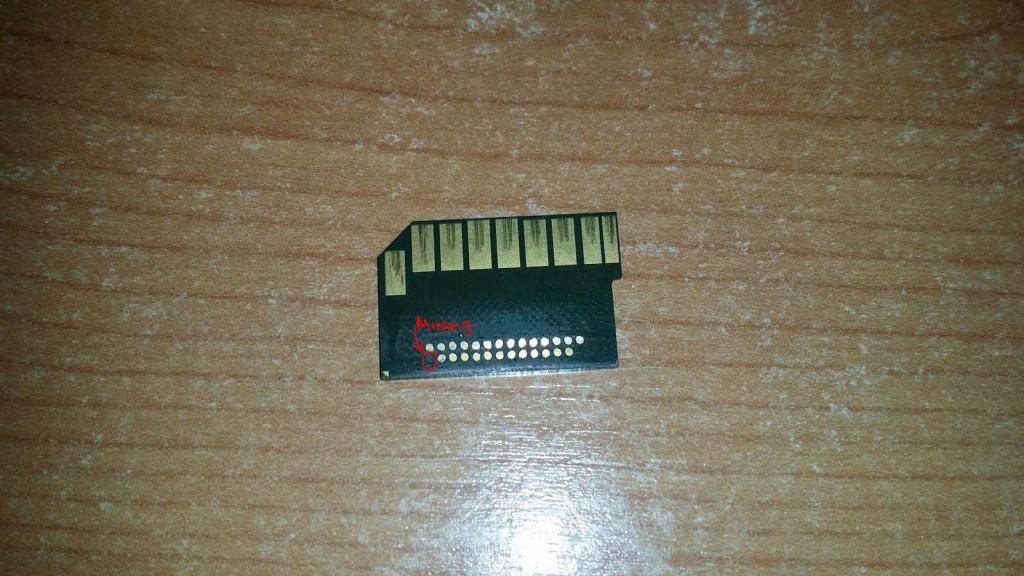
after a shoot, my card did not mount at all. I send it in to a data recovery company and they returned the card back to me saying that the lower left extreme gold pinout is missing due to heat generated while shooting. Now i do not know what else can be done. Please advice .
Re: Sandisk SDXC 64gb
July 23rd, 2014, 12:16
Hi,
I don't know why they couldn't remove some coating to find another part of the track the pin was connected to.
These cards can have other recovery issues as well, I have seen some unsuccessful attempts lately.
Would be happy to attempt a recovery if you want to send it to AU.
Cheers
I don't know why they couldn't remove some coating to find another part of the track the pin was connected to.
These cards can have other recovery issues as well, I have seen some unsuccessful attempts lately.
Would be happy to attempt a recovery if you want to send it to AU.
Cheers
Re: Sandisk SDXC 64gb
August 24th, 2014, 0:53
Thanks Haque.
Bumping up for any other solutions or workarounds
Bumping up for any other solutions or workarounds
Re: Sandisk SDXC 64gb
August 24th, 2014, 2:05
Please make photo on high resolution that we can see traces on board.
For example: http://www.odzyskiwanie-danych.com.pl/i ... arvika.jpg
You can see traces from pads to other place, so if pad is removed, you must just solder to other place in traces which is connected to pad.
For example: http://www.odzyskiwanie-danych.com.pl/i ... arvika.jpg

You can see traces from pads to other place, so if pad is removed, you must just solder to other place in traces which is connected to pad.
Re: Sandisk SDXC 64gb
August 24th, 2014, 2:35
Still happy to have a look if you want to send it to me.
There are no other solutions, you need to take it/send it to a DR place that does Monolith Memory.
Assuming your card controller is corrupted(possible to probable) or dead(unlikely).
You can try this:
1. Download DMDE http://dmde.com/download.html Install not needed, just unzip.
2. then put the card to a PC and ignore any messages(but hope for one as this means the card isn't totally dead in most cases).
3.start DMDE and if the card is detected, and Physical Disks selected in the left pane, you should see it after clicking down the list on the right. Select it and click OK.
4. on the first window that pops up, you should see something like:
right-click the Physical Drive 1(or equivalent on your system) nd choose create image/clone.
If that works, use any recovery software on the image such as GetDataBack or R-Studio.
if you cant do the above only option is send to someone that does Monoliths.
There are no other solutions, you need to take it/send it to a DR place that does Monolith Memory.
Assuming your card controller is corrupted(possible to probable) or dead(unlikely).
You can try this:
1. Download DMDE http://dmde.com/download.html Install not needed, just unzip.
2. then put the card to a PC and ignore any messages(but hope for one as this means the card isn't totally dead in most cases).
3.start DMDE and if the card is detected, and Physical Disks selected in the left pane, you should see it after clicking down the list on the right. Select it and click OK.
4. on the first window that pops up, you should see something like:
right-click the Physical Drive 1(or equivalent on your system) nd choose create image/clone.
If that works, use any recovery software on the image such as GetDataBack or R-Studio.
if you cant do the above only option is send to someone that does Monoliths.
- Attachments
-
- a.jpg (24.96 KiB) Viewed 7820 times
Powered by phpBB © phpBB Group.