T7 try to recover it
January 2nd, 2025, 5:32
hello,
I have a T7 and when I try to use it, it fails
so I decided to open it !
please find enclosed PCB picture . there are a line A ( 7 pins) , a line B ( 5 pins) on the right and 2 pins on the left.
I took value from GND to a pin :
A1 - GND
A2 - 2.3V
A3 - 3.28V
A4 - 0
A5 - 3.28V
A6 - 0
A7 - 0
A8 - 3.28V
A9 - 3.28V
B1 - 0
B2 - 3.28V
B3 - 2.3V
B4 - 1.8V
B line looks to be voltage part
i tried to short pin A6 and A7 during boot. After that, I used a jtagulator to find a JTAG or uart port with without success maybe it is an issue with the controller
do you know if safe mode pins are on the A8/A9 ? if someone has pinout for this ssd, I'll be happy to test !
KR
I have a T7 and when I try to use it, it fails
so I decided to open it !
please find enclosed PCB picture . there are a line A ( 7 pins) , a line B ( 5 pins) on the right and 2 pins on the left.
I took value from GND to a pin :
A1 - GND
A2 - 2.3V
A3 - 3.28V
A4 - 0
A5 - 3.28V
A6 - 0
A7 - 0
A8 - 3.28V
A9 - 3.28V
B1 - 0
B2 - 3.28V
B3 - 2.3V
B4 - 1.8V
B line looks to be voltage part
i tried to short pin A6 and A7 during boot. After that, I used a jtagulator to find a JTAG or uart port with without success
maybe it is an issue with the controller do you know if safe mode pins are on the A8/A9 ? if someone has pinout for this ssd, I'll be happy to test !
KR
- Attachments
-
- Capture d'écran 2025-01-02 101425.png (348.36 KiB) Viewed 10662 times
Re: T7 try to recover it
January 2nd, 2025, 12:07
maybe it is an issue with the controller
Most of the times it's not that.
I have a T7 and when I try to use it, it fails
Is utterly non descriptive and non informative.
Re: T7 try to recover it
January 2nd, 2025, 12:08
This looks strange, could it be shorted? You can safely remove it and make sure that it doesn't short anymore, there are enough capacitors nearby
- Attachments
-
- SamsungPhoto.png (302.22 KiB) Viewed 10605 times
Re: T7 try to recover it
January 2nd, 2025, 17:19
Measure the voltages at V1 - V5.
Can you tell us the markings on "ICx"?
Also check for shorts at the ESD protection diodes:
https://www.hddoracle.com/viewtopic.php?f=100&t=1615&p=24636#p24636
TPS62085, Texas Instruments, adjustable 3A Step-Down Converter with DCS-Control and Hiccup Short Circuit Protection, 2x2 HotRod Package, marking PD5Q, 7-pin:
https://www.ti.com/lit/ds/symlink/tps62085.pdf
Can you tell us the markings on "ICx"?
Also check for shorts at the ESD protection diodes:
https://www.hddoracle.com/viewtopic.php?f=100&t=1615&p=24636#p24636
TPS62085, Texas Instruments, adjustable 3A Step-Down Converter with DCS-Control and Hiccup Short Circuit Protection, 2x2 HotRod Package, marking PD5Q, 7-pin:
https://www.ti.com/lit/ds/symlink/tps62085.pdf
- Attachments
-
-
Re: T7 try to recover it
January 2nd, 2025, 17:26
sourcerer wrote:This looks strange, could it be shorted? You can safely remove it and make sure that it doesn't short anymore, there are enough capacitors nearby
Its marking is "05b" and it is in parallel with the capacitor array.
This is one possibility:
PESD5V0S1BA-N, ESD Protection Diode, 350W, 5V, bidirectional, marking 05B, SOD323:
https://xonstorage.blob.core.windows.net/pdf/bourne_pesd5v0s1ban_apr22_xonlink.pdf
Re: T7 try to recover it
January 3rd, 2025, 0:51
I think ICx is an e-fuse. Compare the Vin and Vout voltages.
TPS259535DSG, Texas Instruments, 2.7V - 18V, 4A, 34mOhm eFuse With Fast Overvoltage Protection, 5.7V clamp, Auto-retry, marking ES35, WSON-8:
https://www.ti.com/lit/gpn/tps2595
TPS259535DSG, Texas Instruments, 2.7V - 18V, 4A, 34mOhm eFuse With Fast Overvoltage Protection, 5.7V clamp, Auto-retry, marking ES35, WSON-8:
https://www.ti.com/lit/gpn/tps2595
Re: T7 try to recover it
January 3rd, 2025, 8:12
hello all,
thanks for your replies and your help
@Arch Stanton
you are right, more information below
- on Windows, there is a new entry on the management disk but a message " no media "
- on Linux ( When I try to access to /dev/sda, there is an error message who says there is no media)
[933052.033318] usb 7-1: new SuperSpeed Plus Gen 2x1 USB device number 5 using xhci_hcd
[933052.045643] usb 7-1: New USB device found, idVendor=04e8, idProduct=4001, bcdDevice= 1.00
[933052.045663] usb 7-1: New USB device strings: Mfr=2, Product=3, SerialNumber=1
[933052.045670] usb 7-1: Product: PSSD T7
[933052.045677] usb 7-1: Manufacturer: Samsung
[933052.045683] usb 7-1: SerialNumber: 00000Sxxxxxx
[933052.046186] usb 7-1: Device is not authorized for usage
[933052.051914] scsi host0: uas
[933052.052328] usb 7-1: authorized to connect
[933056.743328] scsi 0:0:0:0: Direct-Access Samsung PSSD T7 0 PQ: 0 ANSI: 6
[933056.745460] sd 0:0:0:0: Attached scsi generic sg0 type 0
[933056.745615] sd 0:0:0:0: [sda] Media removed, stopped polling
[933056.746543] sd 0:0:0:0: [sda] Attached SCSI removable disk
@fzabkar
please find below values from V1 to V5
V1 : 3.28
V2 : 2.53
V3 : 1.04
V4 : 1.81
V5 : 0.89
ICx looks to be a ES35 188 A3RL but I didn't find the datasheet. Btw i took voltage on pin 4 (Vin?) et 5 (Vout) and both are 5.1 V
@sourcerer
I ll test later, I don't have my clamp with me to do that
thanks again
thanks for your replies and your help
@Arch Stanton
you are right, more information below
- on Windows, there is a new entry on the management disk but a message " no media "
- on Linux ( When I try to access to /dev/sda, there is an error message who says there is no media)
[933052.033318] usb 7-1: new SuperSpeed Plus Gen 2x1 USB device number 5 using xhci_hcd
[933052.045643] usb 7-1: New USB device found, idVendor=04e8, idProduct=4001, bcdDevice= 1.00
[933052.045663] usb 7-1: New USB device strings: Mfr=2, Product=3, SerialNumber=1
[933052.045670] usb 7-1: Product: PSSD T7
[933052.045677] usb 7-1: Manufacturer: Samsung
[933052.045683] usb 7-1: SerialNumber: 00000Sxxxxxx
[933052.046186] usb 7-1: Device is not authorized for usage
[933052.051914] scsi host0: uas
[933052.052328] usb 7-1: authorized to connect
[933056.743328] scsi 0:0:0:0: Direct-Access Samsung PSSD T7 0 PQ: 0 ANSI: 6
[933056.745460] sd 0:0:0:0: Attached scsi generic sg0 type 0
[933056.745615] sd 0:0:0:0: [sda] Media removed, stopped polling
[933056.746543] sd 0:0:0:0: [sda] Attached SCSI removable disk
@fzabkar
please find below values from V1 to V5
V1 : 3.28
V2 : 2.53
V3 : 1.04
V4 : 1.81
V5 : 0.89
ICx looks to be a ES35 188 A3RL but I didn't find the datasheet. Btw i took voltage on pin 4 (Vin?) et 5 (Vout) and both are 5.1 V
@sourcerer
I ll test later, I don't have my clamp with me to do that
thanks again
Re: T7 try to recover it
January 3rd, 2025, 15:10
tcccorp wrote:@fzabkar
please find below values from V1 to V5
V1 : 3.28
V2 : 2.53
V3 : 1.04
V4 : 1.81
V5 : 0.89
ICx looks to be a ES35 188 A3RL but I didn't find the datasheet. Btw i took voltage on pin 4 (Vin?) et 5 (Vout) and both are 5.1 V
@sourcerer
I ll test later, I don't have my clamp with me to do that :)
thanks again :)
Those voltages match up with these:
https://www.zeroalpha.com.au/services/data-recovery-blog/ssd/samsung-portable-ssd-t7-shield-1tb-data-recovery
https://www.zeroalpha.com.au/images/BRANDS/samsung/samsung-t7-shield-1tb-pcb-voltages-schematic.jpg
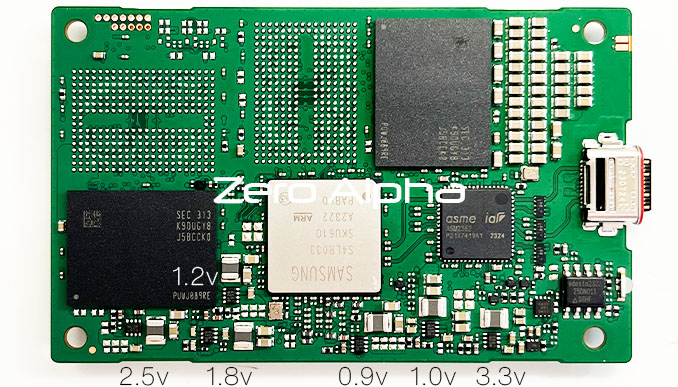
There is no need for you to look for a datasheet for ES35. I found it in my previous post.
There is no need to remove "05b". Just measure the voltage across it.
The following ID info appears to be coming from the bridge firmware:
- Code:
[933052.033318] usb 7-1: new SuperSpeed Plus Gen 2x1 USB device number 5 using xhci_hcd
[933052.045643] usb 7-1: New USB device found, idVendor=04e8, idProduct=4001, bcdDevice= 1.00
[933052.045663] usb 7-1: New USB device strings: Mfr=2, Product=3, SerialNumber=1
[933052.045670] usb 7-1: Product: PSSD T7
[933052.045677] usb 7-1: Manufacturer: Samsung
[933052.045683] usb 7-1: SerialNumber: 00000Sxxxxxx
Re: T7 try to recover it
January 3rd, 2025, 19:17
Thanks fzabkar,
does it mean everything is OK ? do you know what I can do to debug my issue or retrieve my data ?
does it mean everything is OK ? do you know what I can do to debug my issue or retrieve my data ?
Re: T7 try to recover it
January 3rd, 2025, 19:55
It appears that there is a firmware problem.
I'm guessing that A8/A9 could be a UART port.
I'm guessing that A8/A9 could be a UART port.
Re: T7 try to recover it
January 5th, 2025, 14:55
hello
Thanks again for your answer
I tested to find an UART but without success ( I tried with 'safe mode' and without, I'm NOT sure if it is A5 and A6) . if it's an issue with the firmware, maybe it is normal
I dumped flash on the top left. It's a very small one ( only 1Mb and half is empty) . It seems it's not an ARM firmware beacause header look different as we can find on another equipment . After check, SPI pins are connected to the PCI ExpresS to USB bridge
I don't know if I can do something else ie find jyag/swd, ...
Thanks again for your answer
I tested to find an UART but without success ( I tried with 'safe mode' and without, I'm NOT sure if it is A5 and A6) . if it's an issue with the firmware, maybe it is normal
I dumped flash on the top left. It's a very small one ( only 1Mb and half is empty) . It seems it's not an ARM firmware beacause header look different as we can find on another equipment . After check, SPI pins are connected to the PCI ExpresS to USB bridge
I don't know if I can do something else ie find jyag/swd, ...
- Attachments
-
- Capture d'écran 2025-01-05 194534.png (9.75 KiB) Viewed 10191 times
Re: T7 try to recover it
January 5th, 2025, 15:34
Can you upload the SPI flash dump? I'm just curious.
This firmware is used by the bridge. It has no connection to the SSD behind the bridge. The SSD has its own firmware.
This firmware is used by the bridge. It has no connection to the SSD behind the bridge. The SSD has its own firmware.
Re: T7 try to recover it
January 5th, 2025, 16:01
Of course I can
Is there a way to dump the SSD firmware ?
Is there a way to dump the SSD firmware ?
- Attachments
-
- t7.zip
- (24.47 KiB) Downloaded 217 times
Re: T7 try to recover it
January 5th, 2025, 16:47
I don't know about the SSD firmware.
Currently there is no support for your controller in Ace Lab's tools:
https://blog.acelaboratory.com/pc-3000-ssd-list-of-supported-ssd-drives-regularly-updated.html
Currently there is no support for your controller in Ace Lab's tools:
https://blog.acelaboratory.com/pc-3000-ssd-list-of-supported-ssd-drives-regularly-updated.html
Re: T7 try to recover it
January 5th, 2025, 17:58
tcccorp wrote:I don't know if I can do something else ie find jyag/swd, ...
@sourcerer has done a lot of JTAG-ing on an 840 Evo.
Re: T7 try to recover it
January 10th, 2025, 16:47
Hello,
I bought a evo 840 and I'll spend my week end on it
I bought a evo 840 and I'll spend my week end on it
Powered by phpBB © phpBB Group.