Samsung 863 MZ7LM1T9HCJM-00005 reporting 960GB not 1.92TB
May 26th, 2026, 2:07
I have a MZ7LM1T9HCJM-00005 SATA SSD. Firmware GXT1003Q
My understanding is that the 1T9 model should have 1.92 TB capacity. But I only see 960 GB.
AI suggested all the commands below, which state there is no visible over-provisioning.
AI suggested flashing a new firmware. but don't know which one to use. I found one from Dell GA3A.fwh which contains in the header 'MZ7LM1T9HCJM00D3'. The last digits '00D3' don't match the 00005 in my SSD and Samsung Toolkit 2.1 refuses to flash it (after stripping the header to get the binary file to be the correct size). I could force it, or use hdparm, but don't want to risk it. Hoping people in this forum can provide some info. Thanks!
sudo smartctl -a /dev/sda
User Capacity: 960,197,124,096 bytes [960 GB]
sudo hdparm -N /dev/sda
dev/sda:
max sectors = 1875385008/1875385008, HPA is disabled
sudo ./sam_toolkit -d 0 -M -r
================================================================================================
Samsung DC Toolkit Version 2.1.L.Q.0
Copyright (C) 2017 SAMSUNG Electronics Co. Ltd. All rights reserved.
================================================================================================
Disk Number: 0 | Model Name: SAMSUNG MZ7LM1T9HCJM-00005 | Firmware Version: GXT1003Q
------------------------------------------------------------------------------------------------
Native SET MAX value of the disk is 1875385007 LBAs.
------------------------------------------------------------------------------------------------
My understanding is that the 1T9 model should have 1.92 TB capacity. But I only see 960 GB.
AI suggested all the commands below, which state there is no visible over-provisioning.
AI suggested flashing a new firmware. but don't know which one to use. I found one from Dell GA3A.fwh which contains in the header 'MZ7LM1T9HCJM00D3'. The last digits '00D3' don't match the 00005 in my SSD and Samsung Toolkit 2.1 refuses to flash it (after stripping the header to get the binary file to be the correct size). I could force it, or use hdparm, but don't want to risk it. Hoping people in this forum can provide some info. Thanks!
sudo smartctl -a /dev/sda
User Capacity: 960,197,124,096 bytes [960 GB]
sudo hdparm -N /dev/sda
dev/sda:
max sectors = 1875385008/1875385008, HPA is disabled
sudo ./sam_toolkit -d 0 -M -r
================================================================================================
Samsung DC Toolkit Version 2.1.L.Q.0
Copyright (C) 2017 SAMSUNG Electronics Co. Ltd. All rights reserved.
================================================================================================
Disk Number: 0 | Model Name: SAMSUNG MZ7LM1T9HCJM-00005 | Firmware Version: GXT1003Q
------------------------------------------------------------------------------------------------
Native SET MAX value of the disk is 1875385007 LBAs.
------------------------------------------------------------------------------------------------
Re: Samsung 863 MZ7LM1T9HCJM-00005 reporting 960GB not 1.92T
May 26th, 2026, 15:01
Check for the presence of a Device Configuration Overlay:
https://en.wikipedia.org/wiki/Device_configuration_overlay
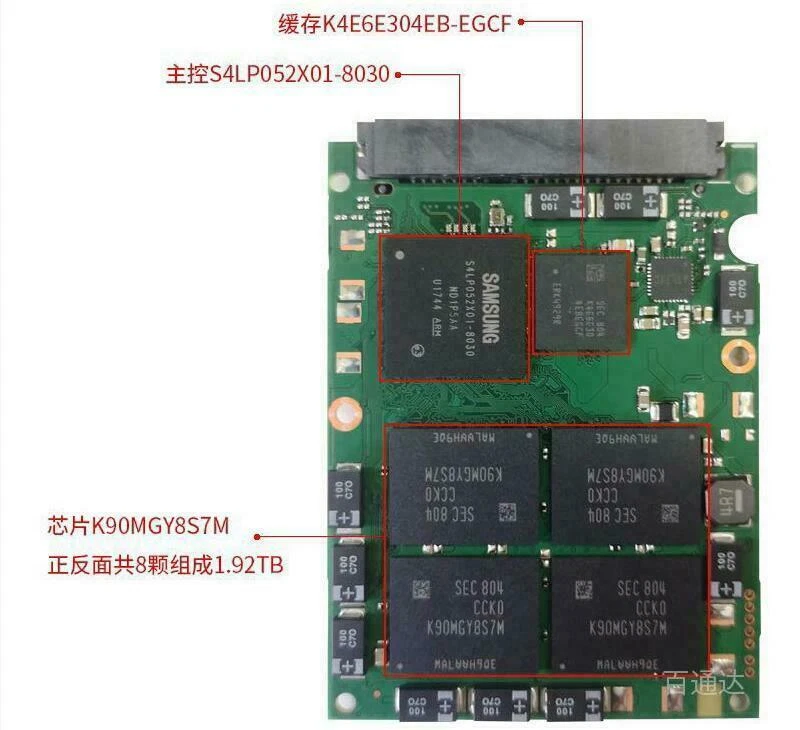
Have you identified the capacity of each NAND IC?
https://i.ebayimg.com/images/g/UhQAAOSwRsJetNmb/s-l1600.webp
https://www.techpowerup.com/ssd-specs/samsung-960-evo-500-gb.d71
https://en.wikipedia.org/wiki/Device_configuration_overlay
Have you identified the capacity of each NAND IC?
https://i.ebayimg.com/images/g/UhQAAOSwRsJetNmb/s-l1600.webp
https://www.techpowerup.com/ssd-specs/samsung-960-evo-500-gb.d71
Re: Samsung 863 MZ7LM1T9HCJM-00005 reporting 960GB not 1.92T
May 27th, 2026, 2:51
Thank you for the information. The flash chips are K90KGY8S7C. From what I read they are 128GB each. There are 8 of them, explaining the 960 GB capacity of the SSD.
Why would the model have 1T9 then?
Why would the model have 1T9 then?
Re: Samsung 863 MZ7LM1T9HCJM-00005 reporting 960GB not 1.92T
May 27th, 2026, 3:16
Perhaps someone swapped the PCB?
Can you show us detailed photos of the PCB and the label side of the case? I would like to compare the date codes on the ICs against the manufacture date on the label.
For example, in the following review the date codes on the Samsung ICs are 1524, 522 and 528, and the date on the PCB is 1528. These are in YWW or YYWW (Year/Week) format. The manufacture date on the label is 2015.07.
https://www.storagereview.com/review/samsung-pm863-ssd-review
Does your drive report the same serial number and model number as the label? Edit: I see that it does report a 1.9TB model number.
Can you show us detailed photos of the PCB and the label side of the case? I would like to compare the date codes on the ICs against the manufacture date on the label.
For example, in the following review the date codes on the Samsung ICs are 1524, 522 and 528, and the date on the PCB is 1528. These are in YWW or YYWW (Year/Week) format. The manufacture date on the label is 2015.07.
https://www.storagereview.com/review/samsung-pm863-ssd-review
Does your drive report the same serial number and model number as the label? Edit: I see that it does report a 1.9TB model number.
Re: Samsung 863 MZ7LM1T9HCJM-00005 reporting 960GB not 1.92T
May 29th, 2026, 3:12
I don't have the case, just the board. The model number is what it reports to the computer. The flash chips have dates 531 and 534. It may have come from some server environment, maybe part of some storage system.
- Attachments
-
-
Re: Samsung 863 MZ7LM1T9HCJM-00005 reporting 960GB not 1.92T
May 29th, 2026, 14:47
What is the serial number? If it's a fake, then perhaps the S/N might provide a clue.
Powered by phpBB © phpBB Group.