Hello everyone, first of all, i introduce myself, im just a humble pc technician. My name is Ezequiel, i always browse this forums because they are filled with great info and great people too
Sorry for my spelling,
if you please want to help me, I would really like to ask you this:
I have a Crucial MX500 2TB SSD that has an SM2259H controller ( silicon motion, from what I could research). I'm not an expert at all , i would say that I'm new to all of this.
The problem is that I had an accident where windows erased all my important and personal files instead of only erasing temporary files. Which i never authorized to disc cleanup just decided to destroy all files in my user folder.
So I need to find a way, without using any fancy electronic adapters, expensive PC3000 or pro electronics knowledge,
how I can stop the SSD controller from erasing information that was accidentally deleted.
I started investigating about ROM MODE, SAFE MODE , FACTORY ACCESS MODE, TECHNOMODE, but the topic is really obscure even on the internet. Little information or hard to find at least by common means.
What i did was, i soon as i realized the disaster I shut down the system and unplugged the SSD say 10 minutes after the incident and never plugged it back into power.
I also think i figured out how to short this drive into ROM mode (I uploaded a photo from here that shows the pin).
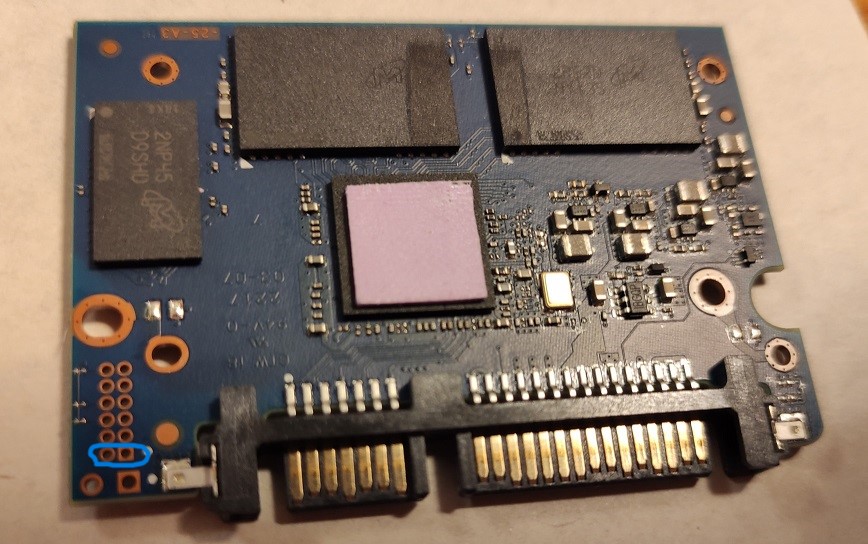 .
.what I really need to know is how to force the controller to stop wiping data via garbage collection, trimming and relocation and actually put it into a READ-ONLY STATE state from which rendering or recovery programs can be run.
Is there any software/tool that can help me with this task?. i Started to investigate about MP tools. Should I keep the ssd in factory mode/ rom mode/ techno mode/ during the entire imaging process? is it just about keeping the short in there while doing to imaging or is there something else i have to do?. In other words, how do you make sure that all background processes associated with trimming or garbage collection/redistribution of cells will be stopped when cloning or restoring from disk? Do I need to change the SSD firmware to stop this, if so how do I do it?
Thank you very much in advance.
Kindest regards,
Ezequiel