| HDD GURU FORUMS http://forum.hddguru.com/ |
|
| T7 try to recover it http://forum.hddguru.com/viewtopic.php?f=10&t=44979 |
Page 1 of 1 |
| Author: | tcccorp [ January 2nd, 2025, 5:32 ] | ||
| Post subject: | T7 try to recover it | ||
hello, I have a T7 and when I try to use it, it fails so I decided to open it ! please find enclosed PCB picture . there are a line A ( 7 pins) , a line B ( 5 pins) on the right and 2 pins on the left. I took value from GND to a pin : A1 - GND A2 - 2.3V A3 - 3.28V A4 - 0 A5 - 3.28V A6 - 0 A7 - 0 A8 - 3.28V A9 - 3.28V B1 - 0 B2 - 3.28V B3 - 2.3V B4 - 1.8V B line looks to be voltage part i tried to short pin A6 and A7 during boot. After that, I used a jtagulator to find a JTAG or uart port with without success do you know if safe mode pins are on the A8/A9 ? if someone has pinout for this ssd, I'll be happy to test ! KR
|
|||
| Author: | Arch Stanton [ January 2nd, 2025, 12:07 ] |
| Post subject: | Re: T7 try to recover it |
Quote: maybe it is an issue with the controller Most of the times it's not that. Quote: I have a T7 and when I try to use it, it fails Is utterly non descriptive and non informative. |
|
| Author: | sourcerer [ January 2nd, 2025, 12:08 ] | ||
| Post subject: | Re: T7 try to recover it | ||
This looks strange, could it be shorted? You can safely remove it and make sure that it doesn't short anymore, there are enough capacitors nearby
|
|||
| Author: | fzabkar [ January 2nd, 2025, 17:19 ] | |||
| Post subject: | Re: T7 try to recover it | |||
Measure the voltages at V1 - V5. Can you tell us the markings on "ICx"? Also check for shorts at the ESD protection diodes: https://www.hddoracle.com/viewtopic.php?f=100&t=1615&p=24636#p24636 TPS62085, Texas Instruments, adjustable 3A Step-Down Converter with DCS-Control and Hiccup Short Circuit Protection, 2x2 HotRod Package, marking PD5Q, 7-pin: https://www.ti.com/lit/ds/symlink/tps62085.pdf
|
||||
| Author: | fzabkar [ January 2nd, 2025, 17:26 ] |
| Post subject: | Re: T7 try to recover it |
sourcerer wrote: This looks strange, could it be shorted? You can safely remove it and make sure that it doesn't short anymore, there are enough capacitors nearby Its marking is "05b" and it is in parallel with the capacitor array. This is one possibility: PESD5V0S1BA-N, ESD Protection Diode, 350W, 5V, bidirectional, marking 05B, SOD323: https://xonstorage.blob.core.windows.net/pdf/bourne_pesd5v0s1ban_apr22_xonlink.pdf |
|
| Author: | fzabkar [ January 3rd, 2025, 0:51 ] |
| Post subject: | Re: T7 try to recover it |
I think ICx is an e-fuse. Compare the Vin and Vout voltages. TPS259535DSG, Texas Instruments, 2.7V - 18V, 4A, 34mOhm eFuse With Fast Overvoltage Protection, 5.7V clamp, Auto-retry, marking ES35, WSON-8: https://www.ti.com/lit/gpn/tps2595 |
|
| Author: | tcccorp [ January 3rd, 2025, 8:12 ] |
| Post subject: | Re: T7 try to recover it |
hello all, thanks for your replies and your help @Arch Stanton you are right, more information below - on Windows, there is a new entry on the management disk but a message " no media " - on Linux ( When I try to access to /dev/sda, there is an error message who says there is no media) [933052.033318] usb 7-1: new SuperSpeed Plus Gen 2x1 USB device number 5 using xhci_hcd [933052.045643] usb 7-1: New USB device found, idVendor=04e8, idProduct=4001, bcdDevice= 1.00 [933052.045663] usb 7-1: New USB device strings: Mfr=2, Product=3, SerialNumber=1 [933052.045670] usb 7-1: Product: PSSD T7 [933052.045677] usb 7-1: Manufacturer: Samsung [933052.045683] usb 7-1: SerialNumber: 00000Sxxxxxx [933052.046186] usb 7-1: Device is not authorized for usage [933052.051914] scsi host0: uas [933052.052328] usb 7-1: authorized to connect [933056.743328] scsi 0:0:0:0: Direct-Access Samsung PSSD T7 0 PQ: 0 ANSI: 6 [933056.745460] sd 0:0:0:0: Attached scsi generic sg0 type 0 [933056.745615] sd 0:0:0:0: [sda] Media removed, stopped polling [933056.746543] sd 0:0:0:0: [sda] Attached SCSI removable disk @fzabkar please find below values from V1 to V5 V1 : 3.28 V2 : 2.53 V3 : 1.04 V4 : 1.81 V5 : 0.89 ICx looks to be a ES35 188 A3RL but I didn't find the datasheet. Btw i took voltage on pin 4 (Vin?) et 5 (Vout) and both are 5.1 V @sourcerer I ll test later, I don't have my clamp with me to do that thanks again |
|
| Author: | fzabkar [ January 3rd, 2025, 15:10 ] |
| Post subject: | Re: T7 try to recover it |
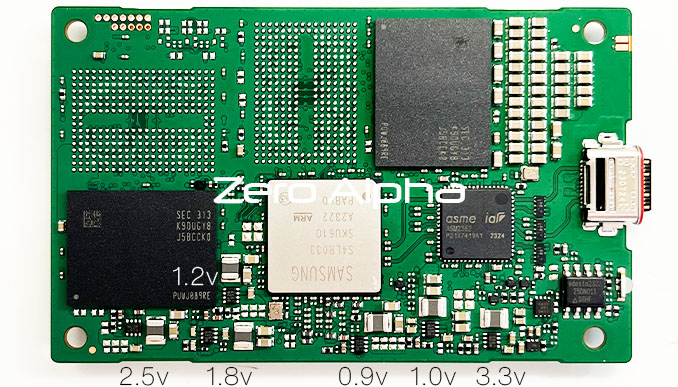
tcccorp wrote: @fzabkar please find below values from V1 to V5 V1 : 3.28 V2 : 2.53 V3 : 1.04 V4 : 1.81 V5 : 0.89 ICx looks to be a ES35 188 A3RL but I didn't find the datasheet. Btw i took voltage on pin 4 (Vin?) et 5 (Vout) and both are 5.1 V @sourcerer I ll test later, I don't have my clamp with me to do that :) thanks again :) Those voltages match up with these: https://www.zeroalpha.com.au/services/data-recovery-blog/ssd/samsung-portable-ssd-t7-shield-1tb-data-recovery https://www.zeroalpha.com.au/images/BRANDS/samsung/samsung-t7-shield-1tb-pcb-voltages-schematic.jpg There is no need for you to look for a datasheet for ES35. I found it in my previous post. There is no need to remove "05b". Just measure the voltage across it. The following ID info appears to be coming from the bridge firmware: Code: [933052.033318] usb 7-1: new SuperSpeed Plus Gen 2x1 USB device number 5 using xhci_hcd
[933052.045643] usb 7-1: New USB device found, idVendor=04e8, idProduct=4001, bcdDevice= 1.00 [933052.045663] usb 7-1: New USB device strings: Mfr=2, Product=3, SerialNumber=1 [933052.045670] usb 7-1: Product: PSSD T7 [933052.045677] usb 7-1: Manufacturer: Samsung [933052.045683] usb 7-1: SerialNumber: 00000Sxxxxxx |
|
| Author: | tcccorp [ January 3rd, 2025, 19:17 ] |
| Post subject: | Re: T7 try to recover it |
Thanks fzabkar, does it mean everything is OK ? do you know what I can do to debug my issue or retrieve my data ? |
|
| Author: | fzabkar [ January 3rd, 2025, 19:55 ] |
| Post subject: | Re: T7 try to recover it |
It appears that there is a firmware problem. I'm guessing that A8/A9 could be a UART port. |
|
| Author: | tcccorp [ January 5th, 2025, 14:55 ] | ||
| Post subject: | Re: T7 try to recover it | ||
hello Thanks again for your answer I tested to find an UART but without success ( I tried with 'safe mode' and without, I'm NOT sure if it is A5 and A6) . if it's an issue with the firmware, maybe it is normal I dumped flash on the top left. It's a very small one ( only 1Mb and half is empty) . It seems it's not an ARM firmware beacause header look different as we can find on another equipment . After check, SPI pins are connected to the PCI ExpresS to USB bridge I don't know if I can do something else ie find jyag/swd, ...
|
|||
| Author: | fzabkar [ January 5th, 2025, 15:34 ] |
| Post subject: | Re: T7 try to recover it |
Can you upload the SPI flash dump? I'm just curious. This firmware is used by the bridge. It has no connection to the SSD behind the bridge. The SSD has its own firmware. |
|
| Author: | tcccorp [ January 5th, 2025, 16:01 ] | ||
| Post subject: | Re: T7 try to recover it | ||
Of course I can Is there a way to dump the SSD firmware ?
|
|||
| Author: | fzabkar [ January 5th, 2025, 16:47 ] |
| Post subject: | Re: T7 try to recover it |
I don't know about the SSD firmware. Currently there is no support for your controller in Ace Lab's tools: https://blog.acelaboratory.com/pc-3000-ssd-list-of-supported-ssd-drives-regularly-updated.html |
|
| Author: | fzabkar [ January 5th, 2025, 17:58 ] |
| Post subject: | Re: T7 try to recover it |
tcccorp wrote: I don't know if I can do something else ie find jyag/swd, ... @sourcerer has done a lot of JTAG-ing on an 840 Evo. |
|
| Author: | tcccorp [ January 10th, 2025, 16:47 ] |
| Post subject: | Re: T7 try to recover it |
Hello, I bought a evo 840 and I'll spend my week end on it |
|
| Page 1 of 1 | All times are UTC - 5 hours [ DST ] |
| Powered by phpBB © 2000, 2002, 2005, 2007 phpBB Group http://www.phpbb.com/ |
|