Page 1 of 1
Silicon Power ACE A58 SSD prevents computer from POST.
Posted: November 3rd, 2025, 18:41
by PDXTai
This 4TB Silicon Power ACE A58 SSD isn't recognized by my USB to SATA adapter. Here's a picture with the voltages I measured.
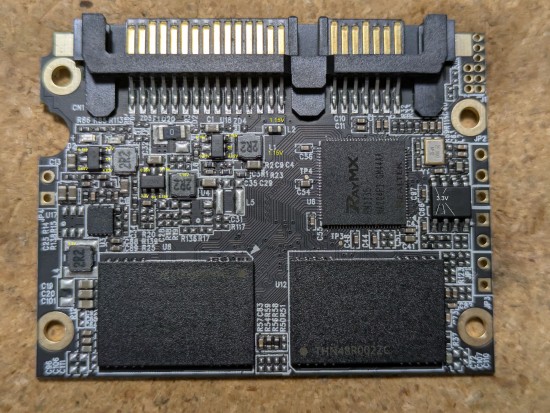
- Voltages on the PCB
On my desktop, the computer won't POST, failing with a power error. I've checked all the capacitors I can see and none are short.
If I leave it plugged into power, the RayMX chip gets warm (32C) but I don't feel any of the capactiors get warm. I don't have a thermal camera.
Any suggestions on where to go from here?
Re: Silicon Power ACE A58 SSD prevents computer from POST.
Posted: November 3rd, 2025, 18:46
by PDXTai
I should add that I'm only interested in recovering the data from the drive. I took it to a local data recovery shop, but they said their LINUX test platform couldn't recognize the drive. No lights appear on the drive when I apply power.
Re: Silicon Power ACE A58 SSD prevents computer from POST.
Posted: November 4th, 2025, 0:36
by fzabkar
The voltages seem OK.
Re: Silicon Power ACE A58 SSD prevents computer from POST.
Posted: November 4th, 2025, 1:31
by PDXTai
Bummer. No obvious issue then. I was going to send it to flashbackdata to see if they could retrieve my files.
Re: Silicon Power ACE A58 SSD prevents computer from POST.
Posted: November 4th, 2025, 11:18
by fzabkar
FWIW, these are the safe mode shorting points for a different Realtek based SSD:
https://www.hddoracle.com/download/file.php?id=10501 (you may need Firefox to access the site at the moment)
Re: Silicon Power ACE A58 SSD prevents computer from POST.
Posted: November 4th, 2025, 14:25
by PDXTai
Thanks for your help fzabkar.
I can't read the jumper numbers on that image so I'm not sure what jumper number that is on my board.
I'm just learing about SSD DR and am not sure what safe mode does and how it might help me. I don't have a PC-3000. I just have a USB SATA adapter, multimeter and a willingness to learn.
Is there a place where I might read a little more SSD DR to get me started?
Re: Silicon Power ACE A58 SSD prevents computer from POST.
Posted: November 4th, 2025, 14:35
by fzabkar
I'm not a DR pro. Most SSD have jumpers which you short with tweezers during power-on, and then release after a few seconds. This forces the SSD controller to power up in safe mode or "ROM mode". In this mode it usually identifies itself with a factory alias and reduced capacity. This then tells you that the controller has basic sanity.
Here are some examples:
http://vlo.name:3000/hw/ssd/rommode/I don't know the relevant shorting points for your SSD, so you would need to be careful. Obviously you wouldn't want to short a power supply to ground, for example.
Re: Silicon Power ACE A58 SSD prevents computer from POST.
Posted: November 4th, 2025, 15:02
by fzabkar
Re: Silicon Power ACE A58 SSD prevents computer from POST.
Posted: November 5th, 2025, 10:46
by Cleanroom
I am with Flashback Data, I saw your inquiry come through. I can definitely take a look at it. Good chance it is a Firmware fault which I am not sure there is a fix for it. But it will be a free eval. Other issue could be Nand degradation.
Re: Silicon Power ACE A58 SSD prevents computer from POST.
Posted: November 5th, 2025, 19:37
by PDXTai
Thanks. I was going to send you my drive tomorrow once I find a mailer. I wasn't willing to try putting the drive into safe mode.
Re: Silicon Power ACE A58 SSD prevents computer from POST.
Posted: November 14th, 2025, 14:12
by PDXTai
Just to follow up. Turned out to be a firmware issue. This controller isn't supported by PC-3000 yet so the data is not recoverable.