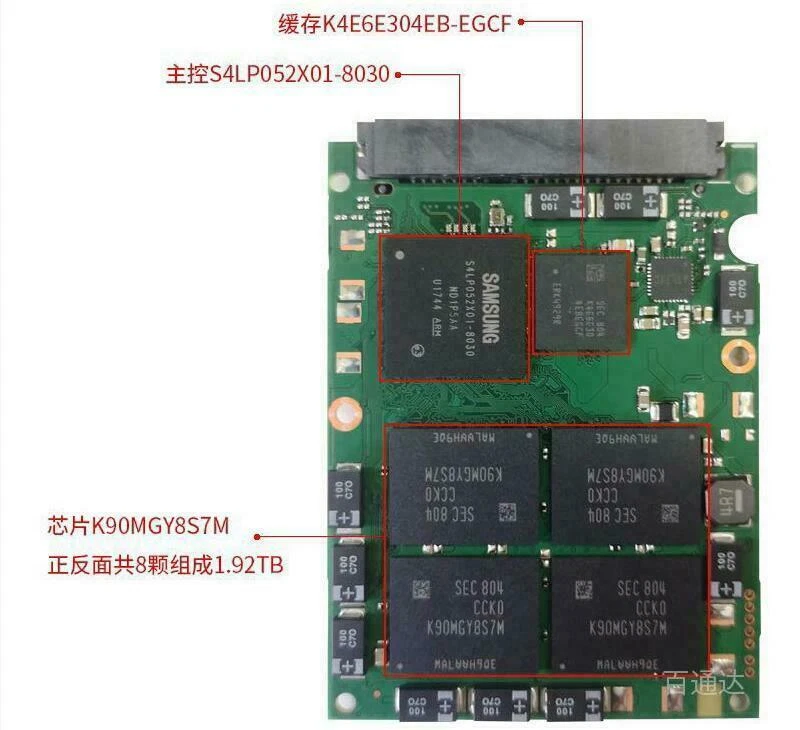
Samsung 863 MZ7LM1T9HCJM-00005 reporting 960GB not 1.92TB
Posted: May 26th, 2026, 2:07
I have a MZ7LM1T9HCJM-00005 SATA SSD. Firmware GXT1003Q
My understanding is that the 1T9 model should have 1.92 TB capacity. But I only see 960 GB.
AI suggested all the commands below, which state there is no visible over-provisioning.
AI suggested flashing a new firmware. but don't know which one to use. I found one from Dell GA3A.fwh which contains in the header 'MZ7LM1T9HCJM00D3'. The last digits '00D3' don't match the 00005 in my SSD and Samsung Toolkit 2.1 refuses to flash it (after stripping the header to get the binary file to be the correct size). I could force it, or use hdparm, but don't want to risk it. Hoping people in this forum can provide some info. Thanks!
sudo smartctl -a /dev/sda
User Capacity: 960,197,124,096 bytes [960 GB]
sudo hdparm -N /dev/sda
dev/sda:
max sectors = 1875385008/1875385008, HPA is disabled
sudo ./sam_toolkit -d 0 -M -r
================================================================================================
Samsung DC Toolkit Version 2.1.L.Q.0
Copyright (C) 2017 SAMSUNG Electronics Co. Ltd. All rights reserved.
================================================================================================
Disk Number: 0 | Model Name: SAMSUNG MZ7LM1T9HCJM-00005 | Firmware Version: GXT1003Q
------------------------------------------------------------------------------------------------
Native SET MAX value of the disk is 1875385007 LBAs.
------------------------------------------------------------------------------------------------
My understanding is that the 1T9 model should have 1.92 TB capacity. But I only see 960 GB.
AI suggested all the commands below, which state there is no visible over-provisioning.
AI suggested flashing a new firmware. but don't know which one to use. I found one from Dell GA3A.fwh which contains in the header 'MZ7LM1T9HCJM00D3'. The last digits '00D3' don't match the 00005 in my SSD and Samsung Toolkit 2.1 refuses to flash it (after stripping the header to get the binary file to be the correct size). I could force it, or use hdparm, but don't want to risk it. Hoping people in this forum can provide some info. Thanks!
sudo smartctl -a /dev/sda
User Capacity: 960,197,124,096 bytes [960 GB]
sudo hdparm -N /dev/sda
dev/sda:
max sectors = 1875385008/1875385008, HPA is disabled
sudo ./sam_toolkit -d 0 -M -r
================================================================================================
Samsung DC Toolkit Version 2.1.L.Q.0
Copyright (C) 2017 SAMSUNG Electronics Co. Ltd. All rights reserved.
================================================================================================
Disk Number: 0 | Model Name: SAMSUNG MZ7LM1T9HCJM-00005 | Firmware Version: GXT1003Q
------------------------------------------------------------------------------------------------
Native SET MAX value of the disk is 1875385007 LBAs.
------------------------------------------------------------------------------------------------