Page 1 of 1
Data Extractor Image Files Join
Posted: September 15th, 2010, 2:26
by einstein9
Guys,,,
I was wondering about this question really in data extractor
When we DUMP HDD Image Files for later Raw Recovery, the PC3k dumps those binary image files into for example here:
img000000000.bin
img000010000.bin
and so...
for 500GB HDD, we will have alot of those, i was reading here about the copy /b which is joining all of those files into ONE Single Image File
i was doing my own research on this and i was wondering :
Is there Any Utility to Join all of those into ONE Single HDD Image File?
anyone tried it?
many thnx
Re: Data Extractor Image Files Join
Posted: September 15th, 2010, 2:54
by guru
As a side not I know a few data rec pro's who hate this feature. I used it once many years ago and found it to be a pain and useless!!
Better to just mount drive to O/S using DE and then use another "Off the shelf" piece of SW for imaging
Re: Data Extractor Image Files Join
Posted: September 15th, 2010, 3:24
by einstein9
guru wrote:As a side not I know a few data rec pro's who hate this feature. I used it once many years ago and found it to be a pain and useless!!
Better to just mount drive to O/S using DE and then use another "Off the shelf" piece of SW for imaging
Well, thnx for the reply but my AIM is to FREE the pc3k task and move it to another station to analyze
keeping my pc3k working with something else

Re: Data Extractor Image Files Join
Posted: September 15th, 2010, 4:42
by guru
I mean mount your patient drive to O/S with DE and then make an image (bit copy) of drive. AFter this your UDMA is free and you can run recovery tools on the image that is created.
While imaging to file you can use other port for FW repair and testing
I have a couple of external drives with E-SATA that I use for cloning and then take these to my analysis machines for recovery etc.
Re: Data Extractor Image Files Join
Posted: September 15th, 2010, 5:05
by mdarwish
Hi,
Try to use the term "Concatenate" files , to search for tools.
Hex editors do that. You can use WinHex : Tools | File Tools | Concatenate.
Good luck!
Re: Data Extractor Image Files Join
Posted: September 15th, 2010, 7:43
by einstein9
mdarwish wrote:Hi,
Try to use the term "Concatenate" files , to search for tools.
Hex editors do that. You can use WinHex : Tools | File Tools | Concatenate.
Good luck!
many thnx,, i never really went to File Tools in winhex before, something new
thnx again for the tip really
will chk it
Re: Data Extractor Image Files Join
Posted: September 15th, 2010, 15:48
by zebong
try this:
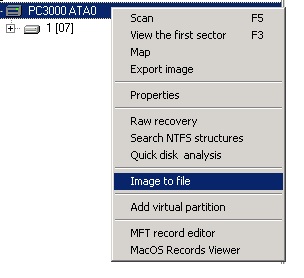
- IMAGETOFILE.jpg (24.35 KiB) Viewed 13898 times
Re: Data Extractor Image Files Join
Posted: September 15th, 2010, 15:51
by guru
Bugger, does that make one BIG file?
Re: Data Extractor Image Files Join
Posted: September 15th, 2010, 15:55
by zebong
yes it makes an image of the size of the disk

do you know a way to make a smaller image ?
Re: Data Extractor Image Files Join
Posted: September 15th, 2010, 16:00
by guru
So it will image whole drive to a single file?
Silly me never even noticed that option... :OP
Re: Data Extractor Image Files Join
Posted: September 15th, 2010, 16:03
by guru
If you want to chop up a large image file (For faster analysis across drives) you can use
hxxp://www.gdgsoft.com/gsplit/
Re: Data Extractor Image Files Join
Posted: September 16th, 2010, 6:42
by hddguy
guru wrote:So it will image whole drive to a single file?
Silly me never even noticed that option... :OP
Problem with this way is that if Data Copy option is selected, which for most cases would be, then it will create the image files in addition to the single file - effectively 2 images.
Re: Data Extractor Image Files Join
Posted: September 16th, 2010, 11:11
by einstein9
have u ever tried this? works with you?
coz am working with dump images for a WEAK head HDD, which i wanted to process with other Appz
please confirm?
i know this app you listed for movies, and never tried it with 500GB dump images
thnx