MultiDrive – free backup, clone & wipe disk utility from Atola Technology

All times are UTC - 5 hours [ DST ]


Forum rules


Please do not post questions about data recovery cases here (use this forum instead). This forum is for topics on finding new ways to recover data. Accessing firmware, writing programs, reading bits off the platter, recovering data from dust...


Post new topic Reply to topic  [ 9 posts ] 
Author Message
 Post subject: Power supplies and hard drives; any feedback welcome!!!
PostPosted: March 18th, 2010, 15:57 
Offline

Joined: March 18th, 2010, 15:25
Posts: 4
Location: United States
So I decided to get a new power supply because occasionally once a week or so, the system powers off without any reason (power light stays ON though! more detail below).

I bought the exact same model power supply (Antec Earthwatt 650W). If I boot the computer without anything attached the BIOS screen will appear. If I attach ANYTHING - (40 GB HD, 120 GB HD, DVD burner), it turns on 5 seconds, then shuts down. The BIOS screen doesn't appear. The video card screen (before the BIOS - GeForce MX 4000*) doesn't display anything either. The most peculiar thing is: THE POWER LIGHT IS ON! Fan stops, hard drives don't buzz. Everything looks off except the power light. Soft power button doesn't work to turn it off. Have to hit the button at the back of the power supply.
After dozens of attempts, I only got the DVD to boot TWICE: once with Ubuntu (worked perfect with GUI), and once to run Memtest86+ (did full pass for over an hour - no errors). Couldn't reproduce that ever again. No attempts with hard drives worked.

So I thought I had a lemon and had a replacement. Same result on the first boot. Second boot I got 10 GB hard drive to boot. Overjoyed, I plugged in various drives to try. All (40, 200, 10) worked in turn. This time the 120 went only 1 second before shutdown. But the others worked.

This is the bizarre part. I plug in my OLD power supply to test. ALL drives work!!!
I returned the new one, and am using the old one now - to be frank I'm very nervous because I'm afraid things will fry or fail at any time.


So here's the questions for your experts on hard drive's power systems: could it be my old power supply outputted too much power, then the hard drives became "tolerant" of it. Then when the new power supply is plugged in, detects incorrect wattage or voltage on my hard drives, it shuts down to prevent any damage. Also, would it mean using my drives with the old power supply will only continue to damage them until failure? And will it means the drives will never power in a system with a normal, healthy power supply? (something I'm very afraid of if migrating to a new system)
I did think of the possibility that BOTH new power supplies were lemons, but how likely is that? (even if they're made in China)


Note: this uses IDE drives mostly (still old Asus A7N8X-E Deluxe (Athlon XP + nForce2)).

* I had a Radeon 9800 and FireGL X1 die before (one had a burned pin where berg connector is for fan power, the other just died). I just went with the cheapest, quietest card I could get as I don't game anymore. (never overclocked anything)

Note 2: the power in this house is nuts. Every month or other month, some light bulb will burst. (went away in places where we started using compact fluorescent light bulbs (you know the ones that look like a coil)). I use a surge protector, but sometimes I'm not even sure if that's enough. When I get a new PC I'll get a UPS for more peace of mind.


Top
 Profile  
 
 Post subject: Re: Power supplies and hard drives; any feedback welcome!!!
PostPosted: March 28th, 2010, 16:27 
Offline

Joined: February 15th, 2006, 3:38
Posts: 1079
Location: canada
that sounds like your wiring is something wrong in the house or your getting bad surges

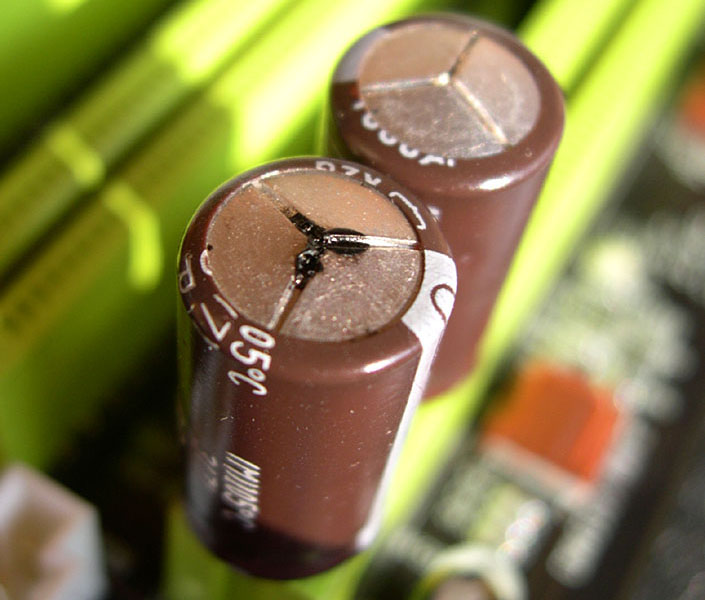
allso the pc problem could be down to your motherboard did you check to see if the caps are bulging on the board.
and to make sure your motherboard can handle all that power and stuff connected up.

allso you could be getting a ripple effect on your pc system to many items plugged in at one time.


Top
 Profile  
 
 Post subject: Re: Power supplies and hard drives; any feedback welcome!!!
PostPosted: March 28th, 2010, 19:31 
Offline
User avatar

Joined: September 8th, 2009, 18:21
Posts: 16960
Location: Australia
bob123 wrote:
I bought the exact same model power supply (Antec Earthwatt 650W). If I boot the computer without anything attached the BIOS screen will appear. If I attach ANYTHING - (40 GB HD, 120 GB HD, DVD burner), it turns on 5 seconds, then shuts down. The BIOS screen doesn't appear. The video card screen (before the BIOS - GeForce MX 4000*) doesn't display anything either. The most peculiar thing is: THE POWER LIGHT IS ON! Fan stops, hard drives don't buzz. Everything looks off except the power light. Soft power button doesn't work to turn it off. Have to hit the button at the back of the power supply.

The power light is probably wired to the +5VSB standby supply. The power button at the front of your PC case doesn't directly control the PSU. Instead it is "interpreted" by a section of the motherboard chipset, and the chipset then sends a PS_ON signal to the supply to turn it on, or negates the signal to turn it off.

Here is an ATX pinout:
http://pinouts.ru/Power/atxpower_pinout.shtml

FWIW, I also have a startup problem with an ECS motherboard, Athlon XP CPU, and Antec 350W PSU. The first power-up attempt after cycling the AC power results in a black screen. All fans are turning, all voltages are present, but the machine doesn't POST. A reset does not help. A soft-off/on cycle gets the machine POSTing and booting without further issue.


Top
 Profile  
 
 Post subject: Re: Power supplies and hard drives; any feedback welcome!!!
PostPosted: March 28th, 2010, 22:28 
Offline

Joined: August 12th, 2008, 13:11
Posts: 3235
Location: USA
If your power supply(s) test good then it is probably a motherboard issue...

_________________
You don't have to backup all of your files, just the ones you want to keep.


Top
 Profile  
 
 Post subject: Re: Power supplies and hard drives; any feedback welcome!!!
PostPosted: March 29th, 2010, 0:13 
Offline

Joined: February 15th, 2006, 3:38
Posts: 1079
Location: canada
you got a ripple effect on the power supply that your problem.
it might not do the ripple effect all the time.
its called over voltage on the power unit.

but when it does it can damaged the motherboard and graffics card.


Top
 Profile  
 
 Post subject: Re: Power supplies and hard drives; any feedback welcome!!!
PostPosted: March 29th, 2010, 17:09 
Offline
User avatar

Joined: July 16th, 2008, 17:52
Posts: 489
Location: Long Beach, California
two things:


Those Anted earthwatts are cheap PSU, Antec is a good brand, but the earthwatts uses a badly made design (Antec doesnt actually make!)


If you like antec move to the Truepower


otherwise, Corsair, Thermaltake, and OCZ are all good choices.


Also get yourself a Battery Backup. I use an APC 750 (like $60USD) and it helps regulate the power going to you PC directly.


Top
 Profile  
 
 Post subject: Re: Power supplies and hard drives; any feedback welcome!!!
PostPosted: April 15th, 2010, 17:20 
Offline

Joined: March 18th, 2010, 15:25
Posts: 4
Location: United States
Wow! I didn't think anyone would answer! I checked back a few times and thought the thread abandoned after a week (I should have been a bit more patient!)

I'll give an update.
Eventually I went back to the original power supply (Antec EarthWatts 650). I was really nervous about turning the PC back on, but after a week I decided to take the plunge. I pulled the main HD from my laptop (320 GB SATA), plugged it into the SATA PCI card, and booted with my 120GB drive. I copied everything over to the laptop drive (while praying it doesn't shut down). Once I safely had the backup I unplugged the laptop drive and started examining things again. The only thing amiss is sound is now dead (built-in motherboard audio; yet device manager detects it just fine; tried headphones and speakers max volume nothing works) and nothing else seems amiss. The weird thing is now that the audio seems gone, everything else seems stable!!!
To be exact, over time, a few components on the motherboard have been dead (one of the ethernet - gigabit by Marvell - also detected OK, but when data is sent it drops connection, with "Port A is bad" in event viewer; and on-board SATA doesn't detect 1TB drive; I disabled both long ago with jumpers), but since they didn't seem to affect anything else, I ignored it.

Conclusion? I have no idea. I'm going to guess motherboard was the problem? Triggered by bad power? Who knows?

I guess I'll keep using this until it dies. (Having no audio sucks though.) I backup new files regularly though (every other day). I'll try to get a UPS on the next PC I buy.


@ craig6928
>> check to see if the caps are bulging on the board
no. it's one of the things I checked long ago (and again after the incident). capacitors on this motherboard seem OK (at least visually).

>> allso you could be getting a ripple effect on your pc system to many items plugged in at one time.
I wish I knew more about this
but you ARE correct about one thing: my worst problems seem to occur when I have multiple items connected (3 or more hard drives - especially when I start doing an intensive copy from one drive to another - then one click, then a hang (mouse and screen frozen - needs reset or poweroff) - I HATE THAT, and I'm always nervous about it happening unexpectedly). Also the most likely time for such click/hangs, or hangs is usually at boot time - 90% of the time if I can get past boot sequence, it's fine (I don't know, it's when windows 2000 does all those reads and writes at boot time, sounds like the time the hard drive is busiest grinding etc).
I used to think having plenty of power (650 W) should handle as many as 4 connected hard drives (the old power-hungry kind, like 5-platter Hitachis) just fine. Not so sure anymore.
Upon googling, the little I could gather was that ripples were only detectable using oscilloscopes?


@ fzabkar
>> The power light is probably wired to the +5VSB standby supply. The power button at the front of your PC case doesn't directly control the PSU. Instead it is "interpreted" by a section of the motherboard chipset, and the chipset then sends a PS_ON signal to the supply to turn it on, or negates the signal to turn it off.

I wired the power/reset/etc wires exactly as per the motherboard manual (at least I think so because everything works OK).
Or does that mean that during a PSU-triggered shutdown (like to protect from surges or brownouts), the light is expected to stay on? And it's expected that the system can't be powered back on without a hard shut off?


@ drc
>> If your power supply(s) test good then it is probably a motherboard issue...

I wish I knew how to test either! But given the audio/SATA/gigabit problems, you're totally right.


@ craig6928

>> you got a ripple effect on the power supply that your problem.
>> it might not do the ripple effect all the time.
>> its called over voltage on the power unit.

>> but when it does it can damaged the motherboard and graffics card.

That likely explains the two fried graphics cards over the years (All-in-Wonder Radeon 9800 Pro, then FireGL X1 (based on Radeon 9700)). The first had a burnt power pin (where the Berg connector goes to feed the fan).


@ Russwinters
>> Those Anted earthwatts are cheap PSU, Antec is a good brand, but the earthwatts uses a badly made design (Antec doesnt actually make!)
>> If you like antec move to the Truepower
I didn't know that. The only thing I noticed was that when I got my first Earthwatts 650 two years ago (the one I'm back to using now - which works, whereas the two new ones I tried didn't), it didn't seem so common and cost quite a bit. The two replacement ones I tried last month were cheap, and the store I went to had a HUGE pile of them (like they were being mass-produced cheaply). So you're probably right about that.

This page on Antec PSU's has some interesting ramblings. The funny part is the guy has a motherboard that is very closely related to mine (mine = A7N8X-E deluxe; his = A7N8X). A lot of replies deal with Athlon-XP-era Asus mobos too. Could the two be incompatible?
http://www.pjrc.com/about/rambling/antec.html

>> Also get yourself a Battery Backup. I use an APC 750 (like $60USD) and it helps regulate the power going to you PC directly.
I'll have to do that with the next PC. I'd read about UPS (uninterruptable power supplies) as being able to condition the line, so as to get stable current without spikes or drops.


Again, thanks for everyone's feedback.


Top
 Profile  
 
 Post subject: Re: Power supplies and hard drives; any feedback welcome!!!
PostPosted: April 16th, 2010, 2:52 
Offline

Joined: February 15th, 2006, 3:38
Posts: 1079
Location: canada
when you connect up say two hard drives or more and you got a cd writer going at the same time

power supply overload and go open circuit or do a ripple effect as its working to hard.


you want a good power unit im using coolmaster extreme power and that working full all the time
no problem.


Top
 Profile  
 
 Post subject: Re: Power supplies and hard drives; any feedback welcome!!!
PostPosted: April 17th, 2010, 4:17 
Offline
User avatar

Joined: September 8th, 2009, 18:21
Posts: 16960
Location: Australia
I don't know what the Antec EarthWatts 650W PSU is like (I have an Antec 350W), but be aware that certain models had a high failure due to bad Fuhjyyu brand capacitors.

Here are some disaster photos:
http://filedb.experts-exchange.com/inco ... -380-1.jpg
http://www.experts-exchange.com/images/ ... PS12V-.jpg
http://www.experts-exchange.com/images/ ... 0-5vsb.jpg
http://www.svethardware.cz/forum/imageh ... 4e5884.jpg

The following forum is a useful resource for capacitor issues in motherboards, PSUs, monitors, etc:
http://www.badcaps.net/forum/

As for the +5VSB supply rail, yes, it is independent of the other secondary outputs. If the PSU shuts down due to a fault condition at the load end, the +5VSB supply remains up, unless it is the rail affected by the fault.

Some faults cause the PSU to latch in the off state. In such cases only a power cycle can restore normal operation.

See this excellent reverse engineering of a 200W ATX PC POWER SUPPLY:
http://www.pavouk.org/hw/en_atxps.html


Top
 Profile  
 
Display posts from previous:  Sort by  
Post new topic Reply to topic  [ 9 posts ] 

All times are UTC - 5 hours [ DST ]


Who is online

Users browsing this forum: No registered users and 6 guests


You cannot post new topics in this forum
You cannot reply to topics in this forum
You cannot edit your posts in this forum
You cannot delete your posts in this forum
You cannot post attachments in this forum

Search for:
Jump to:  
Powered by phpBB © 2000, 2002, 2005, 2007 phpBB Group