Page 1 of 2
Introduction of MRT software version 2127
Posted: September 7th, 2018, 3:50
by mrtpro
MRT data recovery software has been updated to a new official version on August 30th, 2018, and the new version number:2.1.2.7
Offline version software download link:
http://us.mrtlab.com/download/MrtEnSetups2127.rarOnline version software download link:
http://us.mrtlab.com/download/MrtEnSetups2127net.rarBoth Ultra and Express can download from the address above.
This update is free for user with software 2.1.2.X
Many new SSD utility have been added to this upgrade, as well as some new SSD features, such as read/write ROM and modules,view dump chip data, view HDD password, remove SMART, etc.
WD and Samsung modules has been optimized, fixed some known problems and bugs feedback by users, optimized the performance of some factory utility, it will be smoother in future use. More HDDs will support virtual start in this ST utility upgrade, virtual start optimized the write mechanism when writing 3D modules,improves the speed and stability of writing. The stability of ABA read and write has been strengthened. Simplified the process of 9YN head shielding. Independent hexadecimal editor has been added in this DE utility upgrade.
Above is the key functions of this upgrade,please check the upgrade log for the complete upgrade content.
MRT’s development is inseparable from your support!
Sales Consultant – Pink
Email:
sales@mrtlab.comSkype: live:sales_54921
QQ 3292109557
Re: Introduction of MRT software version 2127
Posted: September 7th, 2018, 6:15
by ccc
Hi
Did you read your forum to see the new bugs introduced by this version???? If you read it, did you correct them?
Thanks
Re: Introduction of MRT software version 2127
Posted: September 7th, 2018, 21:55
by reco
ccc wrote:Hi
Did you read your forum to see the new bugs introduced by this version???? If you read it, did you correct them?
Thanks
Can you share with us the link describing those bugs ?
Re: Introduction of MRT software version 2127
Posted: September 8th, 2018, 1:20
by ccc
Re: Introduction of MRT software version 2127
Posted: September 11th, 2018, 4:41
by mrtpro
Thanks for your suggestions.
For language problem, we have fixed it.
Seagate utility problems is solved in 2127 version.
Sales Consultant – Pink
Email:
sales@mrtlab.comSkype: live:sales_54921
QQ 3292109557
Re: Introduction of MRT software version 2127
Posted: September 11th, 2018, 18:26
by Jirbun
Hello mrtpro
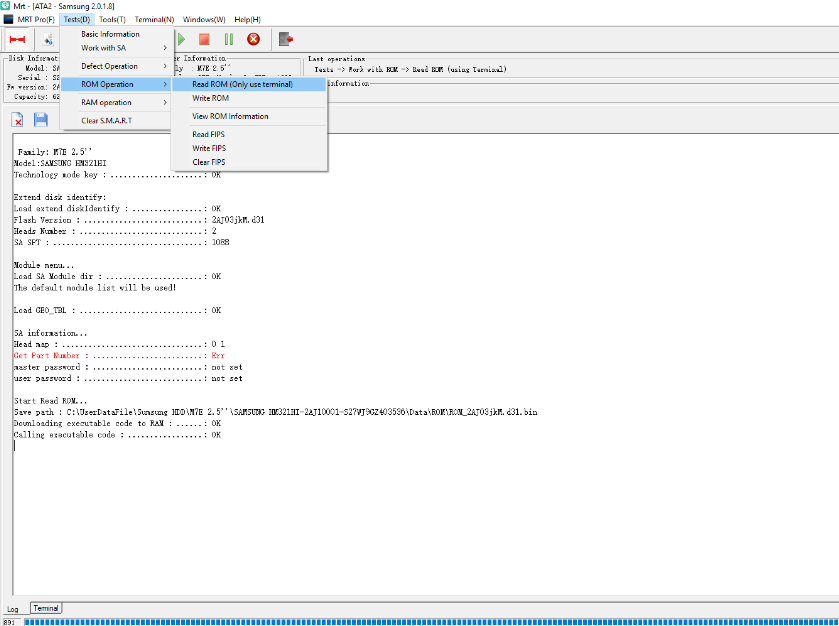
When we have support to read write rom from samsung 2.5" (fails in m7e) ? actually more important when we can edit head map in ram on those disks,we must have this function to resolve cases.
Re: Introduction of MRT software version 2127
Posted: September 13th, 2018, 5:31
by mrtpro
Jirbun wrote:Hello mrtpro
When we have support to read write rom from samsung 2.5" (fails in m7e) ? actually more important when we can edit head map in ram on those disks,we must have this function to resolve cases.
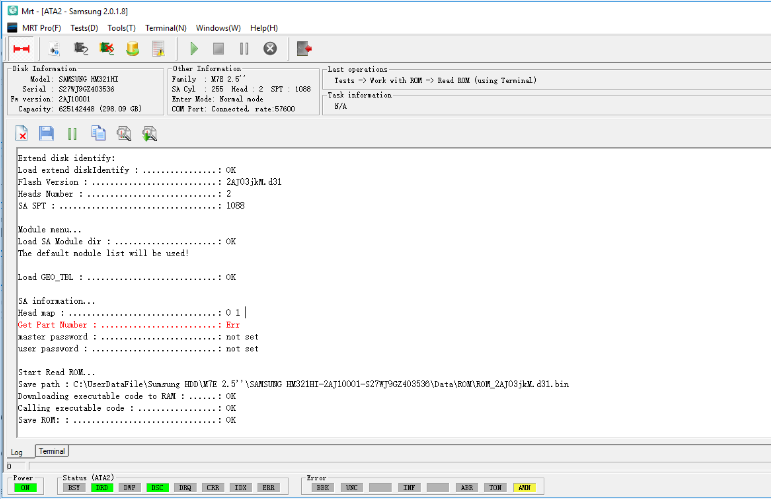
Sir, please find below picture, our software can support what you say, please double check.
If you don't know how to do, please contact our technical support, thanks
Re: Introduction of MRT software version 2127
Posted: September 13th, 2018, 11:39
by Jirbun
I don't know about this very old HM321HI,but we get often HM501II,HM641JI and I tried many good ones on all of them this function don't work,and I post here after no attention from mrt technical support or customer service.
Re: Introduction of MRT software version 2127
Posted: September 13th, 2018, 17:07
by michael chiklis
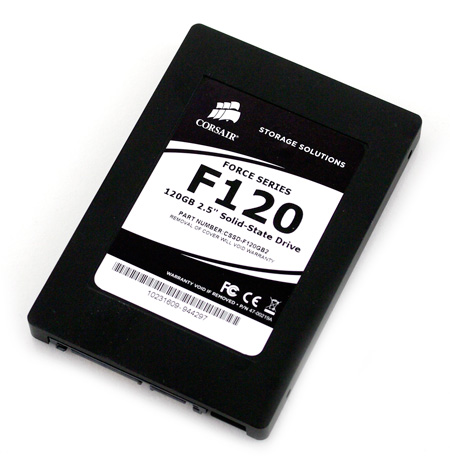
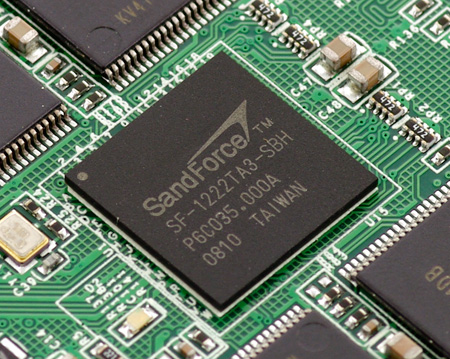
Does MRT support Corsair F120 SSD ?
Re: Introduction of MRT software version 2127
Posted: September 13th, 2018, 21:46
by mrtpro
Jirbun wrote:I don't know about this very old HM321HI,but we get often HM501II,HM641JI and I tried many good ones on all of them this function don't work,and I post here after no attention from mrt technical support or customer service.
Hi, have you contact a wrong person, because both technical support and customer service haven't received your information, below is the contact method of our technical support, he will remote assistant you:
Skype
live:service_5567
Re: Introduction of MRT software version 2127
Posted: September 14th, 2018, 3:47
by mrtpro
michael chiklis wrote:Does MRT support Corsair F120 SSD ?
Hi, can you take us a photo of the label and tell me the master controller version?
Re: Introduction of MRT software version 2127
Posted: September 14th, 2018, 4:42
by michael chiklis
- f120_top.jpg (50.49 KiB) Viewed 28418 times
- f120_controller.jpg (102.96 KiB) Viewed 28418 times
Re: Introduction of MRT software version 2127
Posted: September 17th, 2018, 18:27
by Jirbun
mrtpro wrote:Jirbun wrote:I don't know about this very old HM321HI,but we get often HM501II,HM641JI and I tried many good ones on all of them this function don't work,and I post here after no attention from mrt technical support or customer service.
Hi, have you contact a wrong person, because both technical support and customer service haven't received your information, below is the contact method of our technical support, he will remote assistant you:
Skype
live:service_5567
You see,also you ignore the problem,you don't know it's not working ? why always give evasive unclear answer to customers ? can he fix mrt software bugs by remote ?
Here is another model can't read rom and can't edit head ram.
Re: Introduction of MRT software version 2127
Posted: September 17th, 2018, 19:06
by fzabkar
Why does the software not use the drive's own FIT rather than "the default module list"?
The Err in the "Get part number" line would suggest that the software may be accessing the wrong SA module or incorrectly parsing the correct module.
What does a resource dump look like?
Re: Introduction of MRT software version 2127
Posted: September 17th, 2018, 23:23
by mrtpro
Jirbun wrote:mrtpro wrote:Jirbun wrote:I don't know about this very old HM321HI,but we get often HM501II,HM641JI and I tried many good ones on all of them this function don't work,and I post here after no attention from mrt technical support or customer service.
Hi, have you contact a wrong person, because both technical support and customer service haven't received your information, below is the contact method of our technical support, he will remote assistant you:
Skype
live:service_5567
You see,also you ignore the problem,you don't know it's not working ? why always give evasive unclear answer to customers ? can he fix mrt software bugs by remote ?
Here is another model can't read rom and can't edit head ram.
Hi, just contact Skype
live:service_5567 let technical support remote check for you.
Re: Introduction of MRT software version 2127
Posted: September 18th, 2018, 10:36
by Jirbun
fzabkar wrote:Why does the software not use the drive's own FIT rather than "the default module list"?
The Err in the "Get part number" line would suggest that the software may be accessing the wrong SA module or incorrectly parsing the correct module.
If you already mentioned this I can tell you mrt software has "moods" with the same disk one time there is error and one time there is no error it's happened to me many times with different good disks,perhaps mrt can explain this behavior.
fzabkar wrote: What does a resource dump look like?
I did not find a resource dump in mrt.
Here is a screenshot of the same disk.
Re: Introduction of MRT software version 2127
Posted: September 18th, 2018, 16:01
by fzabkar
The HDD in your latest example manages to load its own FIT, which then allows it to find the part number in the SA. This would suggest that the HDD in your earlier example was faulty, at least in this respect. That said, MRT's examples also have this "problem".

AIUI, MRT's software downloads code into the drive's RAM via terminal, and this code then executes various functions such as a ROM dump or head map edit. Is it possible that the serial adapter is flaky? Is there a debug mode where you can log the traffic on the terminal port?
Re: Introduction of MRT software version 2127
Posted: September 19th, 2018, 20:15
by Jirbun
fzabkar wrote:The HDD in your latest example manages to load its own FIT, which then allows it to find the part number in the SA. This would suggest that the HDD in your earlier example was faulty, at least in this respect. That said, MRT's examples also have this "problem".
Look at the screenshot before the previous one it's the same drive 100% functioning and with error and the same happen on other good working drives,now look at the third time on the sams drive it's with error again,so one time error the second time in another day it without error then third time with error and so it goes on with other drives.
fzabkar wrote:AIUI, MRT's software downloads code into the drive's RAM via terminal, and this code then executes various functions such as a ROM dump or head map edit. Is it possible that the serial adapter is flaky? Is there a debug mode where you can log the traffic on the terminal port?
And the terminal fine.
Re: Introduction of MRT software version 2127
Posted: September 19th, 2018, 20:49
by fzabkar
When I wrote "debug mode", I was asking whether there was a way to capture the Tx/Rx traffic over the serial port for debugging purposes.
Re: Introduction of MRT software version 2127
Posted: September 23rd, 2018, 12:27
by saltwater
Jirbun wrote:fzabkar wrote:The HDD in your latest example manages to load its own FIT, which then allows it to find the part number in the SA. This would suggest that the HDD in your earlier example was faulty, at least in this respect. That said, MRT's examples also have this "problem".
Look at the screenshot before the previous one it's the same drive 100% functioning and with error and the same happen on other good working drives,now look at the third time on the sams drive it's with error again,so one time error the second time in another day it without error then third time with error and so it goes on with other drives.
fzabkar wrote:AIUI, MRT's software downloads code into the drive's RAM via terminal, and this code then executes various functions such as a ROM dump or head map edit. Is it possible that the serial adapter is flaky? Is there a debug mode where you can log the traffic on the terminal port?
And the terminal fine.
Hi!
When MRT failed to load the drive SA module dir, and using default module dir, close utility, and open it again.
Sometimes the MRT utility does not get enough time for the drive to gain access to SA module list (FIT), and the utility jumps out this important step, and uses "default module list".