What does it mean?
June 21st, 2007, 2:32
On a wind2K system U have 2 ST380011A drives and I ran Victoria for windows on them. The first one shows picture1
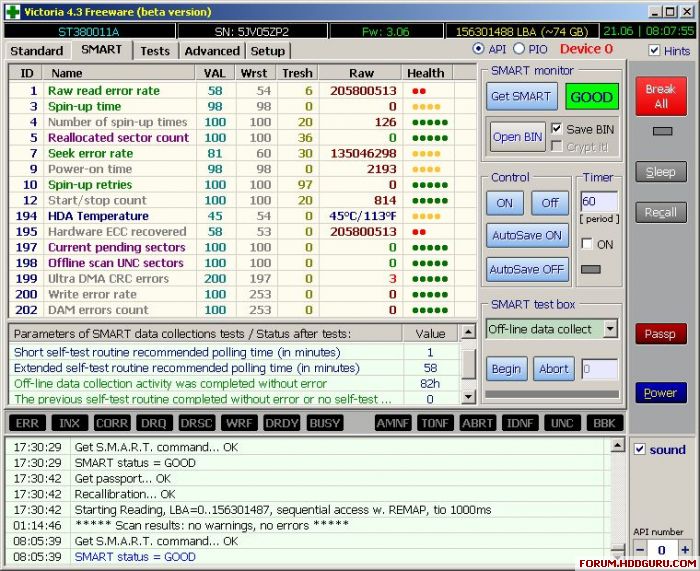
and I ran a test on it with results:
5 (ms) --> 1 ; 20 --> 0; 50 -->609463 ; 200 --> 1090 ; 600 --> 0; >600 > 0; err --> 0
76319 Mb ; 3072 Kb/s
The second one gives picture-2
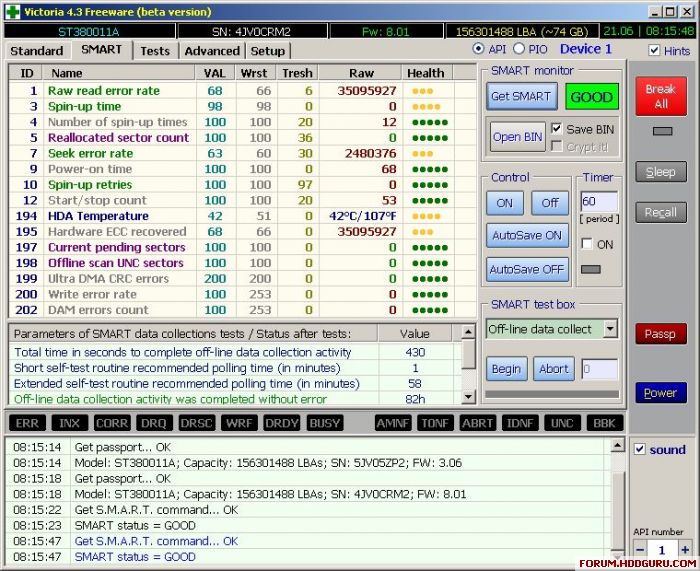
Obviously the 2nd one looks much better.
I read
"Generally speaking, if your drive reports a Raw value of more than 1 in ID #5, 196, or 199, you have a failing drive. ID #197 & 198 are Windows‐generated errors. A full scan of the hard drive will need to be performed in order to find out if the drive is actually failing, or if the filesystem is failing."
So I'm asking myself 'how do I interprete these results?" especially ID=1 (tresh=6, 2 red dots) , ID=195 (2 red dots) and ID=199 (tresh=3) as tests show 'only' 'green blocks'. and "What do these 'green blocks' indicate? and how should a value of 1090 green blocks be interpreted?" Last but not least "should I do something about it and if so what can I do about it"?
Obviously I would like hd1 to look like hd2
and I ran a test on it with results:
5 (ms) --> 1 ; 20 --> 0; 50 -->609463 ; 200 --> 1090 ; 600 --> 0; >600 > 0; err --> 0
76319 Mb ; 3072 Kb/s
The second one gives picture-2
Obviously the 2nd one looks much better.
I read
"Generally speaking, if your drive reports a Raw value of more than 1 in ID #5, 196, or 199, you have a failing drive. ID #197 & 198 are Windows‐generated errors. A full scan of the hard drive will need to be performed in order to find out if the drive is actually failing, or if the filesystem is failing."
So I'm asking myself 'how do I interprete these results?" especially ID=1 (tresh=6, 2 red dots) , ID=195 (2 red dots) and ID=199 (tresh=3) as tests show 'only' 'green blocks'. and "What do these 'green blocks' indicate? and how should a value of 1090 green blocks be interpreted?" Last but not least "should I do something about it and if so what can I do about it"?
Obviously I would like hd1 to look like hd2
June 21st, 2007, 8:49
Both drives are good (still)
Those red atributes are normal on Seagate drives (it is Seagate's feature)
"Color" and gray blocks mean different time expended for testing of each block
But drives are really old they could have green blocks and they could die because of old age
Those red atributes are normal on Seagate drives (it is Seagate's feature)
"Color" and gray blocks mean different time expended for testing of each block
But drives are really old they could have green blocks and they could die because of old age
June 21st, 2007, 9:21
Doomer wrote:But drives are really old they could have green blocks and they could die because of old age
Actually hd2 is almost a NEW one as I had it laying around somewhere and just recently removed it from its bag and installed it. So it's an old one but should have some time to live

July 11th, 2007, 22:13
Seems to be a known issue with Seagate HDDs, the Raw Read Error Rate attribute always looks like garbage and the same with Seek Error Rate.
Is that actually just a Seagate quirk?
Are new Seagate HDDs really failing a major amount?
Is that actually just a Seagate quirk?
Are new Seagate HDDs really failing a major amount?
July 12th, 2007, 4:42
In fact, Seagates are the only hard drives that report true values of these attributes 
July 12th, 2007, 9:52
From the number of Power On Time hours you can tell the second drive is hardly used. The first one with 2193 hours on the clock has also still made not very many hours. I have 2 disks with 8000, one with 15000 and one with 30000 hours that all get a good SMART status. I DO want to know more about the one with the 30000 hours which is why I posted this thread.
SpeedFan has a rather nice feature that allows you to do an on-line comparison with other drives of the same type that people have analysed with this (freeware) utility. On the on-line check page it also gives some information on any SMART values that might warrant some closer attention.

SpeedFan has a rather nice feature that allows you to do an on-line comparison with other drives of the same type that people have analysed with this (freeware) utility. On the on-line check page it also gives some information on any SMART values that might warrant some closer attention.
Powered by phpBB © phpBB Group.