Tools for hard drive diagnostics, repair, and data recovery
Post a reply

WDR Demo unable to detect patient HDD

June 28th, 2023, 6:13

Greetings,

Following this tutorial, I am struggling with getting WDR to detect the patient HDD.

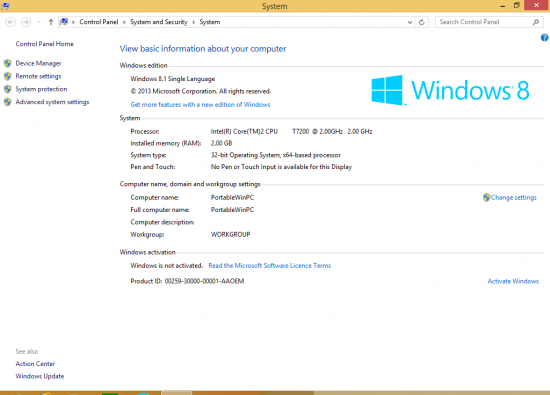
This is the PC I am using for WDR:
PC info.PNG
PC with x86 Windows OS


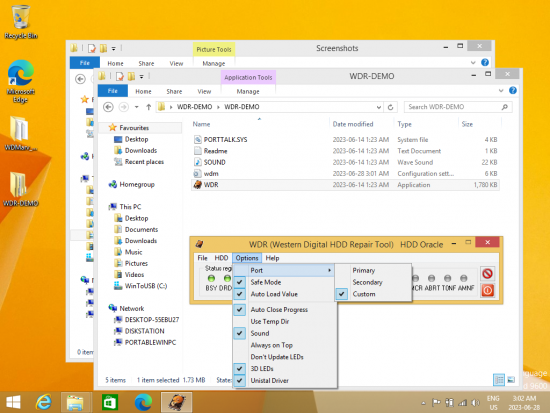
Here is what I see in WDR:

Main:
WDR Demo main.PNG
Main screen with illuminated indicators
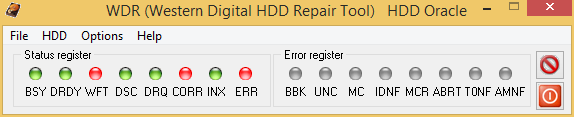
WDR Demo main.PNG (9.32 KiB) Viewed 14762 times
Screenshot (2).png
Main screen with Options menu shown


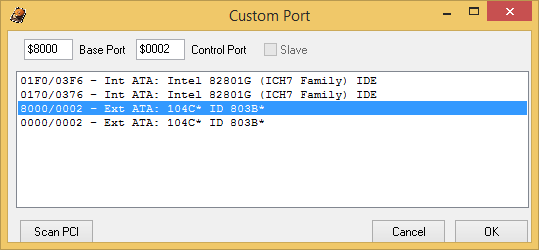
Custom Port:
WDR Demo Custom Port selection.PNG
Custom Port window with selected port
WDR Demo Custom Port selection.PNG (8.14 KiB) Viewed 14762 times


WDMarvel Demo has no problem detecting and reading the patient HDD. Is there a way how to get the patient HDD detected and read correctly in WDR?

Re: WDR Demo unable to detect patient HDD

June 30th, 2023, 3:50

I forgot to mention these are the SATA drivers used:
Attachments
PCMCIA Controller Properties 2.PNG
PCMCIA IDE/ATAPI Controller
Location: PCI bus 24, device 0, function 0
PCMCIA Controller Properties 2.PNG (31.59 KiB) Viewed 14627 times
PCMCIA Controller Properties 1.PNG
PCMCIA IDE/ATAPI Controller
Location: PCI bus 0, device 31, function 2
PCMCIA Controller Properties 1.PNG (36.73 KiB) Viewed 14627 times
ATA Channel 0 Properties.PNG
ATA Channel 0
ATA Channel 0 Properties.PNG (37.48 KiB) Viewed 14627 times

Re: WDR Demo unable to detect patient HDD

July 24th, 2023, 1:38

What is the disk model?

Re: WDR Demo unable to detect patient HDD

July 24th, 2023, 1:50

Spildit's tutorial expects that the target drive is able to respond to ATA commands. To this end, the easiest solution (in the absence of pro tools) would be to purchase a working donor drive and flash the donor's ROM with the patient's ROM image. You will sacrifice the donor HDD, but your patient drive should now work with the donor's PCB.

Of course you should backup the donor's resources. The demo version of WDMarvel can do this.

Re: WDR Demo unable to detect patient HDD

July 24th, 2023, 21:52

mr44er wrote:What is the disk model?

Patient HDD
Attachments
IMG_1012[1].JPG
Manufacturer: WD
S/N: WCAU40285619
MDL: WD10EAVS-00D7B0
DATE: 15 MAY 2008
DCM: HHRNNT2CAB
R/N: 701537
PCB 2060-701537-004 REV A
Post a reply