MultiDrive – free backup, clone & wipe disk utility from Atola Technology

All times are UTC - 5 hours [ DST ]


Post new topic Reply to topic  [ 5 posts ] 
Author Message
 Post subject: Can a bad motherboard cause false S.M.A.R.T. results?
PostPosted: February 16th, 2009, 2:55 
Offline

Joined: February 16th, 2009, 2:06
Posts: 5
Location: Eastern USA
First thing: I ran a pass of memtest86 and a Prime95 stress test with no problems.

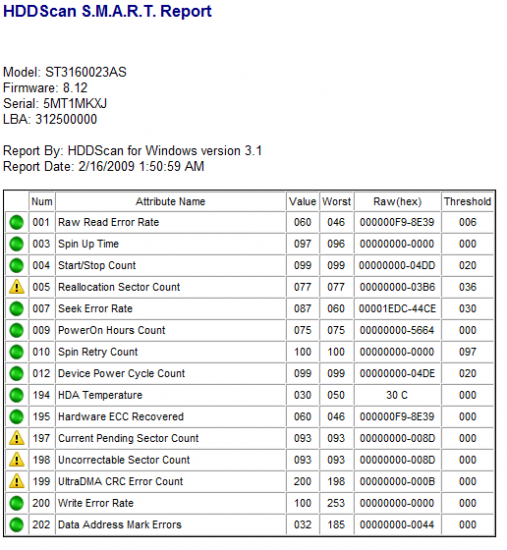
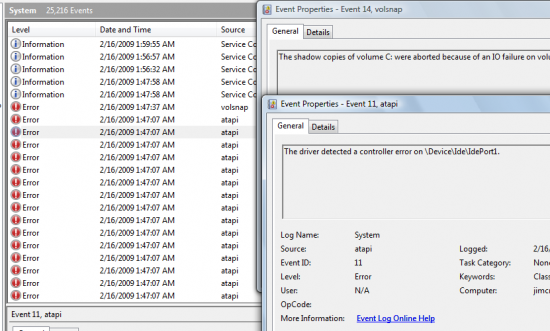
I'm having some problems: slow POST, errors in the Event Log (screenshot below). Sometimes the Hard Drive is not detected by the BIOS. Sometimes Windows Vista locks up and the computer restarts.

1. Can a bad motherboard cause false positive S.M.A.R.T. results in HDDScan?

2. Also, can a bad motherboard or power supply physically damage a hard drive, thus causing S.M.A.R.T. "bangs"

3. Or is this just a case of a bad Hard Drive causing typical problems?

In any case, is this Hard Drive dead, or what? If I buy a new one and stick it in the PC, will the new one get damaged as well?

Thanks in advance. :D

Attachment:
Untitled.png
Untitled.png [ 37.83 KiB | Viewed 7489 times ]

Attachment:
Untitled2.png
Untitled2.png [ 70.89 KiB | Viewed 7491 times ]


Top
 Profile  
 
 Post subject: Re: Can a bad motherboard cause false S.M.A.R.T. results?
PostPosted: February 16th, 2009, 14:58 
Offline

Joined: February 16th, 2009, 2:06
Posts: 5
Location: Eastern USA
Anyone have a comment on what I should do?

Is it time for a new drive or should I try this (from the FAQ)

Quote:
Q: How can I fix delays on my HDD (red and brown blocks in MHDD)?
A: Use ERASE command in MHDD (it will erase the entire hard drive though :)), then run scan+erase delays ON, then scan+remap ON.



Attachment:
Picture 002.jpg
Picture 002.jpg [ 100.01 KiB | Viewed 7490 times ]


Top
 Profile  
 
 Post subject: Re: Can a bad motherboard cause false S.M.A.R.T. results?
PostPosted: February 19th, 2009, 19:03 
Offline
User avatar

Joined: July 16th, 2008, 17:52
Posts: 489
Location: Long Beach, California
The Event Id 11s you are getting are having to do with ATAPI which is linked to your CD/DVD drives, and not your HDD.


A faulty motherboard cannot directly cause false SMART output. Technically it COULD indirectly cause SMART output to show a drive is failing if it is failing in the way of cutting power to the HDD suddenly causing possible damage to the drive, but if that was occuring, you would know (lots of blue screens, instability)


I believe your HDD is genuinly failing and you should back up any data on it immediatly and RMA the drive. It is still a ways away from reallocated sector count threshold so you should still have time, but don't count on that. SMART is not something to rely on, just a decent gauge.


Top
 Profile  
 
 Post subject: Re: Can a bad motherboard cause false S.M.A.R.T. results?
PostPosted: February 26th, 2009, 14:34 
Offline

Joined: February 16th, 2009, 2:06
Posts: 5
Location: Eastern USA
There has been blue screens and screwy behavior in general that I suspect is caused by a faulty power supply, motherboard, or both.

Possibly the power supply has caused the problems with the motherboard, video card, and hard drive?

Thanks for the reply.


Top
 Profile  
 
 Post subject: Re: Can a bad motherboard cause false S.M.A.R.T. results?
PostPosted: March 18th, 2009, 13:15 
Offline
User avatar

Joined: February 27th, 2009, 3:26
Posts: 1721
Location: French Polynesia Tahiti
A bad memory on you mother board will cause this. It will cause your screen to change colors, act funny, reboot your system. lock your system and do all sort of things to your computer. You should try to change out your memory and go from there. If you are still having problems it is in the IDE port of the MB itself. Change out the board, and more times you will need to reload your HD again. Vista is not a stable OS and if possible try to find Windows XP but you will need to download all drives if you use the same MB. New MB come with drivers you can use to reinstall your system. Normally you can attach this to a working computer and using the file manager you can pull off what you need and save it before reformatting your drive and starting over. In a MB there are two factors that will cause this problem one is the memory and the other is the processor or if there is a video card installed on the system too that plays an important factor. So there is a conflict between the three pieces. But normally blue screen if you read it will tell you something about material, memory or video and it will give you a general idea where to start when looking for your problem

_________________
Iorana Haraharaini


Top
 Profile  
 
Display posts from previous:  Sort by  
Post new topic Reply to topic  [ 5 posts ] 

All times are UTC - 5 hours [ DST ]


Who is online

Users browsing this forum: No registered users and 8 guests


You cannot post new topics in this forum
You cannot reply to topics in this forum
You cannot edit your posts in this forum
You cannot delete your posts in this forum
You cannot post attachments in this forum

Search for:
Jump to:  
Powered by phpBB © 2000, 2002, 2005, 2007 phpBB Group