Re: Help Me To Repair This Hard Dick Please !! ♥
May 25th, 2020, 11:01
Sorry, I read the first disk wrong. It seems to be ok as is the second one, at least according to the SMART info.
Looks like the seagate has been powered on for 897 hours (converting the hexadecimal figure to decimal) and the second drive has been powered on for 18748 hours.
If the hard drive password is not the master one you could look that up online and follow this explanation using either MHDD on its own or as part of the Ultimate Boot Disk
https://www.geckoandfly.com/4093/unlock ... oval-tool/
Looks like the seagate has been powered on for 897 hours (converting the hexadecimal figure to decimal) and the second drive has been powered on for 18748 hours.
If the hard drive password is not the master one you could look that up online and follow this explanation using either MHDD on its own or as part of the Ultimate Boot Disk
https://www.geckoandfly.com/4093/unlock ... oval-tool/
Re: Help Me To Repair This Hard Dick Please !! ♥
May 25th, 2020, 20:58
Try a master password of "Seagat>" followed by 25 spaces.
Re: Help Me To Repair This Hard Dick Please !! ♥
May 25th, 2020, 21:19
fzabkar wrote:Try a master password of "Seagat>" followed by 25 spaces.
Try "Seagat", followed by 9Bh plus 25 spaces (20h).
Re: Help Me To Repair This Hard Dick Please !! ♥
May 26th, 2020, 11:50
fzabkar wrote:fzabkar wrote:Try a master password of "Seagat>" followed by 25 spaces.
Try "Seagat", followed by 9Bh plus 25 spaces (20h).
I Can't Understand What Did You Means ??
Can You Tell Me Step By Step Please ♥
Re: Help Me To Repair This Hard Dick Please !! ♥
May 26th, 2020, 17:59
Execute the following command (all on one line):
Make sure that you select the correct drive by replacing "/dev/ice" with the correct target.
- Code:
hdparm --user-master m --security-erase $(printf '\x53\x65\x61\x67\x61\x74\x9B\x20\x20\x20\x20\x20\x20\x20\x20\x20\x20\x20\x20\x20\x20\x20\x20\x20\x20\x20\x20\x20\x20\x20\x20\x20') /dev/ice
Make sure that you select the correct drive by replacing "/dev/ice" with the correct target.
Re: Help Me To Repair This Hard Dick Please !! ♥
May 26th, 2020, 18:12
fzabkar wrote:Execute the following command (all on one line):
- Code:
hdparm --user-master m --security-erase $(printf '\x53\x65\x61\x67\x61\x74\x9B\x20\x20\x20\x20\x20\x20\x20\x20\x20\x20\x20\x20\x20\x20\x20\x20\x20\x20\x20\x20\x20\x20\x20\x20\x20') /dev/ice
Make sure that you select the correct drive by replacing "/dev/ice" with the correct target.
Where I Can Put This Code ??

Re: Help Me To Repair This Hard Dick Please !! ♥
May 26th, 2020, 18:20
fzabkar wrote:Execute the following command (all on one line):
- Code:
hdparm --user-master m --security-erase $(printf '\x53\x65\x61\x67\x61\x74\x9B\x20\x20\x20\x20\x20\x20\x20\x20\x20\x20\x20\x20\x20\x20\x20\x20\x20\x20\x20\x20\x20\x20\x20\x20\x20') /dev/ice
Make sure that you select the correct drive by replacing "/dev/ice" with the correct target.
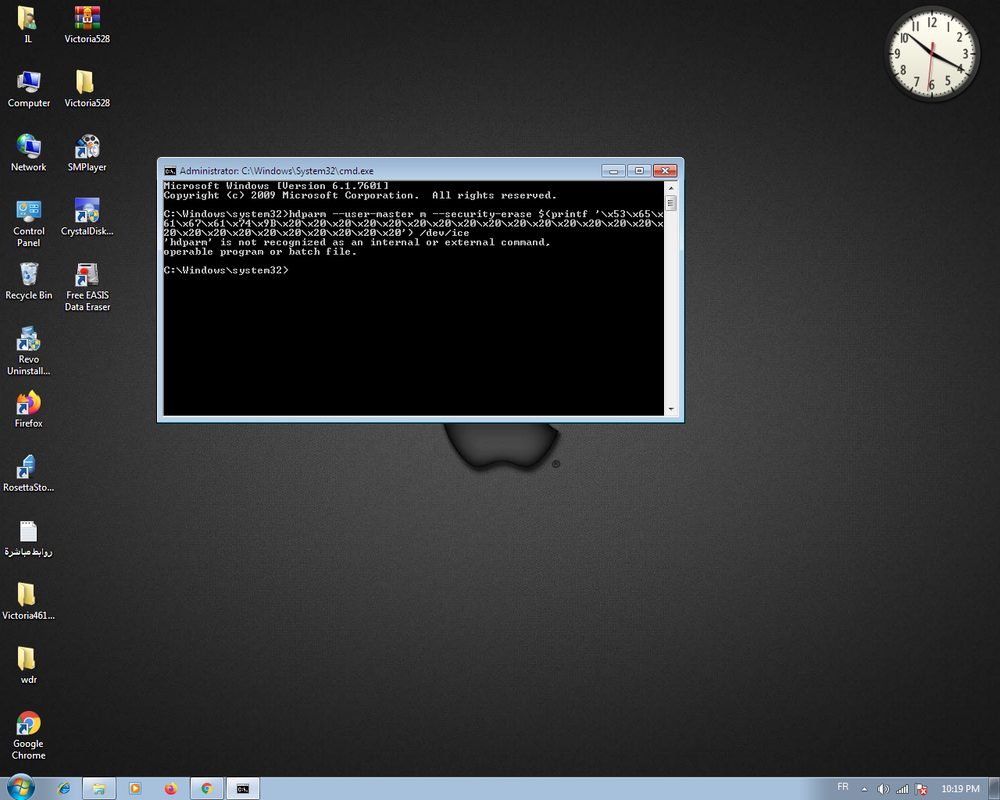
Re: Help Me To Repair This Hard Dick Please !! ♥
May 26th, 2020, 18:42
hdparm is a Linux command. There is a Windows version. You need to search for it and install it.
Re: Help Me To Repair This Hard Dick Please !! ♥
May 26th, 2020, 20:21
IMHO if you don't know why you get a "not recognised as an internal command" error, you shouldn't be messing with disks at this level
Re: Help Me To Repair This Hard Dick Please !! ♥
May 27th, 2020, 12:24
fzabkar wrote:hdparm is a Linux command. There is a Windows version. You need to search for it and install it.
I'm Download And Installed It ( hdparm )
... So Now What The Option Do You Tell Me Set Of These Options ?? 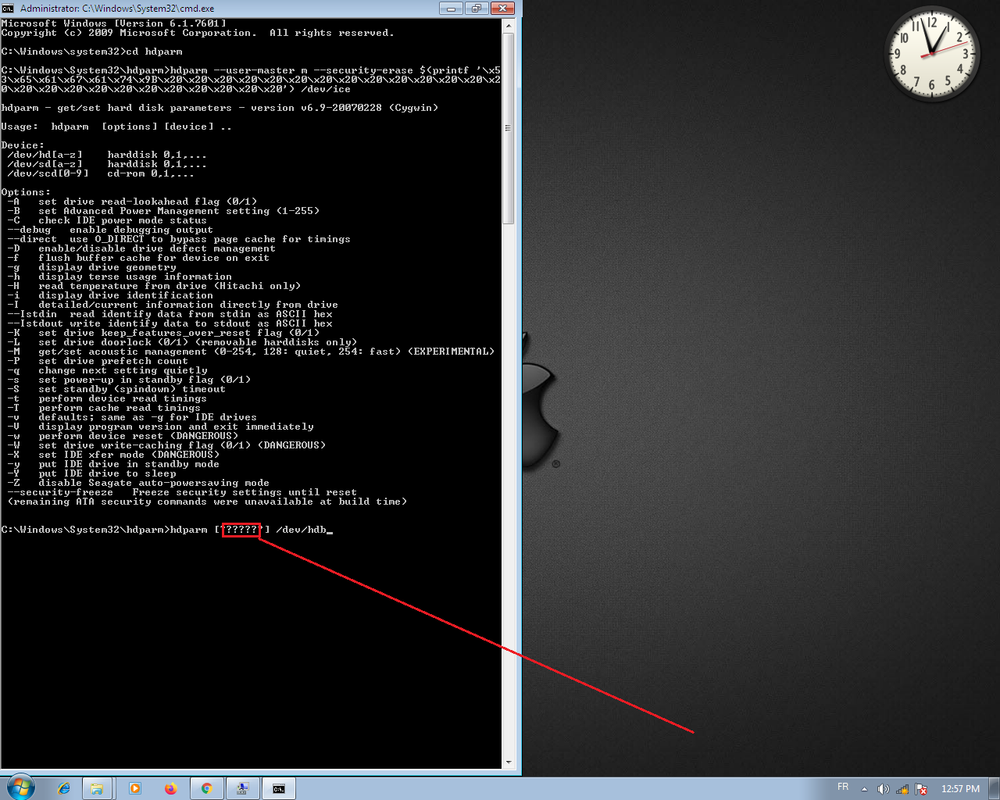
Re: Help Me To Repair This Hard Dick Please !! ♥
May 27th, 2020, 12:43
HaQue wrote:IMHO if you don't know why you get a "not recognised as an internal command" error, you shouldn't be messing with disks at this level
HHHHH
 No No I Swear I Know Why Get A "Not Recognised As An Internal Command" Error .... I Just Wanted To Be Sure ♥
But Any Way I'm So So Sorry Sir Because This is First Time I Will Try Repairing A Hard Disk So Absolutely I'm Not Have Any Background For This Domain


And I Can't Understand English Very Well To Search More Information
Re: Help Me To Repair This Hard Dick Please !! ♥
May 27th, 2020, 15:07
FYI, the default master pwd is
SeaGate.........................
dots and not spaces. 32 characters altogether.
pepe
SeaGate.........................
dots and not spaces. 32 characters altogether.
pepe
Re: Help Me To Repair This Hard Dick Please !! ♥
May 27th, 2020, 16:02
pepe wrote:FYI, the default master pwd is
SeaGate.........................
dots and not spaces. 32 characters altogether.
pepe
I Found This Method It's Good Or Not ??
https://grok.lsu.edu/Article.aspx?articleid=16716
Re: Help Me To Repair This Hard Dick Please !! ♥
May 27th, 2020, 16:15
hamza mostakim wrote:pepe wrote:FYI, the default master pwd is
SeaGate.........................
dots and not spaces. 32 characters altogether.
pepe
I Found This Method It's Good Or Not ??
https://grok.lsu.edu/Article.aspx?articleid=16716
This Method Just For Hard Disk SSD !!!
Re: Help Me To Repair This Hard Dick Please !! ♥
May 27th, 2020, 16:44
I'm Try This Option ( --security-freeze ) But It's Failed
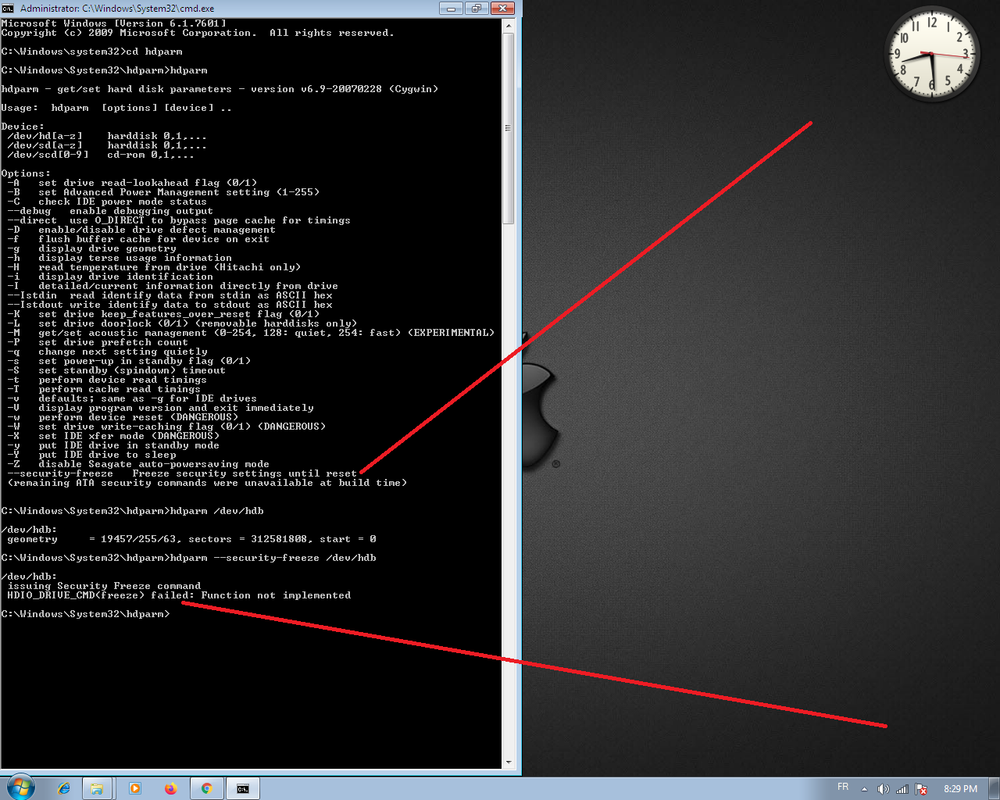
And I Try This Option ( --debug ) ... It Was Successfully
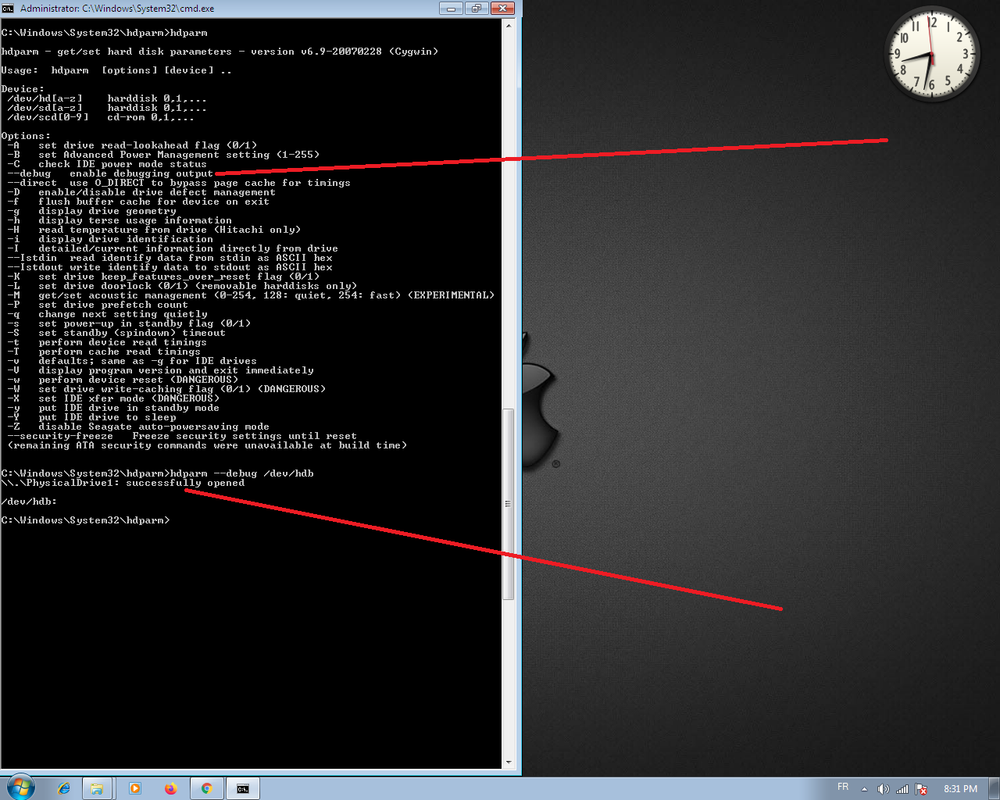
What Did Means This Option ( --debug ) ????
And I Try This Option ( --debug ) ... It Was Successfully
What Did Means This Option ( --debug ) ????
Re: Help Me To Repair This Hard Dick Please !! ♥
May 27th, 2020, 18:43
This Method Just For Hard Disk SSD !!!
that page only said the method only works on SATA and PATA HDD and SSD.
So you have nothing to worry about.
I have no experience with hdparm, can't help with that, but it should be straightforward.
you don't have to set freeze lock, it is already locked, start erasing it using the default master pwd.
Btw, from ata specs:
- Code:
The security level is set to High or Maximum with the SECURITY SET PASSWORD command. The security
level determines device behavior when the Master password is used to unlock the device. When the security
level is set to High the device requires the SECURITY UNLOCK command and the Master password to
unlock. When the security level is set to Maximum the device requires a SECURITY ERASE PREPARE
command and a SECURITY ERASE UNIT command with the master password to unlock. Execution of the
SECURITY ERASE UNIT command erases all user data on the device.
The SECURITY FREEZE LOCK command prevents changes to passwords until a following power cycle. The
purpose of the SECURITY FREEZE LOCK command is to prevent password setting attacks on the security
system.
It says if the security level is high you can unlock it with the master pwd.
Identify sector word 92 gives you the Master Password Revision Code, which should be FFFE if the Master pwd was not changed, ie it is the default string i sent above.
Identify sector word 128:
15-9 Reserved
8 Security level 0 = High, 1 = Maximum
7-6 Reserved
5 1 = Enhanced security erase supported
4 1 = Security count expired
3 1 = Security frozen
2 1 = Security locked
1 1 = Security enabled
0 1 = Security supported
so if bit 8 is 0, you have Security Level set to high, so it is possible to use the master pwd to open the device without erasing it. So open and disable pwd should be working.
if it is 1, you need to send Security Erase Prepare (0xF3) command followed by Security Erase Unit (0xF4) command with an 512byte data block containing 01 00 53 65 61 47 61 74 65 2E 2E 2E 2E 2E 2E 2E 2E 2E 2E 2E 2E 2E 2E 2E 2E 2E 2E 2E 2E 2E 2E 2E 2E 2E
and the rest should be 00.
that hdparm says a note about 'the remaining ATA security commands were unavailable during build time', which probably means it is not implemented.
So you need some different way of opening it.
pepe
Re: Help Me To Repair This Hard Dick Please !! ♥
May 27th, 2020, 20:40
that page only said the method only works on SATA and PATA HDD and SSD.
So you have nothing to worry about.
I have no experience with hdparm, can't help with that, but it should be straightforward.
you don't have to set freeze lock, it is already locked, start erasing it using the default master pwd.
Btw, from ata specs:
It says if the security level is high you can unlock it with the master pwd.
Identify sector word 92 gives you the Master Password Revision Code, which should be FFFE if the Master pwd was not changed, ie it is the default string i sent above.
Identify sector word 128:
15-9 Reserved
8 Security level 0 = High, 1 = Maximum
7-6 Reserved
5 1 = Enhanced security erase supported
4 1 = Security count expired
3 1 = Security frozen
2 1 = Security locked
1 1 = Security enabled
0 1 = Security supported
so if bit 8 is 0, you have Security Level set to high, so it is possible to use the master pwd to open the device without erasing it. So open and disable pwd should be working.
if it is 1, you need to send Security Erase Prepare (0xF3) command followed by Security Erase Unit (0xF4) command with an 512byte data block containing 01 00 53 65 61 47 61 74 65 2E 2E 2E 2E 2E 2E 2E 2E 2E 2E 2E 2E 2E 2E 2E 2E 2E 2E 2E 2E 2E 2E 2E 2E 2E
and the rest should be 00.
that hdparm says a note about 'the remaining ATA security commands were unavailable during build time', which probably means it is not implemented.
So you need some different way of opening it.
pepe[/quote]
Thank You Sir Very Very Much For All Information That You Gave Me ♥♥♥ .... So What I can Do Now ??
So you have nothing to worry about.
I have no experience with hdparm, can't help with that, but it should be straightforward.
you don't have to set freeze lock, it is already locked, start erasing it using the default master pwd.
Btw, from ata specs:
- Code:
The security level is set to High or Maximum with the SECURITY SET PASSWORD command. The security
level determines device behavior when the Master password is used to unlock the device. When the security
level is set to High the device requires the SECURITY UNLOCK command and the Master password to
unlock. When the security level is set to Maximum the device requires a SECURITY ERASE PREPARE
command and a SECURITY ERASE UNIT command with the master password to unlock. Execution of the
SECURITY ERASE UNIT command erases all user data on the device.
The SECURITY FREEZE LOCK command prevents changes to passwords until a following power cycle. The
purpose of the SECURITY FREEZE LOCK command is to prevent password setting attacks on the security
system.
It says if the security level is high you can unlock it with the master pwd.
Identify sector word 92 gives you the Master Password Revision Code, which should be FFFE if the Master pwd was not changed, ie it is the default string i sent above.
Identify sector word 128:
15-9 Reserved
8 Security level 0 = High, 1 = Maximum
7-6 Reserved
5 1 = Enhanced security erase supported
4 1 = Security count expired
3 1 = Security frozen
2 1 = Security locked
1 1 = Security enabled
0 1 = Security supported
so if bit 8 is 0, you have Security Level set to high, so it is possible to use the master pwd to open the device without erasing it. So open and disable pwd should be working.
if it is 1, you need to send Security Erase Prepare (0xF3) command followed by Security Erase Unit (0xF4) command with an 512byte data block containing 01 00 53 65 61 47 61 74 65 2E 2E 2E 2E 2E 2E 2E 2E 2E 2E 2E 2E 2E 2E 2E 2E 2E 2E 2E 2E 2E 2E 2E 2E 2E
and the rest should be 00.
that hdparm says a note about 'the remaining ATA security commands were unavailable during build time', which probably means it is not implemented.
So you need some different way of opening it.
pepe[/quote]
Thank You Sir Very Very Much For All Information That You Gave Me ♥♥♥ .... So What I can Do Now ??
Re: Help Me To Repair This Hard Dick Please !! ♥
May 28th, 2020, 4:54
To be honest i am not quite familiar with free tools, i only know mhdd can send those commands, check the docs here:
https://hddguru.com/software/2005.10.02-MHDD/mhdd_manual.en.html#id
there is also Magic boot disk available for download with MHDD 4.6 included, because you will have to boot to DOS.
pepe
https://hddguru.com/software/2005.10.02-MHDD/mhdd_manual.en.html#id
there is also Magic boot disk available for download with MHDD 4.6 included, because you will have to boot to DOS.
pepe
Re: Help Me To Repair This Hard Dick Please !! ♥
May 28th, 2020, 6:44
Powered by phpBB © phpBB Group.