| HDD GURU FORUMS http://forum.hddguru.com/ |
|
| HddGuru raw copy tool.. couple questions http://forum.hddguru.com/viewtopic.php?f=7&t=33948 |
Page 1 of 1 |
| Author: | kurt2121 [ August 11th, 2016, 16:10 ] |
| Post subject: | HddGuru raw copy tool.. couple questions |
I'm trying to get a copy of all the sectors of my hdd and store it in a new hdd. Will this tool give me everything, including the "deleted" data that hasn't been overwritten? Also, can anybody give me a rough estimate of how long this could generally take? Thanks! |
|
| Author: | data-medics [ August 11th, 2016, 16:28 ] |
| Post subject: | Re: HddGuru raw copy tool.. couple questions |
Yes, if you read all sectors then the data will be exactly the same including deleted but not overwritten data. The time will depend largely on the drive's and how they are connected. Larger drives will take longer to image than smaller capacity ones. Over SATA you should be able to expect at least 110Mb/s copy speed so divide the size of the drive by that. If you're using USB 2.0 though the speed will likely be capped around 40Mb/s. |
|
| Author: | kurt2121 [ August 11th, 2016, 17:59 ] |
| Post subject: | Re: HddGuru raw copy tool.. couple questions |
data-medics wrote: Yes, if you read all sectors then the data will be exactly the same including deleted but not overwritten data. The time will depend largely on the drive's and how they are connected. Larger drives will take longer to image than smaller capacity ones. Over SATA you should be able to expect at least 110Mb/s copy speed so divide the size of the drive by that. If you're using USB 2.0 though the speed will likely be capped around 40Mb/s. Both HDDs are connected to my laptop via usb. Don't know if that means 40mb/s If my math checks out, it could last 24 hours copying a 160,000 mb if it goes 110mb/s |
|
| Author: | fzabkar [ August 11th, 2016, 18:10 ] |
| Post subject: | Re: HddGuru raw copy tool.. couple questions |
24 minutes, not hours, at 110MB/s. http://www.google.com.au/search?q=160+GB+%2F+110+MB%2Fs USB 3.0 speeds are much higher than USB 2.0. Typically they are within 10% of SATA speeds. |
|
| Author: | lcoughey [ August 11th, 2016, 19:51 ] |
| Post subject: | Re: HddGuru raw copy tool.. couple questions |
Mb is megabit MB is megabyte |
|
| Author: | fzabkar [ August 11th, 2016, 19:55 ] |
| Post subject: | Re: HddGuru raw copy tool.. couple questions |
mb = millibit ? http://www.google.com/search?q=160+GB+%2F+110+millibits+per+second |
|
| Author: | lcoughey [ August 11th, 2016, 20:12 ] |
| Post subject: | Re: HddGuru raw copy tool.. couple questions |
Sadly...there is no consistency. |
|
| Author: | kurt2121 [ August 12th, 2016, 15:16 ] |
| Post subject: | Re: HddGuru raw copy tool.. couple questions |
fzabkar wrote: 24 minutes, not hours, at 110MB/s. http://www.google.com.au/search?q=160+GB+%2F+110+MB%2Fs USB 3.0 speeds are much higher than USB 2.0. Typically they are within 10% of SATA speeds. isn't it megabits per second? That would take 24 hours if it were megabits. |
|
| Author: | fzabkar [ August 12th, 2016, 17:18 ] |
| Post subject: | Re: HddGuru raw copy tool.. couple questions |
kurt2121 wrote: fzabkar wrote: 24 minutes, not hours, at 110MB/s. http://www.google.com.au/search?q=160+GB+%2F+110+MB%2Fs USB 3.0 speeds are much higher than USB 2.0. Typically they are within 10% of SATA speeds. isn't it megabits per second? That would take 24 hours if it were megabits. Were my Google calculator examples too difficult for you to comprehend? As for the transfer rate, consult a typical HDD product manual or spec sheet. |
|
| Author: | kurt2121 [ August 12th, 2016, 18:00 ] |
| Post subject: | Re: HddGuru raw copy tool.. couple questions |
fzabkar wrote: kurt2121 wrote: fzabkar wrote: 24 minutes, not hours, at 110MB/s. http://www.google.com.au/search?q=160+GB+%2F+110+MB%2Fs USB 3.0 speeds are much higher than USB 2.0. Typically they are within 10% of SATA speeds. isn't it megabits per second? That would take 24 hours if it were megabits. Were my Google calculator examples too difficult for you to comprehend? As for the transfer rate, consult a typical HDD product manual or spec sheet. Data medics used 110 Mb/s and you used 110 MB/s. Which one am I suppose to be applying? |
|
| Author: | fzabkar [ August 12th, 2016, 18:35 ] |
| Post subject: | Re: HddGuru raw copy tool.. couple questions |
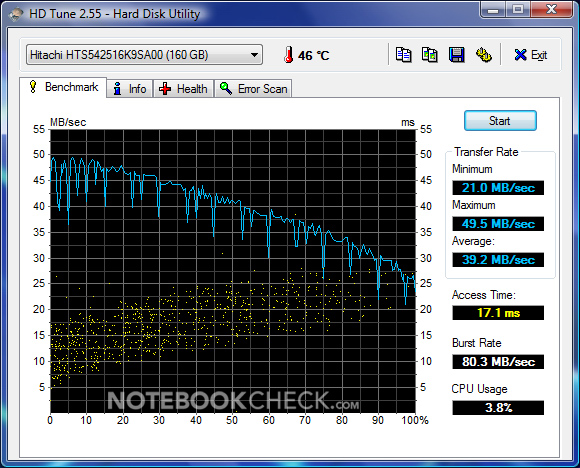
Strictly speaking, Data-Medics is wrong. That said, you didn't give him much to work with. Basically your question reduces to "how fast is my car". In any case, the product manual or spec sheet should be your guide. Alternatively, a HD Tune read benchmark, or similar, would be the best reference. http://www.hdtune.com/testresults.html Your results would depend on the number of heads and RPM. A higher RPM means a higher transfer rate. Less heads means greater data density and higher transfer rate. BTW, there are 8 bits in a byte, not 60. |
|
| Author: | fzabkar [ August 14th, 2016, 19:07 ] |
| Post subject: | Re: HddGuru raw copy tool.. couple questions |
You can see the read transfer rate (for a HTS542516K9SA00) in the following graph: http://www.notebookcheck.net/fileadmin/_migrated/pics/HDTune_Benchmark_26.jpg The average is about 40MB/s. |
|
| Page 1 of 1 | All times are UTC - 5 hours [ DST ] |
| Powered by phpBB © 2000, 2002, 2005, 2007 phpBB Group http://www.phpbb.com/ |
|