| HDD GURU FORUMS http://forum.hddguru.com/ |
|
| Saving hard drive scan from a recovery program http://forum.hddguru.com/viewtopic.php?f=7&t=36308 |
Page 1 of 1 |
| Author: | Alpstin [ January 15th, 2018, 17:03 ] |
| Post subject: | Saving hard drive scan from a recovery program |
Almost a year ago, a refurbished hard drive I had newly received under warranty became completely inaccessible through normal means. I had transferred over 1.5 TB of data to it, and sadly did not back it up elsewhere. However, the data on the drive was shown to be occupied through viewing the basic hard drive properties, and after running Seagate Recovery Suite, all of the data was shown to still be there and usable. However, I didn't do anything with it because I wanted back all of the data with things like the modification dates preserved, and that requires payed software, and for various other reasons, I've left the drive alone almost all this time. The drive I've been using now (which I bought several years ago, but went awhile without using it until this happened) is likely having issues, and I'm going to reformat. What's been holding me back is the scan of the inaccessible drive I made with Seagate Recovery Suite. When I've reinserted the faulty drive and reaccessed it with Seagate Recovery Suite, the full scan becomes accessible again. I'm sure this would be lost if I were to reformat. I know this technically makes no difference (and the less I touch that drive until I get around to transferring the data off, the better), but it would be nice to still have that scan under SRS. Is there any way, at all, of saving this scan so I could reaccess it elsewhere with SRS? And it goes without saying, but this is the free trial of SRS. Not sure if this would be possible even if I had the full version though. |
|
| Author: | Alpstin [ January 27th, 2018, 4:27 ] |
| Post subject: | Re: Saving hard drive scan from a recovery program |
Well, I did end up calling SRS data recovery and they were pretty adamant I couldn't save a copy of a scan. I still find it kind of hard to believe it's impossible though, especially since you seem to imply this is possible with other software- though when you refer to Restorer 2000, I'm not sure if you're referring to the ability to transfer it between drives in that case. I don't really have much of any extra drives to test with though, but I am a little wary about basically gambling by saving the entire SRS folder elsewhere, reformatting, and see if it saves anything. I did manage to stave off the issues I was having with this drive recently though, and it seems to be working fine- for now. It would be nice if I could have this copy of the SRS scan on my drive while I scan the inaccessible drive with a better program, but at this point, I don't know what to go with, and I don't know if it would be totally safe to scan that drive from this one given the issues I've had with this. I've been kind of torn on what recovery program to go ahead with next, since what I'm particularly interested in is saving the original file/folder order and the original modification dates. That only seems possible with payed programs, and I've leaned towards R-Studio for awhile, but I've heard good things about GetDataBack too. The only free recovery program I think that might be able to retain modification dates and such is Ubuntu Live CD, but that seems to rely heavily on command lines and I'm not sure how effective it would be. |
|
| Author: | Alpstin [ January 27th, 2018, 13:33 ] |
| Post subject: | Re: Saving hard drive scan from a recovery program |
What is Restorer 2000 lacking compared to R-Studio? I've also been told SRS is a scaled down version of R-Studio, despite being more expensive. So you're telling me I can transfer the scan to another drive, and access the "damaged" drive from that drive using Restorer 2000, and possibly R-Studio? That's really good to know that that feature is found with other software, but the support from Seagate seemed clear this wasn't possible with SRS. It even seemed to go beyond the fact I ran the scan with a trial copy, it was supposedly impossible for the software to do this. But I don't know- what file or sub-folder, if any, might contain a scan of the copy in the SRS folder? I have been wary of sending the drive out myself because I've had experience with HD recovery in the past a number of years ago, and even when I had to recover a drive with under 200 GB of data, it ended up costing something like $150. For comparison, this one is 1.4 TB. There's also some sensitive personal data on there I'd like to handle on my own. That's why I've leaned towards using software, since it seems like I could get this done for under $100, and I've had success with using SRS' trial, and even recovering a bit of data using free software (which resets the modification dates and likely doesn't preserve original file/folder structure). I haven't done much of anything with the drive in months, but I've learned that's a bad idea since a drive has to be running periodically- thankfully, the data under the preserved scan came up fine when I put it in a few weeks ago. I've also had it in anti-static bag all this time. How could I damage the drive heads though? I know not to keep using recovery software with this though. The only scan software I've run for any significant period has been SRS. Are you at all familiar with Ubuntu Live CD, by the way? |
|
| Author: | Alpstin [ January 28th, 2018, 15:06 ] |
| Post subject: | Re: Saving hard drive scan from a recovery program |
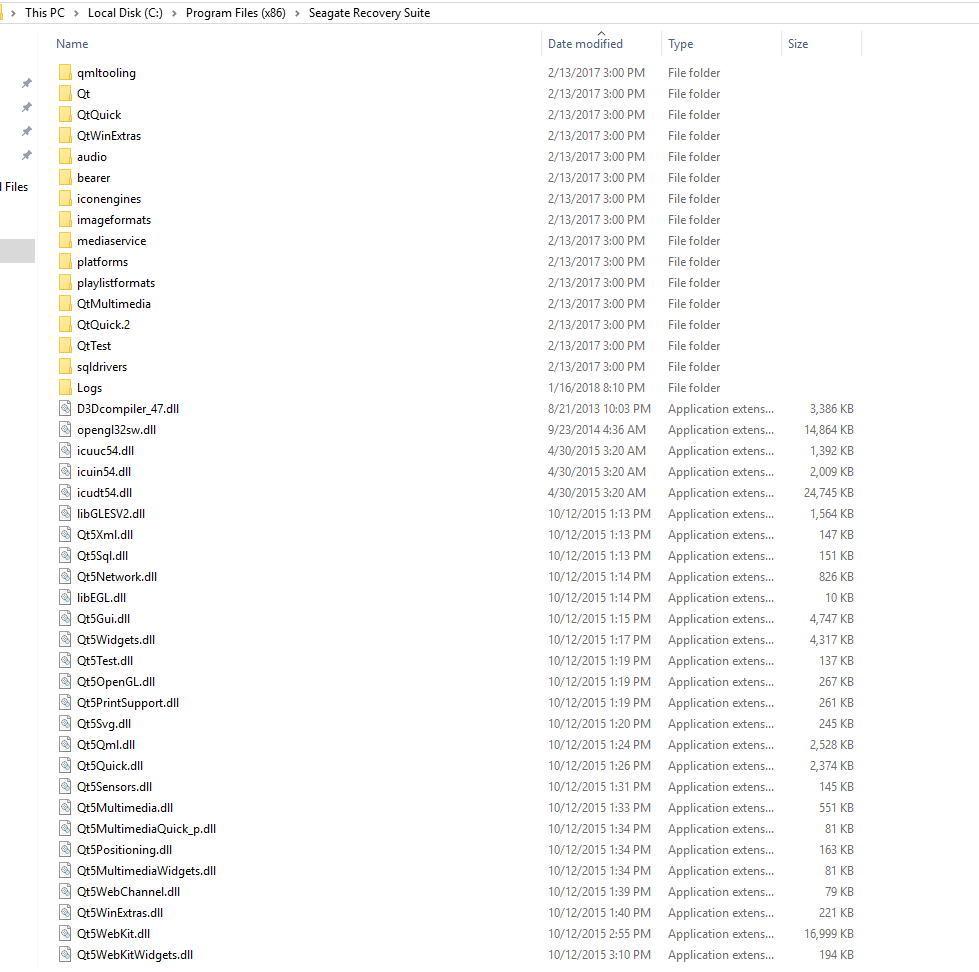
I wouldn't really mind redoing the scan, and if I were to, it would be with other software for sure, especially since there's cheaper, better options. I just would if possible like to possibly transfer the scan I performed with SRS to another drive. Seagate support claimed this wasn't possible. If it helps, here are screens of the SRS folder: https://i.gyazo.com/3174e4b273f64ba9470 ... b0acf0.png https://i.gyazo.com/cc58a301785c34f13b8 ... 11b716.png This is a previous thread describing my issues in further detail. Since the drive is still sitting there, it hasn't changed much. No clicks though. And never did a S.M.A.R.T. attributes screen capture, but I'm not familiar with that. viewtopic.php?f=1&t=35145 I'm not concerned that SRS or other recovery software won't be able to recover the data- again, it's just being sure right now if the SRS scan can transfer the data. If I do this from another hard drive, or a clean format of this drive, I would just like to have that scan and be able to check it as a measure of certainty/reassurance. I could scan from this drive as it stands, but I'm not 100% if that's the best idea given the state it's in. It seems to be fine now though, and a lot of that was tied to a very bad habit I've had of having too many tabs open at once, I think. Though it might be risky on even a clean format, since this drive is pretty old- I actually got it in mid 2012 (it hasn't be continuously in use that entire time though.) I imagine it should be able to handle a day or so of scanning and data transfer, but it does make me wonder. Really don't know much about cloning, and I'd probably be most comfortable just using recovery software. I'm still not sure what to go with though. Most likely not SRS (price, unable to retain modification dates and possibly folder/file structure), and as I said, I've been leaning towards R-Studio, especially since SRS, I've been told, is basically a scaled back version of it. How does it truly compare though, along with Restorer 2000? And what about Ubuntu Live CD? |
|
| Page 1 of 1 | All times are UTC - 5 hours [ DST ] |
| Powered by phpBB © 2000, 2002, 2005, 2007 phpBB Group http://www.phpbb.com/ |
|