I have a 1TB Seagate Desktop HDD which was failing (It started throwing gibberish characters on screen, had a ridiculously slow copy speed, etc). I swapped out the HDD and reinstalled windows on a spare HDD and tried to connect this as is internally. However, my PC wouldnt boot with this particular HDD connected but boot with the replacement drive.
I connected this via an external HDD dock that i have and the drive booted up and showed ALL my data and partitions. I still could not copy data out due to the extremely low copy speed so i decided to give this a clone.
I used the cloning feature of the dock i have (orico) but it would only clone the first partition which was the system reserved partition. I then attempted the clone/imaging via Macrium Reflect but it threw me an error "clone failed error 0 read failed 9 bad file descriptor" and advised me to run chkdsk on C: (Noob mistake , i know). I ran the chkdsk but it was on stage 0 , 1-2% for over 2 hours hence cancelled it by Ctrl+C (Blunder, I know).
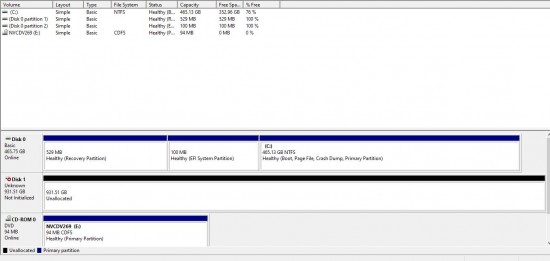
After this my HDD would even though get detected on windows but it would say "It needs to be formatted" in order to use it. This is when i stumbled across HDDGuru's HDD Raw Copy tool and did a clone of the erroneous drive on a fresh (formatted) Seagate drive. The process took 4 days to complete. However, when i am putting this drive into the dock , no partition shows up on win explorer. Disk management shows it up as "unknown" and "unallocated". Attaching screenshot for your reference.
Attachment:
File comment: Disk Management showing disk as unknown and unallocated
 Diskmanagement.JPG [ 93.21 KiB | Viewed 11054 times ]
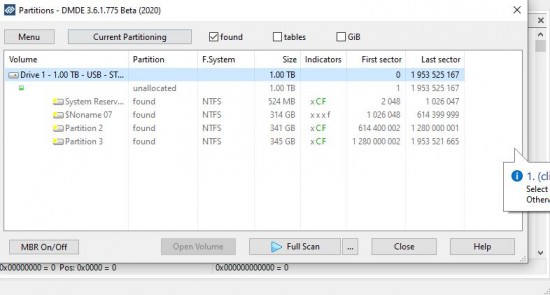
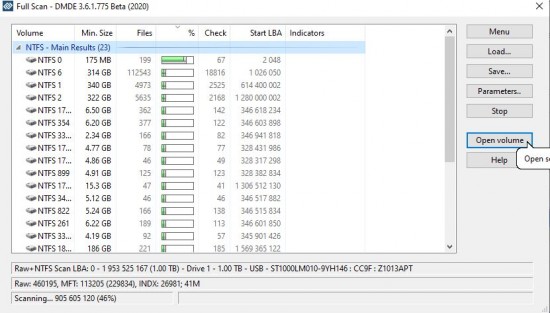
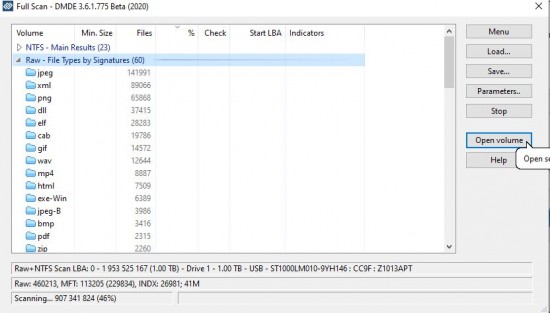
I have downloaded DMDE and the quick scan showed up individual partitions but i couldn't expand those upon load so i have hit a full scan as i type this (Screenshot attached for both)
Attachment:
File comment: DMDE showing the partitions but cannot expand root within any of these volumes
 dmde-1.JPG [ 54.93 KiB | Viewed 11054 times ]
Attachment:
File comment: DMDE full scan -1
 dmde-2.JPG [ 79.4 KiB | Viewed 11054 times ]
Attachment:
File comment: DMDE Full Scan - 2
 dmde-3.JPG [ 59.07 KiB | Viewed 11054 times ]
Attachment:
File comment: DMDE Full Scan - 3
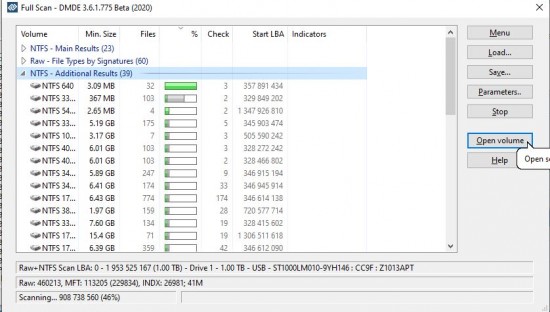 dmde-4.JPG [ 80.81 KiB | Viewed 11054 times ]
The drive contains a lot of critical data and I would want to recover it somehow! Would be grateful for any help /guidance




 FAQ
FAQ Search
 Login
Login Register
 HDDGURU FILES

