Page 1 of 1

HDD partition is gone need help recover the partition

Posted: January 19th, 2022, 12:13
by berkkocaturk
Hello,

I had a 5 TB WD elements disk i plugged it to usb today and it did not show up. It was full before. I though windows did not assign it a partition letter so i went to disk management and windows asked me if i want the disk set as MBR or GPT!!!

I tried a different cable plugged it again but still same mbr gpt windows
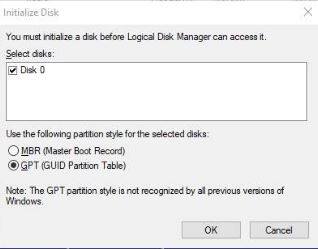


Image(it was like this not my picture but same situation)


Disk was gone . I hit cancel and thought the external thing is screwing with the disk took the disk apart and used another sata usb dock and the disk is like this right now. I have not done any operation on the disk


Now i need help to convert the disk back to original state. I format all my drives GPT and NTFS can i save this drive


when i run disk recovery software when the disk was like this i got over 4 tb of my video files so files seem to be there i want the partition structure to come back is it possible?

Re: HDD partition is gone need help recover the partition

Posted: January 19th, 2022, 15:56
by fzabkar
Can you show us the Partitions window in DMDE?

Re: HDD partition is gone need help recover the partition

Posted: January 20th, 2022, 9:16
by berkkocaturk
I do not know the program you mentioned is this corrent screenshot?

Thanks.

Re: HDD partition is gone need help recover the partition

Posted: January 20th, 2022, 12:18
by fzabkar
Your Elements enclosure is configured with a sector size of 4KB. Your new enclosure is 512B. You need to return the drive to its Elements enclosure and show us the DMDE Partitions window again.

Re: HDD partition is gone need help recover the partition

Posted: January 20th, 2022, 12:44
by berkkocaturk
fzabkar wrote:Your Elements enclosure is configured with a sector size of 4KB. Your new enclosure is 512B. You need to return the drive to its Elements enclosure and show us the DMDE Partitions window again.


Oh. I am using sata internal connection right now i will put it back into its enclosure and send you a picture.

Thanks.

Re: HDD partition is gone need help recover the partition

Posted: January 20th, 2022, 13:20
by berkkocaturk
I do not understand it was on the same enclosure that the whole partition was raw without filesystem and now i put it back it looks like it works...

The partition is back.

Why it went raw i do not know but why it did not run as directly connected sata is it possible for you to explain it to me?

What should i do so this never happens again?

Re: HDD partition is gone need help recover the partition

Posted: January 20th, 2022, 13:34
by fzabkar
You need to examine the drive's SMART report with a tool such as CrystalDiskInfo. I expect that you will find reallocated, pending or uncorrectable sectors.

Your Elements enclosure has been configured with a sector size of 4096 bytes. The hard drive, on the other hand, has a logical sector size of 512 bytes. When the HDD is inside the enclosure, there is a USB-SATA bridge PCB which translates the sector size from 4KB to 512B. When you remove the HDD from its enclosure and connect it directly to a SATA port on your computer's motherboard, you expose the drive's 512e sector size and render your data inaccessible. Essentially you now have a 4Kn file system on a 512e drive.

See https://www.klennet.com/notes/2018-04-14-usb-and-sector-size.aspx

Re: HDD partition is gone need help recover the partition

Posted: January 20th, 2022, 18:37
by berkkocaturk
fzabkar wrote:You need to examine the drive's SMART report with a tool such as CrystalDiskInfo. I expect that you will find reallocated, pending or uncorrectable sectors.

Your Elements enclosure has been configured with a sector size of 4096 bytes. The hard drive, on the other hand, has a logical sector size of 512 bytes. When the HDD is inside the enclosure, there is a USB-SATA bridge PCB which translates the sector size from 4KB to 512B. When you remove the HDD from its enclosure and connect it directly to a SATA port on your computer's motherboard, you expose the drive's 512e sector size and render your data inaccessible. Essentially you now have a 4Kn file system on a 512e drive.

See https://www.klennet.com/notes/2018-04-14-usb-and-sector-size.aspx


The screenshot is attached it looks look doesnt it? Is there any reason to not trust this drive with data anymore ?

Can i set a drive 4k as sata 512 ? I want drive to work on both this is weird for mebut thanks to you I understand it now.

Thanks.

Re: HDD partition is gone need help recover the partition

Posted: January 20th, 2022, 19:23
by berkkocaturk
I just realized different language.

Sorry. Added the english crystaldiskinfo. Does it look problematic?

Re: HDD partition is gone need help recover the partition

Posted: January 20th, 2022, 21:03
by fzabkar
SMART looks good.

WD has a "quick formatter tool" that can change the sector size of WD's enclosures. Backup your data before doing this, though.

Re: HDD partition is gone need help recover the partition

Posted: January 21st, 2022, 9:42
by berkkocaturk
I have moved all files and formatted with the tool you suggested. Right now it is visible in both enclosure and direct sata.

Thank you.

I still have no idea why it wrnt raw the first time in the enclosure.