MultiDrive – free backup, clone & wipe disk utility from Atola Technology

All times are UTC - 5 hours [ DST ]


Post new topic Reply to topic  [ 16 posts ] 
Author Message
 Post subject: MHDD is used
PostPosted: June 6th, 2010, 21:45 
Offline
User avatar

Joined: May 1st, 2010, 16:53
Posts: 12
Location: Argentina
:roll: MHDD is used by professional data recovery, and specifically do with it? which is the most important test performed?


Top
 Profile  
 
 Post subject: Re: MHDD is used
PostPosted: June 7th, 2010, 1:16 
Offline
User avatar

Joined: February 27th, 2009, 3:26
Posts: 1721
Location: French Polynesia Tahiti
Download the manual and read what it does. Yes DR professionals will use this tool. Read some on the forum and maybe you can get more of an idea what it is all about and get the maual and read it too.

_________________
Iorana Haraharaini


Top
 Profile  
 
 Post subject: Re: MHDD is used
PostPosted: June 7th, 2010, 2:23 
Offline

Joined: July 18th, 2006, 3:05
Posts: 7476
Location: ITALY
It can do testing, zerofill /erase, set PW and remove them if known, simple copy/restore of sectors, run SMART tests and configure some parameters if you don't want to send specific commands and get results , plus some "scripting" if you know what to do. Nothing more nothing less.
Firmware or internal/physical problems can't be fixed by MHDD.


Top
 Profile  
 
 Post subject: Re: MHDD is used
PostPosted: July 14th, 2010, 14:58 
Offline

Joined: July 14th, 2010, 14:31
Posts: 9
Location: Buenos Aires - Argentina
Hello!

I think this could be a good place for my question:

What "EraseDelays" *really* does? (Didn't see it explained in any place: FAQ, Manual, docs, and forum).

Scenario:
I have a disk (Fujitsu MHZ2320HZ G2) that suddenly crashed. Discarded PCB problem I went inside of it. Lucky me a friend of mine had exactly the same disc, so I did a platter exchange.

Now I'm able to see parts of files with GetDataBack but I got many CRC errors (first of them on sector 0 - never got it fixed) and also some of them make the process be halted.
Also trying to make an image of the disc (to really trash the device and work safe) it gets halted or hung! :(

Running MHDD I have zones of delaying blocks that I'm trying to remove (or mark to be avoided by other programs), but they appear over and over again. The head sometimes gets really noisy!

Running HDD Regenerator didn't helped neither.


I would like to know what really "EraseDelays" does so I can realize what else could I do.

Any suggestion is really appreciated (already a month fighting with this!) :cry:

TIA,
Pampa


Top
 Profile  
 
 Post subject: Re: MHDD is used
PostPosted: July 14th, 2010, 15:31 
Offline

Joined: May 15th, 2010, 17:30
Posts: 66
Location: United States
As I understand it EraseDelays will erase sectors that show a delay in reading. This has been covered in the FAQ on this site under Software> MHDD> FAQ.

_________________
HWHacker
Smiles


Top
 Profile  
 
 Post subject: Re: MHDD is used
PostPosted: July 14th, 2010, 15:58 
Offline

Joined: July 14th, 2010, 14:31
Posts: 9
Location: Buenos Aires - Argentina
Ok, that's what I "know", but, what *exactly* means "erase" ??

Zerofill?
Mark as damaged?

Now, I have another question: How could I achieve that next programs DO NOT ATTEMPT TO READ from that sector?
Is there any way I can get this behavior?


BTW, thanks for your fast response! :)


Top
 Profile  
 
 Post subject: Re: MHDD is used
PostPosted: July 14th, 2010, 16:33 
Offline

Joined: May 15th, 2010, 17:30
Posts: 66
Location: United States
As I understand it "Erase" means to clear out all data bad sectors do not pass the ECC check. An erase will clear the data and generate a new ECC block. This should clear up the delay if the media is not faulty.
Scan+remap will try to get a good read of the data and move it to a new location and mark the old one bad. Either way you get a good physical read but maybe not a good "logical" read. (i.e. data is gone or may not be the original).

Q: Does MHDD Scan+remap kill my data?
A: Remapping with MHDD is safe to your data as long as you have not too much bad blocks (under 100).

Q: Does MHDD erase delays kill my data?
A: Yes, because it erases by 255-sectors blocks.

_________________
HWHacker
Smiles


Top
 Profile  
 
 Post subject: Re: MHDD is used
PostPosted: July 14th, 2010, 16:43 
Offline

Joined: July 14th, 2010, 14:31
Posts: 9
Location: Buenos Aires - Argentina
Ok, it's clear, thx HWHacker.

Now: have you/anyone a clue on how I could get rid of hungs while trying to do the image of the disk without doing a low-level format previously (if that could solve this problem)?

I need to get that data back to me, at least as most as possible, then I can trash the old drive and use the healthy one for a carry or something.

I'm not being able to recover data because of those errors (spread all over the disk - first part of it is the worst part).

Also, every program (MHDD, HDDReg, GDB, etc) says Error on sector 0 ...

I't supposed that I've regenerated the MBR (sector 0 included + signature) it with Acronis Disk Editor, but it keeps throwing that error. Is there any way in the world to fix this problem? (whatever the possible solution could be: remapping, regenerating, anything)

Thx! (really)


Top
 Profile  
 
 Post subject: Re: MHDD is used
PostPosted: July 14th, 2010, 17:39 
Offline

Joined: July 14th, 2010, 14:31
Posts: 9
Location: Buenos Aires - Argentina
Quote:
think this explain your "bad sectors" problem.


Yes, I know I'm likely to be guilty for that :oops: , however the disk started to make noise (as trying to read sectors) when working normally and in 10 mins died (the click of death started and the BIOS never recognized the disk, till I moved the platters to the "new" disk ... avoiding to do a head replacement which would be harder)

What I want to know now is how to avoid scanning those defective sectors, or fix them. I have totally assumed I'm going to loose data, no problem (I've already cried enough for that), but I need to recover the rest.

Maybe I'll ask a silly thing, sorry: May I do a PARTIAL low-level format?
I mean: I could completely erase the first partition (I had 3: 50gb for system, 50gb, 200gb for data) which used to hold the OS and where the most of the damaged sectors are. How? :roll:


Top
 Profile  
 
 Post subject: Re: MHDD is used
PostPosted: July 14th, 2010, 18:19 
Offline

Joined: July 14th, 2010, 14:31
Posts: 9
Location: Buenos Aires - Argentina
1- No :!: :!: :!:

2- No :oops:

3- Yes :roll:

Ok, explained:

1- Didn't know about alignment. There are 2 platters, { below one - separator - above one }. Obviously I've respected their places and face-up/face-down, but don't know what exactly means "alignment". It's not supposed to rotate very fast and have a self-identification each sector (LBA)? The case that I still see pieces of files and I can read in hex the disc isn't a good sign?

2- No. It was a clean part of my home: no dust, no open windows, no sun. Just a very clean table, tissue paper, latex gloves, patience and care. No magnetized tools!

3- The old drive is dead (I guess heads problem). No way to use it for anything. The "new" (same) drive, I could use it for not-important data-moving, as an USB disk or something (with their original platters). This will require to re-exchange platters again.


I asked in first instance to a professional data recovery service, but they asked me to pay them with the moon and a pile of bills, which I don't have and my data neither worth it.. and even they didn't guaranteed me what/how much they were to recover.. and I can't pay thousands of bucks for a couple JPGs and DOCs.
That's why I've decided to take the challenge and do it myself.

Now, I can't go to one of these guys because nobody would take my case, and/or will not guarantee anything (which is the same than keep doing it myself) and even worst: will charge me with my life.

So I'm already on the boat.. and I will try to row the best I can.


Really thanks for your time and helping!! :)


Top
 Profile  
 
 Post subject: Re: MHDD is used
PostPosted: July 14th, 2010, 21:33 
Offline

Joined: August 12th, 2008, 13:11
Posts: 3235
Location: USA
HWHacker wrote:
Q: Does MHDD Scan+remap kill my data?
A: Remapping with MHDD is safe to your data as long as you have not too much bad blocks (under 100).


And what if one of those sectors that gets remapped had something important on it?

_________________
You don't have to backup all of your files, just the ones you want to keep.


Top
 Profile  
 
 Post subject: Re: MHDD is used
PostPosted: July 14th, 2010, 23:40 
Offline

Joined: July 14th, 2010, 14:31
Posts: 9
Location: Buenos Aires - Argentina
Quote:
To late to read it now, i guess ...

:shock: :? :shock: :? :!: :!: :cry: :cry: :cry: :cry: :cry: :cry: :cry: :cry: :cry:

Yes, it's late

Thanks (Spildit), anyway.

@drc: Ok, "no problem".. I'm in the posture of "I've lost everything... whatever I can get back, it's a gift". A couple files is far less than everything ( = 300GB)


Top
 Profile  
 
 Post subject: Re: MHDD is used
PostPosted: July 15th, 2010, 8:06 
Offline

Joined: May 16th, 2009, 9:32
Posts: 325
Location: UNited Kingdom
fernado

Just for info
you say mhdd can see / read some sectors, but not most of them (incl errors on sector 0)

Can you see any data on any sector ?
Anything that looks like non-garbage ?

"Now I'm able to see parts of files with GetDataBack" !!

I'm just interested in whether your platter exchange has allowed any sector to be read
As normal would it expect it to be totally unreadable
(and / or adatptive and bad sector lists not being picked up right)


Top
 Profile  
 
 Post subject: Re: MHDD is used
PostPosted: July 15th, 2010, 10:01 
Offline

Joined: July 14th, 2010, 14:31
Posts: 9
Location: Buenos Aires - Argentina
Hey Xsoliman,

Yes, MHDD passes most of them as OK and many are delaying/timeout.
The weird thing is that sometimes the same sector throws a TIMEOUT, sometimes (a few) AMNF or ABRT, and others passed fine.

FYI, the *very first* time I connected the disc after the platter exchange, and booted with XP restore console, did a DIR and saw under C: files and directories from the 3 partitions! Also, connecting the disk via USB firstly showed me 3 partitions, unformatted.

Then started degrading. Windoze showed me just 1 partition with the full size and now doesn't shows any partitions at all, but the disk appears in the Device Manager.

Running GetDataBack many times got freezed by these reading errors, and ALWAYS (every program) gives me an error reading sectors 0-63.
Ok, I tried to avoid them and when running a partial scan I've seen a lot of

User defined file BMP @sector xxxxxxxxxxxxxx, LBA=xxxxxx, size=0
...
User defined file MP3 @sector xxxxxxxxxxxxxx, LBA=xxxxxx, size=0

and so on.

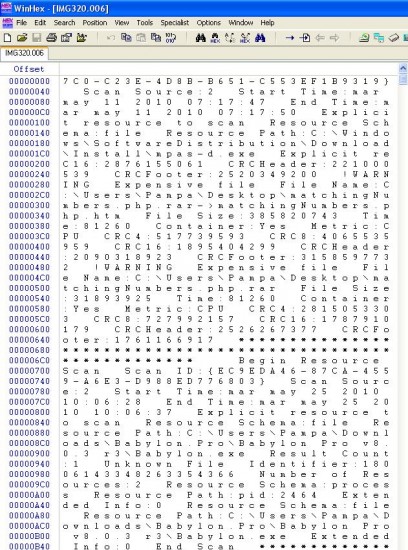
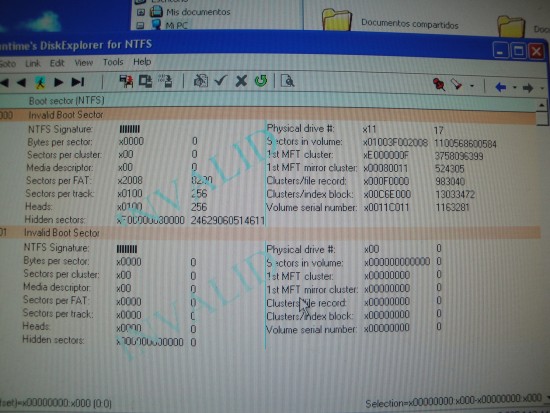
When I was able to do an image with Runtime's DiskExplorer (brother of GetDataBack) I had the 298 GB as in the above screenshot. Many many many entries related to real files!, but no content... as if the whole image were a giant file assignment table.
I have to say that I've used the strategy "skip block on bad sector found" and took about 30 hrs. Running a "retry each sector" will take 59 days :(
Attachment:
image_analysis.JPG
image_analysis.JPG [ 177.04 KiB | Viewed 10948 times ]


My goal now is to ignore completely the first 50GB of the disk (which is where the C: partition used to be, for the OS) and try to recover as most as possible the rest of the disk, ignoring the bad parts. If a file is corrupted it's fine. I'm not going to cry. :oops:

Also, FYI, the disc is giving a looooot of CRC errors, and I think that's because of the missinformation on the first part of the it, telling wrong values.
Attachment:
DSC02162.JPG
DSC02162.JPG [ 2.96 MiB | Viewed 10948 times ]


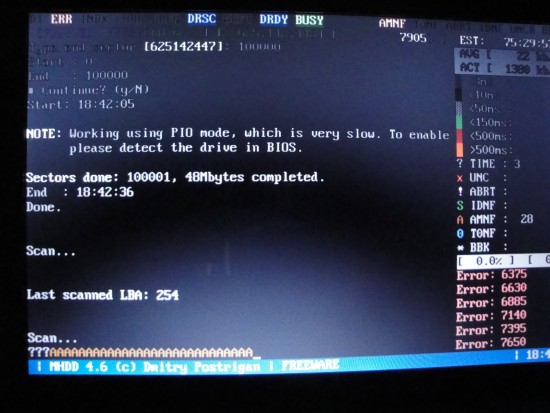
Another two screens that could help to realize what's going on.

Attachment:
DSC02177.JPG
DSC02177.JPG [ 2.74 MiB | Viewed 10948 times ]
Attachment:
DSC02175.JPG
DSC02175.JPG [ 2.85 MiB | Viewed 10948 times ]


Thanks to everyone!


Top
 Profile  
 
 Post subject: Re: MHDD is used
PostPosted: July 15th, 2010, 11:37 
Offline

Joined: July 14th, 2010, 14:31
Posts: 9
Location: Buenos Aires - Argentina
No, that was just to illustrate what happened in SCAN mode after ERASING the first 100.000 sectors.

As I said, not all the time the result is the same.

BTW, there are other parts of the disc that are getting <3ms access time, and some other real bad, however not that that happens in the first 50GB of the disc, which shouldn't hurt so much... the rest are much better.
Attachment:
scan_erase.JPG
scan_erase.JPG [ 83.78 KiB | Viewed 10935 times ]


Top
 Profile  
 
 Post subject: Re: MHDD is used
PostPosted: July 15th, 2010, 23:52 
Offline
User avatar

Joined: September 8th, 2009, 18:21
Posts: 16959
Location: Australia
Spildit wrote:
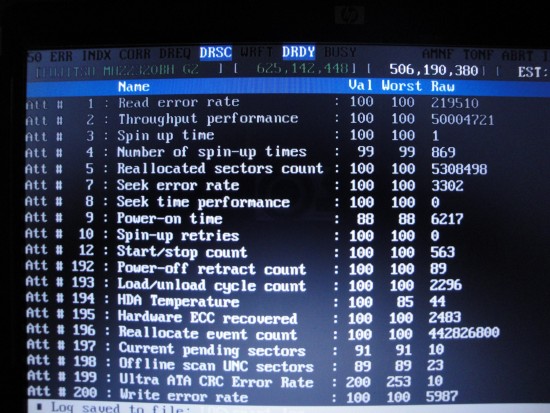
Your realoctaion sector count is at 5308498 !!!!

You need to convert the raw value to hexadecimal. Then you will see the real number of reallocated sectors. Do the same for the reallocate event count.

That said, the normalised values don't make sense in either case.


Top
 Profile  
 
Display posts from previous:  Sort by  
Post new topic Reply to topic  [ 16 posts ] 

All times are UTC - 5 hours [ DST ]


Who is online

Users browsing this forum: Google [Bot] and 33 guests


You cannot post new topics in this forum
You cannot reply to topics in this forum
You cannot edit your posts in this forum
You cannot delete your posts in this forum
You cannot post attachments in this forum

Search for:
Jump to:  
Powered by phpBB © 2000, 2002, 2005, 2007 phpBB Group