Hi,
My neighbour asked me to look what was wrong with his computer, which had developped a variety of problems lately – turned out that the computer's HDD, a ST2000DM001, was in a very bad shape, with above 4000 reallocated sectors and above 5000 weak / unstable ones. I successfully imaged it with ddrescue, with a recovery rate above 99% (I stopped before the end of the “scraping” step which was unnecessarily long and strenuous at that point), and only a few MB of unreadable data (out of only about 200GB worth of actual data based on the allocated size of the “sparse” image file – that recovery wasn't even required as the dude told me that he had “everything in the Cloud”
– even his head sometimes it would seem, his is the only appartment I've ever seen with unidentified stains and spatters on the roof). Apparently the damaged sectors are in two distinct areas, which seem to be “aligned”, relative to their physical location on the platters. What does this pattern indicate ? Is it likely that the damage was caused by a shock, causing a relatively minor head crash ? Yet, this is most likely
a model with 2 platters and 4 heads (there's a mistake on this page, it's 2 platters for the version with a deep groove, according to what I read years ago before purchasing one), so, if a shock caused damage to the platters, shouldn't the unreadable areas form a pattern with four strips at equal distance ? Or could it mean something else entirely ?
Attachment:
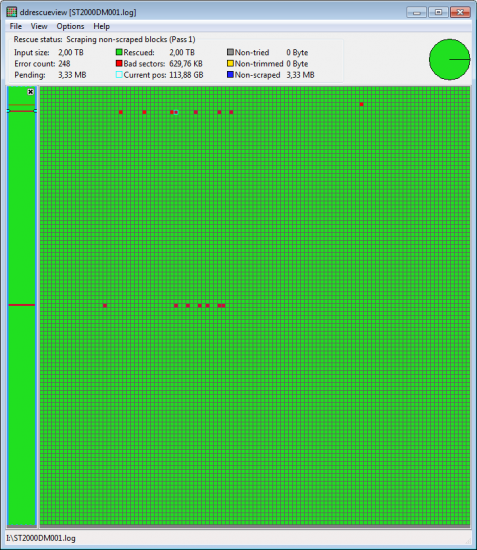 ST2000DM001 Gilles Ledoyen -- ddrescueview (grid size 6px).png [ 18.85 KiB | Viewed 7366 times ]
Before I did the recovery, there were lines in red in GSMARTControl (reallocated sectors / pending sectors) but it still passed the self-test. At the end of the process, it failed the self-test, and a new line appeared in red : “184 End-to-end error count”, with a value of 12. Now, when I plug the drive to my main machine, I get a warning straight up at the P.O.S.T. screen :
Code:
SMART detected HDD/SSD failure: ST2000DM001-1CH164
WARNING: Please back up your data and replace your hard disk drive.
WARNING: Your HDD/SSD might crash at any moment.
And it doesn't boot normally to my Windows install, I have to force boot through the UEFI interface ; I have never seen that before. Then I get regular warnings saying that “Windows had detected a hard disk drive problem”, urging me to start a “recovery process” ; I have never seen that either, even with drives in bad shape connected. In HD Sentinel, the health status for this drive is at 0%, with a long list of warnings.
Attachment:
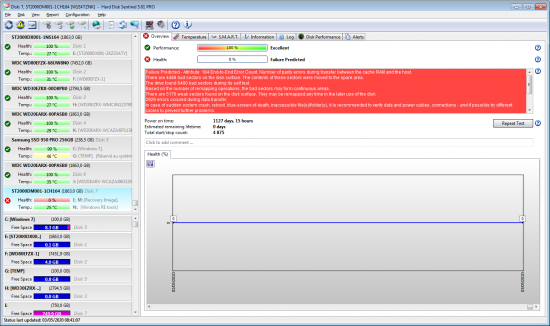 ST2000DM001 Gilles Ledoyen - HDS Overview 202005030844.png [ 138.72 KiB | Viewed 7366 times ]
Still, as I had to do a test requiring a large amount of free space which I didn't have elsewhere at the moment (extracting ~640GB of data from an image of another HDD – which I no longer have – and comparing it with a recovery made directly from that HDD at an earlier point in time, before discarding that image file), I figured that I could try to do it with that one. Since the damaged areas were located between 85GB and 116GB, then between 994 and 999GB, I deleted the main partition, then created a 850GB partition between 125GB and 975GB, then a 834Gb partition beyond 1010GB (thus keeping a safety margin of at least 10GB between the damaged areas and the new partitions), didn't touch the “Recovery” or system reserved partitions. I used the 834GB partition for my testing purposes. And despite the drive's supposedly alarming condition, the extraction of those 640GB went well, at a normal rate. Then I did a thorough comparison between that extraction and the earlier recovery, using WinMerge and DoubleKiller, it also went smoothly, despite the constant nagging about an impending failure, and all the files which were supposed to be identical were indeed found to be identical. There was only one warning in DoubleKiller, one file out of thousands could not be deleted because of an I/O error, then it was deleted the second time around. The number of reallocated sectors did not increase ; the number of pending sectors increased slightly (+64 since yesterday).
What I'm wondering is, how come a drive from this dreaded range of models for which the health assessment is so abysmally bad gets to behave so nicely in practice, for now at least ? I've had trouble once with a ST3000DM001, which initially only had 16 bad sectors, and once I tried to copy files which were occupying bad sectors it became very unstable very quickly, to the point where I couldn't get it to read anything even from areas which were still perfectly readable a few hours prior. What is different in this situation ? Can this drive continue to function like this for a while, now that it's been repartitioned in such a way that the damaged areas should no longer be accessed ? Or is it indeed bound to fail for good at any minute ? (OF COURSE I wouldn't store anything important on it in that state.)
Also :
– What exactly does “end-to-end error” mean ? Is it a particularly severe kind of error ?
– In HD Sentinel's “overview”, what is the difference between “weak sectors” (the value of 5176 corresponds to SMART attribute 197 “pending sector count”), and “bad sectors found during self test” (the value of 6480 corresponds to SMART attribute 198 “offline uncorrectable sector count”) ? Do these two counts partially overlap, i.e., are the 5176 “pending” sectors all included in the 6480 “offline uncorrectable” ones, or are these totally independant assessments ? Then, there are 4488 reallocated sectors, but they're also called “bad sectors” in the report – shouldn't “bad sectors” be the total of all defective sectors, already reallocated or not ?
– “Based on the number of remapping operations, the bad sectors may form continuous areas.” => What does this mean ? How does the number of remapping operations say anything about whether the bad sectors “may form continuous areas” ?
Thanks.



 FAQ
FAQ Search
 Login
Login Register
 HDDGURU FILES
