MultiDrive – free backup, clone & wipe disk utility from Atola Technology

All times are UTC - 5 hours [ DST ]


Post new topic Reply to topic  [ 28 posts ]  Go to page 1, 2  Next
Author Message
 Post subject: Maxtor firmware repairer
PostPosted: February 3rd, 2007, 8:30 
Offline

Joined: February 3rd, 2007, 7:47
Posts: 20
Hi. Im using SalvationData's maxtor firmware repairer to fix my hd but I need a working boot.cod file for a DiamondMaxPlus 8 40GB 63040L0711005 K,M,G,A. Anyone have it?
Ive looked alot of places but I only seem to see ldr & rams files and they only work for pc3000 right? Id be very appreciative of any help you can give.

Thanks.


Top
 Profile  
 
 Post subject:
PostPosted: February 5th, 2007, 14:45 
Offline

Joined: October 23rd, 2006, 8:56
Posts: 1336
I have a few Firmware modules for Diamond Max Plus 8 40GB.
What is the Firmware version?
Im not sure if the boot code is the same on all Firmware revisions.


Top
 Profile  
 
 Post subject:
PostPosted: February 6th, 2007, 2:18 
Offline

Joined: February 3rd, 2007, 7:47
Posts: 20
Thanks for the reply, I think its NAR61EA0.


Top
 Profile  
 
 Post subject:
PostPosted: February 6th, 2007, 3:39 
Offline

Joined: October 23rd, 2006, 8:56
Posts: 1336
Try this one, I think it should work for you.
Quote:
http://rapidshare.com/files/15146545/BOOT.COD.html


Do you just need the Boot.COD, or do you also need the MOD's?


Top
 Profile  
 
 Post subject:
PostPosted: February 6th, 2007, 4:59 
Offline

Joined: February 5th, 2007, 0:10
Posts: 7
I have Maxtor DiamondMaxPlus 8 40GB NAR61HAO too, I use MHDD to set password, but now I not forget password. Are you have a program that can remove password?? Or I must be run program to fix firmware? I want to download SalvationData's maxtor firmware repairer Pro but I haven't got money. Where can I download it? or who are you share it to me?? My English is not good, sorry! Thanks!


Top
 Profile  
 
 Post subject:
PostPosted: February 6th, 2007, 5:34 
Offline

Joined: February 3rd, 2007, 7:47
Posts: 20
quasimodo wrote:
Try this one, I think it should work for you.
Quote:
http://rapidshare.com/files/15146545/BOOT.COD.html


Do you just need the Boot.COD, or do you also need the MOD's?


Ive just been following the manual and it said I needed the boot.cod file. I dont know what the mod's do...
Ill try this and see how it goes.


Top
 Profile  
 
 Post subject:
PostPosted: February 6th, 2007, 6:41 
Offline

Joined: February 3rd, 2007, 7:47
Posts: 20
Hmm well I used that file and I no longer get a hdd error when booting and the drive is recognised in post but I cant see it in windows. The only thing that didnt go perfect when using the firmware repairer was after uploading the boot.cod file, in hdd_info it said it was K C G A whereas my hd is K M G A. Every other code/serial number matched up. :? :?:


Top
 Profile  
 
 Post subject:
PostPosted: February 6th, 2007, 9:53 
Offline

Joined: October 23rd, 2006, 8:56
Posts: 1336
Ok, this should change it to KMGA.
Quote:
http://rapidshare.com/files/15187555/BOOT.RAM.html


Top
 Profile  
 
 Post subject:
PostPosted: February 6th, 2007, 12:28 
Offline

Joined: February 3rd, 2007, 7:47
Posts: 20
Thanks HEAPS for all these files. Id given up getting them.

But unfortunetly that last file didnt change anything. I loaded the .cod file, then .ram using [RW EMS]. Didnt change any firmware


Top
 Profile  
 
 Post subject:
PostPosted: February 6th, 2007, 16:28 
Offline

Joined: October 23rd, 2006, 8:56
Posts: 1336
well,...
The Boot.COD is only for Startup of the Hard drive.
Please give detailed description of the problem.


Top
 Profile  
 
 Post subject:
PostPosted: February 10th, 2007, 8:12 
Offline

Joined: February 3rd, 2007, 7:47
Posts: 20
I cant see the drive in windows and it still says N40P in bios. I think would like to have the exact firmware (KMGA).
I'd go the pc3000 route but its impossible when I cant read the russian interface.


Top
 Profile  
 
 Post subject:
PostPosted: February 10th, 2007, 9:07 
Offline

Joined: October 23rd, 2006, 8:56
Posts: 1336
Run scan mode, and please post the results.


Top
 Profile  
 
 Post subject:
PostPosted: February 10th, 2007, 9:32 
Offline

Joined: February 3rd, 2007, 7:47
Posts: 20
The manuel says a self scan will destroy the data, so I dont wanna try that yet.
Also does it matter that the firmware code isnt EXACTLY the same?


Top
 Profile  
 
 Post subject:
PostPosted: February 10th, 2007, 10:13 
Offline

Joined: October 23rd, 2006, 8:56
Posts: 1336
Noooooo, :shock:
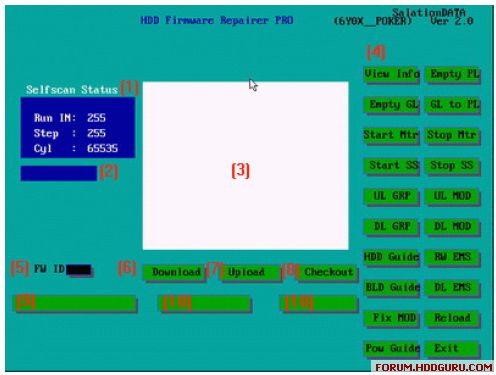
don't run selfscan! (unless you don't need the data) selfscan will wipe your drive. Run [SCAN Mode]. You should have this function on the GUI.


Top
 Profile  
 
 Post subject:
PostPosted: February 10th, 2007, 10:38 
Offline

Joined: February 3rd, 2007, 7:47
Posts: 20
I cant see that button :? . Im using v1.20


Top
 Profile  
 
 Post subject:
PostPosted: February 10th, 2007, 12:09 
Offline

Joined: October 23rd, 2006, 8:56
Posts: 1336
You should be using Maxtor Firmware Repair Pro 6E/6Y.


Top
 Profile  
 
 Post subject:
PostPosted: February 10th, 2007, 12:35 
Offline

Joined: February 3rd, 2007, 7:47
Posts: 20
Yeh, 6E0x.exe


Top
 Profile  
 
 Post subject:
PostPosted: February 13th, 2007, 8:12 
Offline

Joined: February 3rd, 2007, 7:47
Posts: 20
Heres the pic from the manual that im going by. Cant see [scan_mode].
Image


Top
 Profile  
 
 Post subject:
PostPosted: February 14th, 2007, 14:36 
Offline

Joined: February 3rd, 2007, 7:47
Posts: 20
I was going to try running [Fix mod] but im a little worried. In the manual it says to fix the HD if you DONT care about the data to use [fix mod]. But then later on in other procedures that DO keep your data it tells you to use [fix mod].
So can anyone clarify if using [fix mod] wipes the data?

Also while im here what about when emptying the G-list or moving it to P-list?
Just incase I try that.


Top
 Profile  
 
 Post subject:
PostPosted: February 14th, 2007, 14:43 
Offline
User avatar

Joined: January 9th, 2007, 11:12
Posts: 410
Location: Romania
If you want the data do not touch the G-list


Top
 Profile  
 
Display posts from previous:  Sort by  
Post new topic Reply to topic  [ 28 posts ]  Go to page 1, 2  Next

All times are UTC - 5 hours [ DST ]


Who is online

Users browsing this forum: we3fan and 117 guests


You cannot post new topics in this forum
You cannot reply to topics in this forum
You cannot edit your posts in this forum
You cannot delete your posts in this forum
You cannot post attachments in this forum

Search for:
Jump to:  
Powered by phpBB © 2000, 2002, 2005, 2007 phpBB Group