MultiDrive – free backup, clone & wipe disk utility from Atola Technology

All times are UTC - 5 hours [ DST ]


Post new topic Reply to topic  [ 18 posts ] 
Author Message
 Post subject: Maxtor DiamondMax Plus 9
PostPosted: February 9th, 2007, 10:16 
Offline

Joined: January 11th, 2007, 13:11
Posts: 32
Maxtor DiamondMax Plus 9 Calypso
6Y080L0422611
YAR41BW0
N,M,B,A

M6FYA
Image

Any ideea?


Top
 Profile  
 
 Post subject:
PostPosted: February 9th, 2007, 11:54 
Offline

Joined: September 27th, 2005, 4:26
Posts: 505
Location: Bulgaria, Sofia
Those drives are equipped with Poker CPU.

_________________
DataRecovery.bg


Top
 Profile  
 
 Post subject:
PostPosted: February 10th, 2007, 4:14 
Offline

Joined: January 11th, 2007, 13:11
Posts: 32
:oops:
Ok. I will post it on Monday ( the hdd is in my office).
In the meanwhile can anybody explain me a little about DSP/Pocker ?
I have seen some CPU with DSP/Pocker mark on them but this one is Ardent.
Should I understand that Ardent CPU are Pocker CPU?
I know this is a newbee question but.....


Top
 Profile  
 
 Post subject:
PostPosted: February 10th, 2007, 7:46 
Offline
User avatar

Joined: October 2nd, 2005, 0:30
Posts: 288
Location: Jakarta - Indonesia
gill wrote:
:oops:
Ok. I will post it on Monday ( the hdd is in my office).
In the meanwhile can anybody explain me a little about DSP/Pocker ?
I have seen some CPU with DSP/Pocker mark on them but this one is Ardent.
Should I understand that Ardent CPU are Pocker CPU?
I know this is a newbee question but.....


AFAIK, Maxtor used two different chip manufacturer:

1. DSP from Texas Instrument
2. Poker/Ardent from Agere

the second goes to the Poker group (as defined by many HDD repair software).


Top
 Profile  
 
 Post subject:
PostPosted: February 11th, 2007, 6:56 
Offline

Joined: June 27th, 2006, 11:33
Posts: 2288
Location: In ur HDD !
its POKER not POCKER.


Top
 Profile  
 
 Post subject:
PostPosted: February 11th, 2007, 15:27 
Offline

Joined: January 11th, 2007, 13:11
Posts: 32
Thank you Rameez. My mistake.


Top
 Profile  
 
 Post subject:
PostPosted: February 12th, 2007, 12:44 
Offline

Joined: January 11th, 2007, 13:11
Posts: 32
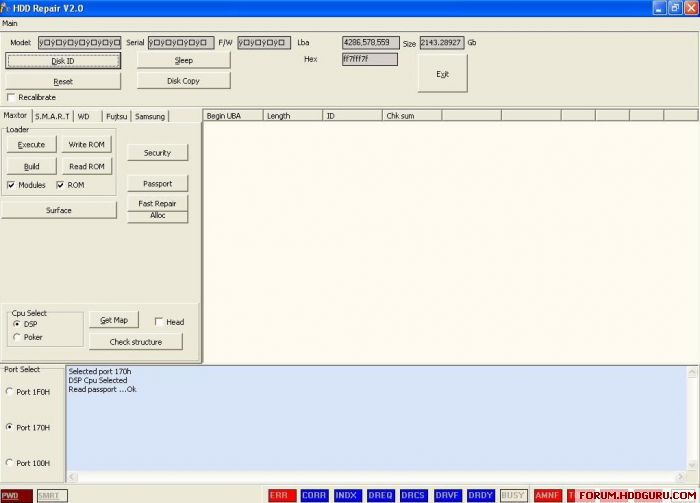
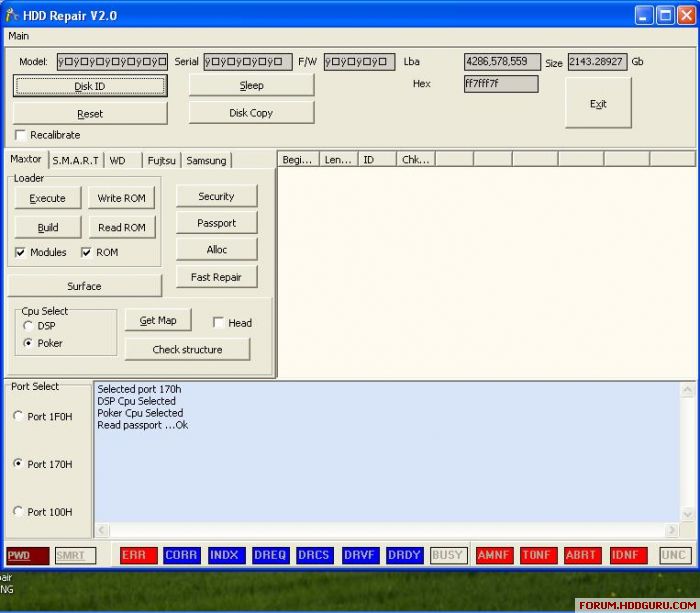
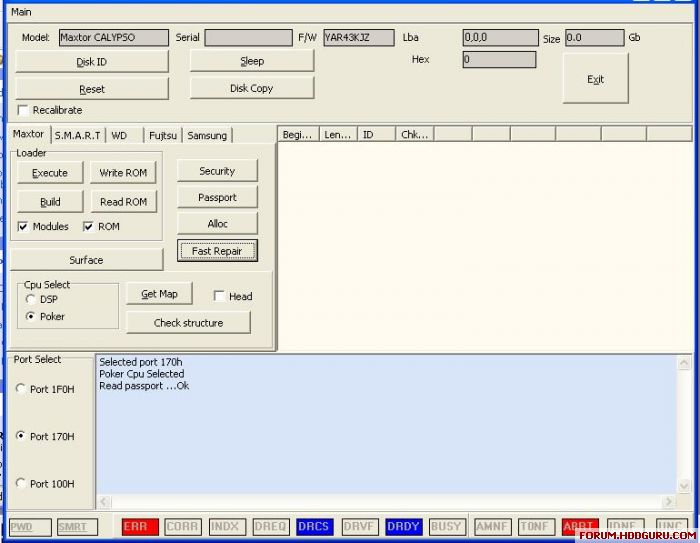
OK. Poker selected. The same thing I think!
So, once again...any ideea?
Image[/img]


Top
 Profile  
 
 Post subject:
PostPosted: February 12th, 2007, 17:42 
Offline

Joined: October 3rd, 2005, 0:40
Posts: 4754
Location: Hungary
Hi,

Apparently there is no working drive connected to port 170, or the prog cannot access that port (all the status and error bits are ON)
U have to reach a state where DRDY and DRCS are on and all the others OFF.

pepe


Top
 Profile  
 
 Post subject:
PostPosted: February 13th, 2007, 2:34 
Offline
User avatar

Joined: January 9th, 2007, 11:12
Posts: 410
Location: Romania
Hi

Yes , i agree with pepe, looks like there is no drive at that port. To check if the program is working, u can select port 1F0 and see if the problem remains or not (the DRDY and DRCS lights must be on, the rest of lights must be off).
Or probably it is a Win XP problem and u should use a little program Userport to gain access to that ports. You can find that program at http://files.hddguru.com.

Rgds


Top
 Profile  
 
 Post subject:
PostPosted: February 13th, 2007, 13:48 
Offline

Joined: January 11th, 2007, 13:11
Posts: 32
I think I made an wrong problem exposure.
"HDD Repair 2.0" is woking. ( At least I think so, I did not repaired any hdd but I've conected working hdd on it and the ID was OK.)
My problem is with the hard disk. This is not working and the print screen is what "HDD Repair 2.0" show when I push "Disk ID"
I was asking for some help regarding what shoud I do with this hard disk.

Or maybee I am so newbee that I can not see that the software is not working as it shoud be.

I am realy in the mist here.


Top
 Profile  
 
 Post subject:
PostPosted: February 13th, 2007, 19:18 
Offline

Joined: October 3rd, 2005, 0:40
Posts: 4754
Location: Hungary
Hi

U can only work with drives becoming ready. But from the picture I can only see that either the port is not working (see ccc-s post, but if U say U worked with drives successfully, I think this is not the case), or the drive is completely dead, or set to slave.

pepe


Top
 Profile  
 
 Post subject:
PostPosted: February 15th, 2007, 12:57 
Offline

Joined: January 11th, 2007, 13:11
Posts: 32
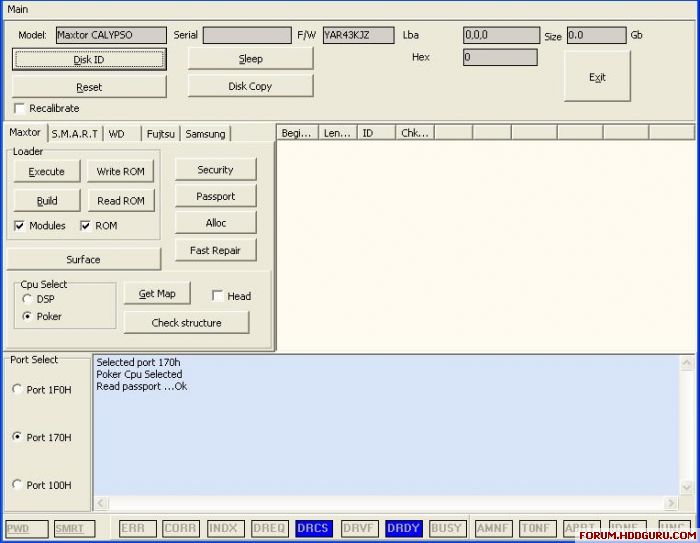
OK. Now hdd is master, it identify it OK, it become ready.

Image

If I touch any of the butons , this is what I get :

Image

So what shoud I do next?


Top
 Profile  
 
 Post subject:
PostPosted: February 16th, 2007, 3:49 
Offline

Joined: June 27th, 2006, 11:33
Posts: 2288
Location: In ur HDD !
U should put the hdd in Safe mode jumper configuration then load the appropriate LDR from the EXECUTE button under the loader option then if command successfull press Check structure button then .


Top
 Profile  
 
 Post subject:
PostPosted: February 16th, 2007, 7:41 
Offline

Joined: January 11th, 2007, 13:11
Posts: 32
Can anybody please give me the "Safe Mode" jumper configuration for Maxtor?


Top
 Profile  
 
 Post subject:
PostPosted: February 16th, 2007, 11:04 
Offline

Joined: February 3rd, 2007, 7:47
Posts: 20
For my Diamondmax 8 POKER safe mode is ['_:::] (pretend there is 2 dots above the _ ).

I see elsewhere that safe mode for a Diamondmax9 60gb Calypso SHOULD be [II:.:]

I cant find one for yours exactly. Maybe try the one I use. I also read it could be for ALL POKER drives.

Again. I cant be certain if these are right (except for the one I use). Its just what ive read on forums.


Top
 Profile  
 
 Post subject:
PostPosted: March 4th, 2007, 13:56 
Offline

Joined: March 4th, 2007, 13:26
Posts: 2
This program you are using "HDD Repair V.2.0" Where did you get it?
I have excactly same problem as you. Did you make it run with these instructions/ program/firmfare files?
:?:


Top
 Profile  
 
 Post subject:
PostPosted: March 23rd, 2007, 19:18 
Offline

Joined: March 23rd, 2007, 14:52
Posts: 9
I woul like also to download HDD Repair v2.0 if possible


Top
 Profile  
 
 Post subject:
PostPosted: March 23rd, 2007, 19:21 
Offline

Joined: November 29th, 2006, 10:08
Posts: 7864
Location: UK
hdd repair 2.0 seems pretty hard to get hold of.

I have.

msn/pm me if you require


Top
 Profile  
 
Display posts from previous:  Sort by  
Post new topic Reply to topic  [ 18 posts ] 

All times are UTC - 5 hours [ DST ]


Who is online

Users browsing this forum: No registered users and 95 guests


You cannot post new topics in this forum
You cannot reply to topics in this forum
You cannot edit your posts in this forum
You cannot delete your posts in this forum
You cannot post attachments in this forum

Search for:
Jump to:  
Powered by phpBB © 2000, 2002, 2005, 2007 phpBB Group