MultiDrive – free backup, clone & wipe disk utility from Atola Technology

All times are UTC - 5 hours [ DST ]


Post new topic Reply to topic  [ 33 posts ]  Go to page Previous  1, 2
Author Message
 Post subject: Re: SCSI Adapters
PostPosted: September 14th, 2013, 14:58 
Offline

Joined: September 4th, 2013, 18:50
Posts: 16
Location: Oklahoma City
The answer to your first question is yes


Top
 Profile  
 
 Post subject: Re: SCSI Adapters
PostPosted: September 14th, 2013, 15:53 
Offline
User avatar

Joined: September 8th, 2009, 18:21
Posts: 16960
Location: Australia
Both drives appear to be OEM versions of Seagate's ST3146707LC.

http://img.auctiva.com/imgdata/1/3/8/8/ ... 186_tp.jpg
BD14688278 = ST3146707LC

http://autos2.bluesock.com/ebay/farnbor ... /13576.jpg
BD146BA4C5 = BD1468A4C5 = ST3146707LC

Compare the jumpers at J2, particularly the SE (single ended) and TP (terminator power) jumpers.

See page 48 of the manual:

Cheetah 10K.7 SCSI Users Guide:
http://www.seagate.com/staticfiles/supp ... 60915d.pdf

_________________
A backup a day keeps DR away.


Top
 Profile  
 
 Post subject: Re: SCSI Adapters
PostPosted: September 14th, 2013, 16:09 
Offline
User avatar

Joined: September 8th, 2009, 18:21
Posts: 16960
Location: Australia
It appears that section 1.1 of the HBA manual allows mixing both LVD and SE devices on the same cable.

Ultra320 SCSI Host Adapters User's Guide:
http://www.lsi.com/downloads/public/scs ... 320_ug.pdf

However, page 67 of Seagate's manual states that "all devices must operate in the same mode, either SE or LVD, but not a mixture of these".

_________________
A backup a day keeps DR away.


Top
 Profile  
 
 Post subject: Re: SCSI Adapters
PostPosted: September 14th, 2013, 19:06 
Offline

Joined: September 4th, 2013, 18:50
Posts: 16
Location: Oklahoma City
Thanks, what really confuses me is that on the sticker of the drive itself it says LVD/SE..


Top
 Profile  
 
 Post subject: Re: SCSI Adapters
PostPosted: September 14th, 2013, 20:04 
Offline
User avatar

Joined: September 8th, 2009, 18:21
Posts: 16960
Location: Australia
Striker wrote:
Thanks, what really confuses me is that on the sticker of the drive itself it says LVD/SE..

That just means that it is capable of either configuration, but you need to choose one or the other via a jumper.

_________________
A backup a day keeps DR away.


Top
 Profile  
 
 Post subject: Re: SCSI Adapters
PostPosted: September 14th, 2013, 23:00 
Offline

Joined: September 4th, 2013, 18:50
Posts: 16
Location: Oklahoma City
Hmm, My drives don't have the J2 Jumper option


Top
 Profile  
 
 Post subject: Re: SCSI Adapters
PostPosted: September 15th, 2013, 1:20 
Offline
User avatar

Joined: September 8th, 2009, 18:21
Posts: 16960
Location: Australia
Sorry, there is a footnote on page 49 that states that J2 does not exist on LC models and is supported on LW models only. Figure 20 says the same thing, but there is a confusing note that states that the TP jumper (Terminator Power) "applies to LW models only; reserved on LC models".

I wonder if, even though the header may be absent, the various options may be strapped into the PCB via preset etches.

Anyway, it looks like I may have introduced a red herring. :-(

_________________
A backup a day keeps DR away.


Top
 Profile  
 
 Post subject: Re: SCSI Adapters
PostPosted: September 15th, 2013, 1:34 
Offline
User avatar

Joined: September 8th, 2009, 18:21
Posts: 16960
Location: Australia
Here is the label for an -LC:
http://tig-rynek.home.pl/apress/SKLEP/D ... 07lc/3.jpg

It has a jumper layout diagram.

This photo of an -LW has no jumpers:
http://www.ixbt.com/storage/scsi2005/ro ... w-back.jpg

Now I'm really confused.

_________________
A backup a day keeps DR away.


Top
 Profile  
 
 Post subject: Re: SCSI Adapters
PostPosted: September 15th, 2013, 1:52 
Offline
User avatar

Joined: September 8th, 2009, 18:21
Posts: 16960
Location: Australia
fzabkar wrote:
Here is the label for an -LC:
http://tig-rynek.home.pl/apress/SKLEP/D ... 07lc/3.jpg

It has a jumper layout diagram ...


... but it states "for LW only", so why bother mentioning it???

_________________
A backup a day keeps DR away.


Top
 Profile  
 
 Post subject: Re: SCSI Adapters
PostPosted: September 15th, 2013, 3:18 
Offline
User avatar

Joined: September 8th, 2009, 18:21
Posts: 16960
Location: Australia
I think I understand the difference between the 80-pin and 68-pin drives.

Seagate's 80-pin -LC drives obtain certain signals from the SCSI interface whereas the 68-pin models obtain these signals via jumpers.

One of these signals is DIFFSNS (pin#46 on 80-way cable). Others are RMT-START and DLYD-START (remote and delayed start).

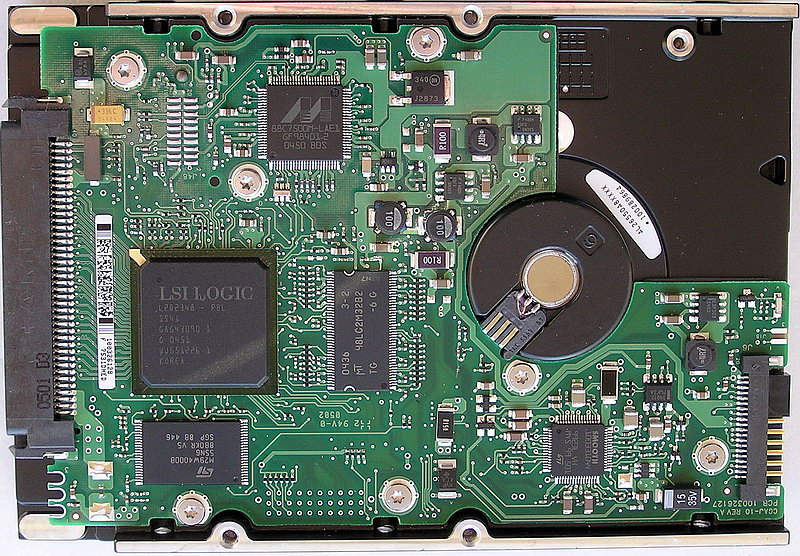
ISTM that your drive needs to get a DIFFSNS signal from the HBA in order to configure itself for LVD mode. Since this signal is not present on the 68-pin cable, then the drive defaults to SE mode. I don't know whether this is the cause of your problems, but it might be worth looking at. If possible, you could try to fudge an appropriate +1.3V signal on this pin to force the drive into LVD mode. If you could show me the underside of your PCB, perhaps we could see how the jumper section is trapped. You would need a Torx screwdriver to remove the board.

The following datasheet might shine some light on the subject:
http://www.ti.com/lit/ds/symlink/ucc5680.pdf

BTW, which of your two drives is the working 68-pin drive?

_________________
A backup a day keeps DR away.


Top
 Profile  
 
 Post subject: Re: SCSI Adapters
PostPosted: September 15th, 2013, 16:55 
Offline
User avatar

Joined: September 8th, 2009, 18:21
Posts: 16960
Location: Australia
Have you tried installing the SYN jumper? I suspect this may be the DIFFSENS signal that determines the SE/LVD mode of the drive .

_________________
A backup a day keeps DR away.


Top
 Profile  
 
 Post subject: Re: SCSI Adapters
PostPosted: September 18th, 2013, 17:17 
Offline

Joined: September 4th, 2013, 18:50
Posts: 16
Location: Oklahoma City
Thanks for the tip, I'll post if it works or not


Top
 Profile  
 
 Post subject: Re: SCSI Adapters
PostPosted: November 4th, 2013, 20:41 
Offline

Joined: September 4th, 2013, 18:50
Posts: 16
Location: Oklahoma City
I never could figure it out, if anyone would be interested in these drives i'm selling them for 20 each, there's three...


Top
 Profile  
 
Display posts from previous:  Sort by  
Post new topic Reply to topic  [ 33 posts ]  Go to page Previous  1, 2

All times are UTC - 5 hours [ DST ]


Who is online

Users browsing this forum: Google [Bot] and 97 guests


You cannot post new topics in this forum
You cannot reply to topics in this forum
You cannot edit your posts in this forum
You cannot delete your posts in this forum
You cannot post attachments in this forum

Search for:
Jump to:  
Powered by phpBB © 2000, 2002, 2005, 2007 phpBB Group