MultiDrive – free backup, clone & wipe disk utility from Atola Technology

All times are UTC - 5 hours [ DST ]


Post new topic Reply to topic  [ 8 posts ] 
Author Message
 Post subject: How can I partition my hard drive? Help!!!
PostPosted: September 16th, 2010, 22:50 
Offline

Joined: September 16th, 2010, 22:37
Posts: 3
Location: China
Hay, guys, first time to ask question here, I just want to connect the information you all provide about the operation of hard drive partition. My hard disk is filled with data, files and some other "rubbish", hah, the running speed of my computer is slower and slower. I have no idea about this, my friend told me I can partition my hard drive, but how, he said he do not know as well. So, help me, guys, I know you are all kindhearted. :D


Top
 Profile  
 
 Post subject: Re: How can I partition my hard drive? Help!!!
PostPosted: September 17th, 2010, 0:33 
Offline

Joined: December 17th, 2009, 22:57
Posts: 142
Location: Macedonia
If your hard drive is full with data, partitioning will do nothing to seed up you computer. Now is time for new external hard disk and then you can move all your "rubbish" data on external. After moving data you will make a lot of space on your internal hard disk, second is defragmentation, and then your computer will wotk little bit faster but you will see difference in speed.

_________________
Sistrum Data Recovery
http://www.sistrum.mk/en


Top
 Profile  
 
 Post subject: Re: How can I partition my hard drive? Help!!!
PostPosted: September 17th, 2010, 17:54 
Offline
User avatar

Joined: September 8th, 2009, 18:21
Posts: 16960
Location: Australia
There are many reasons why a machine may perform slowly.

If you're running Windows, check the number and type of tasks that are running in the background. You can use Task Manager for this. If you're running Windows XP, you can use MSCONFIG to disable some of the unnecessary programs that automatically load on start-up.

To test your hard drive, you can use HD Tune's read/write benchmarks:
http://www.hdtune.com/
http://www.hdtune.com/testresults.html

To optimise your hard drive, after backing up your data, you can use Disk Management to repartition it with separate OS and data partitions.


Top
 Profile  
 
 Post subject: Re: How can I partition my hard drive? Help!!!
PostPosted: September 19th, 2010, 1:49 
Offline

Joined: September 16th, 2010, 22:37
Posts: 3
Location: China
Kum Ruzvelt wrote:
If your hard drive is full with data, partitioning will do nothing to seed up you computer. Now is time for new external hard disk and then you can move all your "rubbish" data on external. After moving data you will make a lot of space on your internal hard disk, second is defragmentation, and then your computer will wotk little bit faster but you will see difference in speed.

Yeah, thanks for your advise, I will buy a external hard drive. :D


Top
 Profile  
 
 Post subject: Re: How can I partition my hard drive? Help!!!
PostPosted: September 19th, 2010, 1:51 
Offline

Joined: September 16th, 2010, 22:37
Posts: 3
Location: China
fzabkar wrote:
There are many reasons why a machine may perform slowly.

If you're running Windows, check the number and type of tasks that are running in the background. You can use Task Manager for this. If you're running Windows XP, you can use MSCONFIG to disable some of the unnecessary programs that automatically load on start-up.

To test your hard drive, you can use HD Tune's read/write benchmarks:
http://www.hdtune.com/
http://www.hdtune.com/testresults.html

To optimise your hard drive, after backing up your data, you can use Disk Management to repartition it with separate OS and data partitions.
I know the disk management can finish the work, but I also heard of that the disk management can not work well, it is true?


Top
 Profile  
 
 Post subject: Re: How can I partition my hard drive? Help!!!
PostPosted: September 19th, 2010, 21:16 
Offline
User avatar

Joined: September 8th, 2009, 18:21
Posts: 16960
Location: Australia
cuplife wrote:
I know the disk management can finish the work, but I also heard of that the disk management can not work well, it is true?

I haven't heard anything like that. However, I know that Win XP cannot create FAT32 partitions that are larger than 32GB, although it can work with them. Win XP also doesn't understand the newer GUID partition structure, nor does it optimally align the partitions on Advanced Format 4KB-sectored drives.


Top
 Profile  
 
 Post subject: Re: How can I partition my hard drive? Help!!!
PostPosted: September 19th, 2010, 23:52 
Offline

Joined: December 17th, 2009, 22:57
Posts: 142
Location: Macedonia
Yes it is possible now with Windows Vista and 7. In Disk Management you can resize partitions but in your case is one hard disk and windows is unable to change system partition.

_________________
Sistrum Data Recovery
http://www.sistrum.mk/en


Top
 Profile  
 
 Post subject: Re: How can I partition my hard drive? Help!!!
PostPosted: September 27th, 2010, 21:36 
Offline
User avatar

Joined: October 22nd, 2008, 22:07
Posts: 110
Ptaak:

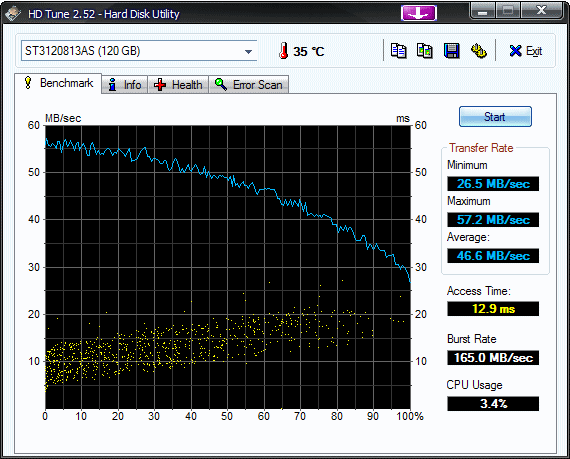
http://www.hdtune.com/results/Seagate_ST3120813AS.gif

That is what it should look like, more or less. If you see severe drops off the curve, falling from time to time, to 5 or 10 Mb / sec, and the locations are the same on each run of the test, then the drive itself is failing and needs to be replaced. A fair number of drives are like that, they slow down before they start developing large numbers of bad sectors.

As for partitioning and drive cloning before partitioning, I will say "Hiren" but I cannot say more than that.

_________________
http://www.youtube.com/user/TerraformingMaster


Top
 Profile  
 
Display posts from previous:  Sort by  
Post new topic Reply to topic  [ 8 posts ] 

All times are UTC - 5 hours [ DST ]


Who is online

Users browsing this forum: No registered users and 49 guests


You cannot post new topics in this forum
You cannot reply to topics in this forum
You cannot edit your posts in this forum
You cannot delete your posts in this forum
You cannot post attachments in this forum

Search for:
Jump to:  
cron
Powered by phpBB © 2000, 2002, 2005, 2007 phpBB Group