All times are UTC - 5 hours [ DST ]


Post new topic Reply to topic  [ 8 posts ] 
Author Message
 Post subject: Need help understanding GNU ddrescue imaging results
PostPosted: February 20th, 2014, 12:41 
Offline

Joined: February 18th, 2014, 14:07
Posts: 11
Location: America
A little background on this.

It's an 256 GB SSD drive with Windows SP3 32-bit and it's encrypted with PGP Whole Disk Encryption. The file system is corrupt and unreadable.

I first ran Clonezilla to clone the drive with -q1 (sector clone) and Clonezilla could not start the clone process because it said the drive is physically damaged (does it determine this by using SMART or looking at the G-List?). I then checked off -rescue (skips bad sectors) and it cloned.

I wanted a better image/clone so I found Ubuntu Rescue Remix Live CD and ran GNU ddrescue. I created an image of the SSD drive using the following syntax:
sudo ddrescue -r 5 -v -d {source drive} {dest drive/imgfile} logfile
(retries bad sectors 5 times; verbose output to screen; direct access mode to skip kernel cache).

It finished in 2:30-3:00 hours. The average transfer rate was around (25.88 MB/s) (I used eSATA and SATA, respectively, to transfer data). It also lists "errors: 116" and "errsize: 470 kB". For the record, the program lists "Sector size: 512 bytes" and "Copy block size: 128 sectors". I attached a screenshot so I hope it displays properly.

Two things:

1) Are the results saying that 116 errors (sectors or blocks?) totaling 470 kB were found and transferred or found and not transferred? If you notice, the program says it's about to copy 256052 MB and it says it rescued 256052 MB. So, I'm really not sure.
2) Is 116 errors considered to be a lot and indicative of physical damage?

For the moment, I can confirm that, at the very least, over 99% of data was transferred. I'd say that's pretty good. In fact, the rough calculation is: 1 - (470 kB/256 GB) =~ 0.9999981640625 --> 0.9999981640625 * 100 ~ 99.9998%.

Again, Clonezilla couldn't clone, at first, because it reported that the drive is physically damaged. Yet, while GNU ddrescue reported 116 errors, at least most of the data was imaged. I know there are logical errors on the drive. But is this drive physically damaged based on 116 errors totaling 470 kB?


Attachments:
GNUddrescue_results.jpg
GNUddrescue_results.jpg [ 1.7 MiB | Viewed 8039 times ]
Top
 Profile  
 
 Post subject: Re: Need help understanding GNU ddrescue imaging results
PostPosted: February 21st, 2014, 12:31 
Offline

Joined: February 18th, 2014, 14:07
Posts: 11
Location: America
I got no reply so I'll update and hope someone out there smarter than me will reply with some answers.

I ran GNU ddrescue once more, with read retries increased from 5 to 20. Everything else is the same, including the results (it took slightly longer to image than the first time, because of the read retry increase). Yes, the error count and error size (still don't understand their relationship or what an error means in this program) are 116 and 470 kB, exactly the same as the first time I imaged with this program. What could that mean? Put a gun to my head, I'd say this SSD drive is not physically damaged. And if it is, it's slight. I still don't know if 116 errors is a lot, but here's why I think there's no physical damage. If there was, wouldn't the error count and error size go UP the 2nd time I imaged the drive, especially with increasing the read retries to 20?

I wanted the errors to go down, which is why I tried imaging again. I don't have much experience with SSDs. But perhaps they differ from mechanical disks in that if you can't read a bad block, most likely you won't be able to, no matter how many times you retry. I'm assuming data recovery services have vastly superior software and hardware tools that could read bad blocks from an SSD, however.

This SSD drive has been slaved quite a few times to analyze and also attempt decryption. I've cloned with it Clonezilla (which claims it's physically damaged), and then I imaged it twice with GNU ddrescue with one parameter value increased and the image results are exactly the same. One would think that with all that this drive has been through, if it was failing, it would take a long time to read from/write to and the number of errors would increase. But none of that has happened. Maybe I'm just getting lucky and it is physically damaged. But if it is, I think it's slight.

But I'll ask again: Is 116 errors a lot? What's the correlation of errors to error size, when I've read accounts of image results with 1 error and an error size of many, many GBs? And is an error here in terms of sectors, blocks, or some other measurement?

Thank you.


Top
 Profile  
 
 Post subject: Re: Need help understanding GNU ddrescue imaging results
PostPosted: February 21st, 2014, 12:48 
Offline

Joined: August 18th, 2010, 17:35
Posts: 3630
Location: Massachusetts, USA
That's a good image generally speaking.

Problem is where those errors are located. How so?
Well, if those errors are located in areas that are occupied by critical file system structures, then the file system interpretation by Windows, data recovery software, etc. may not be done correctly.
For example, let's imagine a book with thousands of pages, where the table of content page or a half page of it is missing (equivalent to one or more of the 116 errors), then the reader would have a problem understand structurally "where at what page" is located, especially if it is written in a language that "nobody understands".

Per your description, the data on your SSD is encrypted, therefore again, the location of those errors play a role in the decryption process itself. Now, there is likely a way to force decrypt the volume on there regardless of file system interpretation, but that is a different story.

These explanations/thoughts above are what I had in mind when I suggested earlier to compare encrypted vs. decrypted.

_________________
Hard Disk Drive, SSD, USB Drive and RAID Data Recovery Specialist in Massachusetts


Top
 Profile  
 
 Post subject: Re: Need help understanding GNU ddrescue imaging results
PostPosted: February 24th, 2014, 15:12 
Offline

Joined: February 18th, 2014, 14:07
Posts: 11
Location: America
That's a great question; where are the errors located?

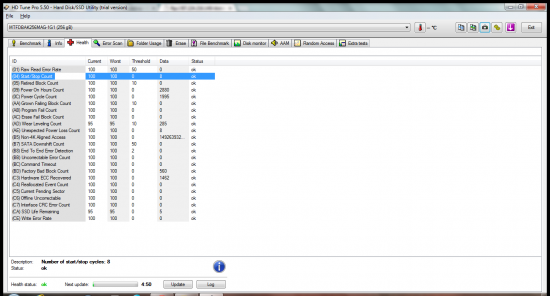
I turned to HD Tune, initially, but SMART health monitor wasn't functioning properly. I could see the data values, but it couldn't verify the disk's health. I had installed it on my company's loaner laptop. I don't know if it was the tool, the SSD having compatibility issues with some SMART tools, or maybe it's permissions since I don't have full admin rights. I've read that some SSDs, notably ones when they were first released, either had no support for SMART there inconsistent issues. My SSD does have support for SMART and TRIM, as it turns out, but I know TRIM support is disabled because the OS is WinXP. As far as SMART, I installed HD Tune Pro on my personal laptop and I had no issues whatsoever with SMART.

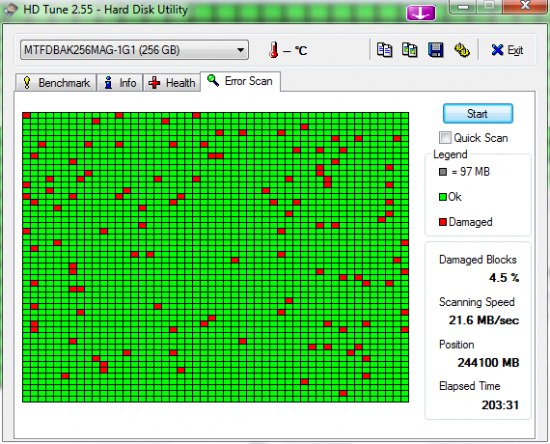
I'm attaching the SMART Health Results and the Error Scan Results.

I found out the SSD is an OEM from Crucial/Micron. HP puts their name on it. It's a RealSSD C300, except it's modified for HP and probably other PC mfrs. It's a SATA 2 that operates at 3 Gb/s, not the 6 Gb/s that the C300 normally operates at if you were to purchase it off the shelf. I couldn't find any mfr diagnostic tools for it. That would've been really helpful. It's firmware version 0005, which is an early version.

I understand that a SMART scan which indicates the drive is in good health doesn't mean it couldn't fail tomorrow. Case in point: I tried running HDD Regenerator and SpinRite on the drive but both indicated there was a delay, right at the first block/tile, and they never really started. I left the HDD Regen running for an hour and it was 0.0%. SpinRite (on level 1 and 2) was also an hour, maybe 2 hours, and it was 0.02 or 0.02%, something like that. The point is I couldn't even run those tools. The SMART health scan does show that bad block/sector reallocation was ever done on the SSD.

The SMART error scan displays -- I counted -- 113 errors. As you can see, there is an error in the very first tile of the scan, which might be why the HDD Regen and SpinRite both essentially hung. I didn't take a screen shot of it, but there was a feature in the error scan which can show you were scanning was "fast" and "slow". I saw more "slow" than "fast". And, interestingly, GNU ddrescue also shows 113 errors. I checked the GNU ddrescue manual again and I think it refers to these errors as areas. The cluster size for ddrescue was set at the default of 64 KB. In HD Tune, the tile size is 97 MB for my SSD, but I don't see where it indicates the block size or how it would show if I have multiple bad blocks in one tile.

For GNU ddresuce, I had 113 errors, with an error size of 458 KB. That's roughly 4 KB per error, or 8 512-byte sectors. The SSD is using NTFS, with a block size of 4KB. Is that NTFS 4 KB block size what GNU ddrescue and HD Tune are referring to when they indicate the error count?

Would you say my SSD drive is in good health, with everything stated thus far?

Lastly, these errors are of a physical or logical nature or possibly both?

Thank you.


Attachments:
File comment: Error Scan Results
HDTune_Error_Scan_MTFDBAK256MAG-1G1.png
HDTune_Error_Scan_MTFDBAK256MAG-1G1.png [ 55.84 KiB | Viewed 7955 times ]
File comment: SMART Health Results
23-February-2014_18-59.png
23-February-2014_18-59.png [ 110.22 KiB | Viewed 7955 times ]
Top
 Profile  
 
 Post subject: Re: Need help understanding GNU ddrescue imaging results
PostPosted: February 24th, 2014, 16:36 
Offline
User avatar

Joined: September 8th, 2009, 18:21
Posts: 14946
Location: Australia
Could we see ddrescue's logfile?

_________________
A backup a day keeps DR away.


Top
 Profile  
 
 Post subject: Re: Need help understanding GNU ddrescue imaging results
PostPosted: February 24th, 2014, 16:45 
Offline

Joined: February 18th, 2014, 14:07
Posts: 11
Location: America
I thought I had created a log file for ddrescue, but I think I've been doing it incorrectly. The logfile I use is for the image to be resumed, instead of having to start over. When the image is complete, the log file is gone. At least, that's what I've observed. I understand there is a way to specifically create a log file with GNU ddrescue. The only log I have, at the moment, is a verbose output of the imaging (this can be seen an earlier I screen shot I attached). I'm currently running ddrescue, again, with direct access, verbose output, 10 retries, and reverse imaging enabled. I understand that reverse imaging is not supposed to have any effect on SSDs, but I have multiple images at this point and have nothing to lose by trying.

If I make another image, before I give back the SSD drive, I'll do my homework and try to enable an actual log file. I would stop the current imaging and enable logging, but I'll only have access to the computer tonight.

For reference, I create a log file similar to this syntax:

ddrescue /dev/sda1 /mnt/ssd/ssdimage.img logfile.log

But when I browse the destination drive after the image is done, I only see the image. I don't see any log files.

Thank you.


Top
 Profile  
 
 Post subject: Re: Need help understanding GNU ddrescue imaging results
PostPosted: February 24th, 2014, 23:19 
Offline
User avatar

Joined: September 8th, 2009, 18:21
Posts: 14946
Location: Australia
HDDWizard wrote:
For reference, I create a log file similar to this syntax:

ddrescue /dev/sda1 /mnt/ssd/ssdimage.img logfile.log

But when I browse the destination drive after the image is done, I only see the image. I don't see any log files.

I think your command line is writing logfile.log to the same drive that ddrescue is being launched from. Since you are using a Ubuntu Rescue Remix Live CD, then it would appear that ddrescue would be trying to log all operations to the optical drive.

Instead, something like the following should work:

ddrescue /dev/sda1 /mnt/ssd/ssdimage.img /dev/ice/logfile.log

As for analysing the log, I believe some ddrescue packages include a tool called ddrescuelog. There is also a GUI tool.

ddrescueview - graphical viewer for GNU ddrescue log files:
http://sourceforge.net/projects/ddrescueview/

_________________
A backup a day keeps DR away.


Top
 Profile  
 
 Post subject: Re: Need help understanding GNU ddrescue imaging results
PostPosted: February 25th, 2014, 11:03 
Offline

Joined: February 18th, 2014, 14:07
Posts: 11
Location: America
fzabkar wrote:
HDDWizard wrote:
For reference, I create a log file similar to this syntax:

ddrescue /dev/sda1 /mnt/ssd/ssdimage.img logfile.log

But when I browse the destination drive after the image is done, I only see the image. I don't see any log files.

I think your command line is writing logfile.log to the same drive that ddrescue is being launched from. Since you are using a Ubuntu Rescue Remix Live CD, then it would appear that ddrescue would be trying to log all operations to the optical drive.

Instead, something like the following should work:

ddrescue /dev/sda1 /mnt/ssd/ssdimage.img /dev/ice/logfile.log

As for analysing the log, I believe some ddrescue packages include a tool called ddrescuelog. There is also a GUI tool.

ddrescueview - graphical viewer for GNU ddrescue log files:
http://sourceforge.net/projects/ddrescueview/


You're correct. That's exactly the issue.

I'm not sure I can make another image or clone of the SSD. I tried a couple of times yesterday and my computer shut down. I noticed the data transfer speed was something like 2-3 MB/s, but that could be because the drive's cache is not utilized in reverse cloning/imaging processes, as far as I know. I checked the drive's SMART health with Victoria and it said the SSD was fine. Same thing applies to the destination drive that's storing these images (the destination drive is brand new). I'll try tonight to run a ddrescue scan and get that log file. So far, my company has not bothered me yet but that could change this week, as early as today.


Top
 Profile  
 
Display posts from previous:  Sort by  
Post new topic Reply to topic  [ 8 posts ] 

All times are UTC - 5 hours [ DST ]


Who is online

Users browsing this forum: No registered users and 6 guests


You cannot post new topics in this forum
You cannot reply to topics in this forum
You cannot edit your posts in this forum
You cannot delete your posts in this forum
You cannot post attachments in this forum

Search for:
Jump to:  
Powered by phpBB © 2000, 2002, 2005, 2007 phpBB Group