MultiDrive – free backup, clone & wipe disk utility from Atola Technology

All times are UTC - 5 hours [ DST ]


Post new topic Reply to topic  [ 11 posts ] 
Author Message
 Post subject: Western Digital WD1600JB-00REA0 does not spin... TVS diodes?
PostPosted: March 28th, 2011, 6:13 
Offline

Joined: March 28th, 2011, 6:02
Posts: 2
Location: France
Hello everyone, i'm new on here and it seems that it's the place to ask when a HDD problem occurs :)
Introducing myself : I'm an IT professionnal, based in France, and am 33 y/o.

Now, on to the question. One of my customers has had an electrical blackout this weekend, which of course caused his PC to switch off.
He tried to start the PC, but the HDD does not spin anymore. It seems that the PCB is dead, or something like this, because mecanically the drive is OK and that it definitely does not even try to spin up.
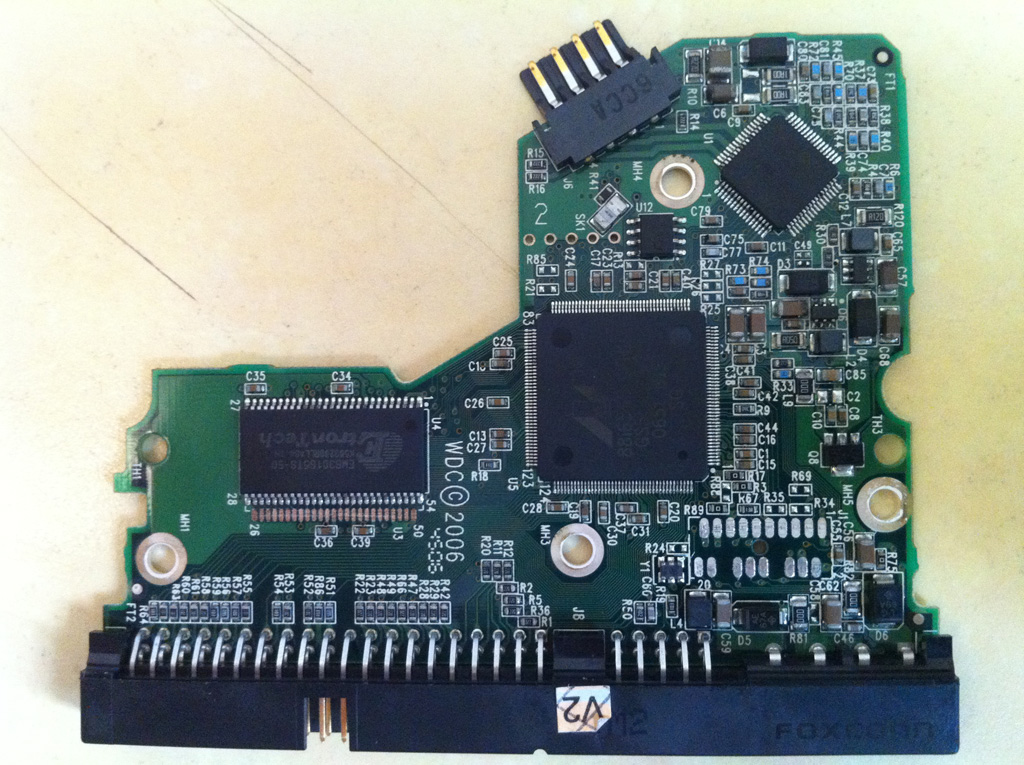
I've read several topics speaking about TVS diodes that may be guilty, and was wondering if someone could help and tell me which diodes must i try to remove to try and recover the data ? I don't need the HDD to be saved for a long time, i just want to have it spin again so that i can ghost it on a brand new hdd, and really need this data back.
Anyone could help ?

Hard Drive:
Model: WD1600JB-00REA0
Date: 27 FEB 2007
DCM: HSBHNT2AH

PCB Info:
2061-701292-C00 AH

Here is the picture of the actual PCB :
Image

Many thanks in advance.


Top
 Profile  
 
 Post subject: Re: Western Digital WD1600JB-00REA0 does not spin... TVS diodes?
PostPosted: March 28th, 2011, 10:18 
Offline

Joined: March 6th, 2011, 23:32
Posts: 260
Location: TN
Check D5 and D6


Top
 Profile  
 
 Post subject: Re: Western Digital WD1600JB-00REA0 does not spin... TVS diodes?
PostPosted: March 28th, 2011, 10:20 
Offline

Joined: March 28th, 2011, 6:02
Posts: 2
Location: France
many thanks for the reply !!!
Can i cut them both or is there a risk ?


Top
 Profile  
 
 Post subject: Re: Western Digital WD1600JB-00REA0 does not spin... TVS diodes?
PostPosted: March 28th, 2011, 11:17 
Offline

Joined: May 6th, 2008, 22:53
Posts: 2138
Location: England
L-Tech wrote:
Can i cut them both

As networks said - you should check them, before deciding what to do. Diagnose first; act second.

To avoid me repeating again the same info as another member has given several times, you can look at the postings of fzabkar on this forum, who has previously given lots of examples of testing TVS diodes.

By removing the diode(s), you lose over-voltage protection on the related power input.

[edited to add this: In addition to checking the TVS diodes, it would also be a good idea to check the values of zero-ohm resistors R81 & R82.]

P.S. Your company website front page is breaking Google's guidelines, by having invisible links. :down:


Last edited by Vulcan on March 28th, 2011, 11:32, edited 1 time in total.

Top
 Profile  
 
 Post subject: Re: Western Digital WD1600JB-00REA0 does not spin... TVS diodes?
PostPosted: March 28th, 2011, 11:26 
Offline

Joined: March 7th, 2009, 12:43
Posts: 1091
Location: Angel Data Recovery
With your symptoms, more likely problem with motor driver chip (U1), and it would be nice that the only.

_________________
Angel Data Recovery


Top
 Profile  
 
 Post subject: Re: Western Digital WD1600JB-00REA0 does not spin... TVS dio
PostPosted: August 25th, 2011, 11:21 
Offline

Joined: October 23rd, 2008, 6:11
Posts: 110
hello folks

i have same drive with somehow same problem.
drive details: WD1600JB-00REA0, dcm-
H8BHNT2CH
14 SEP 2006
pcb 2061-701292-C00 AE
MALAYSIA

attache a picture (sorry for quality). if u follow the arrow there is a burned chip. what is this chip? can it be exchange?
will it help for data recovery?

tks for your assistance

ephraim


Attachments:
burned with arrow.jpg
burned with arrow.jpg [ 1.87 MiB | Viewed 10635 times ]
BURNED MBO.jpg
BURNED MBO.jpg [ 391.67 KiB | Viewed 10635 times ]
Top
 Profile  
 
 Post subject: Re: Western Digital WD1600JB-00REA0 does not spin... TVS dio
PostPosted: August 25th, 2011, 23:30 
Offline

Joined: March 6th, 2011, 23:32
Posts: 260
Location: TN
Need better quality pics the ones posted cant tell anything.


Top
 Profile  
 
 Post subject: Re: Western Digital WD1600JB-00REA0 does not spin... TVS dio
PostPosted: August 26th, 2011, 7:17 
Offline

Joined: October 23rd, 2008, 6:11
Posts: 110
hello folks again

i have same drive with somehow same problem.
drive details: WD1600JB-00REA0, dcm-
H8BHNT2CH
14 SEP 2006
pcb 2061-701292-C00 AE
MALAYSIA

attache a picture (better than last one). if u follow the circle there is are burned chips. what are these chips? can they be replaced?
will it help for data recovery?

tks for your assistance

ephraim


Attachments:
BURNED MBO -4.GIF
BURNED MBO -4.GIF [ 1.29 MiB | Viewed 10590 times ]
Top
 Profile  
 
 Post subject: Re: Western Digital WD1600JB-00REA0 does not spin... TVS dio
PostPosted: August 26th, 2011, 7:44 
Offline

Joined: March 6th, 2011, 23:32
Posts: 260
Location: TN
I am guessing your best bet is to get another PCB and move U12 over or have one of the PCB houses do it for you. One place is http://www.hdd-parts.com


Top
 Profile  
 
 Post subject: Re: Western Digital WD1600JB-00REA0 does not spin... TVS dio
PostPosted: August 26th, 2011, 10:53 
Offline

Joined: October 23rd, 2008, 6:11
Posts: 110
tks a lot networks .

do u know something about those chips?

is the supplier u mentioned is reliable?

brgds and tks again

ephraim


Top
 Profile  
 
 Post subject: Re: Western Digital WD1600JB-00REA0 does not spin... TVS dio
PostPosted: August 26th, 2011, 14:56 
Offline

Joined: March 6th, 2011, 23:32
Posts: 260
Location: TN
ephraim2 - I was not talking about individual components. If you order a new complete PCB and get the rom U12 swapped over that is no guarantee it will fix the drive. I have no idea what the chip number is I can't even tell from the better photo at the beginning of this thread. I think the damage is to great to take a chance replacing the components myself. Your pre-amp on the head stack could also have been taken out when the surge hit.


Top
 Profile  
 
Display posts from previous:  Sort by  
Post new topic Reply to topic  [ 11 posts ] 

All times are UTC - 5 hours [ DST ]


Who is online

Users browsing this forum: No registered users and 165 guests


You cannot post new topics in this forum
You cannot reply to topics in this forum
You cannot edit your posts in this forum
You cannot delete your posts in this forum
You cannot post attachments in this forum

Search for:
Jump to:  
Powered by phpBB © 2000, 2002, 2005, 2007 phpBB Group
