MultiDrive – free backup, clone & wipe disk utility from Atola Technology

All times are UTC - 5 hours [ DST ]


Post new topic Reply to topic  [ 9 posts ] 
Author Message
 Post subject: WD Passport Element - WD7500KMVV board issue
PostPosted: July 2nd, 2011, 22:10 
Offline

Joined: July 2nd, 2011, 21:41
Posts: 3
Location: United States
Hello all. I'm an unfortunate recipient of one of these brutal WD Passport Element SE drives, got it as a gift last year. I have the 750gb version, with the WD7500KMVV 2.5" drive. I was backing up some work data last week using Acronis True Image Echo Workstation when it became obvious there was some problem with the drive. After an hour or so into the backup, which had always run smoothly, files could no longer be backed up. Upon trying to reconnect the drive, the light comes on and the disk spins as normal...but the device is not recognized by Windows or Disk Management. I tried different computers and many Data Recovery software programs and also a Linux Knoppix 6.4.3 Live CD to no avail.

I found this post on here (below) that I was hoping would be a solution that involved moving the U12 (and possibly U14) memory chips:
http://forum.hddguru.com/wd10tmvv-t16204-60.html
I spoke with Western Digital support and since the drive was still under warranty I did an advanced RMA (meaning they send you a replacement drive before receiving your bad drive, if you provide a credit card for hold in case you don't send yours back to them). I also have approval to attempt "data recovery" from my drive before sending my bad drive back, they made a note of this so that I won't void the warranty return.

I recently recieved my replacement drive, and it isn't exactly the one I had. I have the 750gb version and they sent me the 1TB version. I figured "no big deal" and that I could still do the chip swap as mentioned in the other thread on here. Well here's the dilemma. My 750gb board does not have any chip installed at U12. There is only one at U14. I'd be grateful if someone could shed some light on this if they have any knowledge on this scenario. I have some of the data backed up on an older drive and this isn't worth paying $1000+ for one of those data recovery companies. I already bought a new SATA->USB Hard Drive Enclosure and will be making my own portable backup drive(s) from now on, but I'd like to get the data off this WD CrapPort if it only involves swapping a chip or two.

Here is a photo of the WD7500KMVV board and drive:
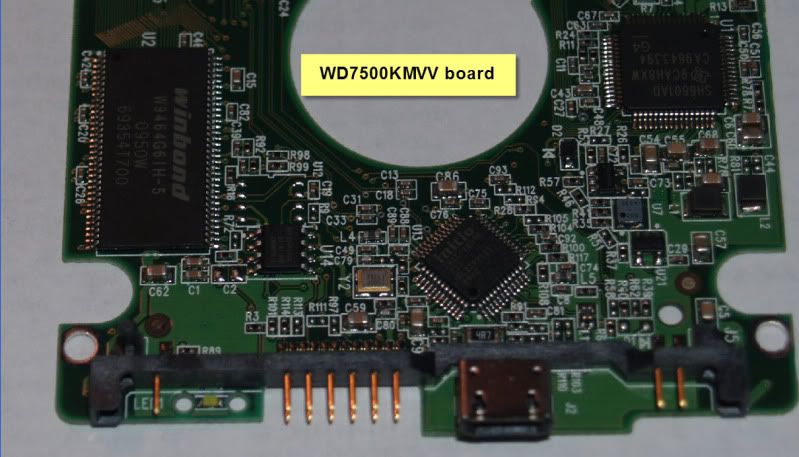
Image
Image

and here is a photo of the replacement drive they sent me, the WD10TMVV board and drive:
Image
Image


Top
 Profile  
 
 Post subject: Re: WD Passport Element - WD7500KMVV board issue
PostPosted: July 3rd, 2011, 10:18 
Offline
User avatar

Joined: June 8th, 2006, 19:44
Posts: 3144
Location: Atlanta, GA
No external EPROM mean the ROM is embedded in CPU.

Except perhaps for connector issues, board problems in this series aren't common. Head and firmware issues are more so.

No offense, but I don't believe that you have made a reliable diagnosis at this point. These drives are a bit challenging sometimes for DR firms -- and way beyond the capabilities of do-it-yourselfers.

_________________
http://www.datasaversllc.com


Top
 Profile  
 
 Post subject: Re: WD Passport Element - WD7500KMVV board issue
PostPosted: July 3rd, 2011, 12:11 
Offline

Joined: November 29th, 2006, 10:08
Posts: 7864
Location: UK
As Jono says, PCB is very unlikely to be the problem as the drive spins up OK.

It's usually firmware issues on these drives, or possibly a suspect USB connector.

The only thing YOU can do is to check the USB connector.

_________________
PC Image Data Recovery
http://www.pcimage.co.uk

New!! HDD-PCB.COM for all your PCB and donor HDD requirements!


Top
 Profile  
 
 Post subject: Re: WD Passport Element - WD7500KMVV board issue
PostPosted: July 3rd, 2011, 16:35 
Offline

Joined: July 2nd, 2011, 21:41
Posts: 3
Location: United States
Thanks for the responses gentlemen. I was initially leaning towards a firmware issue.
I was doing some research and found this for a different WD harddrive, but I was curious if this might apply to my drive also:
"Unfortunately if the firmware on your WD5000aaks is corrupted you won't be able to access the drive regardless of any attempts. Western Digital doesn't install the firmware for the drive in the PCB ROM; it is installed on hidden sectors of the disk itself. It's a design flaw on what is otherwise an excellent hard drive."

Is there anything I can do to try to force/flash a firmware reinstall back on, being that the drive isn't recognized and the firmware can't be installed by regular means (installation program)?


Top
 Profile  
 
 Post subject: Re: WD Passport Element - WD7500KMVV board issue
PostPosted: July 3rd, 2011, 16:58 
Offline

Joined: July 18th, 2006, 3:05
Posts: 7476
Location: ITALY
Not without spending a lot of money on dedicated equipment...


Top
 Profile  
 
 Post subject: Re: WD Passport Element - WD7500KMVV board issue
PostPosted: July 3rd, 2011, 17:03 
Offline
User avatar

Joined: June 8th, 2006, 19:44
Posts: 3144
Location: Atlanta, GA
Proper knowledge and experience is needed as well so that you don't further brick the drive.

If you have a heads issue, trying to fix firmware isn't going to help you. I don't know for sure what the failure is (without examining the drive) --- and neither do you.

_________________
http://www.datasaversllc.com


Top
 Profile  
 
 Post subject: Re: WD Passport Element - WD7500KMVV board issue
PostPosted: July 3rd, 2011, 17:15 
Offline

Joined: July 2nd, 2011, 21:41
Posts: 3
Location: United States
thanks guys...sounds like I'm FUBAR'd with this drive. I'll probably end up sending it back to WD and completing the RMA process and waving bye-bye to the little bit of data I lost.


Top
 Profile  
 
 Post subject: Re: WD Passport Element - WD7500KMVV board issue
PostPosted: July 4th, 2011, 4:02 
Offline

Joined: November 29th, 2006, 10:08
Posts: 7864
Location: UK
norse51 wrote:
thanks guys...sounds like I'm FUBAR'd with this drive. I'll probably end up sending it back to WD and completing the RMA process and waving bye-bye to the little bit of data I lost.


Looks like it, if you're not prepared to spend any $$ on pro help :-(

_________________
PC Image Data Recovery
http://www.pcimage.co.uk

New!! HDD-PCB.COM for all your PCB and donor HDD requirements!


Top
 Profile  
 
 Post subject: Re: WD Passport Element - WD7500KMVV board issue
PostPosted: July 5th, 2011, 9:33 
Offline

Joined: August 12th, 2008, 13:11
Posts: 3235
Location: USA
norse51 wrote:
Is there anything I can do to try to force/flash a firmware reinstall back on, being that the drive isn't recognized and the firmware can't be installed by regular means (installation program)?

This isn't how hard drives work. You can't just "reinstall" the firmware and have access to your data, like you can't reinstall Windows and expect all of your programs to still be there / work.

Quote:
"Western Digital doesn't install the firmware for the drive in the PCB ROM; it is installed on hidden sectors of the disk itself. It's a design flaw on what is otherwise an excellent hard drive."

This statement is misleading. Practically all hard drive firmware lives on the platters rather than the PCB. It is not specific to this drive, or model, or brand.

_________________
You don't have to backup all of your files, just the ones you want to keep.


Top
 Profile  
 
Display posts from previous:  Sort by  
Post new topic Reply to topic  [ 9 posts ] 

All times are UTC - 5 hours [ DST ]


Who is online

Users browsing this forum: No registered users and 50 guests


You cannot post new topics in this forum
You cannot reply to topics in this forum
You cannot edit your posts in this forum
You cannot delete your posts in this forum
You cannot post attachments in this forum

Search for:
Jump to:  
Powered by phpBB © 2000, 2002, 2005, 2007 phpBB Group

