MultiDrive – free backup, clone & wipe disk utility from Atola Technology

All times are UTC - 5 hours [ DST ]


Post new topic Reply to topic  [ 35 posts ]  Go to page Previous  1, 2
Author Message
 Post subject: Re: cWD400 Reovery
PostPosted: May 28th, 2012, 10:35 
Offline

Joined: May 22nd, 2012, 10:11
Posts: 15
Location: New York
Dick, good eyes! There are (2) pins on U5 marked in green....1 pin by R18 and 1 pin by R26.

You people are really great!
It would appear that my next step would be to get a working pcb onto this drive.

If possible, I would also like to get the drive into a USB interface so I can attach it to my laptop. I would rather not put the old tower [that it came out of] back into service.


Top
 Profile  
 
 Post subject: Re: cWD400 Reovery
PostPosted: June 7th, 2012, 18:32 
Offline

Joined: May 22nd, 2012, 10:11
Posts: 15
Location: New York
UPDATE
I purchased a refurbished drive. The model numbers were NOT an exact match.
My original is WD400BB-00HEA0
The new one WD400BB-23FJA0....$20 so worth a shot.

My original is 2061-001130-300 AG
The new one 2061-001130-300 AH

I picked up a USB to SATA/IDE adapter to connect to my laptop.
I swapped the PCB's.

At power up, the HDD spun up, then gave (2) double clicks...spun down, and repeated this cycle until I unplugged the power cable.
I connected the USB cable but my laptop did not see it and the same spin up, (2) double clicks, and spin down cycle took place until I disconnected the power.
I installed the HDD into my tower and got the same results.

I guess the good news is that it spins, and the power supply in my tower is still okay.

What is my next step?


Top
 Profile  
 
 Post subject: Re: cWD400 Reovery
PostPosted: June 7th, 2012, 18:39 
Offline

Joined: July 7th, 2010, 4:45
Posts: 924
Location: UK
Did you desolder & move the U12 chip that store the unique adaptives to the donor pcb?


Top
 Profile  
 
 Post subject: Re: cWD400 Reovery
PostPosted: June 7th, 2012, 19:37 
Offline

Joined: May 22nd, 2012, 10:11
Posts: 15
Location: New York
Huh!
Loki, I can do anything but I first have to be told to do it!
I have no idea about this so please go slow with me.
I have never done any of this before.

I got the replacement PCB and put it onto the old drive. That's it.
If there's more to do to make that drive work just tell me and I'll take a shot.


Top
 Profile  
 
 Post subject: Re: cWD400 Reovery
PostPosted: June 7th, 2012, 19:46 
Offline

Joined: May 22nd, 2012, 10:11
Posts: 15
Location: New York
Do you mean that 'U12' 8-pin chip?

Attachment:
IMG_5942.JPG
IMG_5942.JPG [ 2.37 MiB | Viewed 7096 times ]


It looks like it is soldered on to the surface of the board and the pins do NOT go through the board.

Am I supposed to remove that chip from my old board and install it on the new one?


Top
 Profile  
 
 Post subject: Re: cWD400 Reovery
PostPosted: June 7th, 2012, 20:37 
Offline

Joined: August 18th, 2010, 17:35
Posts: 3669
Location: Massachusetts, USA
That's it

_________________
Hard Disk Drive (HDD), Solid State Drive (SSD, SATA, NVMe, etc), USB Flash Drive and RAID Data Recovery Specialist in Massachusetts


Top
 Profile  
 
 Post subject: Re: cWD400 Reovery
PostPosted: June 7th, 2012, 20:50 
Offline

Joined: May 22nd, 2012, 10:11
Posts: 15
Location: New York
I need a much more literal and concise reply 'cause i have no idea what I'm doing so you cannot assume anything!
does 'That's It' mean that I have correctly identified the chip, or does 'That's it' mean that 'Yes, I must remove that chip from my old board and install it onto the new one'?

Sorry for being such a pain but if I screw this up I lose a lot of data that my wife is expecting me to recover. no room for error here so i need to be precise.
Thank you so much to everyone for their extreme patience!


Top
 Profile  
 
 Post subject: Re: cWD400 Reovery
PostPosted: June 7th, 2012, 20:53 
Offline

Joined: August 18th, 2010, 17:35
Posts: 3669
Location: Massachusetts, USA
That is the chip and it has to be moved to the working PCB.
Make sure you or whoever is comfortable soldering it.

_________________
Hard Disk Drive (HDD), Solid State Drive (SSD, SATA, NVMe, etc), USB Flash Drive and RAID Data Recovery Specialist in Massachusetts


Top
 Profile  
 
 Post subject: Re: cWD400 Reovery
PostPosted: June 8th, 2012, 4:09 
Offline
User avatar

Joined: January 28th, 2009, 10:54
Posts: 3547
Location: Greece
I second labtech's last sentence. If you're not too good with soldering, make sure you ask someone to do it for you (even for a fee).
If you screw this up, this can end up with quite a mess.

_________________
http://www.northwind.gr
SandForce SSD Recovery
Ransomware Reverse Engineering - NoMoreRansom! partners


Top
 Profile  
 
 Post subject: Re: cWD400 Reovery
PostPosted: June 9th, 2012, 6:35 
Offline

Joined: May 22nd, 2012, 10:11
Posts: 15
Location: New York
UPDATE
I picked up
1. A 15W soldering iron at Radio Shack. Too big for that pcb...clumsy but usable.
2. .032" rosin core solder. Useless...way too big
3. Desoldering braid. Also useless....way too big.

With a magnifying visor to see the connections, I used the point of a sewing needle (still too big) to pry up the prongs of the chip as I melted the solder.
I was able to tack down the chip into the left over solder on the new board (since I couldn't desolder properly).

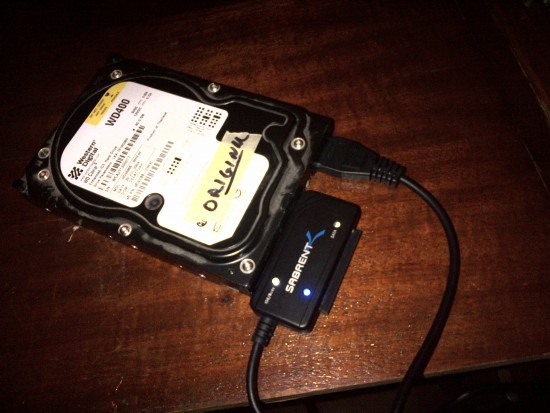
I hooked up to a Sabrent Adapter (Tiger Driect) and the drive spun up...no clicks.
Attachment:
007.jpg
007.jpg [ 925.9 KiB | Viewed 7061 times ]


I plugged into the usb of my laptop and after about a minute, the drive popped up! YIPPEE!
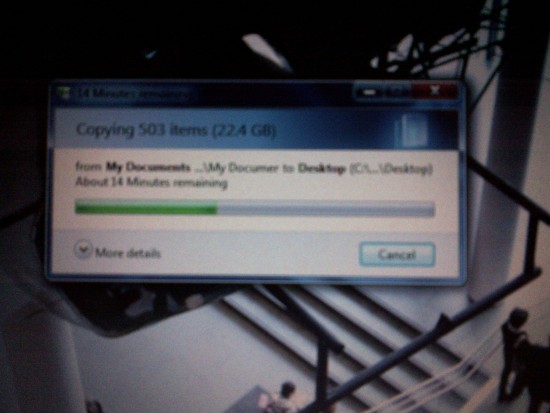
I immediately copied all data to the laptop so everything is recovered and safe.
Attachment:
008.jpg
008.jpg [ 828.49 KiB | Viewed 7061 times ]


Thank you so much to everyone here who took the time, with great patience, to guide me through this.
The drive will go back into the tower it came from and I will find a bare bones laptop that can handle audio drivers to record line-in audio. That is the tower's only function. I have an old Acer 4420 Extensa but it is too old and cannot handle the audio drivers with Win 7. That model is no longer supported from Acer so not worth the trouble to try and make it work.

You people really did save the day for me!


Top
 Profile  
 
 Post subject: Re: cWD400 Reovery
PostPosted: June 9th, 2012, 7:38 
Offline

Joined: August 18th, 2010, 17:35
Posts: 3669
Location: Massachusetts, USA
@royce: if you were to put a price on the work you completed, excluding the materials, what would it be?

_________________
Hard Disk Drive (HDD), Solid State Drive (SSD, SATA, NVMe, etc), USB Flash Drive and RAID Data Recovery Specialist in Massachusetts


Top
 Profile  
 
 Post subject: Re: cWD400 Reovery
PostPosted: June 9th, 2012, 9:42 
Offline

Joined: October 21st, 2007, 8:48
Posts: 1712
Glad to hear a successful DIY story.
Well done. :)


Top
 Profile  
 
 Post subject: Re: cWD400 Reovery
PostPosted: June 9th, 2012, 14:17 
Offline
User avatar

Joined: May 13th, 2010, 11:17
Posts: 2821
Location: Kuwait
unknown wrote:
Glad to hear a successful DIY story.
Well done. :)


Well, i call it LUCKY not successful

but good job :wink:

_________________
Kuwait Data Recovery - UNIX GTC
The only reason for time is so that everything doesn't happen at once. By: Albert Einstein


Top
 Profile  
 
 Post subject: Re: cWD400 Reovery
PostPosted: June 9th, 2012, 17:42 
Offline

Joined: May 22nd, 2012, 10:11
Posts: 15
Location: New York
Labtech, looking at this objectively, I would imagine that the cost of this would be as follows:

$125 Minimum (1) hour of bench time charge for a competent tech with proper tools and skill, who would have likely completed the swap in 20 minutes, testing and transfer the remaining 40 minutes.
$50 Consult and visual assessment of old drive with recommendations and warnings

TOTAL: $175
The job was superficial....a parts swap. No invasive operations into the HDD itself.

I think that's a fair and honest assessment.
The knowledge? That's priceless, so I am deeply grateful to all who shared it with me.
I will be sure to 'pay it forward'.


Top
 Profile  
 
 Post subject: Re: cWD400 Reovery
PostPosted: June 9th, 2012, 17:47 
Offline

Joined: August 18th, 2010, 17:35
Posts: 3669
Location: Massachusetts, USA
Interesting... Thank you for replying.

Best wishes.

_________________
Hard Disk Drive (HDD), Solid State Drive (SSD, SATA, NVMe, etc), USB Flash Drive and RAID Data Recovery Specialist in Massachusetts


Top
 Profile  
 
Display posts from previous:  Sort by  
Post new topic Reply to topic  [ 35 posts ]  Go to page Previous  1, 2

All times are UTC - 5 hours [ DST ]


Who is online

Users browsing this forum: No registered users and 57 guests


You cannot post new topics in this forum
You cannot reply to topics in this forum
You cannot edit your posts in this forum
You cannot delete your posts in this forum
You cannot post attachments in this forum

Search for:
Jump to:  
Powered by phpBB © 2000, 2002, 2005, 2007 phpBB Group

