MultiDrive – free backup, clone & wipe disk utility from Atola Technology

All times are UTC - 5 hours [ DST ]


Post new topic Reply to topic  [ 24 posts ]  Go to page 1, 2  Next
Author Message
 Post subject: My passport Elite 640gb (WDBAAC6400ACH-00) Initio INIC-1607E
PostPosted: November 27th, 2012, 13:49 
Offline

Joined: November 13th, 2011, 17:58
Posts: 14
Location: France
My passport Elite 640gb (WDBAAC6400ACH-00) with Initio INIC-1607E C11

PROBLEM: Drive / Partition (with data on it) is not seen under windows.
Drive was randomly not accessible, unplug-replug to usb port would mount drive (that was before).

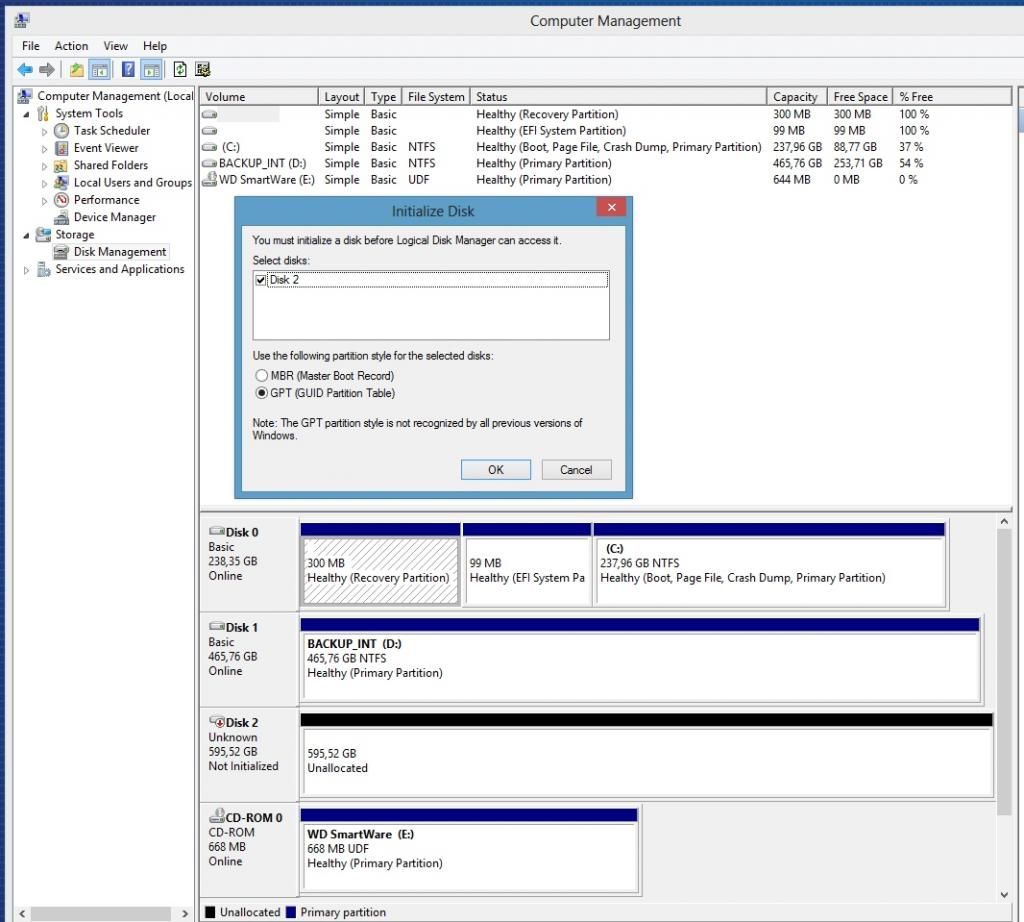
SYMPTOMS: HDD shows as NOT INITIALIZED - UNALLOCATED.
When opening DiskManagement, i get: you must initialize a disk before Logical Disk Manager can access it.

OTHER INFO:
-> No password has been set on the drive.
-> When plugged to computer, HDD starts spinning with solid light
-> HDD hibernates after a while with blinking light
-> In device Manager, under disk drives: WD My Passport 070A USB Device
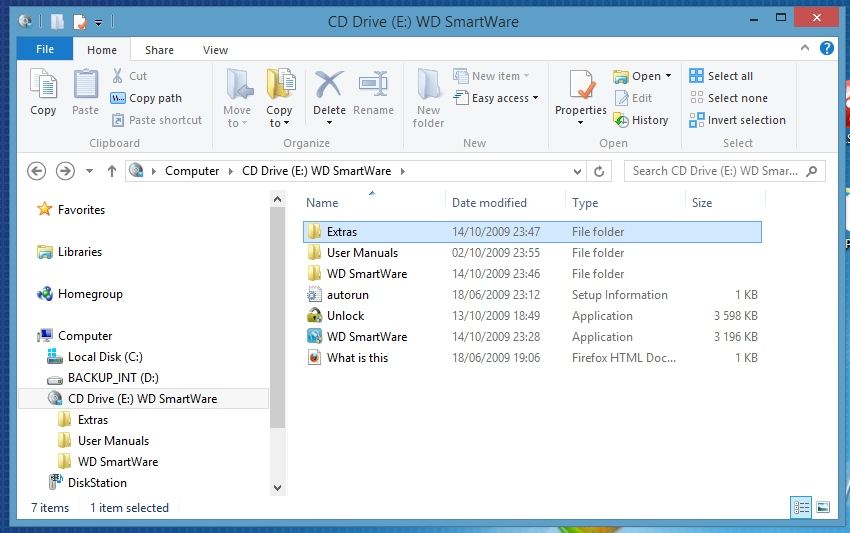
-> In device Manager, under DVD/CD-ROM Drives: WD Virtual CD 070A USB Device
-> In device Manager, under Other devices: WD SES Device USB Device (i believe i don't need to install drive to see drive).

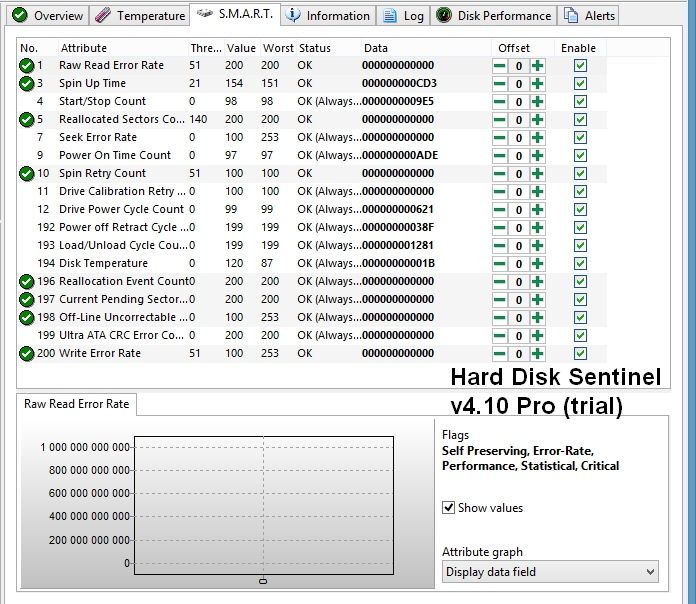
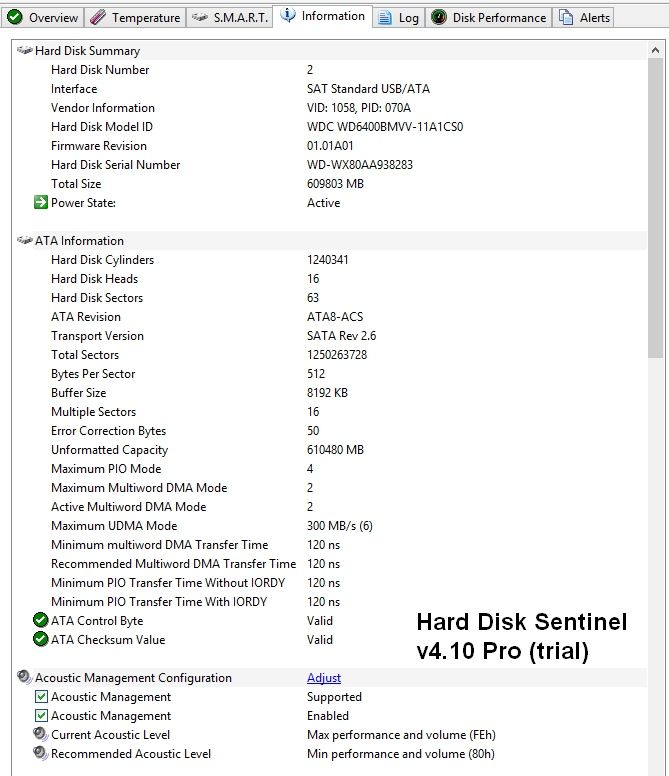
HARD DISK SENTINEL:
See all results in attached pictures below & txt file.
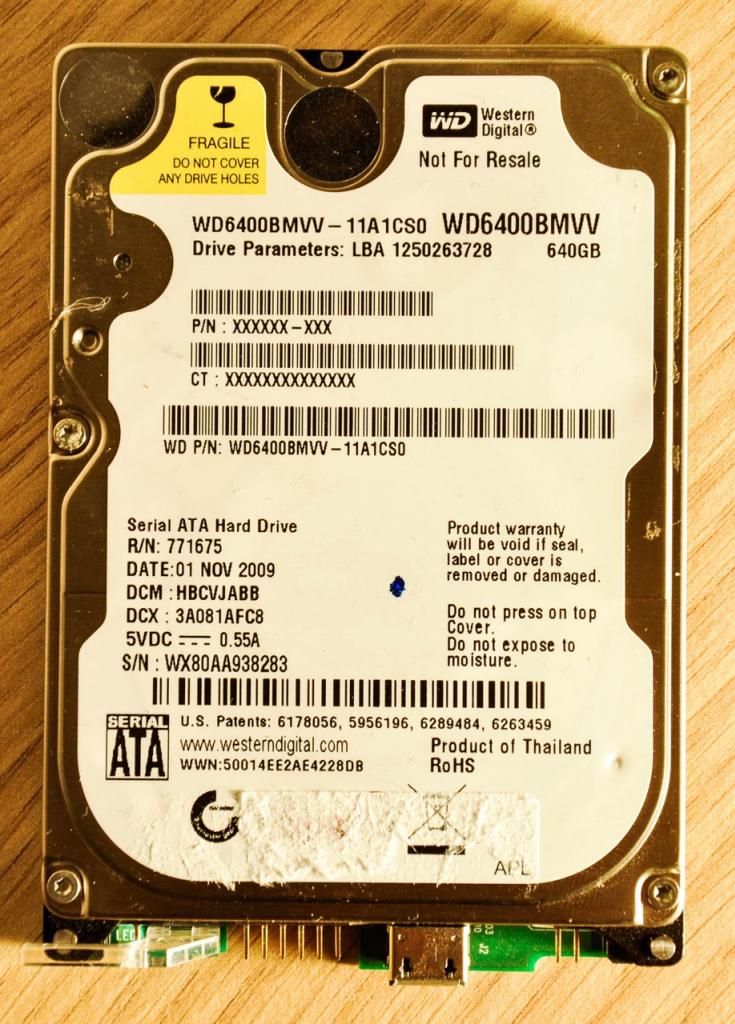
HDD Model ID: WDC WD6400BMVV-11A1CS0 with Firmware Revision: 01.01A01

USB DEVICE VIEWER:
See result in attached picture below & txt file.

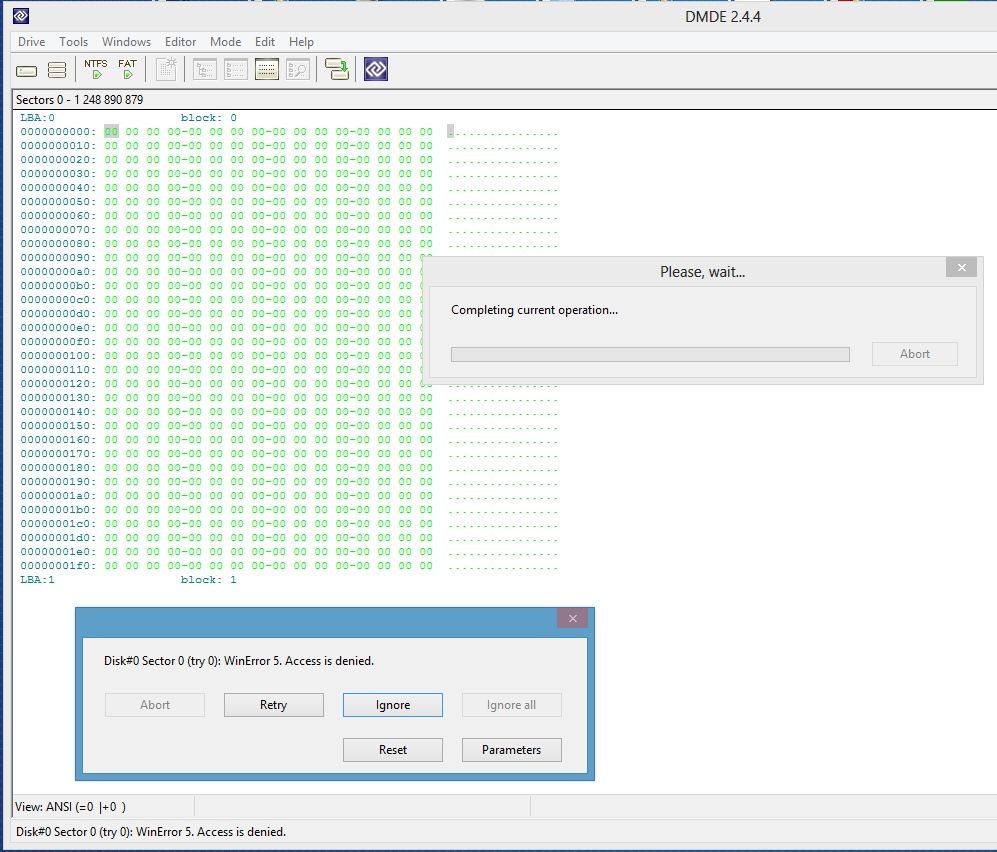
DMDE - DM Disk Editor and Data Recovery Software:
See result in attached picture below
I didn't do much with this one as I don't know what the experts are interested in here.

MY SITUATION:
This problem happened about 13 months ago. From professionnal diagnostic, there was no possible solution at that time.
I am wondering if there are new findings for such failure? And more over any success recovering data? Or is this hopeless (until someone cracks AES 256 encryption in about 10 or 20 years) ?
If further details needed, please ask. Will provide information as fast as I can.

ALSO:
a) How could we determine if it's a hardware failure (related to initio control maybe)
Or if the encryption key is corruped which prevents partition to be mounted ?
(if those assumptions are correct).

b) From Western Digital website, in the firmware update release notes, i see the following:
Firmware 1.016: Fixes: This firmware update fixes the drive’s handling of infrequent ECC errors which can cause data access issues.
Link: http://support.wdc.com/download/notes/Win_Univ_FW_Updater_Release_Notes_v3.2.0.8B.pdf
Wondering if that has anything to do with my issue.

c) If that can be of any help : I have someone in my entourage who has expertise in soldering and willing to help. The person fixes vehicule ECUs and often transfert controllers from/to boards.

Thanks in advance for the time spent looking at this tread and the help provided. Also thanks again for those who helped me before.

Image

Image

Image

Image

Image

Image

Image

Image

Image

Image

Image

Image

Image

Image

Image

Image

Image

Image

Image

Image

Image

Image

Image

Image

Image

Hard Disk Sentinel
Code:
  -- General Information --

    Application Information
   -------------------------
    Installed Version  . . . . . . . . . . . . . . . : Hard Disk Sentinel 4.10 PRO
    Registered To  . . . . . . . . . . . . . . . . . : Unregistered version, please register.
    Current Date And Time  . . . . . . . . . . . . . : 27/11/2012 17:29:38
    Health Calculation Method  . . . . . . . . . . . : Analyse data field (default)

    System Information
   --------------------
    Optical Drive  . . . . . . . . . . . . . . . . . : E: WD      Virtual CD 070A / 1030 (CD)

  -- Physical Disk Information - Disk: #2: WDC WD6400BMVV-11A1CS0 --

    Hard Disk Summary
   -------------------
    Hard Disk Number . . . . . . . . . . . . . . . . : 2
    Interface  . . . . . . . . . . . . . . . . . . . : SAT Standard USB/ATA
    Vendor Information . . . . . . . . . . . . . . . : VID: 1058, PID: 070A
    Hard Disk Model ID . . . . . . . . . . . . . . . : WDC WD6400BMVV-11A1CS0
    Firmware Revision  . . . . . . . . . . . . . . . : 01.01A01
    Hard Disk Serial Number  . . . . . . . . . . . . : WD-WX80AA938283
    Total Size . . . . . . . . . . . . . . . . . . . : 609803 MB
    Power State  . . . . . . . . . . . . . . . . . . : Sleeping (since 27/11/2012 17:29:17)
    Current Temperature  . . . . . . . . . . . . . . : 28 °C
    Power On Time  . . . . . . . . . . . . . . . . . : 116 days, 0 hours
    Estimated Remaining Lifetime . . . . . . . . . . : more than 1000 days
    Health . . . . . . . . . . . . . . . . . . . . . : #################### 100 % (Excellent)
    Performance  . . . . . . . . . . . . . . . . . . : #################### 100 % (Excellent)

    The hard disk status is PERFECT. Problematic or weak sectors were not found and there are no spin up or data transfer errors.
      No actions needed.

    ATA Information
   -----------------
    Hard Disk Cylinders  . . . . . . . . . . . . . . : 1240341
    Hard Disk Heads  . . . . . . . . . . . . . . . . : 16
    Hard Disk Sectors  . . . . . . . . . . . . . . . : 63
    ATA Revision . . . . . . . . . . . . . . . . . . : ATA8-ACS
    Transport Version  . . . . . . . . . . . . . . . : SATA Rev 2.6
    Total Sectors  . . . . . . . . . . . . . . . . . : 1250263728
    Bytes Per Sector . . . . . . . . . . . . . . . . : 512
    Buffer Size  . . . . . . . . . . . . . . . . . . : 8192 KB
    Multiple Sectors . . . . . . . . . . . . . . . . : 16
    Error Correction Bytes . . . . . . . . . . . . . : 50
    Unformatted Capacity . . . . . . . . . . . . . . : 610480 MB
    Maximum PIO Mode . . . . . . . . . . . . . . . . : 4
    Maximum Multiword DMA Mode . . . . . . . . . . . : 2
    Active Multiword DMA Mode  . . . . . . . . . . . : 2
    Maximum UDMA Mode  . . . . . . . . . . . . . . . : 300 MB/s (6)
    Minimum Multiword DMA Transfer Time  . . . . . . : 120 ns
    Recommended Multiword DMA Transfer Time  . . . . : 120 ns
    Minimum PIO Transfer Time Without IORDY  . . . . : 120 ns
    Minimum PIO Transfer Time With IORDY . . . . . . : 120 ns
    ATA Control Byte . . . . . . . . . . . . . . . . : Valid
    ATA Checksum Value . . . . . . . . . . . . . . . : Valid

    Acoustic Management Configuration
   -----------------------------------
    Acoustic Management  . . . . . . . . . . . . . . : Supported
    Acoustic Management  . . . . . . . . . . . . . . : Enabled
    Current Acoustic Level . . . . . . . . . . . . . : Max performance and volume (FEh)
    Recommended Acoustic Level . . . . . . . . . . . : Min performance and volume (80h)

    ATA Features
   --------------
    Read Ahead Buffer  . . . . . . . . . . . . . . . : Supported, Enabled
    DMA  . . . . . . . . . . . . . . . . . . . . . . : Supported
    Ultra DMA  . . . . . . . . . . . . . . . . . . . : Supported
    S.M.A.R.T. . . . . . . . . . . . . . . . . . . . : Supported
    Power Management . . . . . . . . . . . . . . . . : Supported
    Write Cache  . . . . . . . . . . . . . . . . . . : Supported
    Host Protected Area  . . . . . . . . . . . . . . : Supported
    Advanced Power Management  . . . . . . . . . . . : Supported, Enabled
    Advanced Power Management Level  . . . . . . . . : Intermediate power management levels with standby (96)
    Extended Power Management  . . . . . . . . . . . : Not supported
    Power Up In Standby  . . . . . . . . . . . . . . : Not supported
    48-Bit LBA Addressing  . . . . . . . . . . . . . : Supported
    Device Configuration Overlay . . . . . . . . . . : Supported
    IORDY Support  . . . . . . . . . . . . . . . . . : Supported
    Read/Write DMA Queue . . . . . . . . . . . . . . : Not supported
    NOP Command  . . . . . . . . . . . . . . . . . . : Supported
    Trusted Computing  . . . . . . . . . . . . . . . : Not supported
    64-Bit World Wide ID . . . . . . . . . . . . . . : 0150E24E42AEDB28
    Streaming  . . . . . . . . . . . . . . . . . . . : Not supported
    Media Card Pass Through  . . . . . . . . . . . . : Not supported
    General Purpose Logging  . . . . . . . . . . . . : Supported
    Error Logging  . . . . . . . . . . . . . . . . . : Supported
    CFA Feature Set  . . . . . . . . . . . . . . . . : Not supported
    CFast Device . . . . . . . . . . . . . . . . . . : Not supported
    Long Physical Sectors (1)  . . . . . . . . . . . : Not supported
    Long Logical Sectors . . . . . . . . . . . . . . : Not supported
    Write-Read-Verify  . . . . . . . . . . . . . . . : Not supported
    NV Cache Feature . . . . . . . . . . . . . . . . : Not supported
    NV Cache Power Mode  . . . . . . . . . . . . . . : Not supported
    NV Cache Size  . . . . . . . . . . . . . . . . . : Not supported
    Free-fall Control  . . . . . . . . . . . . . . . : Not supported
    Free-fall Control Sensitivity  . . . . . . . . . : Not supported
    Nominal Media Rotation Rate  . . . . . . . . . . : 5400 RPM

    SSD Features
   --------------
    Data Set Management  . . . . . . . . . . . . . . : Not supported
    TRIM Command . . . . . . . . . . . . . . . . . . : Not supported
    Deterministic Read After TRIM  . . . . . . . . . : Not supported

    S.M.A.R.T. Details
   --------------------
    Off-line Data Collection Status  . . . . . . . . : Never Started
    Self Test Execution Status . . . . . . . . . . . : Successfully Completed
    Total Time To Complete Off-line Data Collection  : 15600 seconds
    Execute Off-line Immediate . . . . . . . . . . . : Supported
    Abort/restart Off-line By Host . . . . . . . . . : Not supported
    Off-line Read Scanning . . . . . . . . . . . . . : Supported
    Short Self-test  . . . . . . . . . . . . . . . . : Supported
    Extended Self-test . . . . . . . . . . . . . . . : Supported
    Conveyance Self-test . . . . . . . . . . . . . . : Supported
    Selective Self-Test  . . . . . . . . . . . . . . : Supported
    Save Data Before/After Power Saving Mode . . . . : Supported
    Enable/Disable Attribute Autosave  . . . . . . . : Supported
    Error Logging Capability . . . . . . . . . . . . : Supported
    Short Self-test Estimated Time . . . . . . . . . : 2 minutes
    Extended Self-test Estimated Time  . . . . . . . : 181 minutes
    Conveyance Self-test Estimated Time  . . . . . . : 5 minutes
    Last Short Self-test Result  . . . . . . . . . . : Never Started
    Last Short Self-test Date  . . . . . . . . . . . : Never Started
    Last Extended Self-test Result . . . . . . . . . : Never Started
    Last Extended Self-test Date . . . . . . . . . . : Never Started
    Last Conveyance Self-test Result . . . . . . . . : Never Started
    Last Conveyance Self-test Date . . . . . . . . . : Never Started

    Security Mode
   ---------------
    Security Mode  . . . . . . . . . . . . . . . . . : Supported
    Security Erase . . . . . . . . . . . . . . . . . : Supported
    Security Erase Time  . . . . . . . . . . . . . . : 79 minutes
    Security Enhanced Erase Feature  . . . . . . . . : Supported
    Security Enhanced Erase Time . . . . . . . . . . : 79 minutes
    Security Enabled . . . . . . . . . . . . . . . . : No
    Security Locked  . . . . . . . . . . . . . . . . : No
    Security Frozen  . . . . . . . . . . . . . . . . : No
    Security Counter Expired . . . . . . . . . . . . : No
    Security Level . . . . . . . . . . . . . . . . . : High

    Serial ATA Features
   ---------------------
    S-ATA Compliance . . . . . . . . . . . . . . . . : Yes
    S-ATA I Signaling Speed (1.5 Gps)  . . . . . . . : Supported
    S-ATA II Signaling Speed (3 Gps) . . . . . . . . : Supported
    S-ATA Gen3 Signaling Speed (6 Gps) . . . . . . . : Not supported
    Receipt Of Power Management Requests From Host . : Supported
    PHY Event Counters . . . . . . . . . . . . . . . : Supported
    Non-Zero Buffer Offsets In DMA Setup FIS . . . . : Not supported
    DMA Setup Auto-Activate Optimization . . . . . . : Supported, Disabled
    Device Initiating Interface Power Management . . : Supported, Disabled
    In-Order Data Delivery . . . . . . . . . . . . . : Not supported
    Asynchronous Notification  . . . . . . . . . . . : Not supported
    Software Settings Preservation . . . . . . . . . : Supported, Enabled
    Native Command Queuing (NCQ) . . . . . . . . . . : Supported
    Queue Length . . . . . . . . . . . . . . . . . . : 32

    S.M.A.R.T.
   ------------
No.  Attribute                Thre.. Value  Worst  Data                Status                   Flags                                                 
1    Raw Read Error Rate      51     200    200    000000000000        OK                       Self Preserving, Error-Rate, Performance, Statistica..
3    Spin Up Time             21     153    151    000000000CEC        OK                       Self Preserving, Performance, Statistical, Critical   
4    Start/Stop Count         0      98     98     0000000009E7        OK (Always passing)      Self Preserving, Event Count, Statistical             
5    Reallocated Sectors Co.. 140    200    200    000000000000        OK                       Self Preserving, Event Count, Statistical, Critical   
7    Seek Error Rate          0      100    253    000000000000        OK (Always passing)      Self Preserving, Error-Rate, Performance, Statistical 
9    Power On Time Count      0      97     97     000000000AE0        OK (Always passing)      Self Preserving, Event Count, Statistical             
10   Spin Retry Count         51     100    100    000000000000        OK                       Self Preserving, Event Count, Statistical, Critical   
11   Drive Calibration Retr.. 0      100    100    000000000000        OK (Always passing)      Self Preserving, Event Count, Statistical             
12   Drive Power Cycle Count  0      99     99     000000000621        OK (Always passing)      Self Preserving, Event Count, Statistical             
192  Power off Retract Cycl.. 0      199    199    00000000038F        OK (Always passing)      Self Preserving, Event Count, Statistical             
193  Load/Unload Cycle Count  0      199    199    000000001289        OK (Always passing)      Self Preserving, Event Count, Statistical             
194  Disk Temperature         0      119    87     00000000001C        OK (Always passing)      Self Preserving, Statistical                           
196  Reallocation Event Count 0      200    200    000000000000        OK (Always passing)      Self Preserving, Event Count, Statistical             
197  Current Pending Sector.. 0      200    200    000000000000        OK (Always passing)      Self Preserving, Event Count, Statistical             
198  Off-Line Uncorrectable.. 0      100    253    000000000000        OK (Always passing)      Self Preserving, Event Count                           
199  Ultra ATA CRC Error Co.. 0      200    200    000000000000        OK (Always passing)      Self Preserving, Event Count, Statistical             
200  Write Error Rate         51     100    253    000000000000        OK                       Error-Rate, Critical                                   

    Transfer Rate Information
   ---------------------------
    Total Data Read  . . . . . . . . . . . . . . . . : 0 MB,  0 MB since installation  (27/11/2012)
    Total Data Write . . . . . . . . . . . . . . . . : 0 MB,  0 MB since installation
    Average Reads Per Day  . . . . . . . . . . . . . : 0,00 MB
    Average Writes Per Day . . . . . . . . . . . . . : 0,00 MB
    Current Transfer Rate  . . . . . . . . . . . . . : 0 KB/s
    Maximum Transfer Rate  . . . . . . . . . . . . . : 0 KB/s
    Current Read Rate  . . . . . . . . . . . . . . . : 0 KB/s
    Current Write Rate . . . . . . . . . . . . . . . : 0 KB/s
    Current Disk Activity  . . . . . . . . . . . . . : 0 %


USB VIEWER
Code:
          ---===>Device Information<===---
English product name: "My Passport 070A"

ConnectionStatus:                 
Current Config Value:              0x01  -> Device Bus Speed: High
Device Address:                    0x03
Open Pipes:                           2

          ===>Endpoint Descriptor<===
bLength:                           0x07
bDescriptorType:                   0x05
bEndpointAddress:                  0x81  -> Direction: IN - EndpointID: 1
bmAttributes:                      0x02  -> Bulk Transfer Type
wMaxPacketSize:                  0x0200 = 0x200 max bytes
bInterval:                         0x00

          ===>Endpoint Descriptor<===
bLength:                           0x07
bDescriptorType:                   0x05
bEndpointAddress:                  0x02  -> Direction: OUT - EndpointID: 2
bmAttributes:                      0x02  -> Bulk Transfer Type
wMaxPacketSize:                  0x0200 = 0x200 max bytes
bInterval:                         0x00

          ===>Device Descriptor<===
bLength:                           0x12
bDescriptorType:                   0x01
bcdUSB:                          0x0200
bDeviceClass:                      0x00  -> This is an Interface Class Defined Device
bDeviceSubClass:                   0x00
bDeviceProtocol:                   0x00
bMaxPacketSize0:                   0x40 = (64) Bytes
idVendor:                        0x1058 = Western Digital Technologies, Inc.
idProduct:                       0x070A
bcdDevice:                       0x1030
iManufacturer:                     0x01
     English (United States)  "Western Digital"
iProduct:                          0x02
     English (United States)  "My Passport 070A"
iSerialNumber:                     0x03
     English (United States)  "575838304141393338323833"
bNumConfigurations:                0x01

          ===>Configuration Descriptor<===
bLength:                           0x09
bDescriptorType:                   0x02
wTotalLength:                    0x0020  -> Validated
bNumInterfaces:                    0x01
bConfigurationValue:               0x01
iConfiguration:                    0x00
bmAttributes:                      0x80  -> Bus Powered
MaxPower:                          0xFA = 500 mA

          ===>Interface Descriptor<===
bLength:                           0x09
bDescriptorType:                   0x04
bInterfaceNumber:                  0x00
bAlternateSetting:                 0x00
bNumEndpoints:                     0x02
bInterfaceClass:                   0x08  -> This is a Mass Storage USB Device Interface Class
bInterfaceSubClass:                0x06
bInterfaceProtocol:                0x50
iInterface:                        0x00

          ===>Endpoint Descriptor<===
bLength:                           0x07
bDescriptorType:                   0x05
bEndpointAddress:                  0x81  -> Direction: IN - EndpointID: 1
bmAttributes:                      0x02  -> Bulk Transfer Type
wMaxPacketSize:                  0x0200 = 0x200 max bytes
bInterval:                         0x00

          ===>Endpoint Descriptor<===
bLength:                           0x07
bDescriptorType:                   0x05
bEndpointAddress:                  0x02  -> Direction: OUT - EndpointID: 2
bmAttributes:                      0x02  -> Bulk Transfer Type
wMaxPacketSize:                  0x0200 = 0x200 max bytes
bInterval:                         0x00


iSerialNumber:
HEX : 575838304141393338323833
Converted in ASCII = WX80AA938283 => MATCHING MY HDD S/N
http://www.idea2ic.com/PlayWithJavascript/hexToAscii.html


Top
 Profile  
 
 Post subject: Re: My passport Elite 640gb (WDBAAC6400ACH-00) Initio INIC-1
PostPosted: November 27th, 2012, 17:55 
Offline

Joined: November 13th, 2011, 17:58
Posts: 14
Location: France
Image

Image


Top
 Profile  
 
 Post subject: Re: My passport Elite 640gb (WDBAAC6400ACH-00) Initio INIC-1
PostPosted: November 27th, 2012, 19:21 
Offline

Joined: August 18th, 2010, 17:35
Posts: 3669
Location: Massachusetts, USA
Your drive should be recoverable.

Just need to take it to a real pro.

Recommend member member5963.html in Belgium.

Best wishes

_________________
Hard Disk Drive (HDD), Solid State Drive (SSD, SATA, NVMe, etc), USB Flash Drive and RAID Data Recovery Specialist in Massachusetts


Top
 Profile  
 
 Post subject: Re: My passport Elite 640gb (WDBAAC6400ACH-00) Initio INIC-1
PostPosted: November 27th, 2012, 20:33 
Offline
User avatar

Joined: September 8th, 2009, 18:21
Posts: 16960
Location: Australia
ISTM that your problem could be a logical one. The USB-SATA bridge electronics is obviously working, and the fact that you can see the SmartWare stuff at the end of the drive means that the drive is essentially functional.

I suspect that DMDE probably can't read sector 0 because of some Windows protection issue. You may need to give yourself administrator privileges.

_________________
A backup a day keeps DR away.


Top
 Profile  
 
 Post subject: Re: My passport Elite 640gb (WDBAAC6400ACH-00) Initio INIC-1
PostPosted: November 28th, 2012, 4:19 
Offline
User avatar

Joined: January 28th, 2009, 10:54
Posts: 3547
Location: Greece
Any decent pro can do this and for relatively low cost.
I also suspect that the 'professional' evaluation you took was not so professional.

By the looks of it, this is definitely recoverable.

_________________
http://www.northwind.gr
SandForce SSD Recovery
Ransomware Reverse Engineering - NoMoreRansom! partners


Top
 Profile  
 
 Post subject: Re: My passport Elite 640gb (WDBAAC6400ACH-00) Initio INIC-1
PostPosted: November 28th, 2012, 7:56 
Offline

Joined: July 7th, 2010, 4:45
Posts: 924
Location: UK
Firstly dont initialise the disk.

I agree that it is most likely a logical issue as it reads the correct serial number, model id, sizes, vcd & smart

I'd be instrested in seeing Sector 0
If you download & run winhex as administrator, click on tools>Open Disk & then select your WD drive under Physical Media can you upload a screen shot of sector 0 (dont make or save any changes to the hex)

You don't say if you have tried running any data recovery software? ie R-Studio, RunTime Get Data Back for NTFS (assuming it was formatted as NTFS of cause?) etc


Loki


Top
 Profile  
 
 Post subject: Re: My passport Elite 640gb (WDBAAC6400ACH-00) Initio INIC-1
PostPosted: November 28th, 2012, 10:08 
Offline

Joined: November 13th, 2011, 17:58
Posts: 14
Location: France
First of all let me please thank each one of you for the inputs.

@fzabkar : My windows account is set as administrator. I ran DMDE 2.4.4 as administrator :
-> I still get the same error message : Disk#0 Sector O (try 0): WinError 5. Access is denied.
-> I then selected "ignore", DMDE searched on "Partition searching... #2 LBA: 0" and returned same error message but for sector 1 : Disk#0 Sector 1 (try 0): WinError 5. Access is denied.

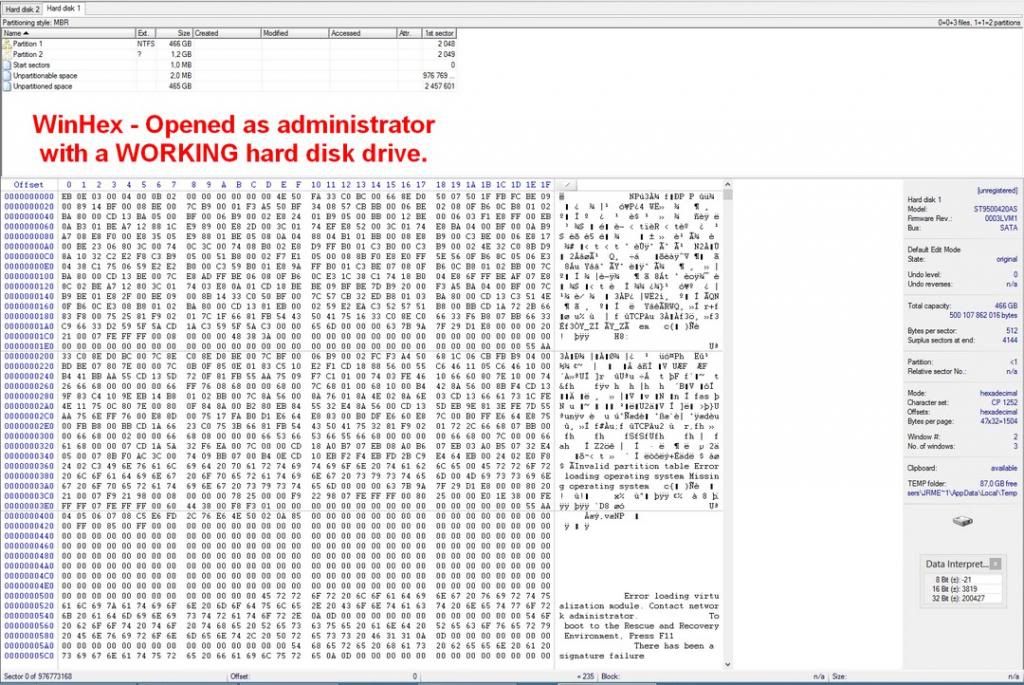
@loki : I ran WinHex 16.7 as administrator :
-> It still refuses to read sector 0 with error message : access is denied.

Using both softwares, I was able to open a working HDD I have on my machine. That means the software are properly working (and I guess that I am not making any mistake).

@loki :
-> I did try in the past running data recovery software with no luck. Though I didn't try the one you refered - should i ?
-> For what I remember I believe the HDD was formated in NTFS but i'm not 100% sure.
-> I don't recall if I did try to initialize the disc in the past (that was a long time ago and I doubt I did) but if I had tried, what damage would have been caused ?

@northwind / @labtech
-> Do you think you can assess if data are recoverable on this drive ?
-> Giving remote access to my machine is definitly an option (TeamViewer,LogMeIn).

- - - - - - - - - - - -
If problem is LOGICAL, how can I assess it ? It seems it was important to be able to read sector 0 which seems not possible.

- - - - - - - - - - - -
If the encryption key within the INIC-1607E was messed up and would prevent my partition to be mounted,
we could say that the DATA on my HDD, even if it was extracted, would be unreable as not decrypted ? Correct ?
- Is there a possibility to check if the key is corrupted ?
- Is that key stored in two different location ?

- - - - - - - - - - - -
What else can I look at to assess if I have any chance of getting my data back ?

- - - - - - - - - - - -

Image

Image

Image

Image

Image

Image

Image


Top
 Profile  
 
 Post subject: Re: My passport Elite 640gb (WDBAAC6400ACH-00) Initio INIC-1
PostPosted: November 29th, 2012, 3:20 
Offline

Joined: November 29th, 2006, 10:08
Posts: 7864
Location: UK
I have seen this before on this model.

In my case it was a problem with a corrupt encryption key on the platters.

Fortunately in my case, the backup key in the Service Area (firmware) was OK and I was able to recover.

Unfortunately (for you) this is not DIY or able to be performed remotely due to the drive being needed to be connected to special hardware.

We can take a look at this if you ship it over to UK.

_________________
PC Image Data Recovery
http://www.pcimage.co.uk

New!! HDD-PCB.COM for all your PCB and donor HDD requirements!


Top
 Profile  
 
 Post subject: Re: My passport Elite 640gb (WDBAAC6400ACH-00) Initio INIC-1
PostPosted: December 1st, 2012, 12:52 
Offline

Joined: November 13th, 2011, 17:58
Posts: 14
Location: France
@pcimage : Thanks for your imput and answer. I fully understand that my issue is not a DIY project.

The original goal of my post was to find out if there were any progress or fix for similar issue (as my HDD problem had no solution about a year ago)
The second goal of my post is to try properly understand the issue I am facing and - if there is now a solution - be able to find the right person
Finally, I hope this thread may also help users facing the same issue I have, by providing them with detailed information and feedback.

- - - - - - - - - -

Anyway, there are lots of forum and articles on the web that mention two kinds of problem close to what mine seems to be :
- Locked drive
- Firmware problem
However I haven't seen much topics that refers to corrupt encryption key.
Does anyone know if this problem is falling under the firmware issue or locked drive ? Or is it a total different subject ?

/

Regarding firmware problem, DataCent provides the following explanation :

All Western Digital hard drives are also well-known for their firmware problems. Firmware of the drive is not located on the logic board as most people think. Main part of firmware is stored on the platters in so-called Service Area. Service Area occupies the negative cylinders of the surface and contains a number of firmware modules. If one of the modules gets corrupted the hard drive fails to initialize correctly and stops working making the data inaccessible. In such case the drive usually spins up fine, it doesn't click but has one of the following symptoms:
- it is not found in BIOS at all
- identifies with its factory alias(for example WDC ROM MODEL-MAMMOTH---,WDC ROM MODEL-HAWK---),
- shows up with wrong S/N (for example WDC-ROM SN# XYZ---) or capacity,
- identifies fine but fails to read any data or boot up operating system giving I/O device errors whenever you try to access LBA sectors.


(source: http://datacent.com/datarecovery/hdd/we ... +Essential)

//

SalvationData seems to have an updated tool that deals with FW issue :
- http://www.salvationdata.com/data-recov ... doctor.htm
- http://www.recoverytoolsrus.com/support ... age_id=162

Maybe those upgraded tools were not available when my HDD encountered this issue and could now deal with it !?


Top
 Profile  
 
 Post subject: Re: My passport Elite 640gb (WDBAAC6400ACH-00) Initio INIC-1
PostPosted: December 1st, 2012, 13:01 
Offline

Joined: August 18th, 2010, 17:35
Posts: 3669
Location: Massachusetts, USA
The solutions have been available longer than a year. So, tools availability is not the issue.

One can't quite answer specifically to your's drive's problem as direct testing with more advanced equipment is necessary to rule out problems with the service area as you have read from datacent. Then more analysis is necessary.

As result, over the forum can't do much as frequently, though similar in theory, failures are unique to each drive as far as where damage is located and how much of it.

Good pro recommendations have been given to you. Try them if data is important. If not, buy one or some of the tools you found in your links and have tinkering for a while as much studying and experience developing is necessary. These are realistically the only two options.

Or if you are financially well off, then sent to a real pro, then they will recover it hopefully. Once you get the data back, then you know recovery is possible. At this point, then you can buy tools and find out for yourself how to do it.

_________________
Hard Disk Drive (HDD), Solid State Drive (SSD, SATA, NVMe, etc), USB Flash Drive and RAID Data Recovery Specialist in Massachusetts


Top
 Profile  
 
 Post subject: Re: My passport Elite 640gb (WDBAAC6400ACH-00) Initio INIC-1
PostPosted: December 1st, 2012, 16:16 
Offline
User avatar

Joined: September 8th, 2009, 18:21
Posts: 16960
Location: Australia
@grom34, your drive's firmware appears to be OK. If it were not, then you would not have access to the SmartWare area at the end of the drive.

pcimage is alluding to a sector near the SmartWare area, outside the accessible user area. This sector needs to be replaced with a copy in the System Area on the platters. I'm sure it can be done as a DIY project, but you would need to know which module in the SA stores this information, and which sector holds the encryption key. There was a thread that discussed the encryption key and where it was located (on a HP SimpleSave external), and there are freeware tools to access the SA, but you would need to modify your drive to give you access via SATA. In short, if I understand pcimage correctly, the job appears to be DIY-able, but not easy. And that's assuming that his diagnosis is correct.

_________________
A backup a day keeps DR away.


Top
 Profile  
 
 Post subject: Re: My passport Elite 640gb (WDBAAC6400ACH-00) Initio INIC-1
PostPosted: December 1st, 2012, 16:44 
Offline

Joined: July 7th, 2010, 4:45
Posts: 924
Location: UK
fzabkar wrote:
@grom34, your drive's firmware appears to be OK. If it were not, then you would not have access to the SmartWare area at the end of the drive.

pcimage is alluding to a sector near the SmartWare area, outside the accessible user area. This sector needs to be replaced with a copy in the System Area on the platters. I'm sure it can be done as a DIY project, but you would need to know which module in the SA stores this information, and which sector holds the encryption key. There was a thread that discussed the encryption key and where it was located (on a HP SimpleSave external), and there are freeware tools to access the SA, but you would need to modify your drive to give you access via SATA. In short, if I understand pcimage correctly, the job appears to be DIY-able, but not easy. And that's assuming that his diagnosis is correct.


Your correct in what your saying that you need to copy the key from the correct SA module to the correct sector but as for the DIY bit it depends on the users skills & SA software. I was going to post more about this but it is not for general public & shouldn't be. Lots of DR people including me spent a lot of time & money researching how to do this.

Loki


Top
 Profile  
 
 Post subject: Re: My passport Elite 640gb (WDBAAC6400ACH-00) Initio INIC-1
PostPosted: December 1st, 2012, 16:50 
Offline

Joined: July 18th, 2006, 3:05
Posts: 7476
Location: ITALY
Come on, Loki, imagine how popular you could be... :mrgreen:


Top
 Profile  
 
 Post subject: Re: My passport Elite 640gb (WDBAAC6400ACH-00) Initio INIC-1
PostPosted: December 1st, 2012, 16:54 
Offline

Joined: July 7th, 2010, 4:45
Posts: 924
Location: UK
BlackST wrote:
Come on, Loki, imagine how popular you could be... :mrgreen:


Never going to happen.
So you can guess how unpopular I'm going to be :(


Loki


Top
 Profile  
 
 Post subject: Re: My passport Elite 640gb (WDBAAC6400ACH-00) Initio INIC-1
PostPosted: December 1st, 2012, 17:11 
Offline

Joined: July 18th, 2006, 3:05
Posts: 7476
Location: ITALY
No, you are always popular. But on the wrong side (the right side, depending on the point of view) :lol:


Top
 Profile  
 
 Post subject: Re: My passport Elite 640gb (WDBAAC6400ACH-00) Initio INIC-1
PostPosted: December 1st, 2012, 17:15 
Offline

Joined: July 7th, 2010, 4:45
Posts: 924
Location: UK
BlackST wrote:
No, you are always popular. But on the wrong side (the right side, depending on the point of view) :lol:


:lol:


Loki


Top
 Profile  
 
 Post subject: Re: My passport Elite 640gb (WDBAAC6400ACH-00) Initio INIC-1
PostPosted: February 17th, 2013, 21:48 
Offline

Joined: February 17th, 2013, 20:46
Posts: 2
Location: indonesia
interest topic. :idea:
PROBLEM: Drive / Partition (with data on it) is not seen under windows
same problem like me.

HDD Model ID: WDC WD6400BMVV-11A1CS0 with Firmware Revision: 01.01A01
my HD wdc green 500Gb, "firmware rev 01.01a01"

history : wdc green was as primary and then damage. so buy 1 wd blue
run win xP 3. wdc blue as primary, and want to repair wdc green as damage hd with "bad sector"
conect Green use sata as slave.
1 times run can see as F: (but 0 data)(full red, likely 0 raw)
position run hd tune pro "health"
2. power Off unplug and plug cable
3. power on and "magic" is gone
in my computer no drive "number 2" or "F:" :?:
i can see in device manager "2 HD",
my Wdc Green can see in hdd reg , device manager , dlgdiag tool , defragler.

will update after get solution :D
problem :are same does seen on window , same firmware
different :OS, wdc 3.5' , internal atack "slave drive"
client : wd green 500 with bad sector :mrgreen:


Top
 Profile  
 
 Post subject: Re: My passport Elite 640gb (WDBAAC6400ACH-00) Initio INIC-1
PostPosted: February 18th, 2013, 5:24 
Offline

Joined: February 17th, 2013, 20:46
Posts: 2
Location: indonesia
pic
Image

tester 1 or 2 hour before post
green as slave 1 and master 2 in bios(unplug and plug to change slot esata)
colour :
black : use for protect my serial , in waranty Replace
dark blue : protect my name :lol:
Green : drive E is drive 1. even though start 5xxGb , that not 2nd drive

update : defragler , not shown drive F. except when detected 0 "in my computer"
hd reg , hd tune pro , dlgdiag can know my green drive

screen short, when drive F can see in defragler and my computer before my green do "magic" in my computer :lol: :lol:

Image


Top
 Profile  
 
 Post subject: Re: My passport Elite 640gb (WDBAAC6400ACH-00) Initio INIC-1
PostPosted: March 16th, 2013, 13:49 
Offline

Joined: November 13th, 2011, 17:58
Posts: 14
Location: France
UPDATE: The drive has been sent to different DATA Recovery companies but unfortunately it could not be recovered. As explain by jono-ats, the encryption key is stored in two different locations on the drive. When the encryption key is corrupted, you would need one to recover the other. In my case, both encryption keys were either missing or corrupted, making the recovery job not possible as of today (if I’m explaining it wrong, I’m sure an member will correct me).

I would like to truly thank Jon from Data Savers (“jono-ats” from this forum) for his professionalism and continuous help on this case. I can’t express you more my gratitude. Let me also thank the HDD GURU forum for existing and all the members for their inputs on the topic ; more specifically fzabkar, DR-KIEV and pc-image.

Now, I would like to share my experience with other users who could be facing a similar issue. 99,99% of individuals (me included) are being told by their instinct to try and fix their issue by themselves. That’s quite a normal reaction considering how many times you’ve probably fixed software bugs on our computer OS and so on....

My advice: the very first thing is to ask yourself how worth is your data. If you think they really are worth then DO NOT ATTEMPT ANYTHING ON THE DRIVE as you could make things worse and loose the last chance you ever had to recover your data. Also don’t waste time blaming the drive manufacturer for what’s happening to you as he sold you a storage solution and not a backup solution. I had to explain that many times to friends who wanted me to sue WD. Well, the only one to blame was myslef for not making backups, end of the story on that aspect. Just be aware that all drives fail, it’s just a matter of time.

Now, the next thing would be to understand what the problem is with your drive. Once you do (if you do), then you’ll have to assess if this is something you could handle by yourself based on your skills. And that’s where you will need to be reasonable!! I spent a lot of time trying to understand what was going on with my drive and when I did, I was reasonable enough to accept that there was nothing else I could do without putting my data in danger.

Data Recovery is a very specific field that requires, as many other professions, equipment - skills and experience. Sure there are “easier” jobs you could potentially handle by yourself, but for all the others you are just taking a second bet. Remember, first one was to live without duplicated data…. :-) Anyway, I hope this will help some of you not waste time or making things worse….

As for my case, I will be holding to my drive hoping one day someone will find a solution to bypass WD encryption tool or (and that’s going to take probably a looooooooog time) someone will brake AES 256bits encryption system. Untill then, I miss my data every day and have well learned my lessons. It’s definitely much cheaper and LESS PAINFULL to setup a backing up solution….


Top
 Profile  
 
 Post subject: Re: My passport Elite 640gb (WDBAAC6400ACH-00) Initio INIC-1
PostPosted: July 20th, 2015, 9:53 
Offline

Joined: November 13th, 2011, 17:58
Posts: 14
Location: France
Hi every one.

It's been a while since my HDD failed (11.2011) so I decided to update this topic to see if there were new findings on that topic.

For the record, the encryption key of my AES 256-Bit based hardware encryption drive got corrupted, making the recovery job not possible back then.

For those who wants to get a quick and clear idea of how this hardware encryption works on Western Digital drive, see bellow link:
http://computersciencelabs.blogspot.fr/2010/11/256-bit-based-hardware-encryption-on-wd.html

I assume my drive is now a bit old and issues with this specific drive aren’t popular anymore on the forum. But based hardware encryption issues is probably still an up to date problem.

Thanks for any feedback on that matter. I still have hope (as you can see) that I'll get my data back on day !

(also a special Hi to jono-ats who had helped me a lot. And also fzabkar & DR-KIEV. Hope you are all doing well guys).


Top
 Profile  
 
Display posts from previous:  Sort by  
Post new topic Reply to topic  [ 24 posts ]  Go to page 1, 2  Next

All times are UTC - 5 hours [ DST ]


Who is online

Users browsing this forum: jimmydata and 60 guests


You cannot post new topics in this forum
You cannot reply to topics in this forum
You cannot edit your posts in this forum
You cannot delete your posts in this forum
You cannot post attachments in this forum

Search for:
Jump to:  
Powered by phpBB © 2000, 2002, 2005, 2007 phpBB Group