MultiDrive – free backup, clone & wipe disk utility from Atola Technology

All times are UTC - 5 hours [ DST ]


Post new topic Reply to topic  [ 47 posts ]  Go to page 1, 2, 3  Next
Author Message
 Post subject: ST3000DM001 NO ID BSY and Spins.
PostPosted: May 9th, 2013, 15:09 
Offline

Joined: April 1st, 2011, 16:12
Posts: 1
Location: Denver, CO USA
The drive spins up and makes the normal init sounds but stays BSY. No access to terminal prompt. I understand this series of drives are exhibiting a lot of problems.The drive does not ID and shows a small LBA . I am not on the PC-3000 console currently to give exact LBA.

Thanks for any information regarding this series of drives.

PCB 100664987.

Any one have an image of the short points for this pcb?

Terminal Output Below:

Boot 0x40M
Spin Up[0x000065B4][0x00006A20][0x00006E8C]
Trans.

Rst 0x40M
MC Internal LPC Process
Spin Up
(P) SATA Reset

MCMainPOR: Start:
Check MCMT Version: Current
MCMainPOR: Non-Init Case
MC Seg Disc and Cache Nodes: 40125B28 40122F00
Seg Write Preamble VBM start: 0000204A end: 00002091
Footer - start: 00002093 end: 000020DA
Seg Read Preamble VBM - start: 000020DC end: 00002123
Footer - start: 00002125 end: 0000216C
Reconstruction: MCMT Reconstruction Start
Max number of MC segments 0A61
Nonvolatile MCMT sequence number 00006218
[RSRS] 044C
ProcessRWError -Read- at LBA 0000000000037A50 Sense Code=40000087
InitiateMarkPendingReallocateRequest for disc_lba: 0000000000037A50!

[SW] 0006
Reconstruction: EXCEPTION: Seg Read Fail: Status = 0000
Continuing after error
ReadFooters (Forward): Segment 044D StartLBA 00000000001BD218 Starting Footer LBA 00000000001BD260
SeqNum 0000621A TotalUserBlocks 0000
ProcessRWError -Read- at LBA 0000000000037A50 Sense Code=40000087
InitiateMarkPendingReallocateRequest for disc_lba: 0000000000037A50!

Footer Status = 0000
Footer Status = 0001
Reconstruction: EXCEPTION: Segment Overall Sequence Number Mismatch, No Valid Footer 0000621A 5D92F227
Reconstruction: ProcessIncompletelyWrittenSegment


SOLVED:

Found short points on PCB 10664987

Attachment:
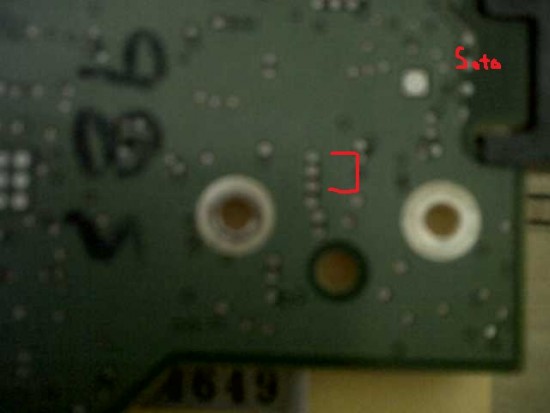
Seagate PCB 10664987.jpg
Seagate PCB 10664987.jpg [ 27.09 KiB | Viewed 46295 times ]


Pins 16 and 18 on HSA. flipped board over and the four test point over the PCB - HSA contacts. it is the 1st and 3rd TPs. from pin 18 PCB-HSA Contacts.

Checked heads all good.

Cleared SMART.

Powered off/on, Exited utility, Selected Seagate F3, DRIVE ID'd

Drive is alive!!

Data Xfer in Progress.


Top
 Profile  
 
 Post subject: Re: ST3000DM001 NO ID BSY and Spins.
PostPosted: May 9th, 2013, 19:13 
Offline
User avatar

Joined: September 8th, 2009, 18:21
Posts: 16960
Location: Australia
Tip: How to identify the Read Channel test points:
http://malthus.zapto.org/viewtopic.php? ... annel#p149

_________________
A backup a day keeps DR away.


Top
 Profile  
 
 Post subject: Re: ST3000DM001 NO ID BSY and Spins.
PostPosted: May 13th, 2013, 20:39 
Offline

Joined: August 18th, 2010, 17:35
Posts: 3669
Location: Massachusetts, USA
@jhewatt
Did you complete the data extraction without any other data access problems?

_________________
Hard Disk Drive (HDD), Solid State Drive (SSD, SATA, NVMe, etc), USB Flash Drive and RAID Data Recovery Specialist in Massachusetts


Top
 Profile  
 
 Post subject: Re: ST3000DM001 NO ID BSY and Spins.
PostPosted: May 23rd, 2013, 14:30 
Offline
User avatar

Joined: January 29th, 2009, 11:23
Posts: 248
Location: SXSW
jhewatt, Thank you Mr jhewatt! Nice to see you here, I just got a drive with same symptoms, found your post and solve!


Top
 Profile  
 
 Post subject: Re: ST3000DM001 NO ID BSY and Spins.
PostPosted: May 31st, 2013, 8:56 
Offline
User avatar

Joined: December 12th, 2005, 3:32
Posts: 709
Location: Belgrade
what was happening when You were shorting it?
i have one like that does not click when I short it

_________________
HddSurgery - Professional Data Recovery Tools


Top
 Profile  
 
 Post subject: Re: ST3000DM001 NO ID BSY and Spins.
PostPosted: May 31st, 2013, 9:06 
Offline
User avatar

Joined: September 29th, 2005, 12:02
Posts: 3577
Location: Chicago
helpdisc wrote:

i have one like that does not click when I short it

This model won't click

_________________
SAN, NAS, RAID, Server, and HDD Data Recovery.


Top
 Profile  
 
 Post subject: Re: ST3000DM001 NO ID BSY and Spins.
PostPosted: May 31st, 2013, 9:43 
Offline
User avatar

Joined: December 12th, 2005, 3:32
Posts: 709
Location: Belgrade
I have one here I can get Z but nothing else...

_________________
HddSurgery - Professional Data Recovery Tools


Top
 Profile  
 
 Post subject: Re: ST3000DM001 NO ID BSY and Spins.
PostPosted: July 28th, 2013, 5:04 
Offline

Joined: July 28th, 2013, 5:03
Posts: 3
Location: Caracas
Is it any doc or tutorial on how do this by this method?


Top
 Profile  
 
 Post subject: Re: ST3000DM001 NO ID BSY and Spins.
PostPosted: August 9th, 2013, 14:20 
Offline

Joined: July 28th, 2013, 5:03
Posts: 3
Location: Caracas
jhewatt, man I have the same problem can you describe by steps what did you do? Thanks


Top
 Profile  
 
 Post subject: Re: ST3000DM001 NO ID BSY and Spins.
PostPosted: September 12th, 2013, 14:15 
Offline

Joined: July 6th, 2013, 15:13
Posts: 311
Location: ISLAMABAD
hi
friend upload the pictures of pcb from component sides and upload terminal logs also . then i tell u where to short and what time to short
thanks
waqasali766@hotmail.com


Top
 Profile  
 
 Post subject: Re: ST3000DM001 NO ID BSY and Spins.
PostPosted: January 16th, 2014, 5:10 
Offline

Joined: March 11th, 2008, 4:35
Posts: 1052
Location: Bangladesh
I have the drive with PCB NO: 100687658 REV C. Can u pls tell me which pin to short?

_________________
__________
There is no substitute for education and experience
THANK YOU
SHAHI
shahi.mahbub@gmail.com


Top
 Profile  
 
 Post subject: Re: ST3000DM001 NO ID BSY and Spins.
PostPosted: January 28th, 2014, 21:40 
Offline

Joined: January 28th, 2014, 21:30
Posts: 3
Location: United States
Sorry to revive this thread, but could anyone give some pointers when to short the terminals?

One of my drives has exhibited the BSY error, still has normal init sounds as well, but I can't get into terminal either.

Could anyone help with some sort of instructions that either jhewatt or hdd_sand could have used to fix the problem?

I've gone over tons of posts and sites containing variations of this fix: https://sites.google.com/site/seagatefix/ so I'm assuming they might have performed something similar.

Any and all help is appreciated, thank you!


Top
 Profile  
 
 Post subject: Re: ST3000DM001 NO ID BSY and Spins.
PostPosted: January 29th, 2014, 6:02 
Offline

Joined: March 7th, 2011, 10:45
Posts: 60
Location: France
For me the original post doesnt mean anything. You should write it in clear english. You had BUSY drive ok, and so what? What is a short point? What do you use it for? Do you say its used to unlock full terminal on new seagate drives?


Top
 Profile  
 
 Post subject: Re: ST3000DM001 NO ID BSY and Spins.
PostPosted: January 29th, 2014, 10:05 
Offline
User avatar

Joined: April 3rd, 2011, 0:19
Posts: 2003
Location: Providence, RI
fzabkar wrote:
Tip: How to identify the Read Channel test points:
http://malthus.zapto.org/viewtopic.php? ... annel#p149


Thanks for the awesome post. Just so I'm clear, is it the "Read Channel" that you short to put it into kernel mode?

_________________
Data Medics - Hard Drive, SSD, and RAID Data Recovery Service Company


Top
 Profile  
 
 Post subject: Re: ST3000DM001 NO ID BSY and Spins.
PostPosted: January 29th, 2014, 10:35 
Offline

Joined: January 28th, 2014, 21:30
Posts: 3
Location: United States
Spildit wrote:
int0x13 wrote:
For me the original post doesnt mean anything. You should write it in clear english. You had BUSY drive ok, and so what? What is a short point? What do you use it for? Do you say its used to unlock full terminal on new seagate drives?


Hi there.
It have been a long time since we last spoke;
The tone of your latest posts sound a little bit "agressive".
Just a friendly reminder that HDDGuru members are not at fault for your drive problems, neither they have the obligation to help you out.
At any rate by "unlocking" the terminal access on this thread the OP is refering to short some points on the pcb to prevent reading from the platters in orther to bypass the firmware problem locking the drive in bsy and with that gaining terminal access as if the drive didn't have any firmware issue.
This will NOT HELP if terminal access is DISABLED from factory as in newer drives. The procedure is just to prevent reading of damaged firmware in drives where terminal access would be possible if the drive were to be working properly.
Regards.

I have the same drive as the OP, same PCB (100664987 REV B), FW CC4B so it seems that I should be able to get into it some way seeing as he eventually got in.

I've never done any sort of fixing of a drive which is why I'm trying to understand when to short the read/write pins (I found them on my PCB as well thanks to OPs picture) so I don't cause any further damage.
Do you short the TPs prior to entering terminal after the drive is powered on (before or during or after spin up?) or do I short after the drive has spun down and is connected to the terminal?
Am I also correct in understanding that you basically short the read TP to the write TP?

The data on the drive is not extremely important as I have most of it backed up on the server, the only thing I'm trying to recover is a friend's backup on it that was made a couple of days prior to the BSY state (never had a chance to back it up to the server prior to the failure), but any help would be extremely appreciated.


Top
 Profile  
 
 Post subject: Re: ST3000DM001 NO ID BSY and Spins.
PostPosted: January 29th, 2014, 13:26 
Offline

Joined: August 18th, 2010, 17:35
Posts: 3669
Location: Massachusetts, USA
Use the forum's search function. Type in "Seagate terminal". There is plenty of info answering all your questions.

_________________
Hard Disk Drive (HDD), Solid State Drive (SSD, SATA, NVMe, etc), USB Flash Drive and RAID Data Recovery Specialist in Massachusetts


Top
 Profile  
 
 Post subject: Re: ST3000DM001 NO ID BSY and Spins.
PostPosted: March 18th, 2014, 12:47 
Offline

Joined: March 18th, 2014, 12:15
Posts: 6
Location: United States
Hello,

I have an ST3000DM001 7200.14 with the PCB 100664987 Rev A which is no longer recognized by the BIOS after a power loss. The drive spins up normally and I did not observe any physical damage to the PCB. I purchased an RS232 adapter from hdd-parts which appears to be well constructed and uses Prolific drivers. All I am seeing is a cursor after starting a terminal session and could not initiate F3 even after shorting pins 1 & 3 shown in the initial post.

I've read something in regard to adapter voltages and was wondering if the one I purchased might not be compatible with this drive since it was advertised for the earlier 7200.11 models. I've tried various USB ports and shorting the test points at different times with no success. I am less hopeful since the OP appears to have received some terminal output prior to accessing F3.

This is a great forum an I've learned a lot, but clearly not enough.

Thank you!


Top
 Profile  
 
 Post subject: Re: ST3000DM001 NO ID BSY and Spins.
PostPosted: March 18th, 2014, 17:11 
Offline

Joined: March 17th, 2014, 8:29
Posts: 11
Location: Netherlands
dcsang wrote:
Hello,

I have an ST3000DM001 7200.14 with the PCB 100664987 Rev A which is no longer recognized by the BIOS after a power loss. The drive spins up normally and I did not observe any physical damage to the PCB. I purchased an RS232 adapter from hdd-parts which appears to be well constructed and uses Prolific drivers. All I am seeing is a cursor after starting a terminal session and could not initiate F3 even after shorting pins 1 & 3 shown in the initial post.

I've read something in regard to adapter voltages and was wondering if the one I purchased might not be compatible with this drive since it was advertised for the earlier 7200.11 models. I've tried various USB ports and shorting the test points at different times with no success. I am less hopeful since the OP appears to have received some terminal output prior to accessing F3.

This is a great forum an I've learned a lot, but clearly not enough.

Thank you!

At first,put the drive aside and check if your terminal setup is working as it should. Do this by shorting the rx and tx wires of the RS232 adapter,and start the terminal connection as you are supposed to.
If any keyboard input comes back at your terminal window,you know that this part of your setup is fine.

I'm struggling with a st3000dm001 myself,could you explain the possibilities of the test points of it's PCB? Is it solely to make data retrieval possible?


Top
 Profile  
 
 Post subject: Re: ST3000DM001 NO ID BSY and Spins.
PostPosted: March 18th, 2014, 19:08 
Offline

Joined: January 28th, 2014, 21:30
Posts: 3
Location: United States
dcsang, I had the same problem as you and I ended up ordering another cable (I'll let you guys know which ones I used once I'm home) that had different voltages (I used on 5v one and one 3.3v one IIRC). I couldn't get the terminal to respond to F3 although the local loopback test worked on both cables.

I haven't tried shorting the test points due to concerns of possibly damaging the drive further (since I'm unsure if shorting at the wrong time could cause a problem).

At this point I'll probably be taking the drive to a data recovery service at some point in the future, but that probably won't be for another month or so. Let me know if either of you gets any response in the terminal though!


Top
 Profile  
 
 Post subject: Re: ST3000DM001 NO ID BSY and Spins.
PostPosted: March 18th, 2014, 23:10 
Offline

Joined: March 18th, 2014, 12:15
Posts: 6
Location: United States
The local loopback test of my adapter was successful. I am no expert but my understanding is that the ST3000DM001 typically experiences a Delayed Write Failure if the drive loses power while being written to. The result is that the drive becomes locked in some sort of a loop and is no longer recognized during post. I believe shorting of the test points interrupts the read/write channels and makes it possible for the CTRL-z to establish terminal access.

I have the identical PCB 100664987 referenced in the initial post and was hoping for a similar result but the difference appears to be that the OP had terminal feedback from the drive before shorting the test points and acquiring F3. Since I am not receiving any feedback at all from terminal I am less hopeful that shorting the test points would have any effect. I also tried isolating the PCB from the drive without success.

The reference in the second post might have been helpful but the external link to http://malthus.zapto.org/viewtopic.php?%20...%20annel#p149 is no longer available and I could not find a new domain for that forum.


Top
 Profile  
 
Display posts from previous:  Sort by  
Post new topic Reply to topic  [ 47 posts ]  Go to page 1, 2, 3  Next

All times are UTC - 5 hours [ DST ]


Who is online

Users browsing this forum: No registered users and 89 guests


You cannot post new topics in this forum
You cannot reply to topics in this forum
You cannot edit your posts in this forum
You cannot delete your posts in this forum
You cannot post attachments in this forum

Search for:
Jump to:  
Powered by phpBB © 2000, 2002, 2005, 2007 phpBB Group