|
I am creating this post, not because I need help, but to hopefully help someone else searching for answers. I have a 1 year old WD My Book Essential 2TB External Hard Drive that just stopped working.
Here is the pertinent info which should hopefully turn up in searches:
Western Digital My Book Essential 2TB
WD20EARX-00PASB0
2061-771698-904 AG
2060-771698-004 REV A
Here are the symptoms that I noticed:
1. The white LED on the front of the enclosure just blinked 1 every second.
2. Windows Explorer indicates drive is not accessible, but it is visible.
3. Computer Management (W7) | Disk Management gave error when trying to access drive.
4. After removing drive from enclosure I determined the drive was not spinning up. No noise from drive at all.
5. Removed PCB and contacted DonorDrives for a replacement and firmware adaptation ($50 with shipping)
However, upon inspection of the PCB, while looking for the correct part numbers and such, I noticed something very interesting. All of the contacts had discoloration, which quite possibly was oxidation/corrosion and since I have been working in the electronics repair industry for some odd 30 years, I knew this type of issue could cause problems.
So, I went into my old bag of tricks and produced a Staedtler eraser that I have had for many years and commenced to cleaning the contacts. I cleaned all of the contacts, front and back, basically anything and everything that had the discoloration, because I did not know which one might be causing the issue. I'll admit it was a long shot, but it was worth a try.
Once all of the contacts were clean, I re-installed the board and attached the power coupling board from the enclosure and plugged it in. Low and behold, the drive started to spin up and was immediately recognized by Windows. Not knowing how long this fix would last, I copied everything off the drive onto a drive from a different manufacturer so I had a backup. That was over a week ago and the drive is still going strong.
Now I am not saying that this will fix every dead drive, but its worth the cost of a $2.00 eraser to give it a shot.
Here are the before and after pics showing the corrosion/oxidization:
| Attachments: |
File comment: After
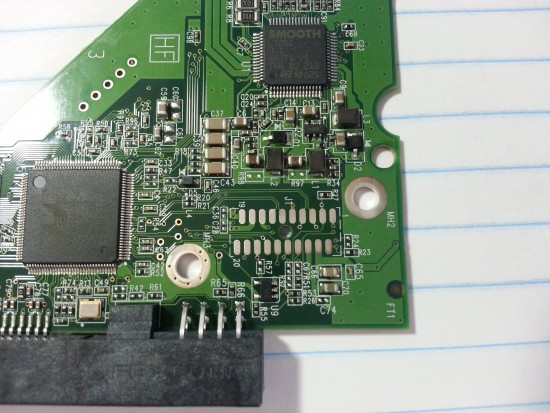
20130905_143749.jpg [ 2.55 MiB | Viewed 6693 times ]
|
File comment: After
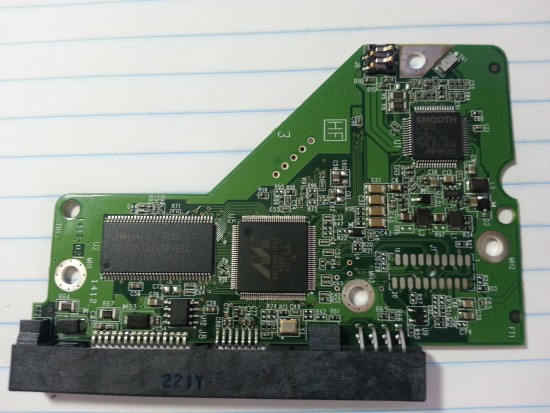
20130905_143734.jpg [ 2.15 MiB | Viewed 6693 times ]
|
File comment: Before
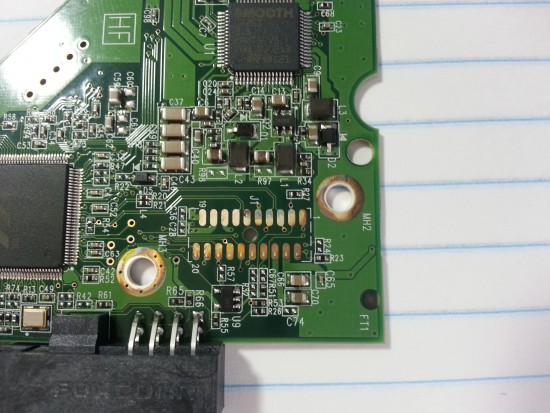
20130905_142758.jpg [ 2.28 MiB | Viewed 6693 times ]
|
File comment: Before
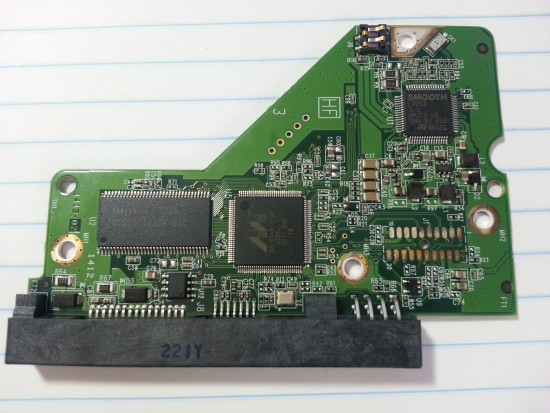
20130905_142739.jpg [ 1.8 MiB | Viewed 6693 times ]
|
|



 FAQ
FAQ Search
 Login
Login Register
 HDDGURU FILES