MultiDrive – free backup, clone & wipe disk utility from Atola Technology

All times are UTC - 5 hours [ DST ]


Post new topic Reply to topic  [ 8 posts ] 
Author Message
 Post subject: Help identifying part from damaged drive
PostPosted: July 21st, 2014, 10:43 
Offline

Joined: July 21st, 2014, 10:22
Posts: 3
Location: Australia
Hello all,
I am new here and trying to help my father. He recently drove over his external hard drive and a component got broken off of the PCB. The drive still spins up fine and the lights come on and it isn't making any suspicious noises so I get the feeling that it might still work.

I have tried my google fu on the part numbers and I can't find anything that may help. My father suspects that the missing part is something called a 'low pass filter'. I would appreciate it if you could help me try to identify this component so that we can try to get a replacement for it. The component is labeled 'L2' on the PCB.

Anyway the drive has the following numbers:
MK2552GSX
HDD2H02
C WL01 S

PCB with the missing part highlighted:
Attachment:
File comment: PCB with missing component highlighted.
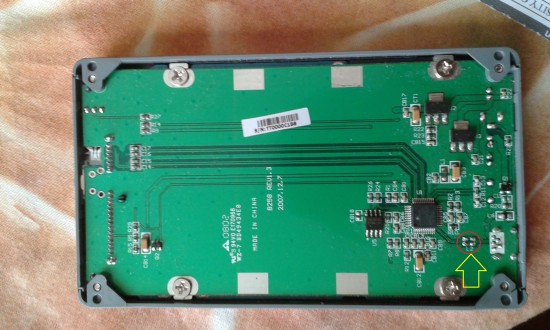
PCB.jpg
PCB.jpg [ 934.34 KiB | Viewed 5421 times ]


Top of disk showing labels:
Attachment:
File comment: Top of the disk
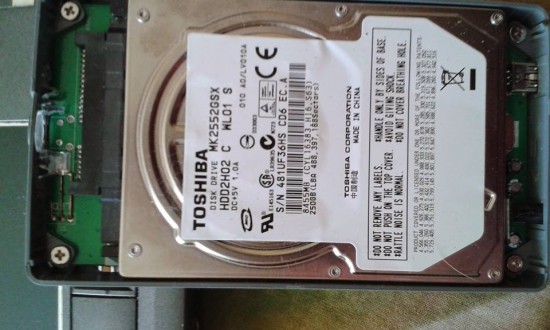
ToOfDisk.jpg
ToOfDisk.jpg [ 76.11 KiB | Viewed 5424 times ]


Looking forward to any help that anybody can give.

Cheers,
K


Top
 Profile  
 
 Post subject: Re: Help identifying part from damaged drive
PostPosted: July 21st, 2014, 11:01 
Offline

Joined: July 20th, 2014, 19:28
Posts: 3
Location: Sweden
L2 is just like L1. Mean a filter coil or ferrite SMD. Bypassing is no problem at all.

As you can see L1 is a ferrite SMD but from the looking of solder plate of L2 I think its a coil filter. Solder two wires between the plates and see.


Attachments:
IndLF_SMD_pf2.jpg
IndLF_SMD_pf2.jpg [ 21.21 KiB | Viewed 5416 times ]
Top
 Profile  
 
 Post subject: Re: Help identifying part from damaged drive
PostPosted: July 21st, 2014, 11:01 
Offline

Joined: November 29th, 2006, 10:08
Posts: 7864
Location: UK
It looks to me that it's only the USB adaptor board (that the standard Toshiba SATA HDD is screwed onto) that's possibly damaged, so try removing the Toshiba HDD from the case and connecting it up to a PC SATA port, or through a USB caddy.

_________________
PC Image Data Recovery
http://www.pcimage.co.uk

New!! HDD-PCB.COM for all your PCB and donor HDD requirements!


Top
 Profile  
 
 Post subject: Re: Help identifying part from damaged drive
PostPosted: July 21st, 2014, 15:45 
Offline
User avatar

Joined: September 8th, 2009, 18:21
Posts: 16960
Location: Australia
montarbo wrote:
L2 is just like L1. Mean a filter coil or ferrite SMD. Bypassing is no problem at all.

As you can see L1 is a ferrite SMD but from the looking of solder plate of L2 I think its a coil filter. Solder two wires between the plates and see.

+1, although two blobs of solder should do it.

_________________
A backup a day keeps DR away.


Top
 Profile  
 
 Post subject: Re: Help identifying part from damaged drive
PostPosted: July 22nd, 2014, 3:18 
Offline

Joined: July 21st, 2014, 10:22
Posts: 3
Location: Australia
Wow so many answers - it looks like my dad has soldered over the components and I'm waiting for him to let me know whether it works. You've certainly saved a lot of heartache. Makes sense that it's the USB controller now that you mention it.


Top
 Profile  
 
 Post subject: Re: Help identifying part from damaged drive
PostPosted: July 22nd, 2014, 3:19 
Offline

Joined: July 21st, 2014, 10:22
Posts: 3
Location: Australia
here's a picture of the soldered L2


Attachments:
soldered.jpg
soldered.jpg [ 112.12 KiB | Viewed 5318 times ]
Top
 Profile  
 
 Post subject: Re: Help identifying part from damaged drive
PostPosted: July 22nd, 2014, 7:40 
Offline
User avatar

Joined: August 13th, 2008, 13:10
Posts: 811
Location: World
+ pcimage


I will detach toshiba drive from USB controler, and try to read it with other USB controler or directly to SATA controler.

good look!


Top
 Profile  
 
 Post subject: Re: Help identifying part from damaged drive
PostPosted: July 22nd, 2014, 17:40 
Offline
User avatar

Joined: September 8th, 2009, 18:21
Posts: 16960
Location: Australia
kehan wrote:
here's a picture of the soldered L2

You might like to detach the USB-SATA bridge PCB from the HDD and power it up on its own. If it shows up in Device Manager (or under USBDeview) as a USB mass storage device, then that should give you some confidence in it.

_________________
A backup a day keeps DR away.


Top
 Profile  
 
Display posts from previous:  Sort by  
Post new topic Reply to topic  [ 8 posts ] 

All times are UTC - 5 hours [ DST ]


Who is online

Users browsing this forum: No registered users and 34 guests


You cannot post new topics in this forum
You cannot reply to topics in this forum
You cannot edit your posts in this forum
You cannot delete your posts in this forum
You cannot post attachments in this forum

Search for:
Jump to:  
Powered by phpBB © 2000, 2002, 2005, 2007 phpBB Group

