Joined: July 30th, 2014, 20:57
Posts: 1
Location: San Jose CA
|
|
First I should say - and I don't know how this has anything to do with it - but the problem occurred after I installed a new SSD on a single disk Windows 7 computer. The computer originally had a single 500GB WD drive. After installing the SSD I put a new installation of Win 7 on the SSD but kept the old 500GB drive "as is" just in case.
About one week after using the computer booting off the SSD but occasionally booting off the old drive, Windows gave the message (during a boot) that there was a problem with one of the drives and wanted to do a chkdsk. It took a few hours and seemed to find a problem with every file on the disk. This was a week ago and I can now not remember the exact nature of the message but I think it was replacing the security_descriptor NTFS attribute on each file with a default value.
It seemed to be happy when it completed and when I run it now it finds no problems with the disk. When I go into Control Panel/Administrative Tools/Computer Management/storage/disk management it reports all the partitions on the drive are healthy (shown in attached jpg - partition in question is F:)
However not only can I not boot from the drive, but when I boot from the SSD, I cannot access the drive. In "My Computer" the main partition just shows as a disk icon (see attached jpg) but does not indicate "xx GB free of yy GB". It DOES indicate that it is an NTFS partition but when you try to browse the drive I get the message "F:\ is not Accessible" and "Access Denied".
Interestingly enough the small system partition and recovery partition on that drive do show the free and total space and are accessible.
I also can access ALL the files on the drive by using the Acronis or Macrium Reflect apps. I even did an image backup of all the partitions on the drive and then restored them and nothing seems to have changed.
Would appreciate any ideas. Can I look at the security_descriptor attributes or are those:
When I right-click a file that has been extracted from the disk using Macrium and select properties and select the security tab, the various permissions seem sensible (most are "allow" and none are "deny")
Thanks
| Attachments: |
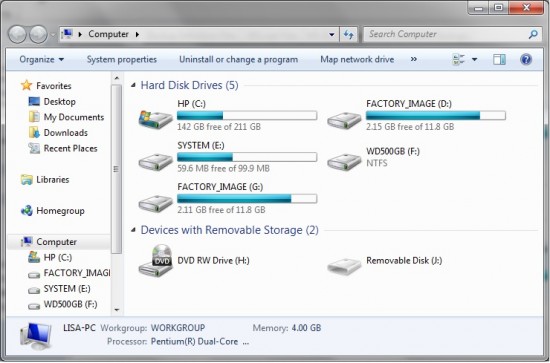
My Computer.jpg [ 98.71 KiB | Viewed 3915 times ]
|
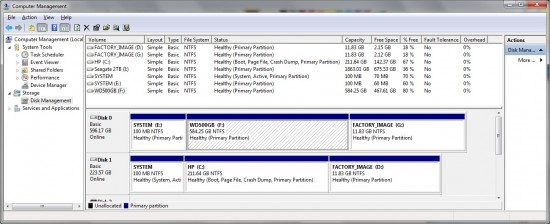
Disk Status.jpg [ 231.22 KiB | Viewed 3915 times ]
|
|
|



 FAQ
FAQ Search
 Login
Login Register
 HDDGURU FILES