MultiDrive – free backup, clone & wipe disk utility from Atola Technology

All times are UTC - 5 hours [ DST ]


Post new topic Reply to topic  [ 13 posts ] 
Author Message
 Post subject: Hard drive recovery advice
PostPosted: August 24th, 2014, 7:02 
Offline

Joined: August 24th, 2014, 6:51
Posts: 2
Location: England
Dear experts, some advice please. I'm trying to recover somebody's data from a dropped laptop drive.
Win8.1 can see the drive but chkdsk (or whatever it is with Win8.1) freezes at 69% (for recovery I've connected the drive to a desktop SATA port directly).
There's no clicking or odd sounds - but its definitely got a major problem.

To date I've used win8.1 to "sort" corrupt drives out and this is the first time its failed to recover.

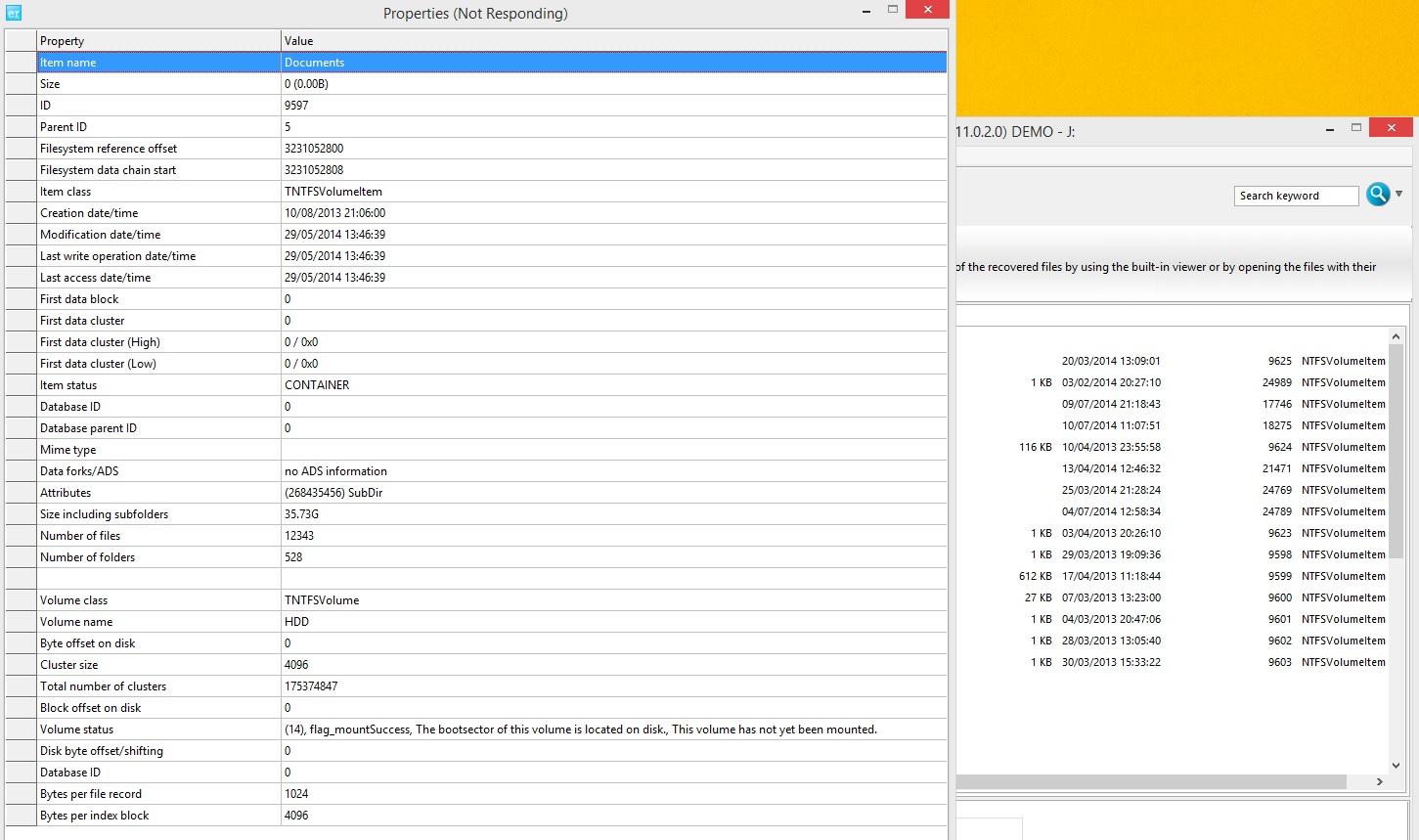
I'm trying ontrack datarecovery demo s/w and, even though it takes a long time to access the drive its given me a file/directory listing - sounds promising - but whether it can access the files is another question!

Here's a screenshot of a folder I did properties of. Can anybody advise whether this should give me enough confidence to buy the product? Cheers! (pic below but also attached if the resolution of the image is poor)

My thinking:- although the software can see folders and files this doesn't necessarily mean it can access them. Either that or the company in question wants more money by me sending the disk to them.

Image


Attachments:
ontrack3.jpg
ontrack3.jpg [ 360.66 KiB | Viewed 7344 times ]
ontrack3.jpg
ontrack3.jpg [ 360.66 KiB | Viewed 7344 times ]
Top
 Profile  
 
 Post subject: Re: Hard drive recovery advice
PostPosted: August 24th, 2014, 19:13 
Offline

Joined: April 26th, 2012, 1:52
Posts: 388
Location: Chicago, USA
Dropped disk means internal mechanical fault. I'm sure more experienced experts will pipe up and agree with me.

_________________
On a clear disk you can seek forever.


Top
 Profile  
 
 Post subject: Re: Hard drive recovery advice
PostPosted: August 24th, 2014, 19:57 
Offline
User avatar

Joined: June 8th, 2006, 19:44
Posts: 3144
Location: Atlanta, GA
Read Kroll's warning. Very. Carefully. It's there for a reason, and it applies in your case.

You can't use a software tool to compensate for a hardware problem.

If you care about "somebody's" data and their chances for reuniting with their data, I strongly suggest you stop now. The nature of the hardware failure must be ascertained, and addressed, before a recovery attempt can continue.

Jon

_________________
http://www.datasaversllc.com


Top
 Profile  
 
 Post subject: Re: Hard drive recovery advice
PostPosted: August 25th, 2014, 3:55 
Offline

Joined: November 29th, 2006, 10:08
Posts: 7864
Location: UK
jono-ats wrote:
Read Kroll's warning. Very. Carefully. It's there for a reason, and it applies in your case.

You can't use a software tool to compensate for a hardware problem.

If you care about "somebody's" data and their chances for reuniting with their data, I strongly suggest you stop now. The nature of the hardware failure must be ascertained, and addressed, before a recovery attempt can continue.

Jon


Agree, please read the warning on the screen. If you continue ignoring this warning, you WILL kill the drive, possibly beyond recovery :-(

We can almost certainly retrieve the data for you at a reasonable cost, AT THIS STAGE.

_________________
PC Image Data Recovery
http://www.pcimage.co.uk

New!! HDD-PCB.COM for all your PCB and donor HDD requirements!


Top
 Profile  
 
 Post subject: Re: Hard drive recovery advice
PostPosted: August 25th, 2014, 6:32 
Offline
User avatar

Joined: August 13th, 2008, 13:10
Posts: 811
Location: World
Hi musicrab,

Tha best is to stop data recovery with ontrack datarecovery solution or other software solutions, because your heads are badly, and problably media will be down.

in this step a PRO with correct tools probably can help you.
the best in this case is to Contact with local pro if your data is valuable.


Top
 Profile  
 
 Post subject: Re: Hard drive recovery advice
PostPosted: August 25th, 2014, 6:35 
Offline

Joined: August 24th, 2014, 6:51
Posts: 2
Location: England
Thanks guys. Customer has been advised to try, in first instance, Kroll (this is the only "professional" service which I am familiar with.)


Top
 Profile  
 
 Post subject: Re: Hard drive recovery advice
PostPosted: August 25th, 2014, 6:46 
Offline
User avatar

Joined: August 13th, 2008, 13:10
Posts: 811
Location: World
Hi musicrab,

goog decision, report us your advances.


Top
 Profile  
 
 Post subject: Re: Hard drive recovery advice
PostPosted: August 25th, 2014, 8:04 
Offline
User avatar

Joined: June 8th, 2006, 19:44
Posts: 3144
Location: Atlanta, GA
I recommend pcimage. They'll do as good of a job for less.

_________________
http://www.datasaversllc.com


Top
 Profile  
 
 Post subject: Re: Hard drive recovery advice
PostPosted: August 26th, 2014, 8:01 
Offline

Joined: October 24th, 2009, 8:16
Posts: 281
Location: Gdansk - Poland
Use ddrescue to clone the hdd to the other disk.
Then you can recover data

_________________
data recovery Poland


Top
 Profile  
 
 Post subject: Re: Hard drive recovery advice
PostPosted: August 26th, 2014, 10:37 
Offline
User avatar

Joined: June 8th, 2006, 19:44
Posts: 3144
Location: Atlanta, GA
laptokowiec wrote:
Use ddrescue to clone the hdd to the other disk.
Then you can recover data


You can do that on your own drive, but not on someone else's. :-)

_________________
http://www.datasaversllc.com


Top
 Profile  
 
 Post subject: Re: Hard drive recovery advice
PostPosted: August 26th, 2014, 18:01 
Offline
User avatar

Joined: September 8th, 2009, 18:21
Posts: 16960
Location: Australia
jono-ats wrote:
laptokowiec wrote:
Use ddrescue to clone the hdd to the other disk.
Then you can recover data


You can do that on your own drive, but not on someone else's. :-)

ISTM that Kroll Ontrack's software product would be less likely to recover the client's data than ddrescue, or is there something about the former that we should know?

_________________
A backup a day keeps DR away.


Top
 Profile  
 
 Post subject: Re: Hard drive recovery advice
PostPosted: August 26th, 2014, 21:44 
Offline
User avatar

Joined: June 8th, 2006, 19:44
Posts: 3144
Location: Atlanta, GA
fzabkar: It makes no difference what software too you pick: You can't use a software tool to compensate for a hardware problem.

_________________
http://www.datasaversllc.com


Top
 Profile  
 
 Post subject: Re: Hard drive recovery advice
PostPosted: August 27th, 2014, 5:29 
Offline
User avatar

Joined: January 28th, 2009, 10:54
Posts: 3547
Location: Greece
jono-ats wrote:
You can't use a software tool to compensate for a hardware problem.


Let's make that a sticky.

_________________
http://www.northwind.gr
SandForce SSD Recovery
Ransomware Reverse Engineering - NoMoreRansom! partners


Top
 Profile  
 
Display posts from previous:  Sort by  
Post new topic Reply to topic  [ 13 posts ] 

All times are UTC - 5 hours [ DST ]


Who is online

Users browsing this forum: Google [Bot] and 84 guests


You cannot post new topics in this forum
You cannot reply to topics in this forum
You cannot edit your posts in this forum
You cannot delete your posts in this forum
You cannot post attachments in this forum

Search for:
Jump to:  
Powered by phpBB © 2000, 2002, 2005, 2007 phpBB Group



