MultiDrive – free backup, clone & wipe disk utility from Atola Technology

All times are UTC - 5 hours [ DST ]


Post new topic Reply to topic  [ 5 posts ] 
Author Message
 Post subject: Can existing boot disk become secondary drive ?
PostPosted: March 13th, 2015, 13:05 
Offline

Joined: March 13th, 2015, 12:48
Posts: 8
Location: New Jersey USA
On a Dell running Windows 7 Pro I am booting from an internally located hard disk purchased March 2014, and connected to SATA0. This March 2014 disk contains partitions C: and D:, plus a RECOVERY partition.

If I disconnect this drive, put a new hard disk on SATA0, and install Windows 8, will I be able to access all partitions on the old hard drive if (a) I connect the old drive to the SATA1 port on the motherboard (b) I connect it to an external USB hard drive.

Will Windows 8 allow me to do this stuff or will it go crazy ? Or will it let me access everything except what had been previously the boot partition on the old drive ?

I will much appreciate advice on these issues.


Top
 Profile  
 
 Post subject: Re: Can existing boot disk become secondary drive ?
PostPosted: March 13th, 2015, 15:59 
Offline
User avatar

Joined: April 3rd, 2011, 0:19
Posts: 2003
Location: Providence, RI
Yes you should have no issues with this. You just have to be sure that your BIOS (or UEFI) is set to boot from the correct drive.

Windows will automatically assign new drive letters to the partitions.

_________________
Data Medics - Hard Drive, SSD, and RAID Data Recovery Service Company


Top
 Profile  
 
 Post subject: Re: Can existing boot disk become secondary drive ?
PostPosted: March 13th, 2015, 16:01 
Offline
User avatar

Joined: April 3rd, 2011, 0:19
Posts: 2003
Location: Providence, RI
The only folders that might give you any issues is your actual user folders. But as long as your logged in as an administrator it should prompt you to take permission of the folder.

_________________
Data Medics - Hard Drive, SSD, and RAID Data Recovery Service Company


Top
 Profile  
 
 Post subject: Re: Can existing boot disk become secondary drive ?
PostPosted: March 13th, 2015, 17:24 
Offline

Joined: March 13th, 2015, 12:48
Posts: 8
Location: New Jersey USA
Hi Data Medics:

Many many thanks. I'll give it a try.

Regards

Boblite


Top
 Profile  
 
 Post subject: Re: Can existing boot disk become secondary drive ?
PostPosted: March 14th, 2015, 21:04 
Offline

Joined: March 13th, 2015, 12:48
Posts: 8
Location: New Jersey USA
Interesting results, on my Dell Optiplex 7010 I bought a year ago, new.
Results are reported as a timeline to help clarify.


12:15am Physical setup: Hooked 500GB HD with Windows 8 to SATA 0 port on motherboard; Hooked 1000GB HD with Windows 7 to SATA 1 port on motherboard

12:25am In BIOS I set SATA 0 disk visible, SATA 1 disk not visible No problem. booted Win 8

12:28am In BIOS I set SATA 0 disk not visible, Sata 1 disk visible No problem, booted Win 7

12:32am In BIOS I set SATA 0 disk visible, Sata 1 disk visible. The system booted to Windows 8, but none of the partitions on the SATA 1 drive were seen by Windows Explorer.

12:35am I ran the Disk Management applet (Control Panel > Administrative Tools > Computer Management > Storage > Disk Management). In that view, hard disk 1 (i.e, the SATA 1 hard disk) was visible, and all its partitions were visible, but not assigned any drive letters. It had two partitions of interest, namely the boot partition, and a partition I had created to hold my data.

I unhid the data partition and rebooted.

12:39pm After rebooting, the data partition on hard disk 1 became visible in Windows Explorer, was assigned drive letter F, and files were fully accessible on that partition.

12:41 I shut down the system, went into BIOS, and set SATA disk 0 not visible, and set SATA disk 1 as visible. No problem, booted to Windows 7.

12:44 I shut down the system, went into BIOS, and set SATA disks 0 and disk 1 visible, and rebooted. I then ran the Disk Management applet, and unhid the boot partition on SATA disk 1.

12:47 Rebooted. Windows 8 (located on hard disk 0) went into action to establish its primacy. It recognized there was a boot partition on hard disk 1, and steriized that partition (not sure sterilized is the right word: but anyway, it rendered it unbootable.)

So... in sum... the data on the boot partition of hard disk 1 was exposed and made accessible, but the booting ability was removed.

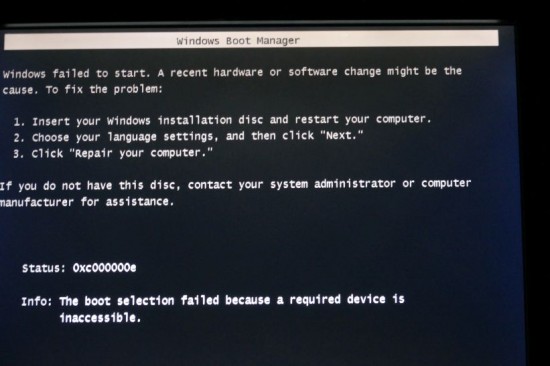
12:55 Rebooted into BIOS, disabled hard disk 0, and kept hard disk 1 enabled. Booted. Got an error message shown in the attached photo:

As expected, Windows 8 had established itself as king, and beheaded its rival.


Attachments:
Screenshot of error message.jpg
Screenshot of error message.jpg [ 99.46 KiB | Viewed 4444 times ]
Top
 Profile  
 
Display posts from previous:  Sort by  
Post new topic Reply to topic  [ 5 posts ] 

All times are UTC - 5 hours [ DST ]


Who is online

Users browsing this forum: No registered users and 47 guests


You cannot post new topics in this forum
You cannot reply to topics in this forum
You cannot edit your posts in this forum
You cannot delete your posts in this forum
You cannot post attachments in this forum

Search for:
Jump to:  
Powered by phpBB © 2000, 2002, 2005, 2007 phpBB Group