MultiDrive – free backup, clone & wipe disk utility from Atola Technology

All times are UTC - 5 hours [ DST ]


Post new topic Reply to topic  [ 25 posts ]  Go to page 1, 2  Next
Author Message
 Post subject: Need help with damaged WD 1 TB SATA drive
PostPosted: January 7th, 2016, 18:21 
Offline

Joined: January 7th, 2016, 17:47
Posts: 9
Location: California
Hi Folks,

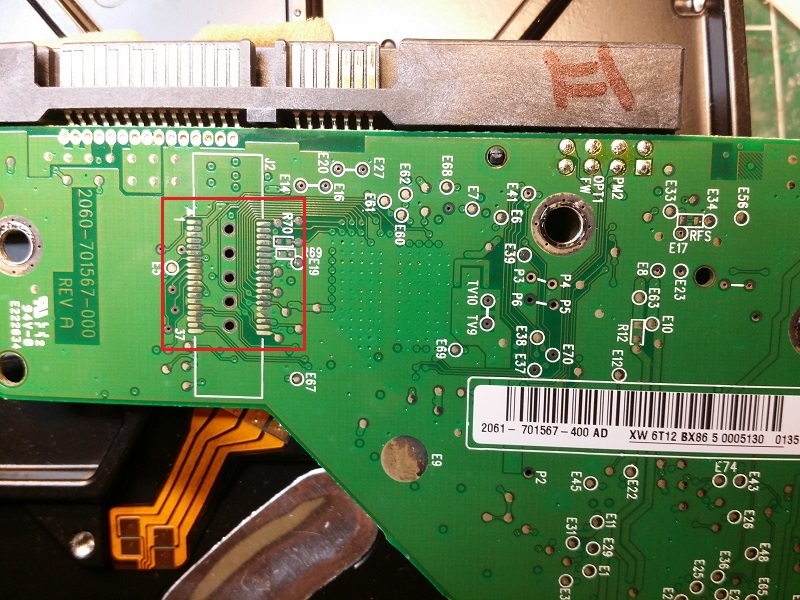
I desperately need some help. My wife started her computer last week and reported that it only made a BZzzzz noise. I went to take a look and encountered a bad burny smell in the room. Further examination revealed that her PSU burnt out and sent a voltage spike high enough to destroy every electronic component in the computer. I ordered new guts but when I attempted to use the existing two WD 1TB SATA drives, they would not even spin up, and neither was recognized. In looking at the backs of the drives, I spotted some burn marks on the PCB, as indicated in red below:
Image

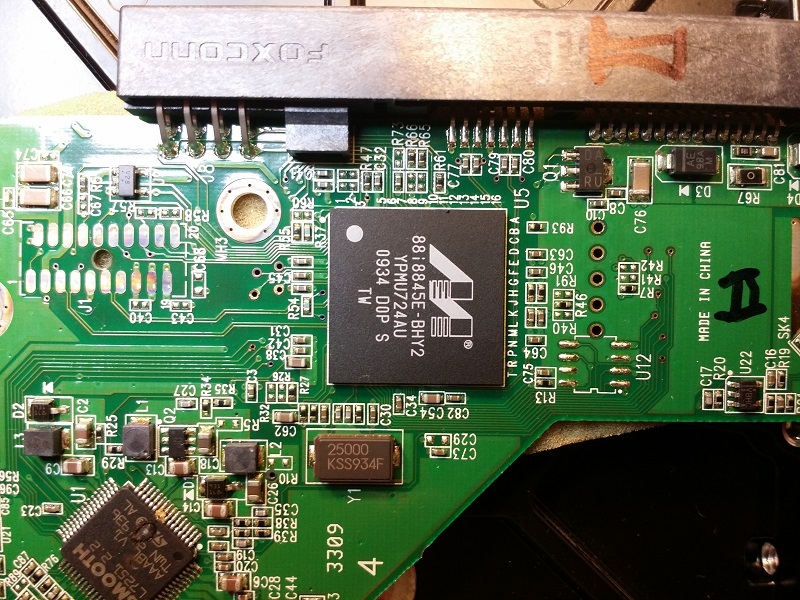
I did a little Googling and found a place in China that sells replacement PCB's, with the caviat that the BIOS chip will probably need to be changed. I ordered a new PCB for it and installed it on the drive to test. The drive now spins up and is recognized, but with a 0.0 GB capacity, so it seems that I will need to go further. Apparently this particular board has the BIOS integrated with the main IC:
Image

I've called around quite a bit, but can find no one in my area who is willing to take on the job swapping these chips. I did some more Googling and found this site (joy).

I have not read this site from end to end, but it looks as though from what I've uncovered so far, it may be possible with the help of a utility called WDR to read the BIOS from the system area on the HD's platters and flash that to the chip on the replacement PCB I bought.

Can anyone offer a n00b any advice on how to proceed with getting this working again so I can extract the data from it? I'm in IT, so I'm not a completely handless clown who's going to pull the platters out to have a look, but neither am I an electrical engineer with a godlike knowledge of the interior esoteric workings of hard drives.

Thanks a million for any bones you might throw my way,

ianc


Top
 Profile  
 
 Post subject: Re: Need help with damaged WD 1 TB SATA drive
PostPosted: January 7th, 2016, 23:15 
Offline
User avatar

Joined: September 8th, 2009, 18:21
Posts: 16960
Location: Australia
Those are not burn marks, and there is no need to do anything about them.

Oxidisation on Western Digital PCBs:
http://www.hddoracle.com/viewtopic.php? ... 649&p=1789

It appears that your preamp may have survived (does the drive click?), but here is what often happens to WD drives that have been overvolted:

Catastrophic failures in Western Digital PCBs:
http://www.hddoracle.com/viewtopic.php? ... 119&p=5033

I think I can see some damage on the 5V side of the SMOOTH IC. Can you measure the resistances of the TVS diodes (D3 and D4) and zero-ohm resistors (R67 and R64)? This will tell us how the drive died. I suspect that D3 will be shorted and R67 will be open, in which case there will have been an overvoltage on the 5V supply.

_________________
A backup a day keeps DR away.


Top
 Profile  
 
 Post subject: Re: Need help with damaged WD 1 TB SATA drive
PostPosted: January 7th, 2016, 23:34 
Offline
User avatar

Joined: September 8th, 2009, 18:21
Posts: 16960
Location: Australia
Assuming that the Marvell MCU survived, you could try the following service:

http://www.onepcbsolution.com/largerepairs.html

_________________
A backup a day keeps DR away.


Top
 Profile  
 
 Post subject: Re: Need help with damaged WD 1 TB SATA drive
PostPosted: January 8th, 2016, 4:37 
Offline
User avatar

Joined: January 6th, 2015, 2:21
Posts: 186
Location: Germany
Looks like the Motor control unit (MCU Smooth chip) is toast.

Usually in this case you could just order a new board and then move the U12 (ROM) chip to the new board. But on this PCB the ROM is embedded in the Controller (Marvel chip).

First option - You will either need extremely good soldering skills to move the marvel chip to a new matching board.
Second option - send it to a DR pro who has the tools that can re-build the ROM from the firmware on the platters without needing access to the original PCB or any soldering work.

PS - Don't open the drive whatever you do.

_________________
Web: https://www.day1data.de


Top
 Profile  
 
 Post subject: Re: Need help with damaged WD 1 TB SATA drive
PostPosted: January 8th, 2016, 6:10 
Offline

Joined: January 8th, 2016, 5:46
Posts: 3
Location: Livermore, Ca
Outsource Data Recovery in Cleveland, OHIO are experts that I've used to fix several bad PCB boards I've come across from my clients. They replace the PCB with the correct board, and re-flash your firmware. They only charge $60 to do this, which considering many PCBs cost $20-60 it's an excellent deal. There are VERY few models of PCB boards that you can just swap without having a re-flash or transfer of the IC, such as your case.

You simply open a request with outsource, print out an order id sheet, and mail it to their address. I HIGHLY suggest you send it in a medium flat rate box well protected with cardboard and bubbles. Once they get it it's 24-48hrs to diagnose and fix. Once it's fixed they will send the $60 invoice, and once you pay they will ship it back. If they cannot fix it they will let you know and ask if you want to continue service, this would be for head or other major failure where they need to clean-room it. I also suggest you pay the $15 priority to get it back to you, as the less time a drive is in transit the better.

Good Luck!
Kyle


Top
 Profile  
 
 Post subject: Re: Need help with damaged WD 1 TB SATA drive
PostPosted: January 8th, 2016, 16:36 
Offline

Joined: January 7th, 2016, 17:47
Posts: 9
Location: California
Thanks so much for your responses guys!

I did make some measurements on the two drives as fzabkar suggested:

Drive 1:
--------
D3 - open
D4 - 3 Ohms
R67 - 3 Ohms
R64 - 1165 Ohms

Drive 2
--------
D3 - 340 Ohms
D4 - 3 Ohms
R67 - 3 Ohms
R64 - open

From what I can gather reading the link on WD catastrophic failures, it looks like the 12V line spiked. I believe the SMOOTH MCU's are in fact cooked as you suggest. When I first pulled the PCB I noticed that, but initially I thought it was a spot of glue which help the small insulating pad of styrofoam to the PCB. Closer inspection showed there was no glue, but the pad had in fact melted to the legs of the MCU.

Thanks also for the couple included sources of establishments that might be able to do the repair work. They are relatively inexpensive compared to the data recovery specialists who I got quotes from. I take it then by the fact that you're recommending these establishments that trying to recover the BIOS from the SA on the disk is beyond the capabilities of a laymen and I shouldn't even attempt it?

Thanks again, loads, for helping to point me in the right direction!

ianc


Top
 Profile  
 
 Post subject: Re: Need help with damaged WD 1 TB SATA drive
PostPosted: January 8th, 2016, 16:51 
Offline
User avatar

Joined: September 8th, 2009, 18:21
Posts: 16960
Location: Australia
ISTM that the overvoltage struck the 12V supply, in which case I would have expected damage to the motor side of the SMOOTH chip, not the 5V side. Anyway, there is a good chance that the preamp is OK, so a board swap and firmware transfer will probably work.

BTW, I caution you to read the following thread before entrusting your data to Outsource Data Recovery:

viewtopic.php?t=25524

Outsource Data Recovery and Donor Drives are one and the same outfit.

Here is another thread that may interest you:
http://www.tomshardware.com/forum/29438 ... ment-again

... and another one:
viewtopic.php?f=1&t=30895

BTW, another tool you might consider is WDMarvel (US$15). The author has an active forum whereas WDR has no support.

_________________
A backup a day keeps DR away.


Top
 Profile  
 
 Post subject: Re: Need help with damaged WD 1 TB SATA drive
PostPosted: January 8th, 2016, 20:41 
Offline

Joined: January 7th, 2016, 17:47
Posts: 9
Location: California
Thanks for the info fzabkar; I did read those other threads and porthas seems a bit shady to me.

I had heard of WDMarvel and actually downloaded a demo copy of it already, but have not had the chance to play with it or read any of the docs yet.

Can it do what I'm trying to accomplish?

As usual, thanks much for the benefits of your expertise,

ianc


Top
 Profile  
 
 Post subject: Re: Need help with damaged WD 1 TB SATA drive
PostPosted: January 10th, 2016, 17:12 
Offline

Joined: January 7th, 2016, 17:47
Posts: 9
Location: California
Hey there, sorry for the slow response. I posted one a few days ago, but maybe it slipped through the moderator's cracks 'cause it never showed up.

Anyway, I understand my options to be:

1) sending the board\drive out to have the BIOS recovered and flashed to the new PCB I purchased, or,

2) attempting it myself. Fzabkar, you mention WDMarvel. I downloaded the demo version of that but have not had time to play with it yet. I took a look at the forum, but due to some difficulties with Google translate and the registration process, was not able to register an account there yet. I took a look at some of the topics and (to this non Russian speaker at least), even when they were translated, they were barely understandable.

So, would WDMarvel allow me to do what it is I need to do? Would I find documentation somewhere that would describe the basics of accomplishing this, or would it be trial and error and continually asking questions here there and everywhere with the ever-present risk of screwing something up?

Trying to decide which way to go. I can enjoy a challenge, but not a continuing frustration. I'm technically-minded, but can only learn if there is stuff readily available to learn from. I also don't have a great deal of time to finagle with it due to work and my 7 year old daughter.

What would you do if you were me? Thanks muchly for any input...

ianc


Top
 Profile  
 
 Post subject: Re: Need help with damaged WD 1 TB SATA drive
PostPosted: January 10th, 2016, 22:25 
Offline

Joined: April 26th, 2012, 1:52
Posts: 388
Location: Chicago, USA
Go pro..

_________________
On a clear disk you can seek forever.


Top
 Profile  
 
 Post subject: Re: Need help with damaged WD 1 TB SATA drive
PostPosted: January 10th, 2016, 23:15 
Offline

Joined: April 26th, 2012, 1:52
Posts: 388
Location: Chicago, USA
Go pro..

_________________
On a clear disk you can seek forever.


Top
 Profile  
 
 Post subject: Re: Need help with damaged WD 1 TB SATA drive
PostPosted: January 10th, 2016, 23:54 
Offline
User avatar

Joined: June 8th, 2006, 19:44
Posts: 3144
Location: Atlanta, GA
Just playing "the odds", the chances that the MCU is damaged is high, and / or the support circuitry that would enable you to copy the ROM data from the MCU.

We see this type of damage from time-to-time. Sometimes the ROM cannot be built from the service area modules, because of missing adaptives.

_________________
http://www.datasaversllc.com


Top
 Profile  
 
 Post subject: Re: Need help with damaged WD 1 TB SATA drive
PostPosted: January 11th, 2016, 1:12 
Offline
User avatar

Joined: September 8th, 2009, 18:21
Posts: 16960
Location: Australia
I would take a few more resistance measurements to determine the likelihood that the Marvell MCU survived. To this end I would measure the resistance between ground (eg a screw hole) and the test points in the attachments. Use the 200 ohms range of your meter.
Attachment:
regs.jpg
regs.jpg [ 165.88 KiB | Viewed 18841 times ]
Attachment:
3V3.jpg
3V3.jpg [ 51.84 KiB | Viewed 18841 times ]

_________________
A backup a day keeps DR away.


Top
 Profile  
 
 Post subject: Re: Need help with damaged WD 1 TB SATA drive
PostPosted: January 11th, 2016, 15:36 
Offline

Joined: January 7th, 2016, 17:47
Posts: 9
Location: California
Hi fzabkar,

As usual, thanks greatly for your attention! I've made the measurements you requested on both drives, and they are:

Drive 1
-------
Vneg = 100 Ohms
Vcore = 80
2V5 = ~1
3V3 = ~1
5V = open

Drive 2
-------
Vneg = 125
Vcore = ~1
2V5 = ~1
3V3 = ~1
5V = 35

Even if the MCU didn't survive, couldn't the BIOS be retrieved from the SA on the platters with the help of the replacement PCB, and then written to it?

Still not quite gettin' it...

ianc


Top
 Profile  
 
 Post subject: Re: Need help with damaged WD 1 TB SATA drive
PostPosted: January 11th, 2016, 16:31 
Offline
User avatar

Joined: September 8th, 2009, 18:21
Posts: 16960
Location: Australia
Jono-ats is saying that the ROM components are not always backed up in the SA, in which case a DIY solution involving ROM regeneration would not be feasible.

Repairing your PCB would only be feasible if we could determine whether the MCU is likely to have survived. The SMOOTH chip generates 3 voltages for the MCU, namely Vcore, +2.5V and +3.3V. If any of these supplies are shorted, then any component that is connected to them must be suspect.

Your results are a little confusing. I presume that "~1" means that the measurement overranged on the 200 ohms scale, in which case I don't understand the distinction with "open". If instead the resistance is 1 ohm, then that's a short circuit. Could you clarify this for us?

_________________
A backup a day keeps DR away.


Top
 Profile  
 
 Post subject: Re: Need help with damaged WD 1 TB SATA drive
PostPosted: January 11th, 2016, 16:41 
Offline

Joined: January 7th, 2016, 17:47
Posts: 9
Location: California
Quote:
Could you clarify this for us?


Sure, sorry for the confusion.

~1 means about 1 or less Ohms, basically very little to no resistance. Open means infinite resistance on the 200 Ohm scale.

Hmmm... Repairing the PCB sounds a little nightmarish; troubleshooting and replacing every damaged component sounds like an arduous and expensive job. I should think extracting the ROM would be the low hanging fruit, but what do I know... ;)

ianc


Top
 Profile  
 
 Post subject: Re: Need help with damaged WD 1 TB SATA drive
PostPosted: January 11th, 2016, 16:59 
Offline
User avatar

Joined: September 8th, 2009, 18:21
Posts: 16960
Location: Australia
Thanks for the clarification. Previously you measured 3 ohms when I would have expected to see 0 ohms, so I assumed that 3 ohms was the resistance of your meter leads. A reading of 1 ohm would have been less than the resistance of your leads, which is clearly not possible, hence the confusion.

Anyway, it does look like the MCU in both cases is dead, so your only DIY hope is to rebuild the ROM from the SA.

_________________
A backup a day keeps DR away.


Top
 Profile  
 
 Post subject: Re: Need help with damaged WD 1 TB SATA drive
PostPosted: January 11th, 2016, 17:10 
Offline

Joined: January 7th, 2016, 17:47
Posts: 9
Location: California
Quote:
Previously you measured 3 ohms when I would have expected to see 0 ohms, so I assumed that 3 ohms was the resistance of your meter leads


Yeah, I'm not sure what's up with that meter. The other day I was measuring 2-3 Ohms across the meter's leads; today it was more like .2-.4. Not sure why that is. Maybe grungy connections from the cable to the meter?

In terms of rebuilding the ROM from the SA, is that something which should be relatively straightforward if one licenses a full copy of WDMarvel for a month? Are there any how-to docs that you've seen that detail this process? Or am I best off not mucking with it and just sending it off for someone more knowledgable to tackle?

Greatly appreciate your insight,

ianc


Top
 Profile  
 
 Post subject: Re: Need help with damaged WD 1 TB SATA drive
PostPosted: January 11th, 2016, 17:13 
Offline
User avatar

Joined: September 8th, 2009, 18:21
Posts: 16960
Location: Australia
How is it that you measured 35 ohms between 5V and ground, yet D3 measured 340 ohms? Do you get a different reading if you reverse the probes?

Just to be sure, resistance measurements should be taken in the absence of power.

_________________
A backup a day keeps DR away.


Top
 Profile  
 
 Post subject: Re: Need help with damaged WD 1 TB SATA drive
PostPosted: January 11th, 2016, 17:21 
Offline

Joined: April 26th, 2012, 1:52
Posts: 388
Location: Chicago, USA
Send it off to someone that can handle new problems as they become apparent. Either that or muddle through till something either works or permanently breaks.

I always advise my clients to treat the HDD/SSD as a black box. Once it breaks, it breaks, throw it away. Pull out your backups and don't waste time getting back on the road.

_________________
On a clear disk you can seek forever.


Top
 Profile  
 
Display posts from previous:  Sort by  
Post new topic Reply to topic  [ 25 posts ]  Go to page 1, 2  Next

All times are UTC - 5 hours [ DST ]


Who is online

Users browsing this forum: Bing [Bot] and 188 guests


You cannot post new topics in this forum
You cannot reply to topics in this forum
You cannot edit your posts in this forum
You cannot delete your posts in this forum
You cannot post attachments in this forum

Search for:
Jump to:  
cron
Powered by phpBB © 2000, 2002, 2005, 2007 phpBB Group


