MultiDrive – free backup, clone & wipe disk utility from Atola Technology

All times are UTC - 5 hours [ DST ]


Post new topic Reply to topic  [ 11 posts ] 
Author Message
 Post subject: WD MY BOOK DUO Corrupted partition
PostPosted: February 15th, 2016, 0:53 
Offline

Joined: August 19th, 2013, 22:53
Posts: 19
Hello awesome Folks, Long story short, I have an issue here with an inaccessible data inside a fully working hdd/enclosure! seems pretty easy; but no way!

Drive: WD MY BOOK DUO (2X6tb)
Configuration: JBOD (each drive works independently)
File System: HFS+
Condition: Drives & Enclosure Works fine

Scenario:

(0) My Book Duo enclosure contains [Drive 1] & [Drive 2] that are JBOD configured
(1) All the essential data are on [Drive 1]
(2) Wanted to test [Drive 2]
(3) I removed [Drive 2] from the bay and reconnected the enclosure that only contains [Drive 1] and I found that all data are still available and accessible so I was sure that the two drives are working independently.
(4) I run some tests on the [Drive 2] then returned it back to the Enclosure
(5) The data on [Drive 1] were still available and accessible
(6) Using WD Utility I quickly erased [Drive 2] ONLY, and just after doing so the Data on [Drive 1] were not accessible as the partition was unmounted
(7) I'm 100% sure that [Disk 1] isn't erased and to confirm I have inspected the drive with WinHex.
(8) Using all known Data Recovery SW and tricks ( Testdisk, Diskwarrior, R-Studio, Data Rescue......etc) revealed nothing
(9) All tests were performed on drive inside the enclosure and outside the enclosure and it only reveal few meaningless corrupted RAW files.


waiting to read your suggestions and tricks, as you can see mostly we are dealing with an encryption issue due to a bug in WD utility tool!


Top
 Profile  
 
 Post subject: Re: WD MY BOOK DUO Corrupted partition
PostPosted: February 15th, 2016, 1:30 
Offline
User avatar

Joined: September 8th, 2009, 18:21
Posts: 16955
Location: Australia
How did you go about step 6? Do you have a link to this "WD Utility"?

WD have a "quick formatter" tool for their external drives. The documentation is hopelessly inept, but AIUI this utility changes the sector size of the enclosure from the default factory setting of 4096 bytes to 512 bytes. It is not really a "formatter" as real people would understand the term.

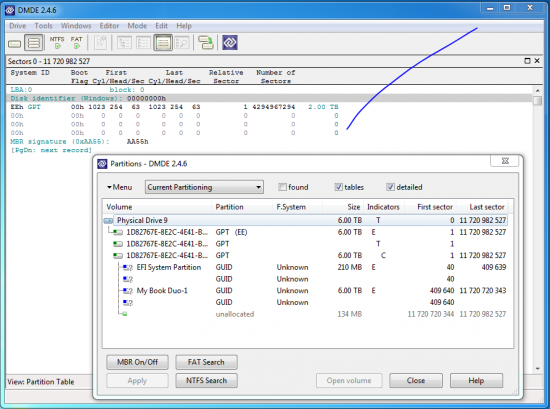
Could we see how DMDE (freeware disc editor) displays the partition information?

(DMDE is a Windows tool. I'm sorry, I don't have any Mac experience.)

_________________
A backup a day keeps DR away.


Top
 Profile  
 
 Post subject: Re: WD MY BOOK DUO Corrupted partition
PostPosted: February 15th, 2016, 2:10 
Offline

Joined: August 19th, 2013, 22:53
Posts: 19
fzabkar wrote:
How did you go about step 6? Do you have a link to this "WD Utility"?

WD have a "quick formatter" tool for their external drives. The documentation is hopelessly inept, but AIUI this utility changes the sector size of the enclosure from the default factory setting of 4096 bytes to 512 bytes. It is not really a "formatter" as real people would understand the term.

Could we see how DMDE (freeware disc editor) displays the partition information?

(DMDE is a Windows tool. I'm sorry, I don't have any Mac experience.)


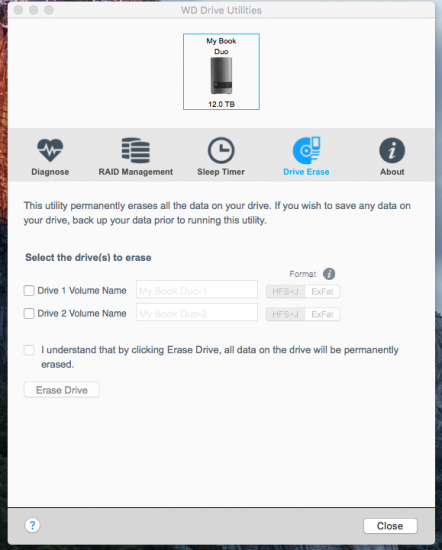
it's ok, here is a screenshot for WD utilities app showing the option that allow you to erase specific drive inside the enclosure and don't worry I have access to both Windows and Mac, and I'm attaching how DMDE see the drive too.

Attachment:
File comment: DMDE Partitions
Capture.PNG
Capture.PNG [ 98.16 KiB | Viewed 8196 times ]


Attachment:
File comment: WD utilities
Screen Shot 2016-02-15 at 7.44.27 AM.png
Screen Shot 2016-02-15 at 7.44.27 AM.png [ 120.36 KiB | Viewed 8196 times ]


Top
 Profile  
 
 Post subject: Re: WD MY BOOK DUO Corrupted partition
PostPosted: February 15th, 2016, 3:01 
Offline
User avatar

Joined: September 8th, 2009, 18:21
Posts: 16955
Location: Australia
It appears that your WD tool is not the Quick Formatter I was thinking of. In any case your enclosure is presenting a sector size of 512 bytes, and this appears to be the default for this particular product.

DMDE doesn't understand HFS (and neither do I), but it appears to have found all the partitions. I would examine sectors 40 and 409640 (the first sectors of each partition), but the next step would be a learning experience for me.

BTW, I'm assuming that you did not repartition drive #1 or allow TestDisk or any other tool to restore any partitions. That is, I'm assuming that DMDE is showing the original, untouched partition structure.

_________________
A backup a day keeps DR away.


Top
 Profile  
 
 Post subject: Re: WD MY BOOK DUO Corrupted partition
PostPosted: February 16th, 2016, 3:11 
Offline

Joined: August 19th, 2013, 22:53
Posts: 19
Yes, I can see that DMDE doesn't support the HFS+ .... For now we are dealing with decryption case for WD, am I right ? and apparently this is just a glitch in their Utility


Top
 Profile  
 
 Post subject: Re: WD MY BOOK DUO Corrupted partition
PostPosted: February 16th, 2016, 3:38 
Offline

Joined: August 19th, 2013, 22:53
Posts: 19
here is attached image for Sectors 40 and 409640

Attachment:
Capture1.PNG
Capture1.PNG [ 147.64 KiB | Viewed 8088 times ]


Attachment:
Capture2.PNG
Capture2.PNG [ 154.26 KiB | Viewed 8088 times ]


Top
 Profile  
 
 Post subject: Re: WD MY BOOK DUO Corrupted partition
PostPosted: February 16th, 2016, 4:04 
Offline
User avatar

Joined: September 8th, 2009, 18:21
Posts: 16955
Location: Australia
The EFI partition appears to be a FAT32 volume. No surprises there, but I would have expected that DMDE would have identified it as such. :?

The My Book Duo-1 partition has an empty boot sector. I have never examined a HFS+ volume, so I don't know what I should be looking for. However I would have expected that this sector would contain information about the volume. If you scroll down through the user area, do you see any non-zero sectors?

_________________
A backup a day keeps DR away.


Top
 Profile  
 
 Post subject: Re: WD MY BOOK DUO Corrupted partition
PostPosted: February 16th, 2016, 15:18 
Offline

Joined: August 19th, 2013, 22:53
Posts: 19
Yes, all the sectors after few lines shows non zero data that are giving the typical appearance of fully functional active drive that hold bunch of data files.


Top
 Profile  
 
 Post subject: Re: WD MY BOOK DUO Corrupted partition
PostPosted: February 16th, 2016, 15:45 
Offline
User avatar

Joined: September 8th, 2009, 18:21
Posts: 16955
Location: Australia
Sorry, I don't have any more ideas.

_________________
A backup a day keeps DR away.


Top
 Profile  
 
 Post subject: Re: WD MY BOOK DUO Corrupted partition
PostPosted: February 16th, 2016, 16:53 
Offline
User avatar

Joined: April 3rd, 2011, 0:19
Posts: 2003
Location: Providence, RI
HFS often is blank for the first three sectors, so you'd actually need to look at sector 4 of it. Have you tried just scanning the drive using R-Studio? I don't think the duo drives actually do any encryption themselves, unless the Mac OS was encrypting it.

And you're certain it's not a RAID 0?

_________________
Data Medics - Hard Drive, SSD, and RAID Data Recovery Service Company


Top
 Profile  
 
 Post subject: Re: WD MY BOOK DUO Corrupted partition
PostPosted: February 23rd, 2016, 15:33 
Offline

Joined: August 19th, 2013, 22:53
Posts: 19
Hello, Nope I'm not doing a RAID 0 nor RAID 1 .. it is just a JBOD (each drive behave independently; and when I removed Drive 2 from the enclosure I was able to access the data on Drive 1).

yes after scanning the drive with R-Studio from inside the enclosure and using SAtA I was getting only specific file counts, all are corrupted make no sense data with different extensions.

But I can see the whole drive sectors are full of Binaries !!


Top
 Profile  
 
Display posts from previous:  Sort by  
Post new topic Reply to topic  [ 11 posts ] 

All times are UTC - 5 hours [ DST ]


Who is online

Users browsing this forum: No registered users and 39 guests


You cannot post new topics in this forum
You cannot reply to topics in this forum
You cannot edit your posts in this forum
You cannot delete your posts in this forum
You cannot post attachments in this forum

Search for:
Jump to:  
Powered by phpBB © 2000, 2002, 2005, 2007 phpBB Group


