MultiDrive – free backup, clone & wipe disk utility from Atola Technology

All times are UTC - 5 hours [ DST ]


Post new topic Reply to topic  [ 29 posts ]  Go to page 1, 2  Next
Author Message
 Post subject: WD MyBook Recovery - Encrypted Bridge Board
PostPosted: May 20th, 2016, 14:58 
Offline

Joined: May 20th, 2016, 14:33
Posts: 15
Location: Chicago
Hi there - I couldn't find a specific answer to this on the forums, but I found enough information that I think I'll be able to ask my question clearly enough.

I have a WD MyBook USB 3.0 4TB External HDD that's acting up (WDBFJK0040HBK-04). I put about 3.2TB of my laboratory's data on it when we were at our old institution. We relocated the lab and the HDD physically came with us. At the new location, the drive would not boot. I flew back, got another HDD, and repeated the process. In the new location, I got the same result - no power, no whir, no LED, nothing.

Seeing as we had two of these, I figured I would shell/look inside one of them to see what was wrong (I have modest EE training). Turns out, the electrical outlets at the new location have way too much fluctuation (they were recently installed as part of a lab renovation) to keep these bridge boards happy. Diagnostically, I had the following:

Outlet + Surge Protector: LED is working, but the drive doesn't spin up
Outlet alone: SATA Bridge Board makes that popping sound, square controller chip starts to smoke :roll:

So, to see how far the electrical damage had gone, I disconnected the USB/SATA bridge board and put the HD directly into a computer that has matching drivers/OS. Here's the exciting part: it boots up/spins, and Windows even recognizes it as "Drive E:" where it should be. However, I can't see the information on it - I get asked to reformat the drive.

With that in mind, my reading suggests that I need to replace this board/chip. As I understand it, there is a level of encryption at this stage, so even though I can (in theory) bypass the USB for data Tx and the shorted power circuit, I can't get the data back without that board.

I was hoping someone could confirm that this was the direction I needed to go in - replacing the part (4060-7051749-000 REV A) and power transformer (just in case). Is there any aspect of this I might be missing? After getting through this stage, I would hope to see a prompt for the BitLocker password (which I have).

Thank you so much for your time.


Top
 Profile  
 
 Post subject: Re: WD MyBook Recovery - Encrypted Bridge Board
PostPosted: May 20th, 2016, 15:21 
Offline

Joined: October 24th, 2014, 4:57
Posts: 219
Location: Remote Raid Help on planet Earth
What was the bridge IC on the USB panel?

_________________
http://www.alfadatarecovery.com


Top
 Profile  
 
 Post subject: Re: WD MyBook Recovery - Encrypted Bridge Board
PostPosted: May 20th, 2016, 15:24 
Offline
User avatar

Joined: December 8th, 2013, 4:48
Posts: 838
Location: Pakistan
upload clear picture of usb/sata bridge component side.
drive is probably encrypted by the bridge and without it you wont be able to get data.

_________________
Data Recovery Pakistan


Top
 Profile  
 
 Post subject: Re: WD MyBook Recovery - Encrypted Bridge Board
PostPosted: May 20th, 2016, 15:38 
Offline

Joined: May 20th, 2016, 14:33
Posts: 15
Location: Chicago
Martin wrote:
What was the bridge IC on the USB panel?


I make the Bridge Square IC to be:

asmedia
ASM1051W
BKT8 4927B3
1116*

*this is where the plastic melted


Top
 Profile  
 
 Post subject: Re: WD MyBook Recovery - Encrypted Bridge Board
PostPosted: May 20th, 2016, 15:52 
Offline

Joined: May 20th, 2016, 14:33
Posts: 15
Location: Chicago
MindMergepk wrote:
upload clear picture of usb/sata bridge component side.
drive is probably encrypted by the bridge and without it you wont be able to get data.


Here is as zoomed out as our scope camera would get, and you should be able to make out the burnt-out IC.


Attachments:
File comment: Bridge
Image2.jpg
Image2.jpg [ 10.64 MiB | Viewed 16602 times ]
Top
 Profile  
 
 Post subject: Re: WD MyBook Recovery - Encrypted Bridge Board
PostPosted: May 20th, 2016, 16:07 
Offline
User avatar

Joined: September 8th, 2009, 18:21
Posts: 16960
Location: Australia
The documentation confirms that the product incorporates hardware encryption:
http://www.wdc.com/wdproducts/library/A ... 705863.pdf

That said, I would have thought that Windows would have prompted you to initialise the drive rather than formatting it ... unless you had already mistakenly initialised it. Did you?

BTW, the bridge IC should be getting power from the onboard regulator and/or the USB port. AFAICT, there must be additional damage upstream.

_________________
A backup a day keeps DR away.


Top
 Profile  
 
 Post subject: Re: WD MyBook Recovery - Encrypted Bridge Board
PostPosted: May 20th, 2016, 16:33 
Offline

Joined: October 5th, 2015, 18:53
Posts: 488
Location: US
You need to replace 4060-7051749-000 REV A. Usually it's enough to get access to data if you didn't do anything else with drive.


Top
 Profile  
 
 Post subject: Re: WD MyBook Recovery - Encrypted Bridge Board
PostPosted: May 20th, 2016, 16:39 
Offline
User avatar

Joined: September 8th, 2009, 18:21
Posts: 16960
Location: Australia
I think you'll find that the number should be 4060-705149, not 4060-7051749.

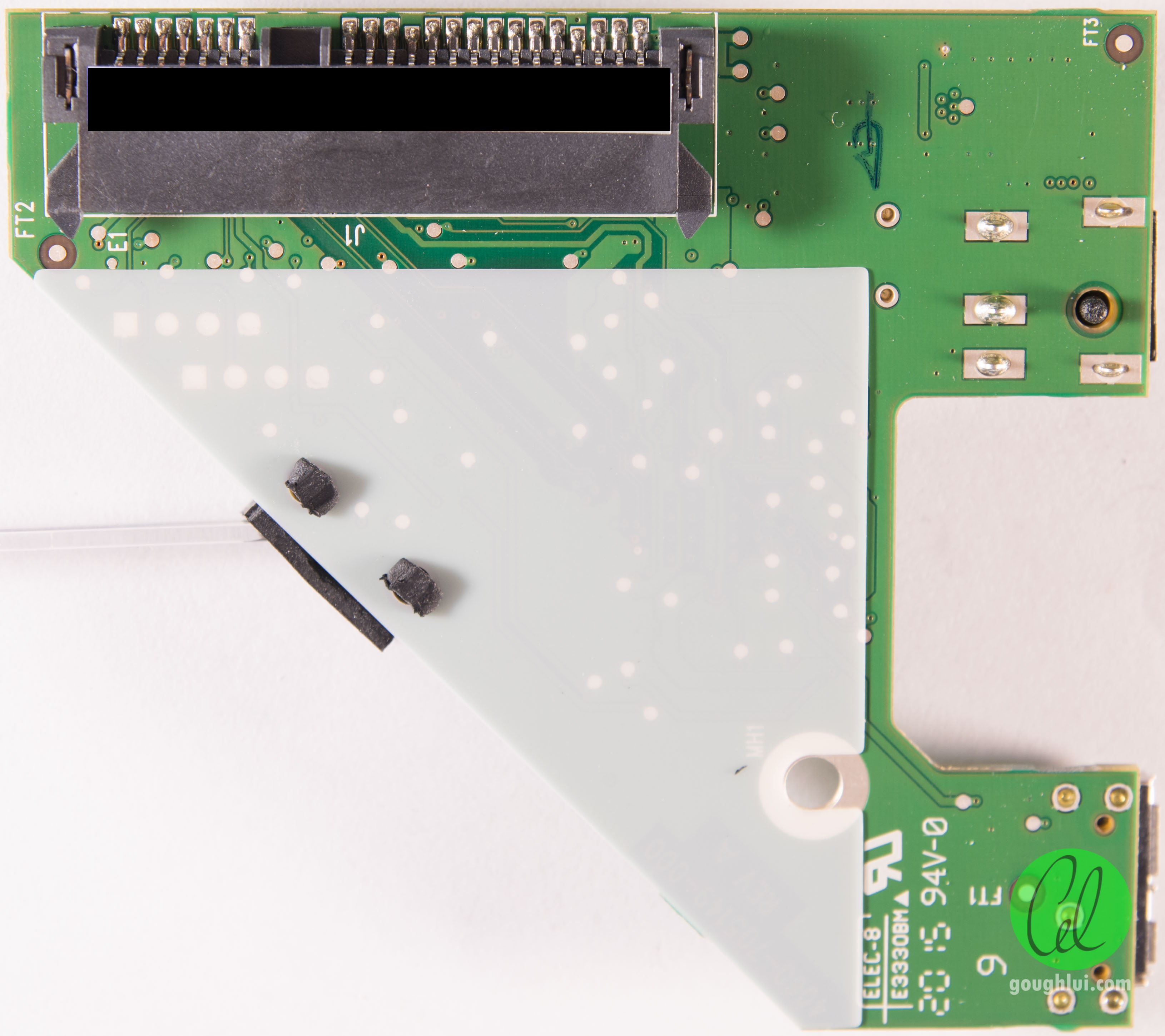
BTW, if the damage was the result of an external event, then I would expect that U5 would be damaged as well (U5 is the 5V regulator). AFAICT, the damage to the bridge IC appears to be in the area of its on-chip Vcore regulator. I believe that Vcore would be derived from the 5V rail. If U5 is damaged, then this would point to a problem with the adapter.

Here is a detailed photo of the PCB:

http://cdn2.goughlui.com/wp-content/upl ... 0-0066.jpg
http://cdn2.goughlui.com/wp-content/upl ... 0-0067.jpg

_________________
A backup a day keeps DR away.


Top
 Profile  
 
 Post subject: Re: WD MyBook Recovery - Encrypted Bridge Board
PostPosted: May 20th, 2016, 17:06 
Offline

Joined: May 20th, 2016, 14:33
Posts: 15
Location: Chicago
fzabkar wrote:
The documentation confirms that the product incorporates hardware encryption:
http://www.wdc.com/wdproducts/library/A ... 705863.pdf

That said, I would have thought that Windows would have prompted you to initialise the drive rather than formatting it ... unless you had already mistakenly initialised it. Did you?

BTW, the bridge IC should be getting power from the onboard regulator and/or the USB port. AFAICT, there must be additional damage upstream.


I certainly didn't manually initialize anything. I didn't boot to BIOS though - by initialize are you referring to the process by which I was able to see the disk in explorer? In device manager on control panel, everything looked correct (well, the MDL of the HDD at least).


Top
 Profile  
 
 Post subject: Re: WD MyBook Recovery - Encrypted Bridge Board
PostPosted: May 20th, 2016, 18:05 
Offline

Joined: May 20th, 2016, 14:33
Posts: 15
Location: Chicago
fzabkar wrote:
The documentation confirms that the product incorporates hardware encryption:
http://www.wdc.com/wdproducts/library/A ... 705863.pdf

That said, I would have thought that Windows would have prompted you to initialise the drive rather than formatting it ... unless you had already mistakenly initialised it. Did you?

BTW, the bridge IC should be getting power from the onboard regulator and/or the USB port. AFAICT, there must be additional damage upstream.


I didn't manually initialize it via Computer Management (Local) > Storage > Disk Management > Initialize. However, it seems to know all of the drivers and the MDL of the disk when I look in device manager - should I have booted in safe-mode or interrupted start up?


Top
 Profile  
 
 Post subject: Re: WD MyBook Recovery - Encrypted Bridge Board
PostPosted: May 20th, 2016, 18:25 
Offline

Joined: May 20th, 2016, 14:33
Posts: 15
Location: Chicago
fzabkar wrote:
I think you'll find that the number should be 4060-705149, not 4060-7051749.

BTW, if the damage was the result of an external event, then I would expect that U5 would be damaged as well (U5 is the 5V regulator). AFAICT, the damage to the bridge IC appears to be in the area of its on-chip Vcore regulator. I believe that Vcore would be derived from the 5V rail. If U5 is damaged, then this would point to a problem with the adapter.

Here is a detailed photo of the PCB:

http://cdn2.goughlui.com/wp-content/upl ... 0-0066.jpg
http://cdn2.goughlui.com/wp-content/upl ... 0-0067.jpg


Yes - you're right about the number: typo.

I don't see visible damage on the regulator and don't have much in the way of testing equipment nearby, but according to the datasheet I found, you're right: the damage on the IC is in the regulator region (1: 3.3V regulator input, 47: regulator ground).

So if I understand you correctly, the flow is AC outlet >> Adapter: 12V, 1.5A to board >> Regulator (U5): 5V rail to Pin 1 of IC? So, damage at the IC means that it's getting more than 5V, IE that the regulator is essentially a short?


Top
 Profile  
 
 Post subject: Re: WD MyBook Recovery - Encrypted Bridge Board
PostPosted: May 20th, 2016, 20:16 
Offline
User avatar

Joined: September 8th, 2009, 18:21
Posts: 16960
Location: Australia
Can you provide a link to the datasheet?

AIUI, the power flow is as follows:

AC outlet >> Adapter: +12VDC, 1.5A to board >> Regulator (U5): +5V rail >> +3.3V regulator (U3) >> pin 1 of ASM1051W

_________________
A backup a day keeps DR away.


Top
 Profile  
 
 Post subject: Re: WD MyBook Recovery - Encrypted Bridge Board
PostPosted: May 20th, 2016, 20:37 
Offline

Joined: May 20th, 2016, 14:33
Posts: 15
Location: Chicago
http://www.datasheetbay.com/pdf/917641/ASM1053.html

And, yours makes sense - I didn't know where the 5V became 3.3V.

FWIW, WD support emailed me this:

1st email:


Due to the fact that you we do not have the PCB model number for each drive, we can't guarantee that purchasing two same drive to swap the PCB or the drives will work as expected. However, If you purchase an external enclosure which match the specification of the internal drive, you will have a large percentage to read your files.


2nd email (after I sent them the 'specs'):


I did verify the drive model number as an internal drive and here is the specifications which will help you to choose the correct external enclosure.

Serial number: WCC4EEVLNCF2
Model number: WD40EZRX-00SPEB0
Drive capacity: 4 TB
Drive RPM: IntelliPower
Drive Buffer: 64 MB Cache
SATA Interface: SATA III (6GB\s)
Form factor: 3.5-inch
Advanced Format (AF): Yes

IntelliPower.
http://support.wdc.com/KnowledgeBase/an ... px?ID=3665


This seems weird to me - as their answer is ignoring the whole encryption part - is it really that simple?


Top
 Profile  
 
 Post subject: Re: WD MyBook Recovery - Encrypted Bridge Board
PostPosted: May 20th, 2016, 22:03 
Offline
User avatar

Joined: September 8th, 2009, 18:21
Posts: 16960
Location: Australia
Obviously your tech support contact at WD has no understanding of your problem. S/he is merely regurgitating some unrelated marketing pap. I would dispose of the emails thoughtfully.

_________________
A backup a day keeps DR away.


Top
 Profile  
 
 Post subject: Re: WD MyBook Recovery - Encrypted Bridge Board
PostPosted: May 20th, 2016, 22:19 
Offline
User avatar

Joined: September 8th, 2009, 18:21
Posts: 16960
Location: Australia
BTW, here are the warranty details:
http://support.wdc.com/Warranty/warrantyStatus.aspx

Code:
Serial Number     Model Number     Description     Expiration Date     Status
WCC4EEVLNCF2    WDBFJK0040HBK    My Book    07/25/2016    In Limited Warranty

I wouldn't have thought that a regular My Book would be encrypted. :?

_________________
A backup a day keeps DR away.


Top
 Profile  
 
 Post subject: Re: WD MyBook Recovery - Encrypted Bridge Board
PostPosted: May 20th, 2016, 22:25 
Offline

Joined: May 20th, 2016, 14:33
Posts: 15
Location: Chicago
Okay, I figured as much. With that in mind, I guess it's time to hunt down 4060-7051749-000 REV A. Is there anything in the way of surrogate software that might be able to pull this off? I've seen "reallymine" on another forum (and a reply from you even), but I have no experience with those. How would I be able to tell what kind of class this Asmedia chip is (Initio, Symwave, Oxford, JMicron, or none of them)?


Top
 Profile  
 
 Post subject: Re: WD MyBook Recovery - Encrypted Bridge Board
PostPosted: May 20th, 2016, 23:24 
Offline
User avatar

Joined: September 8th, 2009, 18:21
Posts: 16960
Location: Australia
This thread suggests that it may be a JMicron class:
https://forum.hddguru.com/viewtopic.php?f=1&t=30081

Note that the enclosure will probably be configured with a 4KB sector size, so even if you do decrypt the drive outside its enclosure, you will end up with a 4Kn file system on a 512e physical drive. This will render the file system inaccessible, unless your data recovery software can handle this situation.

_________________
A backup a day keeps DR away.


Top
 Profile  
 
 Post subject: Re: WD MyBook Recovery - Encrypted Bridge Board
PostPosted: May 21st, 2016, 0:17 
Offline

Joined: May 20th, 2016, 14:33
Posts: 15
Location: Chicago
fzabkar wrote:
This thread suggests that it may be a JMicron class:
https://forum.hddguru.com/viewtopic.php?f=1&t=30081

Note that the enclosure will probably be configured with a 4KB sector size, so even if you do decrypt the drive outside its enclosure, you will end up with a 4Kn file system on a 512e physical drive. This will render the file system inaccessible, unless your data recovery software can handle this situation.


Okay, I admit that you've lost me here. The enclosure that this drive came with is just a plastic shell - all the things I would associate with a "functioning" HD enclosure (wall adapter power > 4 pin "PC power", USB to SATA) are contained on this bridge, correct? Are you saying that in theory, I could* decrypt the IC controller encryption without replacing the PCB (like with software and the HDD physically in a computer). But, even if I managed to do that, the data would still be inaccessible because the sector partitioning of the drive is different when you have direct computer power/SATA link vs the USB/adapter system from the board? Sounds like I should just try and replace the bridge outright, correct? Is there any reason a matching bridge wouldn't work?


Top
 Profile  
 
 Post subject: Re: WD MyBook Recovery - Encrypted Bridge Board
PostPosted: May 21st, 2016, 13:37 
Offline
User avatar

Joined: September 8th, 2009, 18:21
Posts: 16960
Location: Australia
A matching bridge should work, as explained by others. My only concerns were in regard to the reason for the failure. I wanted to determine whether your adapter was at fault.

My other concern was in regard to the unexpected "formatting" prompt from Windows. That's not what you would expect from an encrypted drive, unless you had rewritten the MBR in sector 0 ("initialisation"). I would examine the beginning of the user area with a hex editor (eg DMDE freeware).

_________________
A backup a day keeps DR away.


Top
 Profile  
 
 Post subject: Re: WD MyBook Recovery - Encrypted Bridge Board
PostPosted: May 22nd, 2016, 13:09 
Offline

Joined: May 20th, 2016, 14:33
Posts: 15
Location: Chicago
fzabkar wrote:
A matching bridge should work, as explained by others. My only concerns were in regard to the reason for the failure. I wanted to determine whether your adapter was at fault.

My other concern was in regard to the unexpected "formatting" prompt from Windows. That's not what you would expect from an encrypted drive, unless you had rewritten the MBR in sector 0 ("initialisation"). I would examine the beginning of the user area with a hex editor (eg DMDE freeware).


Here is a DMDE screenshot for the drive and the background is when the top "MBR" section is selected - the disk is inside of the computer, and is still recognized as initialized volume E: that needs to be formatted.

I'm reading my way through the manual/help - but the "primary" data table has all lines with the following:

NUMBER: E5 E5 E5 E5 E5 E5 E5 E5 E5 E5 E5 E5 E5 E5 E5 E5 a(dot on top) 16 times

Is this what it reads when it's empty/inaccessible/damaged?


Attachments:
HEX 01.JPG
HEX 01.JPG [ 94.3 KiB | Viewed 16370 times ]
Top
 Profile  
 
Display posts from previous:  Sort by  
Post new topic Reply to topic  [ 29 posts ]  Go to page 1, 2  Next

All times are UTC - 5 hours [ DST ]


Who is online

Users browsing this forum: No registered users and 158 guests


You cannot post new topics in this forum
You cannot reply to topics in this forum
You cannot edit your posts in this forum
You cannot delete your posts in this forum
You cannot post attachments in this forum

Search for:
Jump to:  
Powered by phpBB © 2000, 2002, 2005, 2007 phpBB Group