MultiDrive – free backup, clone & wipe disk utility from Atola Technology

All times are UTC - 5 hours [ DST ]


Post new topic Reply to topic  [ 7 posts ] 
Author Message
 Post subject: Seagate 500GB Hard drive. Which SATA do I use?
PostPosted: August 3rd, 2016, 12:48 
Offline

Joined: August 3rd, 2016, 12:26
Posts: 4
Location: United Kingdom
Hi all.

Zolabud here from East Sussex UK hoping I can get some advice on a disk drive issue.

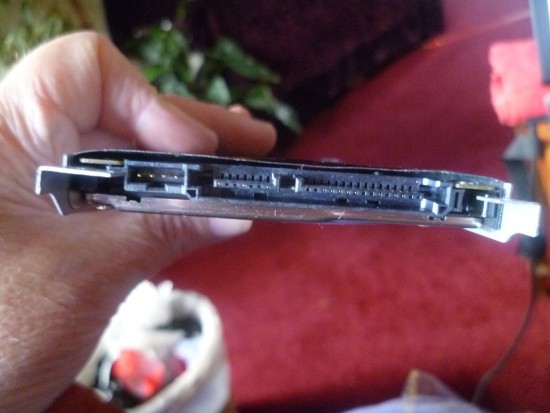
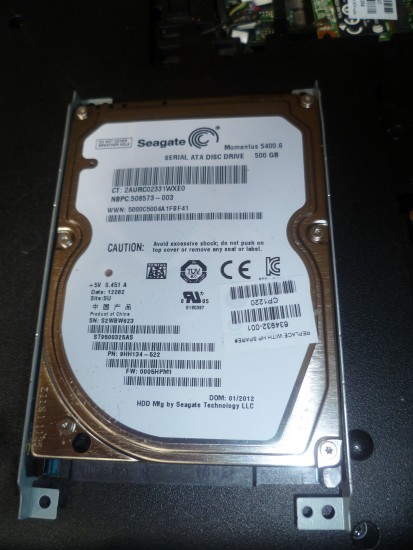
Took my hard drive from my HP Presario lappy today which hasn't worked for ages but I have a lot of photos of my Grandson which I would like to retrieve. It was an XP.

Searched on You Tube and found a video and I need a SATA to USB. ( I think)

Looked on E Bay and there are loads but they have different numbers. 2,3 etc.

HD is a Seagate. 500 GB. And measures 2 3/4 inches across.

I am stuck. I got so far but now I am stumped.

I need some help please. Be gentle with me as I am a dunce when it comes to laptops...
Attachment:
lappy 005.JPG
lappy 005.JPG [ 4.72 MiB | Viewed 5661 times ]
Attachment:
003.JPG
003.JPG [ 4.32 MiB | Viewed 5661 times ]


Top
 Profile  
 
 Post subject: Re: Seagate 500GB Hard drive. Which SATA do I use?
PostPosted: August 3rd, 2016, 13:25 
Offline

Joined: November 29th, 2006, 10:08
Posts: 7864
Location: UK
Any SATA to USB should do, probably easier to buy one of those SATA USB caddies.

You'll just have to unscrew the drive from its frame and fit it into the caddy.

This is assuming the drive itself is in good working order :-)

_________________
PC Image Data Recovery
http://www.pcimage.co.uk

New!! HDD-PCB.COM for all your PCB and donor HDD requirements!


Top
 Profile  
 
 Post subject: Re: Seagate 500GB Hard drive. Which SATA do I use?
PostPosted: August 3rd, 2016, 13:30 
Offline

Joined: August 3rd, 2016, 12:26
Posts: 4
Location: United Kingdom
The You Tube clip I watched... The guy had a SATA USB in a box with a case that he put the hard drive into.
Then he said you can use it as an external hard drive.

The HDD works fine. The plugs at the end are all the same size then. Regardless of how big in dimension the HD is?

Thanks for answering by the way. Much appreciated.


Top
 Profile  
 
 Post subject: Re: Seagate 500GB Hard drive. Which SATA do I use?
PostPosted: August 3rd, 2016, 13:36 
Offline
User avatar

Joined: April 3rd, 2011, 0:19
Posts: 2003
Location: Providence, RI
Yes, SATA is a standard layout on all drives except for the little tiny 1.8" and smaller models. Any old SATA to USB adapter will work for your drive.

_________________
Data Medics - Hard Drive, SSD, and RAID Data Recovery Service Company


Top
 Profile  
 
 Post subject: Re: Seagate 500GB Hard drive. Which SATA do I use?
PostPosted: August 3rd, 2016, 15:53 
Offline

Joined: August 3rd, 2016, 12:26
Posts: 4
Location: United Kingdom
http://www.ebay.co.uk/itm/271659298952? ... EBIDX%3AIT

Bought his one.

f it doesn't work I will spend more money.

I checked the number of pins in my hard drive and it matches the one I bought.

This has been a huge learning curve for me. Luckily I had a set of screwdrivers that I use to take my E Cigs apart to clean them.

Next thing will be to take the photos off my old hard drive and on to my laptop.
Then I can transfer them onto my external hard drive.

Thanks for all your help. Glad I found this site. Is it a UK based site I wonder...??


Top
 Profile  
 
 Post subject: Re: Seagate 500GB Hard drive. Which SATA do I use?
PostPosted: August 3rd, 2016, 16:05 
Offline

Joined: November 29th, 2006, 10:08
Posts: 7864
Location: UK
Should do the trick if the drive is OK :-)

_________________
PC Image Data Recovery
http://www.pcimage.co.uk

New!! HDD-PCB.COM for all your PCB and donor HDD requirements!


Top
 Profile  
 
 Post subject: Re: Seagate 500GB Hard drive. Which SATA do I use?
PostPosted: August 5th, 2016, 17:17 
Offline

Joined: August 3rd, 2016, 12:26
Posts: 4
Location: United Kingdom
SATA arrived this morning.

It works. Recognises the hard drive.

2 drives came down, A 'G' drive which is labelled as recovery and an 'H' drive which I have tried to cut and paste but it won't let me...

I have gone through every single entry but I was hoping to see pictures somewhere as that is what I want to transfer onto my lappy.

Any ideas where to look ?

Thanking you in advance.


Top
 Profile  
 
Display posts from previous:  Sort by  
Post new topic Reply to topic  [ 7 posts ] 

All times are UTC - 5 hours [ DST ]


Who is online

Users browsing this forum: No registered users and 119 guests


You cannot post new topics in this forum
You cannot reply to topics in this forum
You cannot edit your posts in this forum
You cannot delete your posts in this forum
You cannot post attachments in this forum

Search for:
Jump to:  
Powered by phpBB © 2000, 2002, 2005, 2007 phpBB Group