MultiDrive – free backup, clone & wipe disk utility from Atola Technology

All times are UTC - 5 hours [ DST ]


Post new topic Reply to topic  [ 44 posts ]  Go to page Previous  1, 2, 3
Author Message
 Post subject: Re: Trying Data-Recovery from Seagate ST4000
PostPosted: March 17th, 2020, 18:07 
Offline

Joined: March 6th, 2020, 14:18
Posts: 22
Location: Germany
I sure believe that it is a capable tool. But it has a problem with this recovery.

And trying to launch a browser as root is less than professional. Anyway, I could glean the URL to turn to from that window, let's see...

There's a few parameters under settings which might have to be increased, if you really have hundreds of thousands of files on the HD:

Attachment:
Bildschirmfoto zu 2020-03-17 23-01-26.png
Bildschirmfoto zu 2020-03-17 23-01-26.png [ 57.77 KiB | Viewed 5822 times ]


Give it more memory, search results, etc. Could that be helpful?

Also, if there really is no progress file or logfile to retrieve after a power-down, I would restore a recent backup to eliminate all damage that this crash might have done to my Linux. There are no symptoms yet, but that would be better.


Top
 Profile  
 
 Post subject: Re: Trying Data-Recovery from Seagate ST4000
PostPosted: May 5th, 2020, 14:06 
Offline

Joined: March 6th, 2020, 14:18
Posts: 22
Location: Germany
Hi all,

I learned a few things in the meantime. First of all, the customer service of UFS-Explorer has confirmed to me, that there is a bug in UFS-Explorer Standard v7. It has a problem with VHDs, of which there are quite a few on my damaged HDD. After scanning the disk, it will try to generate a .vrfs-file, which is practically a new directory tree. This step fails. Regardless how many GB of RAM you have and how many GB of swap partition you give it on top of that, it will eventually run out of memory. (Memory overflow.)

The good news is: UFS-Explorer 5 does not have this problem. This version is done analyzing the disk in a few seconds. Then you can save the .vrfs-file and start looking for files which are worth being recovered. (In my case, a lot is old junk which I never bothered to delete.)

So far, I was able to rescue ~30.000 files (~490 GB. ).

Since HDDSuperClone could not recover ~3 GB of bad clusters, I had to search the recovered files for "HDDSUPERFILLMARK". (If a cluster can not be read, you can have it put a dummy cluster starting with this word in its place, so that you can find invalid files later.) I used "Agent Ransack" for this. It is the fastest search program that I know, but it still took 5 hours to complete. Plus, it seems to exclude some files, though I thought I told it to search in every file. Does anyone know a better program for this?

It turned out that there were two files (one Acronis backup and one VPC-snapshot), which contained ~220.000 and ~800 Hddsuperfillmarks, respectively. I can live without these two. Fortunately, the bad clusters seem to occur in larger patches. So some files are very bad, but the rest is OK.

So much for this time, best regards,
Georg


Top
 Profile  
 
 Post subject: Re: Trying Data-Recovery from Seagate ST4000
PostPosted: May 5th, 2020, 18:18 
Offline

Joined: November 22nd, 2017, 21:47
Posts: 309
Location: France
Perhaps you could post a screenshot from HDDSCViewer ? It may provide some clues as to what the issue with that drive could be. If it looks like alternating stripes of good and bad reads, it generally means that one head (or more) completely failed. See this thread for instance.


Top
 Profile  
 
 Post subject: Re: Trying Data-Recovery from Seagate ST4000
PostPosted: May 7th, 2020, 15:29 
Offline

Joined: March 6th, 2020, 14:18
Posts: 22
Location: Germany
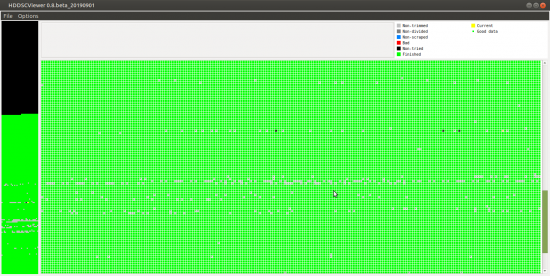
Interesting program, I did not know that one. Before we come to the result: I copied the damaged HD to a new one of same model (Seagate ST4000). First, I used HDD Raw Copy. That went slow, but without any errors, until a power spike or something caused a reboot. So I switched to HDDSuperClone, starting from the last position which I had written down before that reboot. Therefore, the first ~30% are black (untried) in the plot. So here it is:

Attachment:
HDDScViewer Screenshot Clone-2.png
HDDScViewer Screenshot Clone-2.png [ 29.44 KiB | Viewed 5300 times ]


There were no BAD clusters in the sense that HDDSuperclone gave up on them. At some point, the recovery rate slowed down to a trickle. It was about less than 0,1% of the data anymore and getting that might have taken a month or so. So I gave up and started looking at what I have got so far.

I am a layman but to me, there is no regular pattern in the hard-to-read clusters. This looks more like some zones of the surface have started to fail, doesn't it?

According to HDDSuperclone, the NTFS root folder of the clone is damaged. Also, I can see that some directories appear twice, with the same name. When the disk started to fail, attempts to use chkdsk /f have probably done more damage than good. In one case, Windows got stuck and I had to turn the power off. So there are inconsistencies in the file system.

About the memory overflows: Does NTFS still work with chains of clusters, where one points at the next? If so, can a chain of clusters which points back at itself cause a "loop without end", which makes recovery software trying to trace it fill all available memory until it crashes? (Just such an idea, it may be stupid.)

Restore points from Windows' system restore might also introduce bizarre file system errors, if the system of snapshots gets corrupted.

This all is somewhat above my knowledge. For now, I am glad that all is not lost. Hundreds of photos and videos are back intact already and more is coming. :)


Top
 Profile  
 
Display posts from previous:  Sort by  
Post new topic Reply to topic  [ 44 posts ]  Go to page Previous  1, 2, 3

All times are UTC - 5 hours [ DST ]


Who is online

Users browsing this forum: No registered users and 65 guests


You cannot post new topics in this forum
You cannot reply to topics in this forum
You cannot edit your posts in this forum
You cannot delete your posts in this forum
You cannot post attachments in this forum

Search for:
Jump to:  
Powered by phpBB © 2000, 2002, 2005, 2007 phpBB Group
