MultiDrive – free backup, clone & wipe disk utility from Atola Technology

All times are UTC - 5 hours [ DST ]


Post new topic Reply to topic  [ 12 posts ] 
Author Message
 Post subject: Hard drive remaining locked after using HDDRawCopy
PostPosted: March 31st, 2022, 3:34 
Offline

Joined: March 31st, 2022, 3:26
Posts: 7
Location: France
Hello everyone and sorry for my imperfect English.

I wanted to copy data from an internal hard drive to an external hard drive but there was a power outage.

The source hard drive is locked and I can no longer access or copy data (ATA Security is: ENABLED, PW Level HIGH, **LOCKED** [SEC4])

I did not put any password and it is since the use of this software. I think the disc remained on locked as before the copy.

How to unlock this hard drive please?

thank you in advance


Top
 Profile  
 
 Post subject: Re: Hard drive remaining locked after using HDDRawCopy
PostPosted: April 1st, 2022, 3:46 
Offline

Joined: March 31st, 2022, 3:26
Posts: 7
Location: France
Nobody ? :(


Top
 Profile  
 
 Post subject: Re: Hard drive remaining locked after using HDDRawCopy
PostPosted: April 1st, 2022, 13:26 
Offline

Joined: September 30th, 2005, 7:33
Posts: 849
PsyKos wrote:
Nobody ? :(

Do you have rubles to pay for it? :lol: :lol: :lol:


Top
 Profile  
 
 Post subject: Re: Hard drive remaining locked after using HDDRawCopy
PostPosted: April 1st, 2022, 14:01 
Offline

Joined: March 31st, 2022, 3:26
Posts: 7
Location: France
BGman wrote:
PsyKos wrote:
Nobody ? :(

Do you have rubles to pay for it? :lol: :lol: :lol:


:lol: No, sorry ! :wink:

Is there a command to unlock a hard drive with HDDRawCopy please?


Top
 Profile  
 
 Post subject: Re: Hard drive remaining locked after using HDDRawCopy
PostPosted: April 1st, 2022, 14:14 
Offline
User avatar

Joined: September 8th, 2009, 18:21
Posts: 16955
Location: Australia
What is the model number?

_________________
A backup a day keeps DR away.


Top
 Profile  
 
 Post subject: Re: Hard drive remaining locked after using HDDRawCopy
PostPosted: April 1st, 2022, 15:48 
Offline

Joined: March 31st, 2022, 3:26
Posts: 7
Location: France
fzabkar wrote:
What is the model number?


Disk drive : Toshiba DT01ACA100

HDDRawCopy lock the hard drive before copying. I think the drive isn't unlock because the copy was not terminated.

Thanks.


Top
 Profile  
 
 Post subject: Re: Hard drive remaining locked after using HDDRawCopy
PostPosted: April 1st, 2022, 16:16 
Offline

Joined: October 3rd, 2005, 0:40
Posts: 4753
Location: Hungary
I don't see why would HddRawCopy tool lock the drive. What are the symptoms? does it report ID (seen by bios or windows correctly)?
I saw several such drives overwriting their own SA with user data due to a firmware bug, so is there a chance yours is struck by this problem too?

pepe

_________________
Adatmentés - Data recovery


Top
 Profile  
 
 Post subject: Re: Hard drive remaining locked after using HDDRawCopy
PostPosted: April 1st, 2022, 16:49 
Offline
User avatar

Joined: September 8th, 2009, 18:21
Posts: 16955
Location: Australia
PsyKos wrote:
fzabkar wrote:
What is the model number?


Disk drive : Toshiba DT01ACA100

HDDRawCopy lock the hard drive before copying. I think the drive isn't unlock because the copy was not terminated.

Thanks.

When the HDD is ATA locked, then no tool, including HDDRawCopy, is able to access it. Therefore, the idea of locking before copying doesn't make sense in such a case.

Instead, I would expect that HDDRawCopy locks the drive in a different way to prevent other Windows tasks from writing to it during the copy process. This is an OS-level lock, not a firmware level lock. An OS-level lock is released when HDDRawCopy terminates, or when the system is rebooted.

_________________
A backup a day keeps DR away.


Top
 Profile  
 
 Post subject: Re: Hard drive remaining locked after using HDDRawCopy
PostPosted: April 2nd, 2022, 5:29 
Offline

Joined: March 31st, 2022, 3:26
Posts: 7
Location: France
pepe wrote:
I don't see why would HddRawCopy tool lock the drive. What are the symptoms? does it report ID (seen by bios or windows correctly)?
I saw several such drives overwriting their own SA with user data due to a firmware bug, so is there a chance yours is struck by this problem too?


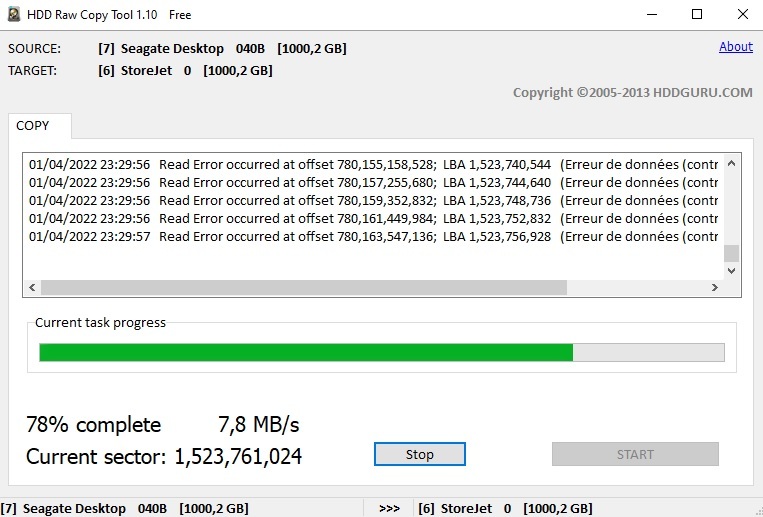
Perhaps ! Actually, I use HDDRawCopy to clone my XBox hard drives. I've done it several times without any problem, with different hard drives.

Now this source disk cannot be formatted and there are CRC errors when I use HDDRawCopy with it. (ATA Security is: ENABLED, PW Level HIGH, **LOCKED** [SEC4]) :

Image

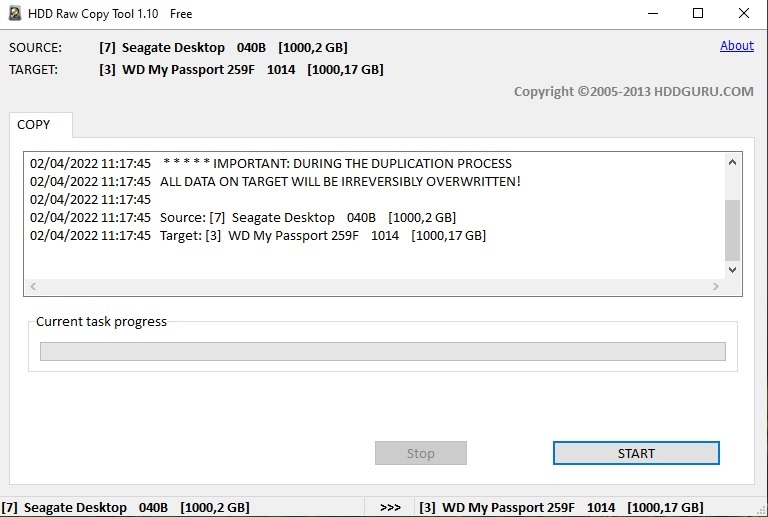
I just checked the destination disk and noticed that the total size is not the same with it being 1TB disk each. The source hard drive is 1000.2 GB while the destination hard drive is 1000.17 GB :

Image

I think that the problem was there but how to repair the original disk please?


Top
 Profile  
 
 Post subject: Re: Hard drive remaining locked after using HDDRawCopy
PostPosted: April 2nd, 2022, 10:14 
Offline

Joined: September 30th, 2005, 7:33
Posts: 849
PsyKos wrote:
Is there a command to unlock a hard drive with HDDRawCopy please?


Since the drive is Toshiba, it can be unlock in a minute by a VSC comannd (plus SuperON) . It can be unlocked by PC3000 as well, but I doubt that somebody is going to help you for free...I hope I'm wrong.


Top
 Profile  
 
 Post subject: Re: Hard drive remaining locked after using HDDRawCopy
PostPosted: April 2nd, 2022, 11:32 
Offline

Joined: March 31st, 2022, 3:26
Posts: 7
Location: France
BGman wrote:
PsyKos wrote:
Is there a command to unlock a hard drive with HDDRawCopy please?


Since the drive is Toshiba, it can be unlock in a minute by a VSC comannd (plus SuperON) . It can be unlocked by PC3000 as well, but I doubt that somebody is going to help you for free...I hope I'm wrong.


Thanks but I have used Ultimate Boot CD, Zu, Hdat2 but nothing to do... I've tried many master password with no luck...

I don't care about data and 1Tb hard drive cost 10€, if it's impossible to unlock it, I will buy another. :wink:

I think HDDRawCopy can provide information about this possibly of locking drive :(


Top
 Profile  
 
 Post subject: Re: Hard drive remaining locked after using HDDRawCopy
PostPosted: April 4th, 2022, 8:03 
Offline

Joined: March 31st, 2022, 3:26
Posts: 7
Location: France
Nothing to work ! I use ZU, UBCD with ATAPWD/HDDErase, use master password for Toshiba (32 spaces), hdat2, victoria....

Can't unlock or erase hard drive ! Security is high, not maximum, but nothing to do, unlock or erase doesn't work :(


Top
 Profile  
 
Display posts from previous:  Sort by  
Post new topic Reply to topic  [ 12 posts ] 

All times are UTC - 5 hours [ DST ]


Who is online

Users browsing this forum: No registered users and 36 guests


You cannot post new topics in this forum
You cannot reply to topics in this forum
You cannot edit your posts in this forum
You cannot delete your posts in this forum
You cannot post attachments in this forum

Search for:
Jump to:  
Powered by phpBB © 2000, 2002, 2005, 2007 phpBB Group