MultiDrive – free backup, clone & wipe disk utility from Atola Technology

All times are UTC - 5 hours [ DST ]


Post new topic Reply to topic  [ 9 posts ] 
Author Message
 Post subject: Antique IBM DBCA-204860 4.86 GB without sign of life
PostPosted: May 6th, 2024, 6:42 
Offline

Joined: July 7th, 2014, 6:44
Posts: 225
Location: Switzerland
Hi there,

I received a very old 2.5'' IBM DBCA-204860 4.86 GB for data recovery and connected it to my dock for IDE drives.
It is not spinning, nor giving any sign of life. There is also no buzzing noise like in the case of heads stuck.

See the bottom drive and pcb on the attached picture.

I can confirm that other hard drives are working fine with the same dock.

I also tested the drive in other IDE to USB enclosures, with same result.

As assuming a possible PCB issue, I ordered a PCB, originating from a 6.49 GB IBM DBCA-206480 hard drive, the top one in the attached picture. The purpose was here only to test is the drive would spin when powered on with a board that I assumed as compatible for this only task.

Despite the boards have different numbers (110 11K2366 01) for the 4.86GB patient and (110 36H4834 01) for the 6.49GB donor, they seem sharing a very similar design.

The hard drive still doesn't give any sign of life with the board I purchased.

The MCU on both boards are same:
Code:
IBM 90G1325
Mitsubishi M37952M4B-2202RP -DF
929A110 vs 917A118 (on 3rd line).


The HSA chip is same as well:
Code:
IBM36 JAPAN
AMSRC04 03
TQA7BB. 6C
20L7994  PQ
(1C25157TQR vs 1 C14090TQR)

The SRAM chip is same on both boards: Sanyo LC324265AT-25

The chip from Texas Instruments is labeled TLS2245 in both cases ; 1st line differ however

The 6-legged TDK 40.0M chips are same.

I notice that the 6-legged TDK 33.3M chips are same but soldered with opposite orientations.
Likely only capacitor, but I am not totally sure about that.

When each PCB is detached from the HDD and powered on, I measure no voltage at each of the 4 motor-pins, below the square-shaped hole.

Of course, since I only acquired a PCB so far, I cannot be totally sure that it is in good condition.

But before getting another donor, I wonder is these antique IBM hard drives had something special, like needing some data signal or else before they start spinning, and if this serie was affected by some typical failure.
Maybe a few veterans here remember ...

Any other suggestion?
Maybe injecting some small current through the motor pins to test if the motor spins?

Thank you.


Attachments:
File comment: IBM DCBA-204860 and IBM DCBA-206480 hard drives with their respective circuit boards.
IBM-DBCA-hard-drives-with-their-PCB-boards.jpg
IBM-DBCA-hard-drives-with-their-PCB-boards.jpg [ 977.46 KiB | Viewed 4582 times ]
Top
 Profile  
 
 Post subject: Re: Antique IBM DBCA-204860 4.86 GB without sign of life
PostPosted: May 6th, 2024, 13:44 
Offline
User avatar

Joined: September 8th, 2009, 18:21
Posts: 16955
Location: Australia
"33.3M" (Y2) is a 33.3MHz crystal. TDK is the manufacturer.

If the drive is waiting for a spin-up signal or command, it should still identify itself via an ATA Identify Device command, I would think.

Did you measure the resistances of the motor windings (phase-to-common and phase-to-phase)?

Did you check the fuses? F1 and F2 are near the top right corner of the IDE header while F3 is above and to the left of the motor controller.

_________________
A backup a day keeps DR away.


Top
 Profile  
 
 Post subject: Re: Antique IBM DBCA-204860 4.86 GB without sign of life
PostPosted: May 6th, 2024, 14:42 
Offline

Joined: July 7th, 2014, 6:44
Posts: 225
Location: Switzerland
Thank you very much for the useful help.

Maybe is this hard drive expecting some spin-up signal.

I didn't check the fuses yet ; I will do it tomorrow.
What I can say so far is that there is no ozone smell.

The resistances of the motor windings were not checked so far.


Top
 Profile  
 
 Post subject: Re: Antique IBM DBCA-204860 4.86 GB without sign of life
PostPosted: May 10th, 2024, 9:50 
Offline

Joined: July 7th, 2014, 6:44
Posts: 225
Location: Switzerland
Hello,

Sorry for the late reply.

Quote:
Did you check the fuses? F1 and F2 are near the top right corner of the IDE header while F3 is above and to the left of the motor controller.
I did a continuity check of all three F1, F2 and F3 fuses. My multimeter beeps for for each fuse: continuity is OK for all three fuses, on both PCBs.

Quote:
Did you measure the resistances of the motor windings (phase-to-common and phase-to-phase)?
I am not sure about the procedure for phase-to-common and phase-to-phase testing, but I measured the resistances at the motor connector pins (those who connect to the PCB). They are either 2.65Ω (+/- 0.05Ω) or the double 5.3V (+/- 0.1Ω).
I compared with sightly more recent tested IBM Travelstar, and ─ although the pinout is different, with larger pads ─ the measured values are same (2.7 and 5.4V). So I presume the motor is OK.

Quote:
If the drive is waiting for a spin-up signal or command, it should still identify itself via an ATA Identify Device command, I would think.
I did one additional check inserting the drive directly in a working Acer Aspire 1200 series (almost as antique, from the Windows XP era): the HDD doesn't spin after powering the laptop on. I could check by not closing the HDD niche and check with my finger that there was no vibration.

Quote:
When each PCB is detached from the HDD and powered on, I measure no voltage at each of the 4 motor-pins, below the square-shaped hole.
I had wrongly measured VDC instead of VAC.
Testing PCB motor pins on PCBs from working 10GB or 20GB IBM Travelstar DJSA drives, I measure voltages around ~0.13-0.15 V(AC) with my Fluke 70, and similar value at 130 millivolt with a more accurate Fluke 87 (True RMS) multimeter.
For the PCB of the IBM Travelstar 4.86GB DBCA series, I measure voltages of only 3-7 millivolts ; and same for the donor board.

Additionally, when connecting the PCBs (alone) from working drive are connected to my Sharkoon QuickPort Combo hard drive docking station, its diodes are "Blue/ Blue" (i.e. OK), whilst for the not spinning drives the diodes are "Blue/Red", typical of defective drives.

So, I presume the received hard drive has a dead PCB board, and the board received being also defective.
I noticed that the Bluestork enclosure in which I received the hard drive is not keyed and you can easily accidentally offset the HDD by one pin.
As I tested the HDD directly with my docking station cable hardness, I didn't pay attention whether the HDD has possibly been wrongly inserted by the client. There are however no visible burnt components nor smell of anything.


Top
 Profile  
 
 Post subject: Re: Antique IBM DBCA-204860 4.86 GB without sign of life
PostPosted: May 10th, 2024, 16:32 
Offline
User avatar

Joined: September 8th, 2009, 18:21
Posts: 16955
Location: Australia
If you have an oscilloscope, I would look for activity at the address and data bus of the DRAM. Also check the two crystals (with a high impedance probe).

I think the MCU is a 16-bit type with mask ROM. All the major ICs appear to be powered from +5V. I can't recognise any regulators, although there is an 8-pin IC and a SOT23-5 IC near the HDA connector. I don't know what these do.

The information I have been able to find is sparse.

M37952M4B-2202RP, Mitsubishi, MCU, QFP-144 - probably a 7902 Series 16-bit, 5V microcontroller with mask ROM (F versions have flash, S versions have external ROM/Flash)
https://www.datasheetarchive.com/?q=M379

TLS2245, Texas Instruments, Servo-Combination Driver, 5V, 56-pin:
https://www.hddoracle.com/download/file.php?id=10532
https://www.datasheetarchive.com/datasheet?id=58ac27cc3429e0efd7690a0699f2fccb7f95db&type=M&term=tls2245

LC324265AT-25, Sanyo, DRAM, 4Mbit (256K x 16), 5V, 40/44-pin:
https://audiocircuit.dk/downloads/hhb/HHB-CDR830-cdr-sm.pdf (pinout on page 22)
https://audiodna.sk/de/download?task=download.send&id=3196&catid=90&m=0 (pinout on page 10)
https://cdn3.guidessimo.com/view/1039185/sanyo-dvd-sl20v-service-manual-46.pdf
http://d.520101.com:81/tvpdf/dvd/2/14041115455663.pdf


Attachments:
LC324265AT_pinout.gif
LC324265AT_pinout.gif [ 55.19 KiB | Viewed 4336 times ]

_________________
A backup a day keeps DR away.
Top
 Profile  
 
 Post subject: Re: Antique IBM DBCA-204860 4.86 GB without sign of life
PostPosted: June 19th, 2024, 13:56 
Offline

Joined: July 7th, 2014, 6:44
Posts: 225
Location: Switzerland
Thank you for all the info gathered and sorry for the late reply.

I could aquire at a fair price a donor drive which arrived.
The PowerBook was also sent to me.

Within the ProBook, I could test the donor drive as spinning, but it was not protected well enough for transportation and there is some repetitive noise like the reading arm is unsucessfully attempting to read the SA to initialize the drive.

The, I transfered the board from the donor to the patient, and this made it to spin again.
So, there was definitely a problem with the PCB.

But the drive is still not initializing itself.
I can hear the repetive sound of the read arm that attemps to initilize the disk.

Code:
Patient: DBCA-204860, P/N 31L9846, MLC: F41935, Firmware: Apple HDD firmware 1999, Date: SEP-99.
Donor:   DBCA-204860, P/N 21L9540, MLC: F22080, Firmware: (?) form HP Omnibook,    Date: AUG-99.
The PCB boards of patient and donor are same: AKASAKA-4, IBM CORP. 1999, 110 11K2366 01

Additionally, all inscriptions on all four major chips are same.
The boards only differ by their manufacturing country.

I transplanted the small 8-legged chip near to the IBM36 AMSRC04 controller ; without result, the HDD is still clicking.

For a similar case, with a newer but still antique 40GB IBM IC25N020ATCS04-0, user rameez suggests that the ROM would be embeded in the CPU (i.e. in the MCU): https://forum.hddguru.com/viewtopic.php?t=9020

I assume Apple ProBook and HP OmniBook use different firmwares, which could be stored in the MCU.
Can someone confirm if transplanting the MCU is necessary for this model, in the case where the firmware is different?

Possibly, the HDD has damaged heads, but based on informations received from my customer, it should a priori not be the case.


Top
 Profile  
 
 Post subject: Re: Antique IBM DBCA-204860 4.86 GB without sign of life
PostPosted: July 23rd, 2024, 12:07 
Offline

Joined: July 7th, 2014, 6:44
Posts: 225
Location: Switzerland
Very significant progress here, as I could list list the files and partially clone the hard drive !

So, here's what I learned from this antique IBM DBCA-204860 4.86GB 2.5'' IDE hard drive from 1999 !

1) Contrarily to slightly more recent IBM hard drives (like the IBM DJSA-220 20GB from year 2000, and later hard drives), this hard drive won't spin at with my docking station a Sharkoon QUICKPORT COMBO eSATA, nor any other IDE enclosure in my possession.

2) The hard drive will spin within the Macintosh PowerBook G3.
The donor PCB that I used was coming from the same HDD model (DBCA-204860), originating from an HP Omnibook.
Different HDD P/N 21L9540, but same PCB number 11K2366 and same MCU.
It suffices to transfer the BIOS chip. Transfering the MCU was not necessary...

3) The hard drive is extremely noisy at start-up or when gaining access to critical areas, typically when it is loading the "mac-boot" firmware. The hard drive, even when properly working is emitting a loud "clicking" noise, that can be easily confused with the clicking noise from a defective hard drive. You can clearly hear a spring noise when the reading arm moves. Just be patient until Apple Open Firmware suggests you typing "mac-boot", and do it.
Then, the hard drive becomes much more silent because the arm is no longer working ; you will still hear the drive spinning.

4) The Macintosh PowerBook G3 uses Apple Open Firmware, that appears as something hybrid between a classical BIOS (in ROM) and a "DOS"-like environment (i.e. console) where you can issue commands to list hardware as well as to list files.
If the hard drive is detected and working but not able to start the OS (likely a damaged partition table in my case), it will suggest entering "mac-boot" to load Open Firmware.

This environment is loaded from the hard drive and is a console like recovery environment.
For an introduction to Open Firmware, see https://macos9lives.com/smforum/index.php?topic=1965.0.
And this documentation is the one that helped me listing the files and folders thanks to the printenv, devalias, and dircommands: https://www.uvm.edu/~dlrh/osx/Running%20files%20from%20a%20hard%20drive%20in%20Open%20Firmware.pdf

_________________
Data recovery in Geneva (Switzerland)
https://www.sosdonnees.ch/en


Top
 Profile  
 
 Post subject: Re: Antique IBM DBCA-204860 4.86 GB without sign of life
PostPosted: July 23rd, 2024, 12:14 
Offline

Joined: July 7th, 2014, 6:44
Posts: 225
Location: Switzerland
I additionally learned that to eject a CD, you have to hold the "C" key after boot, to start booting from the CD.
Else, the eject button from the CD bay won't work.


Top
 Profile  
 
 Post subject: Re: Antique IBM DBCA-204860 4.86 GB without sign of life
PostPosted: July 23rd, 2024, 12:23 
Offline
User avatar

Joined: September 8th, 2009, 18:21
Posts: 16955
Location: Australia
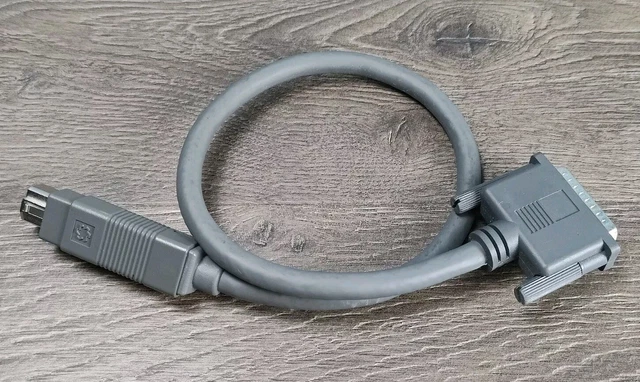
According Apple's user manual, you can make the entire Apple computer look like a hard drive to another computer by using an "Apple HDI-30 SCSI Disk Adapter" cable.

https://elektrotanya.com/apple_macintosh_powerbook_g3_usermanual.pdf/download.html (page 35)

https://wiki.preterhuman.net/Apple_HDI-30_SCSI_Disk_Adapter

https://www.picclickimg.com/ThwAAOSwO-pmSJ7G/Vintage-Apple-Macintosh-PowerBook-HDI30-to-DB25-Pin.webp

_________________
A backup a day keeps DR away.


Top
 Profile  
 
Display posts from previous:  Sort by  
Post new topic Reply to topic  [ 9 posts ] 

All times are UTC - 5 hours [ DST ]


Who is online

Users browsing this forum: Google [Bot] and 38 guests


You cannot post new topics in this forum
You cannot reply to topics in this forum
You cannot edit your posts in this forum
You cannot delete your posts in this forum
You cannot post attachments in this forum

Search for:
Jump to:  
Powered by phpBB © 2000, 2002, 2005, 2007 phpBB Group